Blog · Customer support
Chatbot vs live chat for Shopify stores: which one, and when you need both
A chatbot answers your shoppers instantly, at any hour, from what your store has written down; live chat puts a person from your team in the conversation. For most Shopify stores the right answer is both in the same chat window: an AI agent that takes the repeat questions, and a clean handoff to a person for the rest.
Updated · The Strathly team · 24 min read
On this page
- Chatbot vs live chat: the difference at a glance
- What a chatbot does well on a Shopify store
- What live chat does well
- Which questions go to the chatbot, and which to a person
- What each one costs a Shopify store
- When you need both: how to run them in one chat
- Mistakes to avoid when you mix the two
- How shoppers feel about AI customer service
- How to decide for your store
- How Strathly helps
- Frequently asked questions
- Conclusion
A chatbot is software that replies to your shoppers automatically, any time of day, from scripts or from what your store has written down. Live chat is a chat window where a person from your team reads the message and replies in real time. The chatbot wins on speed, hours and volume; live chat wins on judgment, empathy and the exceptions no policy covers.
So "chatbot vs live chat" is less a choice than a split of the work. You already know the questions that fill your inbox: where is my order, will it arrive by Friday, which size should I pick, can I return it. Those have answers. The conversations that need you are the refund that's outside the policy, the shopper who is upset, the order of 40 pieces for a company. This guide shows how to divide the two, what each costs, and how to hand a conversation to your team with a drafted reply so the shopper never starts over. The Strathly side of it is in the docs on choosing when Ivy hands off.
If you'd like to see an AI agent and your team share one chat on your own store: Install on Shopify. Setup takes about 2 minutes. 14-day free trial. Cancel anytime.
Chatbot vs live chat: the difference at a glance
The difference between a chatbot and live chat is who writes the reply: software in a chatbot, a person in live chat. Everything else follows from that. A chatbot is always on and never queues; a person can bend a rule, read a mood and make a decision. On a store, both appear in the same small window in the corner of the page, which is why shoppers and merchants mix them up.
| Chatbot (AI agent) | Live chat (your team) | |
|---|---|---|
| Who replies | Software, from your store's content | A person on your team |
| When it's available | Every hour of the week | The hours someone is at the desk |
| First reply | Seconds | Seconds to hours, depending on the queue |
| Conversations at once | Unlimited | A few per person |
| What the cost grows with | Conversations (or messages, or resolutions) | People's hours, and seats in the software |
| Best at | Repeat questions with a written answer, product questions, order status | Exceptions, refunds, upset shoppers, custom and bulk orders |
| Weak at | Anything nobody has written down, decisions outside policy | Volume, nights, weekends, holidays |
| When it can't help | Hands the conversation to a person | Asks the shopper to wait or to write an email |
Read from the way each one works, not from a vendor's claims: the right column is the same whether you use Shopify's free inbox or a paid helpdesk, and the left column describes a modern AI agent rather than an old menu bot.
Rule-based chatbots and AI agents are not the same thing
A rule-based chatbot follows a decision tree you build: buttons like "Track my order" or "Returns", a scripted answer behind each, and a dead end when the shopper types something the tree doesn't expect. An AI agent reads the shopper's own words, looks for the answer in your products, policies, pages and orders, and writes a reply in the shopper's language. When people say chatbots are frustrating, they are usually remembering the first kind.
The distinction matters for this comparison because the old argument for live chat, "bots can't understand real questions", is mostly about menu bots. An AI agent that answers only from your store's content understands "does the fjord run small? i'm usually an M" perfectly well. What it still can't do is decide something your store hasn't decided, and that is exactly where live chat earns its place.
What a chatbot does well on a Shopify store
A chatbot does best what your store repeats most: answering the same questions, with the same facts, at any hour, for as many shoppers as arrive at once. For a Shopify store that covers most of a normal week's chat, because shoppers ask a short, predictable list of things before and after they buy.
Answers in seconds, at 2 a.m. and on Sunday
Shoppers browse when they have time, which is often when you don't: evenings, weekends, lunch breaks in another time zone. A chatbot answers a sizing question at 11 p.m. while the shopper still has the product page open. A reply the next morning arrives after they've closed the tab, and often after they've bought somewhere else.
The questions with a written answer
Order status, delivery times, shipping costs, return windows, materials, care instructions, which size to pick: these have answers in your Shopify store already, in the product descriptions, the policies and the order data. An AI agent that reads them answers each one the same way every time. With the order number and the email used at checkout, Ivy, Strathly's agent, shows the shopper the status, the carrier and the tracking link from Shopify; that is order status answered in the chat, the single question most stores get most often.
Selling, not only answering
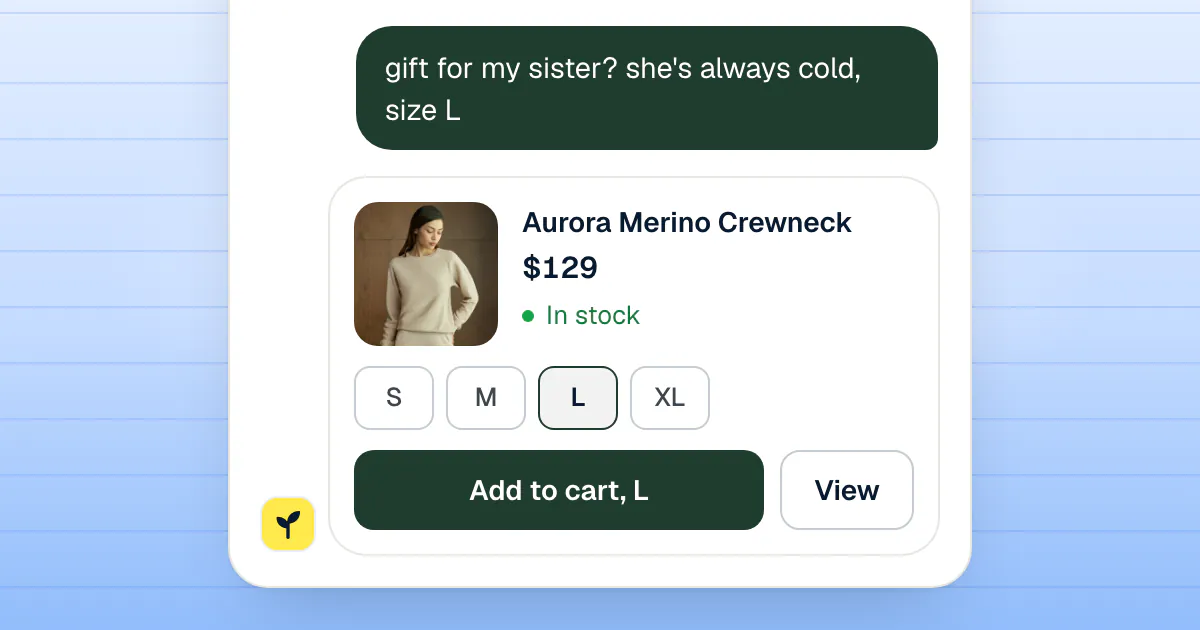
A chatbot on a store is also a salesperson that never leaves the floor. It can recommend a product from your catalog when a shopper describes what they want, show it as a card with the price and the sizes, and add it to the cart. A person on live chat can do the same, slower, and only while they're online.
Its limits
A chatbot only knows what your store has written down. Ask it about a custom size, a delivery that went wrong in a way your policy doesn't describe, or a discount you've never offered, and a good one says it doesn't know and passes the conversation on. A bad one guesses. The test of any chatbot is not how it handles the easy questions; it's what it does with the first question it can't answer.
The second limit is trust. Some shoppers want a person, full stop, and a chatbot that makes them fight for one turns a simple question into a complaint. That is the strongest argument for keeping live chat in the same window, and the numbers further down show how strongly shoppers feel about it.
What live chat does well
Live chat does best what a policy can't: judgment, empathy and decisions. A person can make an exception for a loyal customer, calm someone whose gift arrived broken, quote a price for a bulk order, or notice that a "simple" return is really a quality problem with a whole batch.
Judgment and exceptions
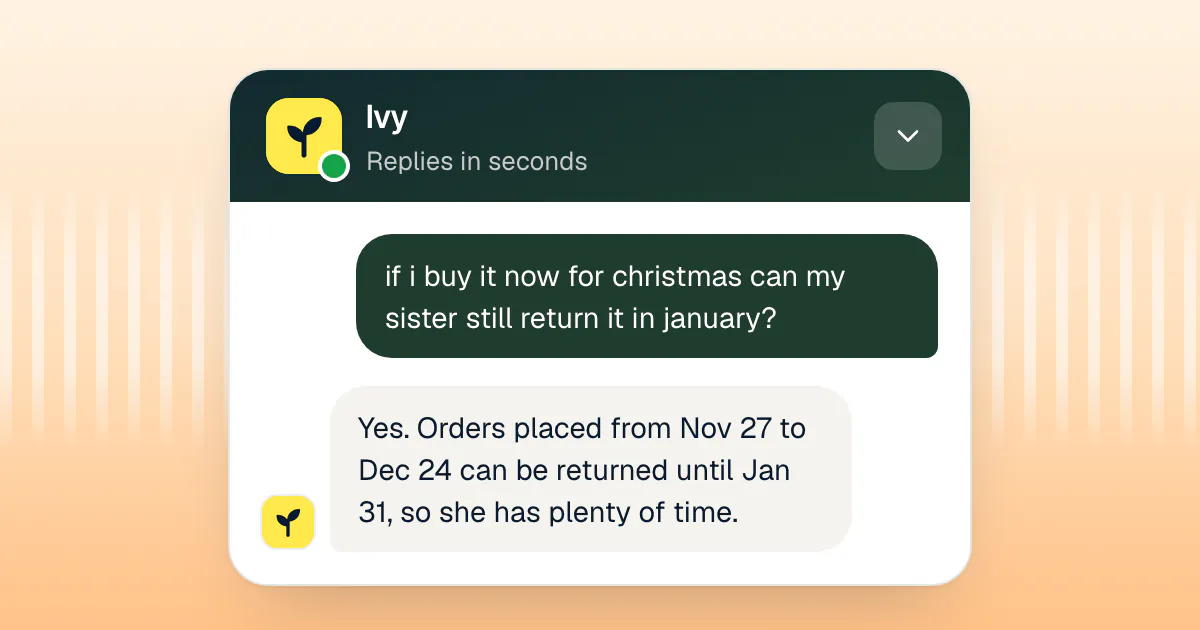
Every store has rules it bends: a return accepted three days late, a free replacement instead of a refund, a shipping upgrade for a wedding date. Those decisions need someone who knows the business and can take responsibility for them. A chatbot can collect the facts and propose the remedy your policy allows; the exception itself belongs to a person.
Empathy when something went wrong
An upset shopper isn't asking for information. They want to be heard by someone who can fix it. A well-written AI reply can be polite, but a person who says "that's on us, I'm sending a new one today" ends the conversation in a way a script can't. This is also where a store keeps or loses a customer for good.
High-ticket, custom and wholesale
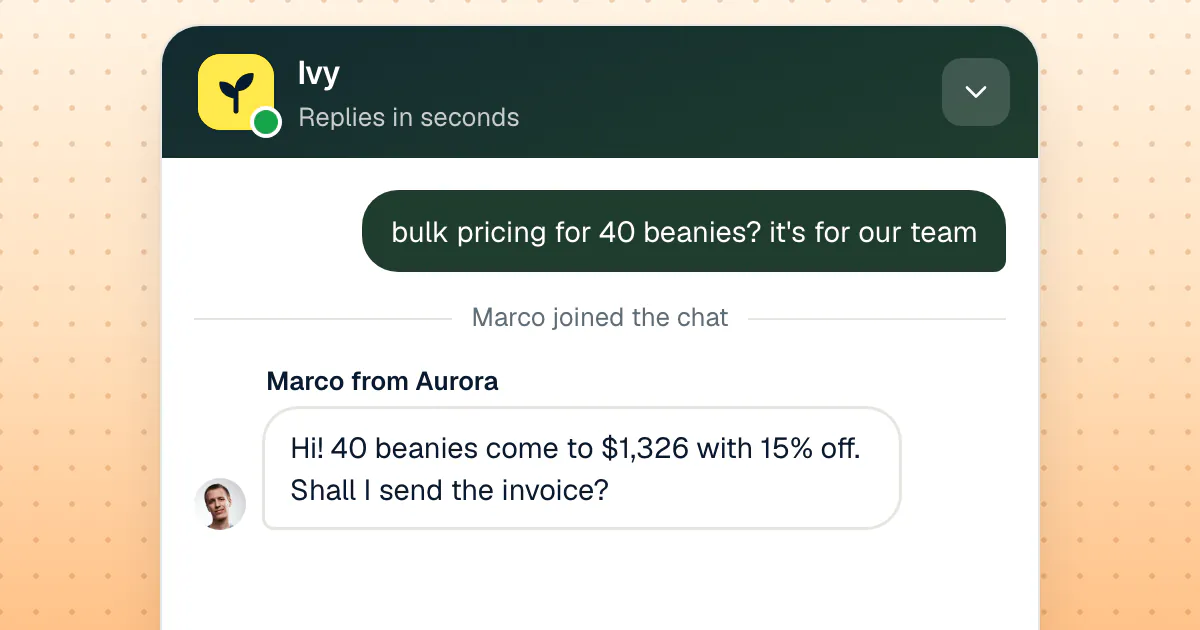
The bigger the order, the more a shopper wants a person: a custom knit, a sofa, a corporate gift of 40 pieces, a wholesale account. These conversations are rare and valuable, and a quick, human reply is part of what the shopper is buying.
Its limits: hours, capacity and repetition
Live chat is only live when someone is there. A small team that answers from 9 to 6 on weekdays is at the desk for 45 hours of the week's 168. For the other 123, a shopper who opens the chat meets a form, an away message or silence.
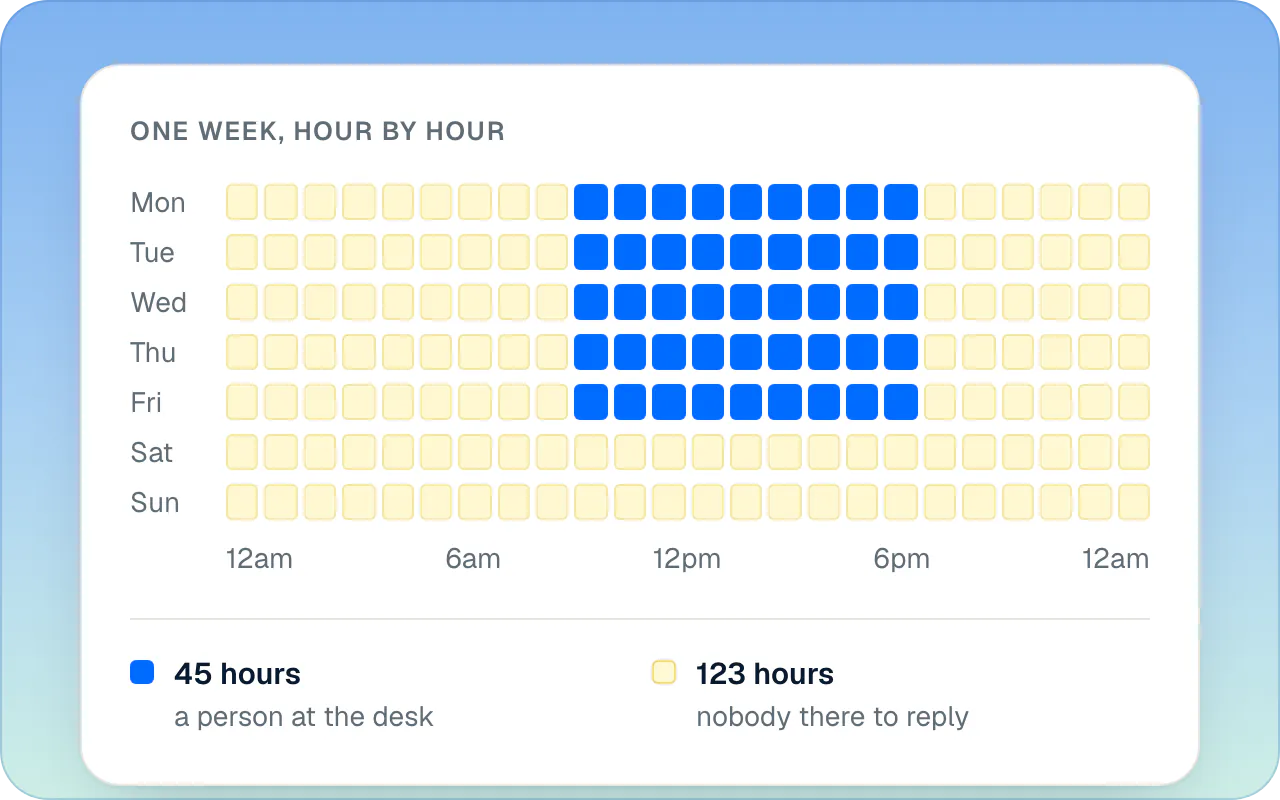
Capacity is the second limit. A person can follow a few chats at once; at the moment a sale email goes out, twenty arrive together, and most of them are the same three questions. The third limit is the one your team feels most: answering "where is my order?" for the twelfth time in a day is not what anyone hired them for, and it leaves less attention for the conversations that need it.
Shopify gives every store a free starting point for live chat: Shopify Inbox, where your staff answer the store's chat from the desktop, iOS and Android apps, with an optional AI agent that is opt-in (your conversations stay with your staff until you turn it on, according to Shopify's Help Center, read October 17, 2026). It's a reasonable place to start; here is how Shopify Inbox compares with eight AI chatbots on orders and handoff once you outgrow answering everything yourself. Tidio is the other common start, a live chat with an AI agent billed on top; Tidio alternatives for Shopify stores compares it with the options.
Which questions go to the chatbot, and which to a person
Give the chatbot every question with a written answer, and give a person every question that needs a decision, a feeling or a price. In practice that splits a store's chat into three groups: what the chatbot answers alone, what it prepares for a person to approve, and what it hands over straight away.
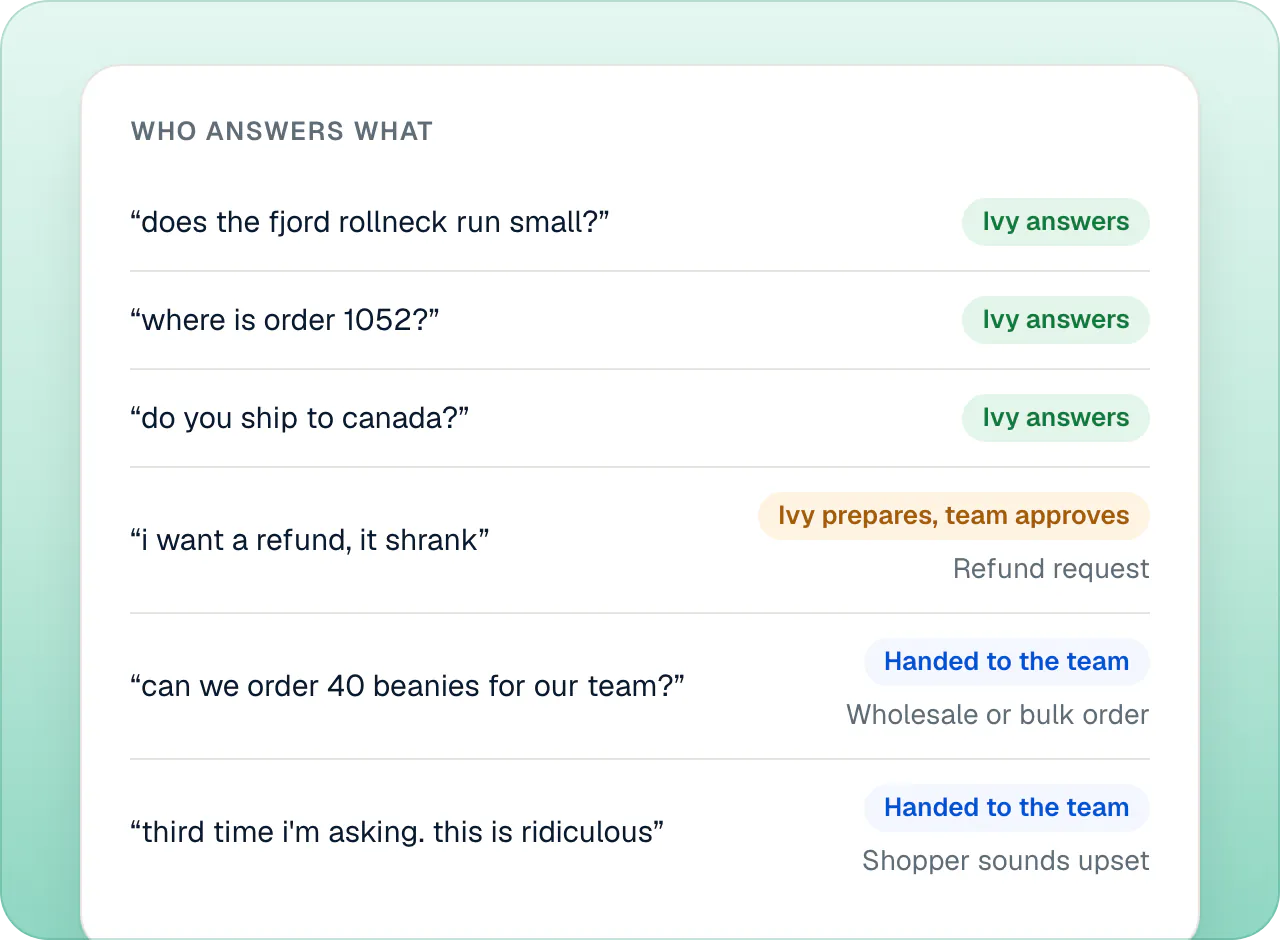
The chatbot answers alone:
- Order status and tracking ("where is my order?").
- Shipping times, costs and countries.
- Sizing, fit, materials and care.
- The return and exchange policy as written.
- Product recommendations, availability and comparisons from your catalog.
- Opening hours, contact details, gift wrap, payment methods.
The chatbot prepares, a person decides:
- Refunds and cancellations, especially above an amount you choose.
- Address changes and replacements on orders that have shipped or are about to.
- Anything that touches money, where a wrong answer costs you more than a short wait costs the shopper.
A person takes it from the start:
- The shopper asks for a person. Don't argue with the request.
- The shopper is upset, or writing for the second or third time about the same problem.
- Wholesale, bulk and corporate orders, which deserve a quote from a human.
- Custom work, personal notes, special occasions with a deadline.
- Words that signal risk, such as "chargeback", "lawyer" or "never arrived".
- Any question the chatbot couldn't answer from your store's content.
The last line is the one that grows your chatbot over time. Each question it couldn't answer is a gap in your store's written content: answer it once, write it down, and next time the chatbot answers it alone. In Strathly those questions land on a list, and the docs explain what happens when Ivy doesn't know an answer and how one written answer reaches the shoppers who were waiting.
What each one costs a Shopify store
Live chat costs people's time, plus software that is usually priced per seat; a chatbot costs a fee per unit of AI work, usually per conversation, per message or per resolution. Which one is cheaper depends on how many hours you need covered and how many conversations you get, so do the arithmetic with your own numbers before trusting a vendor's savings percentage.
Live chat: hours and seats
The cost of live chat is mostly the cost of the hours someone is available to reply. A week has 168 hours. Covering every one of them with a single person on duty takes about 4.2 full-time people at 40 hours a week each (168 ÷ 40), before holidays, sick days and the busy hours when one person isn't enough. Most small stores don't try: they cover the working day and accept that the chat is closed the rest of the time.
The software adds a second line. Helpdesks and live chat tools are commonly priced per seat, a monthly fee for each teammate who answers, so the bill grows with the team you need to cover more hours. It's worth checking whether a tool charges for the AI separately on top of those seats. If a helpdesk's per-seat price is what's pushing you to look around, here are Gorgias alternatives for Shopify stores. For the same month priced in seven tools' own units, see what live chat costs a three-person store team.
A chatbot: the unit you're billed for
AI chatbots bill for usage, and the unit matters more than the headline price. Some count conversations, some count each AI reply or message, some count a "resolution" or "outcome" by their own definition, and a few count site visitors whether they chat or not. The same long conversation can be one unit with one vendor and a dozen with another; we explain how AI chatbots for online stores compare on pricing units in our comparison. Per outcome is how Fin bills; Intercom (Fin) alternatives for online stores shows what else is out there.
Strathly's pricing, in one rule
With Strathly, only the conversations Ivy takes count toward your plan; the conversations your team answers on its own are unlimited on every plan. Everything one shopper asks within 24 hours is one conversation, and every feature is on every plan:
| Plan | Price a month | Ivy conversations a month | Teammates | Extra conversation |
|---|---|---|---|---|
| Starter | $39 | 100 | 2 | $0.39 |
| Growth | $79 | 300 | 5 | $0.26 |
| Scale | $199 | 1,000 | Unlimited | $0.20 |
Prices in US dollars, excluding VAT and sales tax. A conversation Ivy hands to your team counts once, as Ivy's; your teammates' replies never add to it. That's why the hybrid doesn't get more expensive as your team gets more involved: see what counts as a conversation for the full rule.
When you need both: how to run them in one chat
You need both as soon as your store gets more questions than one person can answer in a day, or gets them at hours nobody is working, which for most Shopify stores is from the first month. The point is not to have two tools; it's to have one chat where the shopper meets the AI first and reaches a person without starting over.
A good hybrid has six parts.
1. A way to reach a person, always visible
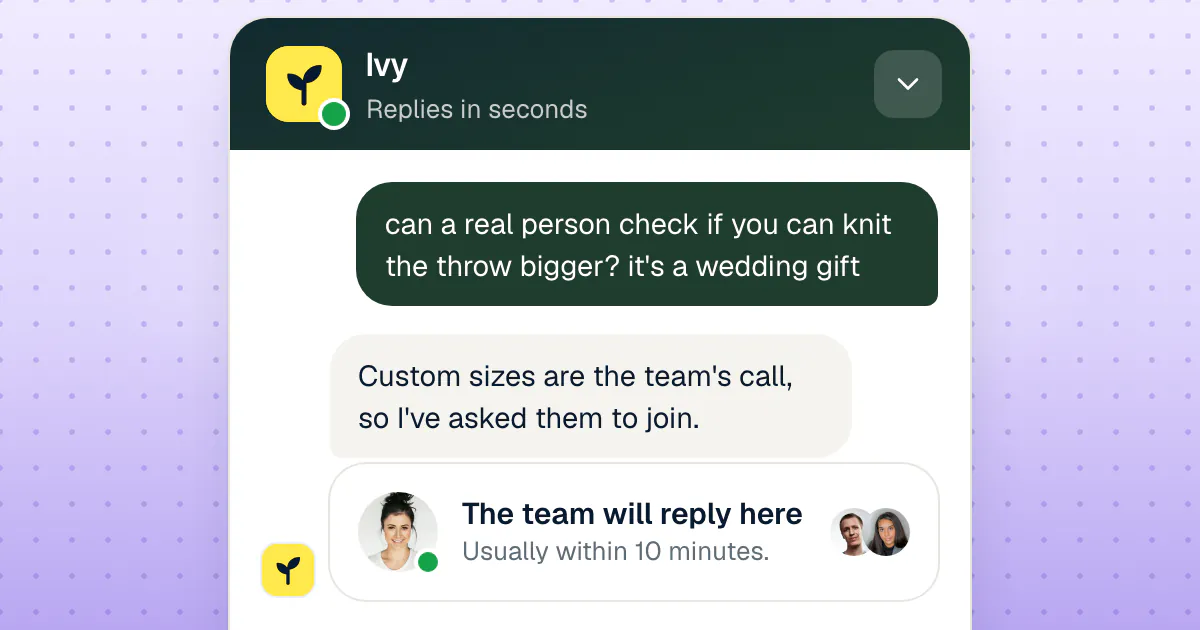
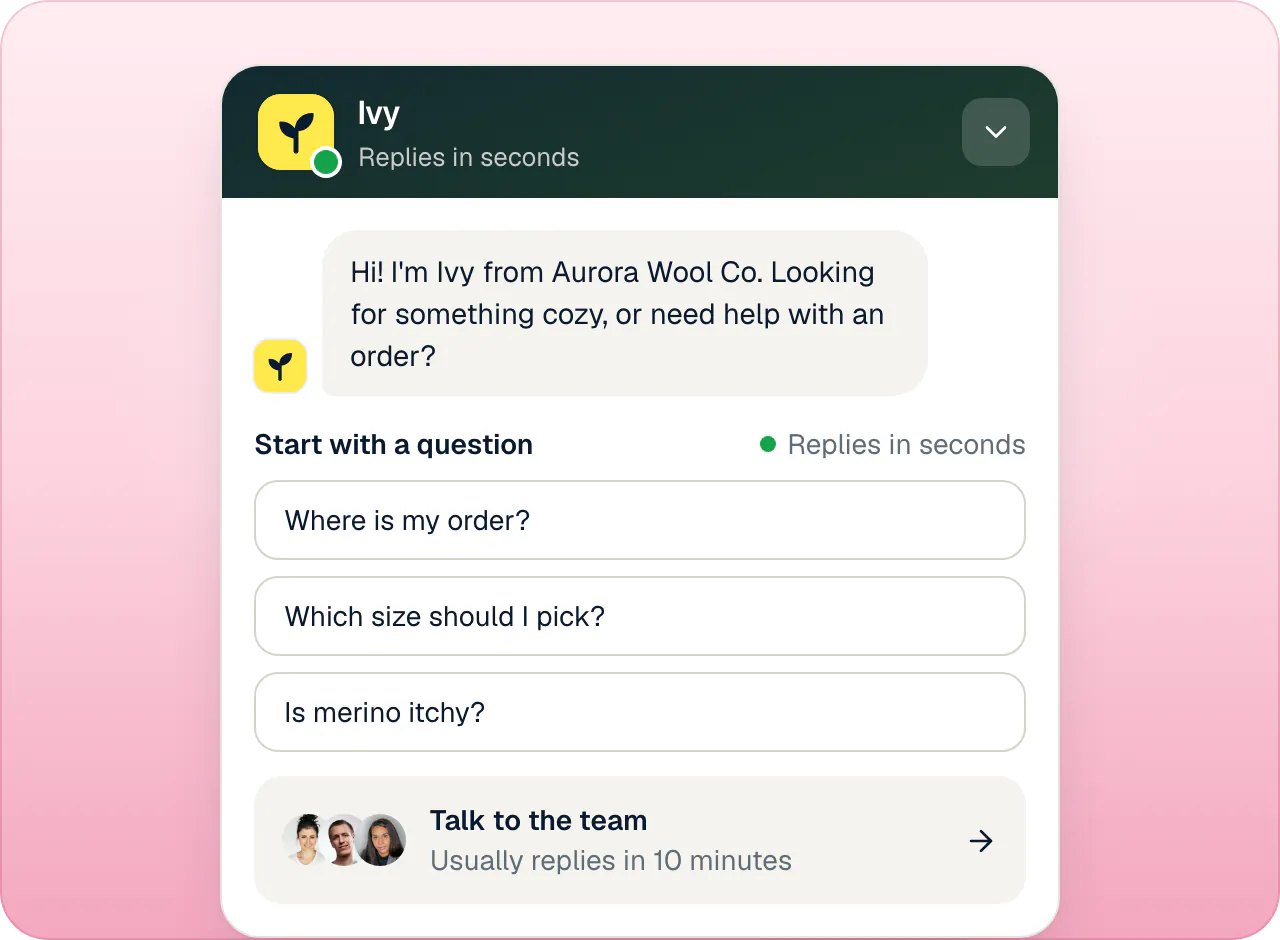
The fastest way to make shoppers hate a chatbot is to hide the human. Show the way to a person on the first screen and accept "can I talk to someone?" at any point in the conversation. In Strathly's chat the welcome screen offers suggested questions for Ivy and a "Talk to the team" row with your reply target, and the line under the composer says a person can join anytime.
2. Handoff rules you decide in advance
Write down which conversations go to a person, using the lists above, and make them rules rather than the chatbot's mood on the day. Typical rules: a refund request above an amount, the shopper asks for a person, the shopper sounds upset, a wholesale order, the chatbot's answers didn't help after a couple of tries, and keywords you choose. Strathly's rules are switches in Ivy's Behavior, plus keyword rules you write; the docs list what triggers a handoff and what each rule can do.
3. The context travels with the conversation
A handoff fails when the shopper has to explain everything again. The person who picks it up should see the whole conversation, why it was handed over, what the AI looked up, and ideally a reply ready to edit. In Strathly the conversation arrives in the Inbox with Ivy's summary, the reason, and a reply she drafted for you to edit or send.
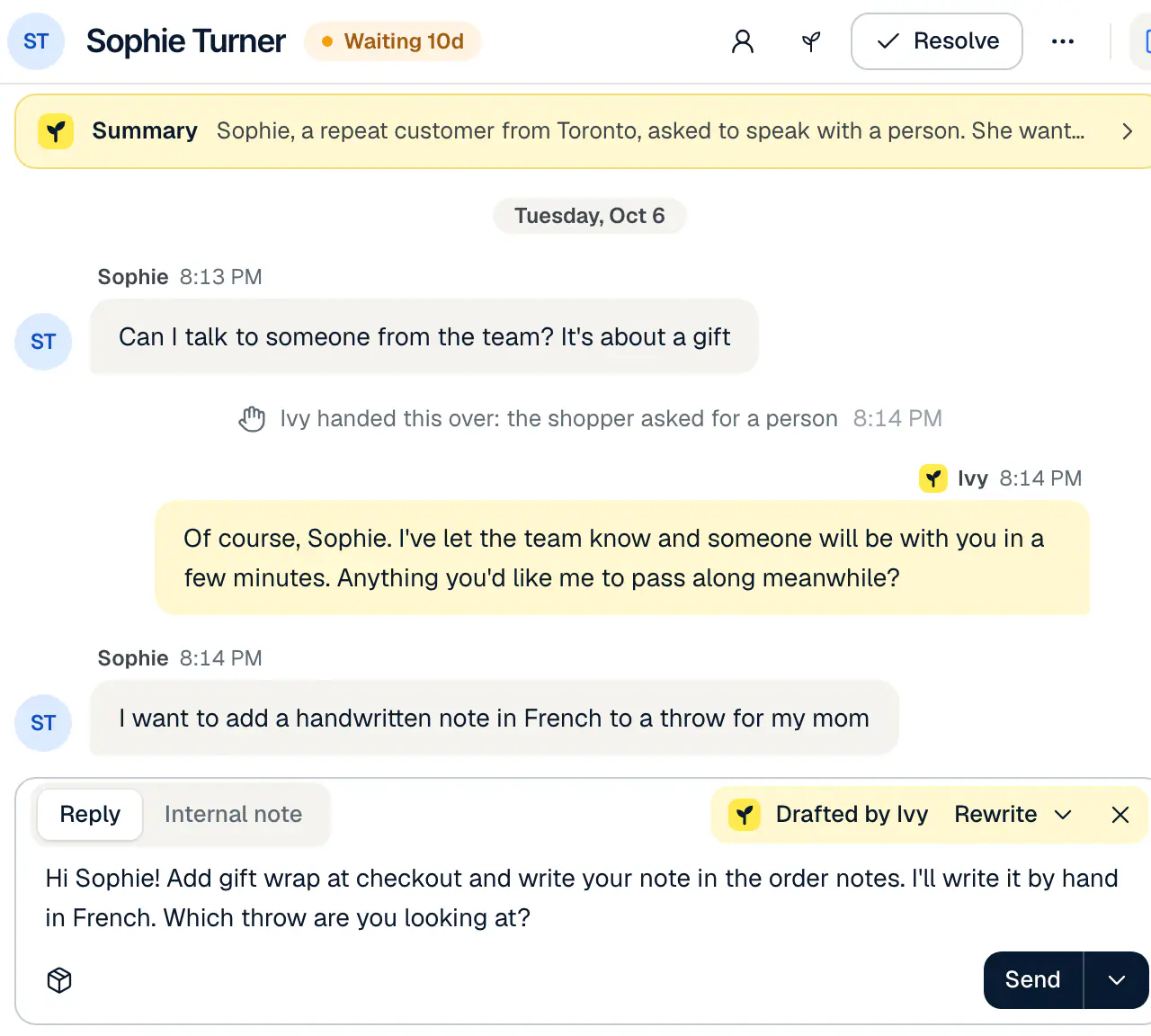
The docs show how Ivy drafts the reply for you and what to do when the shopper has already left.
4. An honest promise of when a person will reply
"Someone will be with you shortly" at 11 p.m. on a Saturday is a broken promise. Tell the shopper when a person will reply, and give them a way to get the answer without waiting in the window. A reply target you can keep (in Strathly, from 5 to 60 minutes, 10 by default) sets the "usually within" line the shopper sees, and turns a waiting conversation late in your Inbox when you miss it.
5. A plan for the hours nobody is there
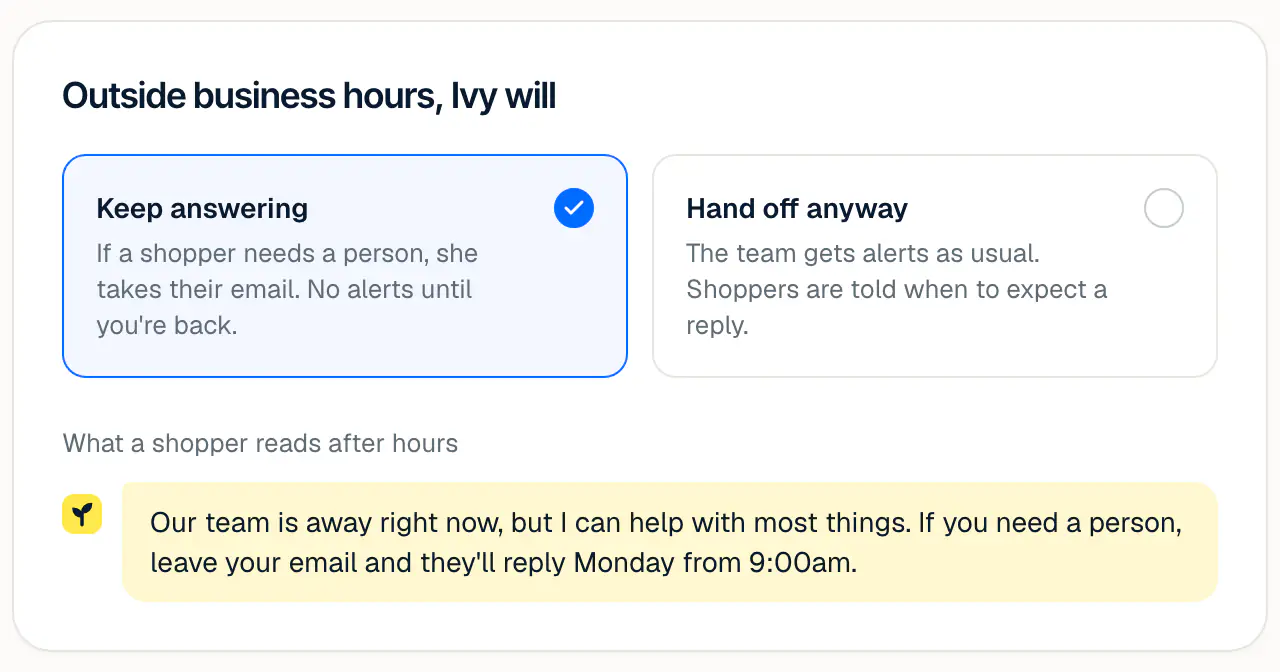
Outside business hours, the AI keeps answering what it can and is honest about the rest. Two choices make sense: keep answering and take the shopper's email when a person is needed, so your team replies when they're back, or hand off anyway and let the team be alerted. In Strathly it's one setting, next to your weekly hours and holiday dates; hours, holidays and what Ivy does at night covers the details.
6. The shopper sees who joined
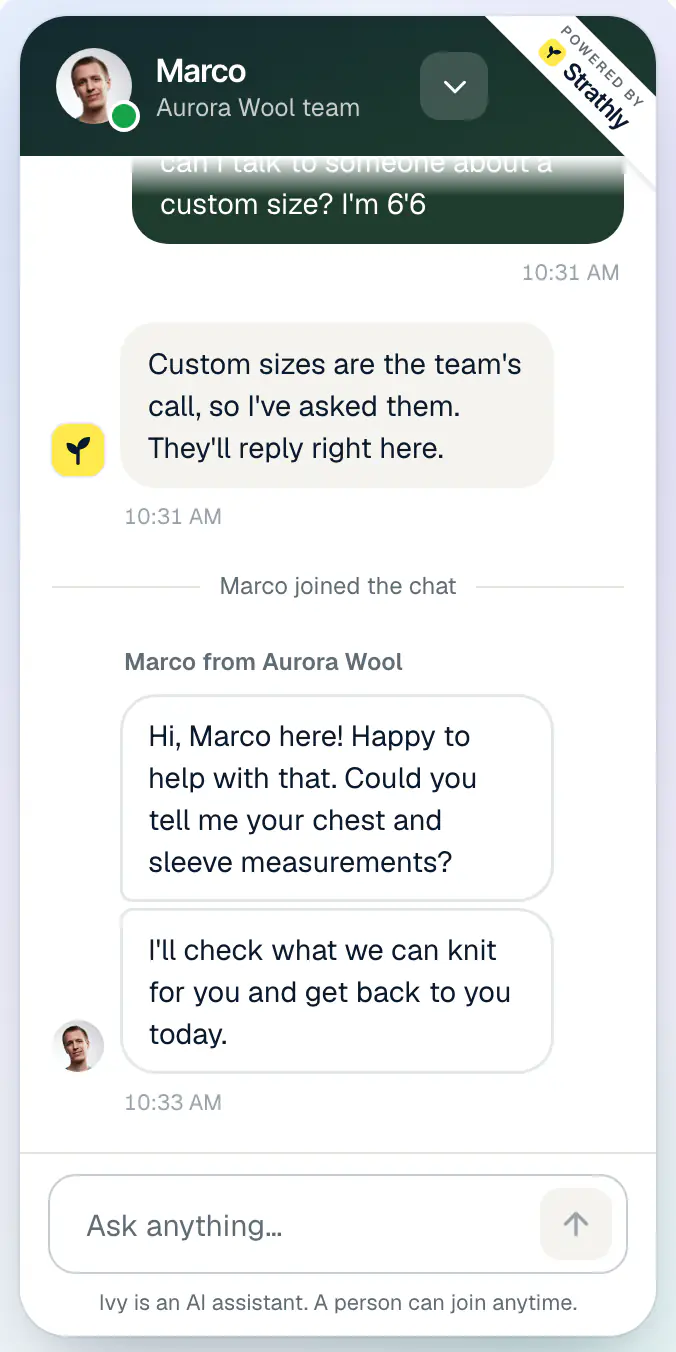
When a person takes over, the shopper should see it: a line saying who joined, and the teammate's name and face on their messages. It changes the tone of the conversation, and it's honest. The same goes the other way: when the person is done, the conversation can return to the AI for the next question.
Mistakes to avoid when you mix the two
Most chatbot and live chat setups fail in the gap between them, not inside either one. These are the mistakes that turn a good tool into a complaint.
- Letting the bot pass as a person. A chatbot with a human name and no AI notice feels like a trick when the shopper finds out. Say it's an assistant, in the chat itself.
- No way out of the bot. A shopper who asks for a person three times and gets three menus will remember your store for that, not for your products.
- Promising live chat you can't staff. A "chat with us" button that leads to an empty queue at night is worse than an honest "we reply from 9 a.m.".
- A chatbot that guesses. An invented delivery date or discount code costs more than "I don't know, I've asked the team". Choose an assistant that answers only from your store.
- A handoff without context. If your teammate starts with "how can I help you?", the shopper has to repeat everything and the handoff has made things worse.
- Measuring only deflection. A chatbot that "resolves" 90% of chats by ending them isn't saving you anything. Look at the questions it couldn't answer, at what shoppers do after the chat, and at the conversations that reached a person late.
Disclosure: what the rules say about bots
Telling shoppers they're talking to an AI is not only good manners in some places. In the EU, Article 50 of the AI Act requires providers to design AI systems that interact directly with people so that those people are informed they are interacting with an AI, unless it's obvious from the context; under Article 113 that rule applies from August 2, 2026. In California, the bot disclosure law (Business and Professions Code section 17941, in force since July 1, 2019) makes it unlawful to use a bot to mislead someone about its artificial identity in order to incentivize a purchase, unless the bot is disclosed clearly and conspicuously. Check with a lawyer for the countries you sell to; the simplest safe habit is an AI notice in the chat, every time. Strathly's chat shows a short AI notice under the conversation on every store.
How shoppers feel about AI customer service
Shoppers are wary of AI support mostly because they fear losing the way to a person. In a Gartner survey of 5,728 customers fielded in December 2023 and published on July 9, 2024, 64% said they would prefer that companies didn't use AI for customer service, and 53% said they would consider switching to a competitor if they found out a company was going to use it (Gartner press release). The top concern Gartner reported was that AI would make it more difficult to reach a person, ahead of job losses and wrong answers.
Read that as a design brief, not a verdict against chatbots. The fear is a closed door. Gartner's own advice in the same release is that a chatbot should tell customers it will connect them to an agent if it can't solve the problem, and that the agent should pick up where the bot left off. That is the hybrid of the previous section: the AI answers first, the way to a person stays open, and the person starts with the full conversation.
How to decide for your store
Start from your hours, your volume and the kind of questions you get, not from the tool. These rules of thumb cover most Shopify stores:
- You answer everything yourself, a few chats a day. Live chat on its own works while you're at your desk. Add an AI agent as soon as questions arrive at night or while you're packing orders: it's the cheapest way to stop losing the evening shoppers.
- A small team, most questions repeat. Let an AI agent take the repeat questions and keep the team on handoffs, refunds and the conversations that sell big orders. This is where the hybrid pays back fastest.
- High-ticket, custom or made-to-order products. Keep people central: the AI answers specs, delivery and order status, and every buying conversation past the first questions goes to a person quickly.
- Seasonal peaks. Black Friday, launches and the holidays multiply the same questions; an AI agent absorbs the wave and your team keeps its hours for orders that go wrong. The Black Friday customer service checklist has the staffing arithmetic.
- Shoppers in several countries. An AI agent answers in the shopper's language at their hour; live chat in five languages and four time zones is out of reach for most teams.
If you're still choosing a tool, test it with your own questions: ask the five things your shoppers ask most, then ask for a person, then ask something your store has never written down. The answers to those three tests tell you more than any feature list.
How Strathly helps
Strathly puts Ivy, an AI sales and support agent, and your team in the same chat on your Shopify store. Ivy answers first, from your store, at any hour; when a conversation needs a person, it reaches your team with the context, and the shopper stays in the same window. Here is how that maps to the hybrid above.
Ivy answers the repeat questions, from your store only
Ivy reads your products and variants, policies, pages and shipping rates when you connect Shopify, and keeps them in sync. She answers sizing, shipping, returns and product questions in the shopper's language, and she doesn't invent products, prices, dates or discount codes: when nothing in your store answers a question, she says so and the question goes to your team. That is how Ivy learns your store, and why the list of questions she couldn't answer becomes the place you improve her.
Orders, without a person for the easy part
With an order number and the checkout email, Ivy shows status, carrier and tracking from Shopify. Refunds, cancellations, address changes and replacements are prepared for your team to approve with one click; if you switch an action on for her, she does it herself within the money cap you set, only for a shopper who proved the order is theirs, and every action waits 10 seconds with Undo. That is refunds and address changes within your limits.
She sells while she answers
When a shopper describes what they want, Ivy recommends from your catalog with product cards, sizes and Add to cart, and can build the cart in the chat. It's an AI shopping assistant that recommends from your live catalog, and the orders that follow a conversation are counted under one stated rule, within 3 days, so you can check each sale.
The handoff is built in
Handoff rules for refunds, a request for a person, an upset shopper, wholesale orders, answers that didn't help and your own keywords send the conversation to the Inbox with Ivy's summary and a drafted reply. Your team can take a conversation over at any time, assign it, resolve it or return it to Ivy. Business hours, holiday dates, Available and Away per teammate and a reply target decide what the shopper is told and when. The shared inbox for the conversations that need a person shows the whole flow.
Your team replies from anywhere
Your team answers from the web dashboard or from the iPhone app with a push when a shopper needs you (free on the App Store), which matters most for small teams where the person on call is rarely at a desk. A shopper who left the chat gets your team's reply by email.
A price that doesn't punish the hybrid
Only Ivy's conversations count toward your plan, and your team's conversations are unlimited on every plan, so handing more to people never costs more. Strathly's plans and prices start at $39 a month with 100 Ivy conversations and 2 teammates, with a 14-day free trial on Growth. Setup takes about two minutes: connect Shopify and go live shows each step, and the five-step quickstart has the details.
Frequently asked questions
What is the difference between a chatbot and live chat?
A chatbot replies automatically, with software, while live chat is a person from your team replying in real time. A chatbot is available every hour and answers many shoppers at once; live chat brings judgment and empathy but only during the hours someone is at the desk. On a store, both usually live in the same chat window.
Is live chat a chatbot?
No. Live chat means a person is writing the replies; a chatbot means software is. Many chat apps include both, which is why the terms get mixed up: the same window can show an AI agent's answer first and a teammate's reply after a handoff. Check which one a tool means before you compare prices.
Which is better for a small Shopify store, a chatbot or live chat?
For most small Shopify stores, a chatbot that hands off to live chat is better than either alone. The chatbot answers order status, shipping and sizing at any hour; you take refunds, upset shoppers and big orders. A store with a handful of chats a day, all during working hours, can start with live chat only.
Chatbot vs human: will shoppers accept talking to an AI?
Yes, if they can always reach a person. In Gartner's 2024 survey, the top concern about AI in customer service was that it would make reaching a person harder. Shoppers accept a fast, accurate answer from an assistant that says it's an AI and offers a way to the team; they resent one that blocks the way.
AI vs human customer service: which is better?
Neither is better at everything. AI customer service is better at speed, hours, volume and consistent answers to repeat questions; human customer service is better at exceptions, refunds outside policy, complaints and high-value sales. The stores that do best let AI take the first reply and keep people for the conversations that need a decision.
Do I have to tell shoppers they are chatting with a bot?
In some places, yes. The EU AI Act (Article 50) requires that people be informed they are interacting with an AI system unless it's obvious, from August 2, 2026, and California's bot disclosure law covers bots used to encourage a purchase. An AI notice in the chat is the simple habit; check with a lawyer for your markets.
How much does live chat cost compared with a chatbot?
Live chat costs the hours someone is available plus per-seat software; a chatbot costs a fee per conversation, message or resolution. With Strathly, only Ivy's conversations count and your team's are unlimited: plans start at $39 a month for 100 Ivy conversations, and the pricing calculator shows your month.
Conclusion
Chatbot vs live chat is a false choice for a Shopify store. A chatbot gives you instant answers at every hour for the questions you already know; live chat gives you a person for the conversations that decide whether a shopper comes back. Put them in one chat, with a visible way to a person, handoff rules, the context passed along and an honest promise of when your team replies, and each does what it's good at.