Fill the gaps Ivy found
When nothing in Ivy's knowledge answers a question, she doesn't guess: she says so, offers your team and logs the question. Knowledge › Unanswered collects those questions, so you answer each one once and she handles it herself from then on.
Updated · 6 min read
Feature overview:AI chatbot knowledge base
On this page
Open Knowledge,Unanswered. The tab's count is the number of open questions. Admins and the owner can answer and dismiss them here; agents can't open Knowledge.
What happens when Ivy doesn't know?#
Ivy answers only from your products, pages, policies, files, web pages and answers. When none of them covers what a shopper asks, she tells the shopper she isn't sure and offers your team. When she hands the conversation over, it reaches your Inbox with the reason Ivy couldn't answer (what happens after hours depends on your after-hours setting). The question is logged here.
A question is logged after a real conversation when:
- Ivy searched her knowledge and found nothing relevant, or
- she handed the conversation to your team because she couldn't answer.
Questions asked in the Playground are never logged.
How questions are grouped#
Shoppers ask the same thing in many ways: "do you ship to switzerland", "Shipping to Europe? Switzerland specifically". When a new question means the same as an open one, it joins that card instead of making a new one. Asked 9 times counts conversations: a shopper who asks twice in the same conversation counts once.
In the background, Strathly also:
- rewrites the question as one short, clear sentence in English, the card's title;
- picks a topic for it, like Shipping or Product question;
- drafts an answer, only when one of your sources already covers the question. Many questions have no draft, because nothing in your knowledge answers them: that's why they're here.
The open question's card#
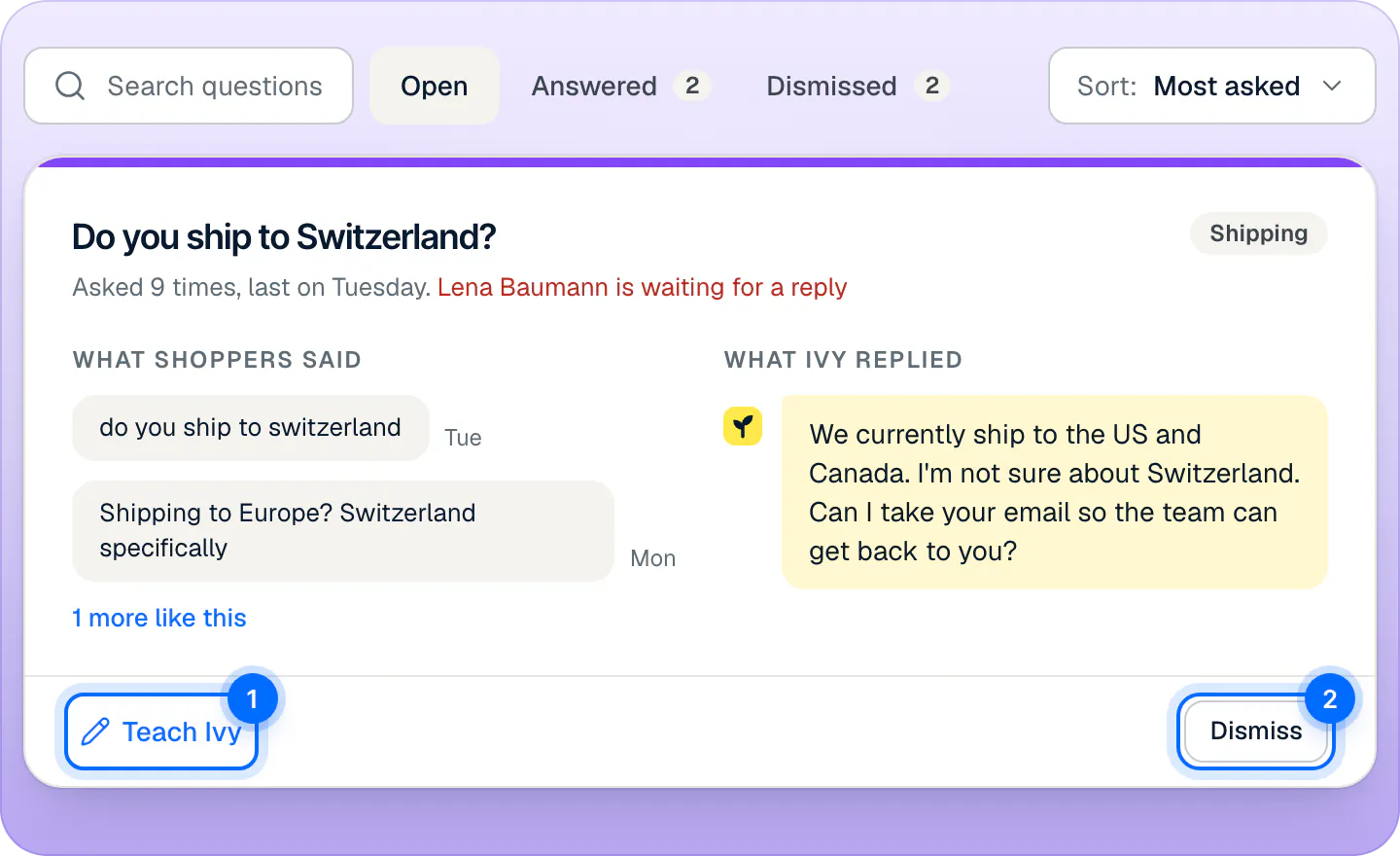
- The title is the question; the line under it says how often and when it was last asked. When a shopper is waiting for a reply on it right now, their name follows in red, and links to the conversation.
- What shoppers said: their own words, each linking to its conversation. 1 more like this shows the rest.
- What Ivy replied: what she told them at the time.
- The topic chip, on the right.
The list is sorted by Most asked; switch Sort: to Most recent to see the newest first.
Answer a question#
- Open Knowledge,Unanswered and find the question.
- Press Teach Ivy on its card. The card opens an answer box.
- Read Ivy's suggestion, if there is one. It's tinted yellow and says which source it comes from, like Suggested by Ivy from Shipping policy. Check the facts, change what you need, or press Clear to start from nothing. With no suggestion, the box says "Nothing in your knowledge covers this yet."
- If shoppers are waiting on this question, Also send it to names them and is checked. Keep it checked to send your answer as your reply in their conversations, or uncheck it.
- Press Save and send (or Save answer when nothing is sent), or ⌘Enter.
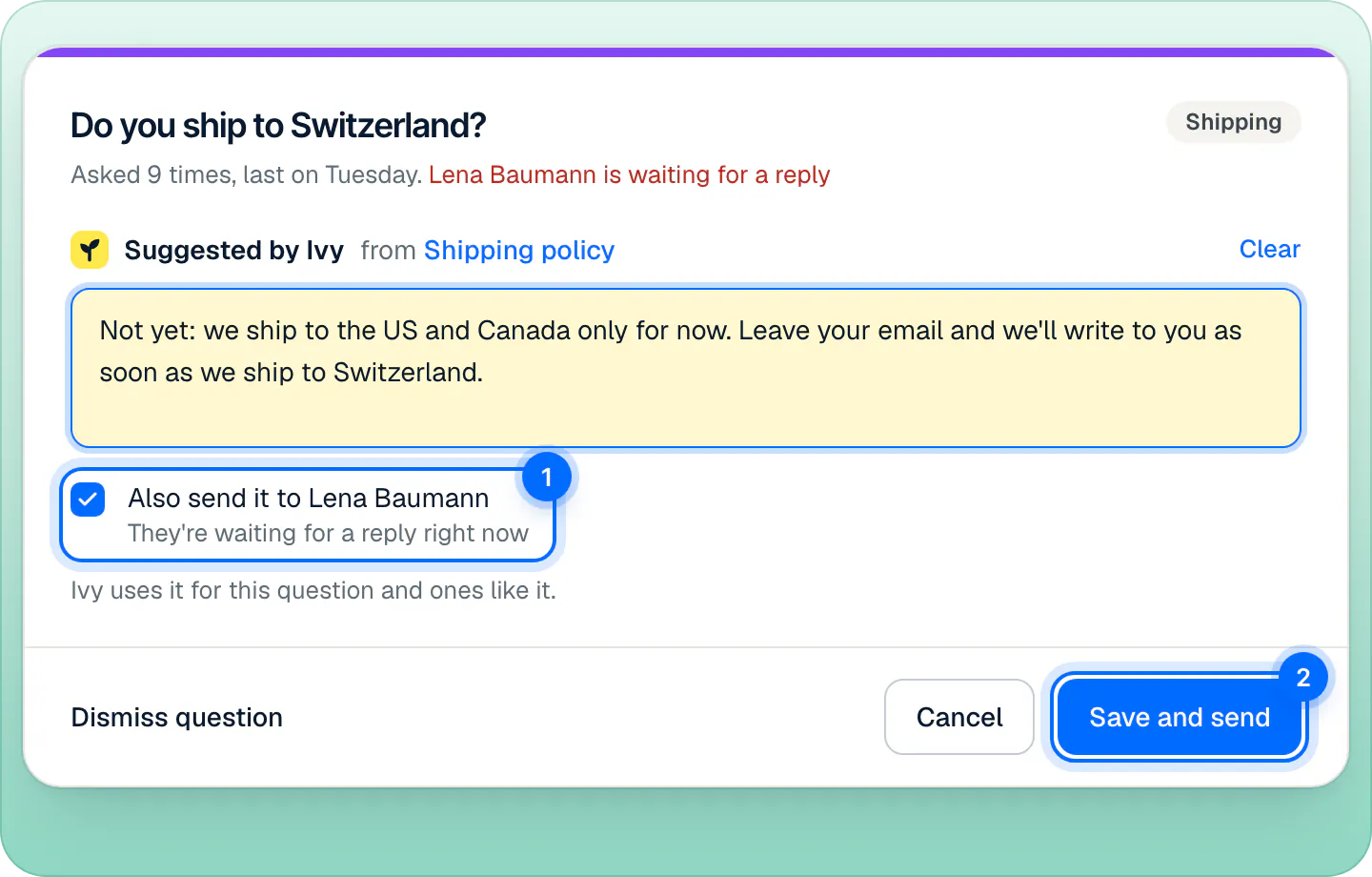
The question moves to Answered, your answer is saved in Knowledge,Answers (see Manage the answers you've taught Ivy), and Ivy uses it for this question and ones like it from her next reply. The toast says "Ivy will use this from now on", with Test it and Undo. The question's wording can't be changed here; the saved answer can be edited later in Answers. The card's answer box saves the same way as the Teach Ivy dialog, described in Teach Ivy and correct her.
Can I reply to the shoppers who asked?#
Yes, to those still waiting on a person: conversations in the Inbox's Needs you view that are unassigned or assigned to you, up to 20 at a time. Also send it to sends your answer as your own reply in each of them, so they get it at once. Shoppers whose conversations already ended don't get it.
Undo removes the answer and reopens the question, but replies already sent stay sent.
When am I notified?#
When a question reaches 3 different shoppers, everyone on the team gets a notification in the app's Notifications: "3 shoppers asked “Do you ship to Switzerland?”", with "Teach Ivy an answer so she stops handing it off". Clicking it opens the question.
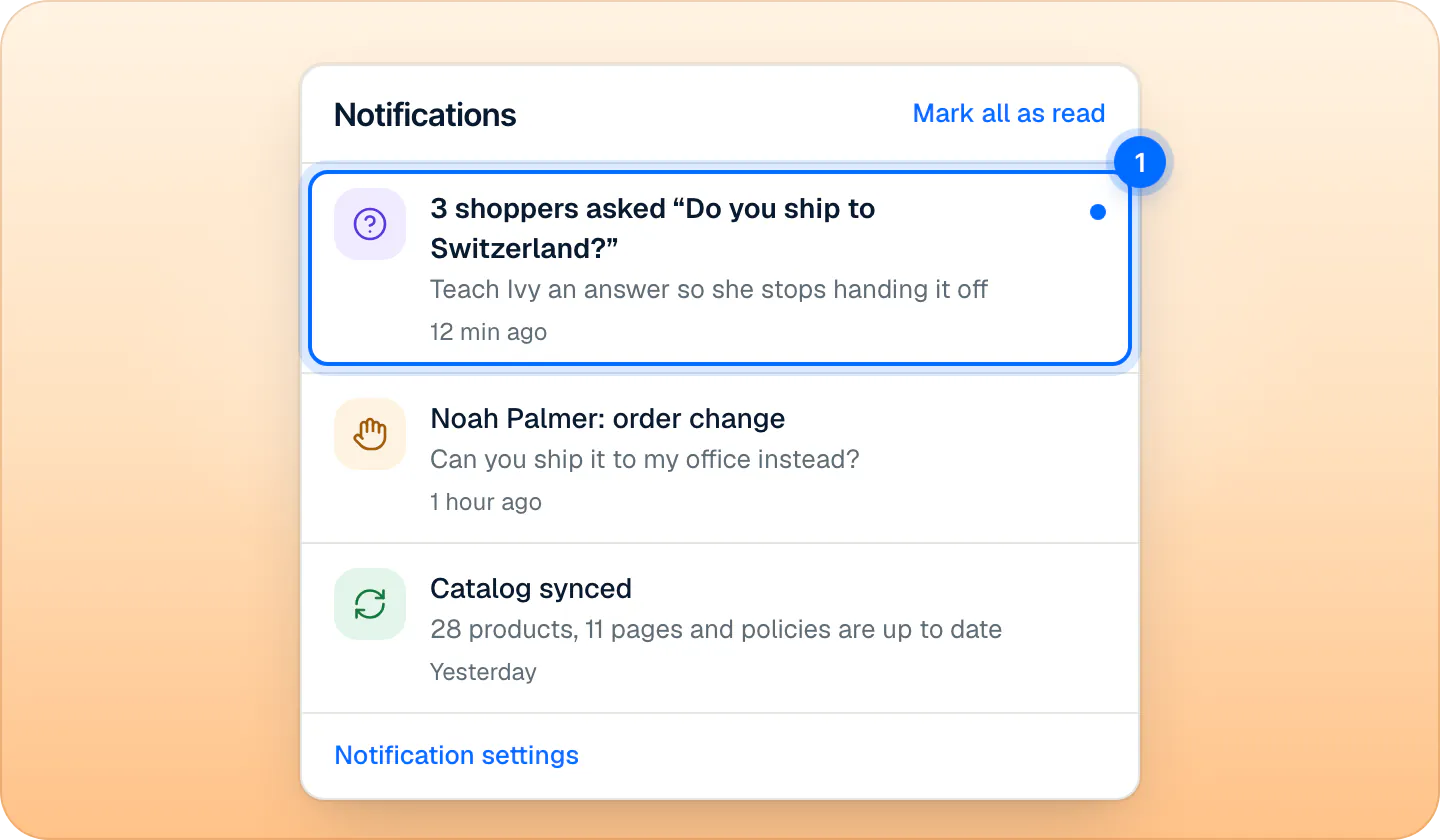
There is no email and no push notification for unanswered questions, and no daily or weekly digest. Agents get the notification too, but only admins and the owner can open Knowledge to answer it.
The same questions also show up:
- on Home, in Ivy couldn't answer (admins and the owner): the three most asked. See Your Home page.
- in a product's panel, under What shoppers ask, when the question names that product.
- in the Playground, under Not answered yet.
Dismiss a question#
Some questions don't need an answer from Ivy: a one-off request, something only your team should handle. Press Dismiss on the card. The toast says "Question dismissed" and "Ivy keeps handing it to your team.", with Undo.
If a shopper asks it again later, it comes back as a new open question. A dismissed question doesn't stay hidden for good.
Answered and dismissed questions#
The Open, Answered and Dismissed tabs at the top hold the questions in each state.
- An answered card shows who answered it, when, and what Ivy says now. Edit answer changes the answer, and Reopen question in its … menu moves it back to Open.
- If you delete its answer in Knowledge,Answers, the question reopens on its own.
- A dismissed card has Restore, which moves it back to Open.
Frequently asked questions
Why did a dismissed question come back?
A shopper asked it again. Dismissing applies to the questions asked so far; a new ask after a dismissal opens a new question.
Does every question get a suggested answer?
No. Ivy drafts one only when one of your sources already covers the question, for example when a policy mentions it but she didn't find it at the time. When nothing covers it, write the answer the way you'd tell a shopper.
Can I get unanswered questions by email?
No. They show in Knowledge › Unanswered, on Home, and as an in-app notification when 3 shoppers have asked the same thing.
Are Playground questions logged here?
No. Only questions from real conversations on your store are logged.
Related pages
- KnowledgeTeach Ivy and correct herUse Teach Ivy from the sidebar, a conversation, Unanswered or the Playground, and Correct this answer when she got it wrong. Live from her next reply.
- KnowledgeManage the answers you've taught IvyAnswers you teach Ivy win over your pages and policies. Find, edit, test or delete them in Knowledge › Answers and see how often each one is used.
- AnalyticsThe Home page: today at a glanceWhat Home shows: sales from conversations, who needs you, Ivy's week, who is chatting now, what sold and the questions Ivy couldn't answer, card by card.