Blog · Customer support
Black Friday customer service checklist for Shopify [2026]
Black Friday customer service is won before the sale: publish the answers shoppers will ask for, decide who answers what and when, and prepare for the wave of order questions that comes after Cyber Monday. Here is the checklist, dated for 2026, with each task's place in Shopify.
Updated · First published · The Strathly team · 21 min read
On this page
- Why Black Friday customer service needs a plan
- The BFCM checklist at a glance
- Policies and answers to publish by November 6
- Replies for the five questions of the week
- Handoff rules, hours and a reply target, set by November 13
- Staffing the peak without guessing
- Black Friday to Cyber Monday: running the queue
- After Cyber Monday: the wave of "Where is my order?"
- How Strathly helps
- Frequently asked questions
- Conclusion
Black Friday customer service on a Shopify store is mostly decided in the four weeks before the sale. The questions are predictable: will it arrive in time, can it be returned after the holidays, why doesn't the code work, where is my order. What changes is how many arrive at once, and how many come in while you are asleep, cooking a turkey or packing parcels.
This checklist is built for a small or mid-size Shopify team in 2026: Thanksgiving falls on Thursday, November 26, Black Friday on November 27 and Cyber Monday on November 30. Each task says when to do it and where it lives in your Shopify admin, and the policy lines and replies are written out so you can copy them. Where a task is something an assistant can take off your plate, it says how Ivy answers order status in the chat, and the step-by-step for Strathly is in the docs on choosing when Ivy hands off.
If you would like Ivy answering these questions on your own store before the rush starts: Install on Shopify. Setup takes about 2 minutes. 14-day free trial. Cancel anytime.
Why Black Friday customer service needs a plan
Black Friday customer service needs a plan because the volume, the timing and the kind of question all change in the same five days. More people buy, more of them are new to your store, and more of them buy gifts, which brings questions about delivery dates and returns you rarely get the rest of the year.
The scale is real even for small stores. Shopify reported that its merchants sold a record $14.6 billion over the Black Friday Cyber Monday weekend in 2025, up 27% on 2024, to more than 81 million consumers worldwide, with sales peaking at $5.1 million a minute at 12:01 p.m. EST on Black Friday (Shopify's BFCM 2025 results, published December 2, 2025). More than 94,900 merchants had their highest-selling day ever on Shopify, and cross-border orders were 16% of all orders. That last number matters for support: a sixth of your shoppers may write in another language or ask about duties and delivery to another country.
Three things make the season harder than a normal busy week:
- The peak is short and front-loaded. Most questions arrive in a few hours on Friday morning and Monday, when your team is also handling fulfilment, ads and stock.
- The work continues after the sale. Orders placed on Friday ship over the following days, so "Where is my order?" climbs through early December, exactly when you want to rest.
- Holidays shrink the team. Thanksgiving and the weekend mean fewer people online at the moment more shoppers are buying for the first time.
A checklist does not add people. It moves the work earlier: answers written in October don't have to be typed again in November.
The BFCM checklist at a glance
Here is the whole Black Friday customer service checklist for a Shopify store, in one table. Copy it into your own task list and give each row an owner. The sections below explain each group and give you the wording.
| Task | Do it by | Where in Shopify (or your support tool) |
|---|---|---|
| Update the return policy (holiday window, final-sale items) | Nov 6 | Settings › Policies › Return policy |
| Publish processing times, shipping times and cut-off dates | Nov 6 | Settings › Policies › Shipping policy, plus a banner |
| Add the season's questions to your FAQ page | Nov 6 | Online Store › Pages |
| Check shipping notifications and tracking | Nov 6 | Settings › Notifications › Customer notifications |
| Write the replies for the five big questions | Nov 6 | Your helpdesk, inbox or assistant |
| Write the promotion's rules down in one place | Nov 13 | A page or note your team and your assistant can read |
| Set handoff rules (refunds, a person, upset, wholesale) | Nov 13 | Your support tool |
| Set business hours, Thanksgiving closure and a reply target | Nov 13 | Your support tool |
| Build the team rota for Nov 26 to Dec 4 | Nov 13 | A shared calendar |
| Test every flow from a phone, as a shopper | Nov 20 | Your storefront |
| Check your conversation or ticket allowance | Nov 23 | Your support tool's billing |
| Morning and evening queue review during the sale | Nov 27 to 30 | Your inbox |
| Proactive delay notices, if a carrier slips | Dec 1 onward | Email, plus the chat |
| Review the questions nobody could answer | Dec 7 | Your support tool |
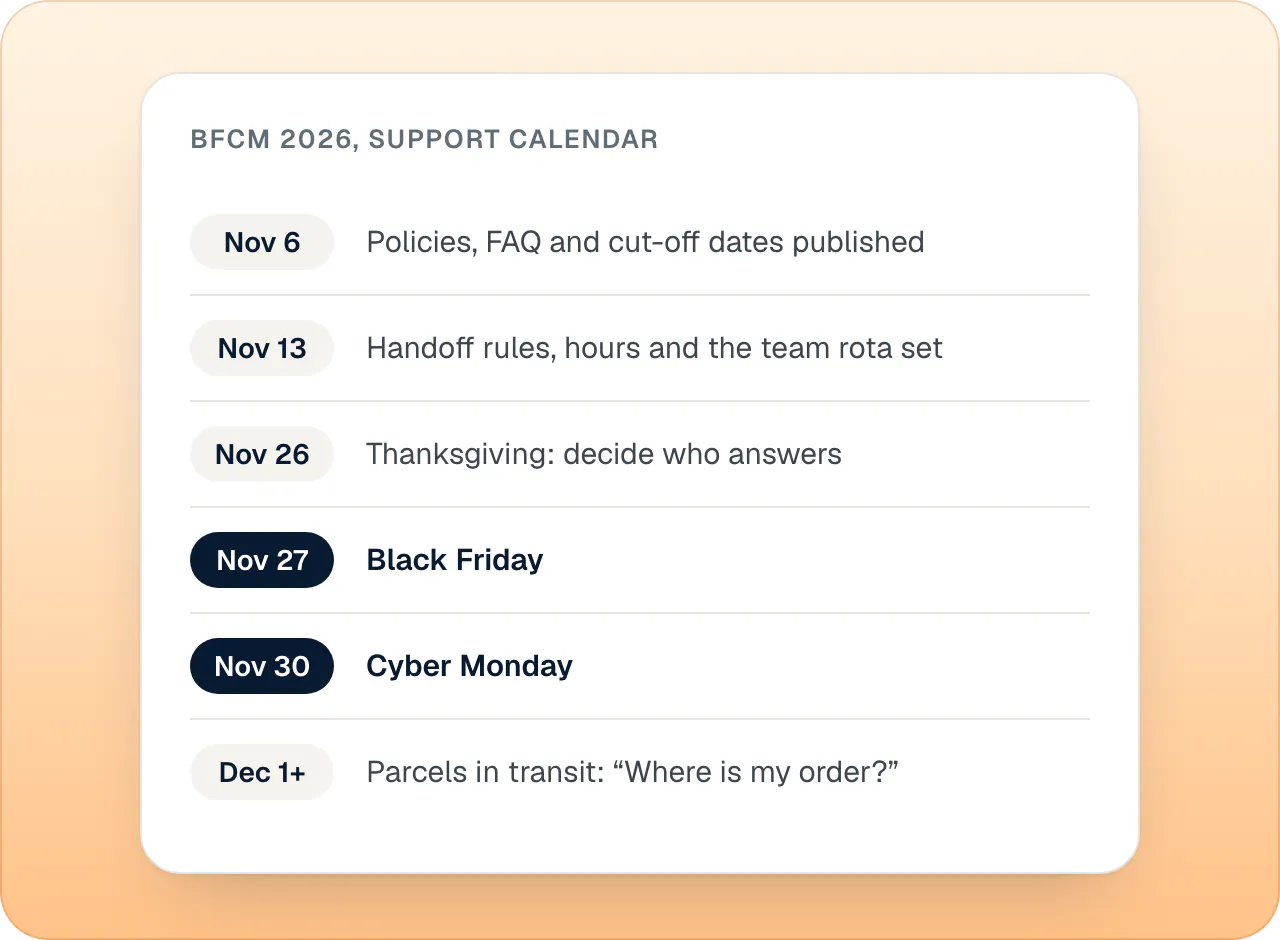
The dates leave a week of slack before Thanksgiving. If you are reading this later, keep the order and compress the gaps: written answers first, rules and people second, testing last.
Policies and answers to publish by November 6
Publish your return policy, shipping policy and cut-off dates first, because every other task depends on them. Your team will quote them, your FAQ will link them, and an assistant answers from them. A rule that only lives in someone's head can't be answered at 2 a.m.
Shopify keeps these in Settings › Policies, where you can add a return policy, a shipping policy and contact information, among others; by default, links to your policies appear in the checkout footer (Shopify Help Center: store policies). Shopify can generate automated policies from your store settings, and its Help Center is clear that those templates aren't legal advice, so read what they say before the sale.
The return policy: say what happens to gifts
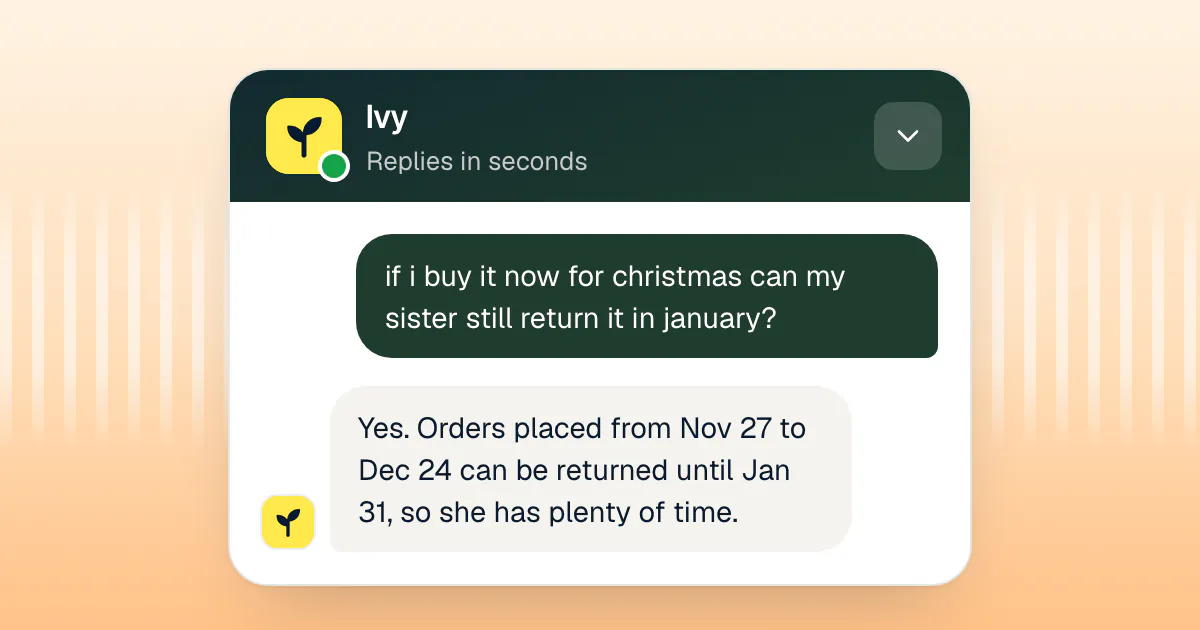
Gift buyers ask a question you rarely hear the rest of the year: can the person who receives it return it after the holidays? Decide the answer and write it in one sentence. A common choice is an extended window for orders placed during the season. A two-line clause you can adapt:
Orders placed between [November 27] and [December 24] can be returned until [January 31]. Gift recipients can return or exchange with the order number, and the refund goes to the original payment method or as store credit to [the recipient].
Two limits to respect. In the EU, consumers have 14 days to withdraw from an online purchase, counted from the day they receive the goods, and must be refunded within 14 days of telling you (Directive 2011/83/EU, Articles 9 and 13). In the UK, the cancellation period also ends 14 days after the goods arrive (Consumer Contracts Regulations 2013, regulation 30). An extended holiday window can add time on top of those rights, never replace them, so a "final sale" line does not remove a statutory right to withdraw where it applies. Check the wording with a lawyer for the countries you sell to.
The shipping policy: processing time, delivery time, cut-offs
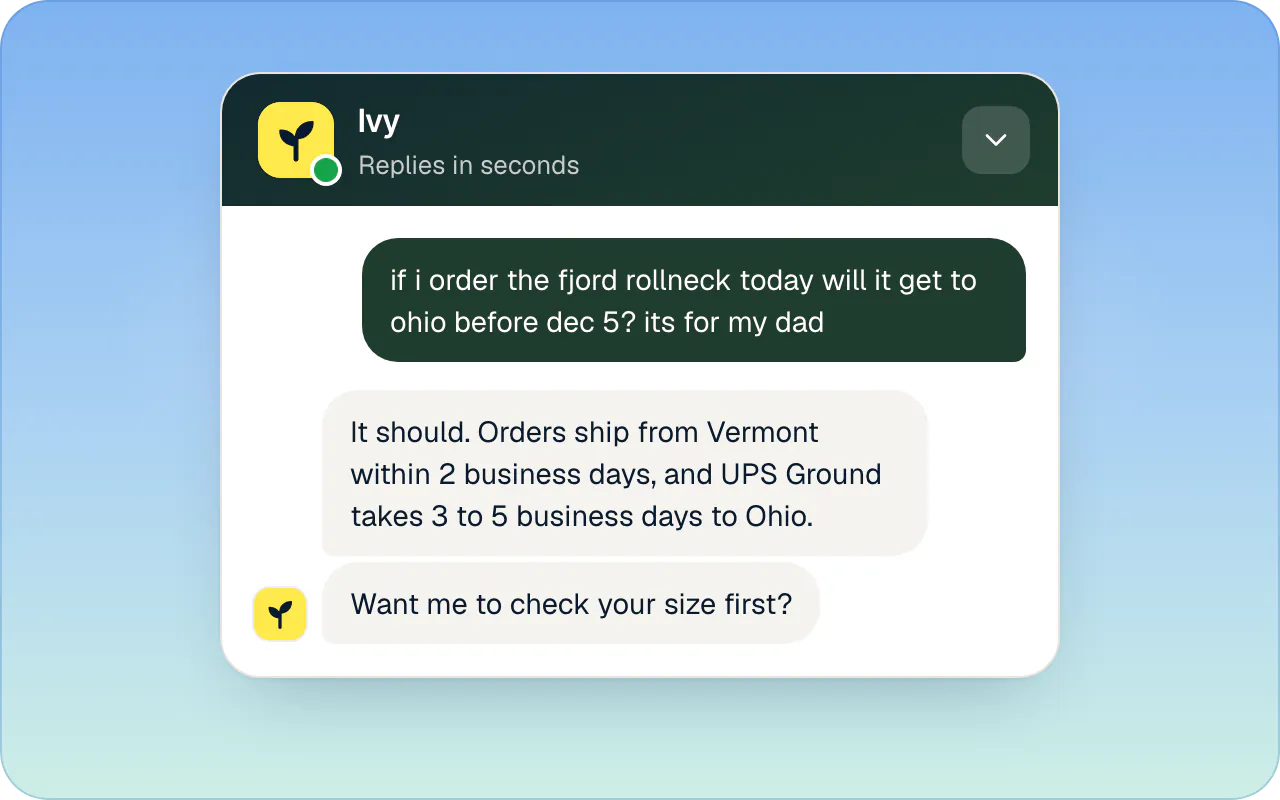
Shoppers don't ask how you ship; they ask whether it will arrive before a date. Your shipping policy should give them the three numbers that answer it:
Orders ship within [2] business days. During [November 27 to December 4], allow [up to 4] business days. Standard delivery to [the US] takes [3 to 5] business days after shipping. Order by [December 15] for delivery before [December 24] with standard shipping, or by [December 19] with express.
In the United States, the FTC's Mail, Internet, or Telephone Order Merchandise Rule requires a reasonable basis for any shipping time you state, and, when you state none, a reasonable basis for shipping within 30 days. If you can't ship on time, you must tell the customer before the promised date, give a revised date (or say you can't give one) and offer the option to cancel for a full and prompt refund (FTC business guide to the Mail Order Rule). Publishing a longer processing time for the sale week costs nothing and keeps you on the right side of it.
The FAQ page: the season's questions, answered once
Add a short "Black Friday and holidays" block to your FAQ page with the questions your policies don't cover directly: whether discounts stack, whether gift cards are discounted, whether you gift-wrap, until when orders can be changed, how to reach you over the long weekend. Each answer should be one or two sentences and link to the policy it comes from. If you need help structuring it, write it the way an assistant reads your Shopify policies, which helps people reading them too: short sentences, one rule each, no "please contact us for details".
Notifications and the order status page
A shopper who gets a clear shipping email with a tracking link has one less reason to write to you. Shopify's customer notifications include Shipping confirmation, Shipping update, Out for delivery and Delivered; the last ones depend on tracking events from the carrier (Shopify Help Center: customer notifications). Open Settings › Notifications, send yourself a test of each, and check the wording mentions your sale-week processing time.
The emails link to the order status page, where, once a tracking number is added, customers can check where their shipment is without contacting you (Shopify Help Center: order status page). Make sure your fulfilment app adds tracking numbers to every order, including those shipped from a second warehouse.
Replies for the five questions of the week
Write the replies to the five questions you know are coming before the sale, in your own voice, and keep them where your whole team can reach them. Each one below answers first, gives the shopper the fact they need, and ends with the next step. Replace the brackets.
"Will it arrive by [date]?"
Yes, if you order by [December 15]. We ship within [2] business days and standard delivery to [your country] takes [3 to 5] business days after that. If you need it sooner, express shipping arrives in [1 to 2] business days.
"Can it be returned after Christmas?"
Yes. Everything ordered between [November 27] and [December 24] can be returned until [January 31], and the person who receives it can return or exchange it with the order number. Sale items marked final sale are the exception.
"My discount code doesn't work"
I'm sorry about that. The [BLACKFRIDAY] code works on [sweaters, scarves and socks] until [Monday, November 30, at 11:59 p.m. ET] and can't be combined with other codes or used on gift cards. If your cart has only those items and it still fails, send me the cart and I'll check it.
"Where is my order?"
Your order [#1063] shipped on [December 1] with [UPS], and the tracking shows [in transit, due Thursday]. You can follow it here: [tracking link]. Orders placed during the sale week can take a day longer than usual.
"Can I change or cancel my order?"
I can still change it: your order hasn't shipped yet. Tell me the new [address or size] and I'll update it. Once an order ships we can't change it, but you can return it until [January 31].
Handoff rules, hours and a reply target, set by November 13
Decide which conversations need a person, when your team is available and how fast you promise to reply, and write it down by November 13. Under pressure, a team without rules either answers everything slowly or answers the easy questions first and lets the angry ones wait.
Which conversations go to a person
Five kinds of conversation should reach a person during the sale, whatever tool answers first:
- Refunds, above an amount you choose, and any refund on an order that has already shipped.
- The shopper asks for a person. Don't argue with the request.
- The shopper sounds upset. An upset shopper who waits behind easy questions only gets more upset.
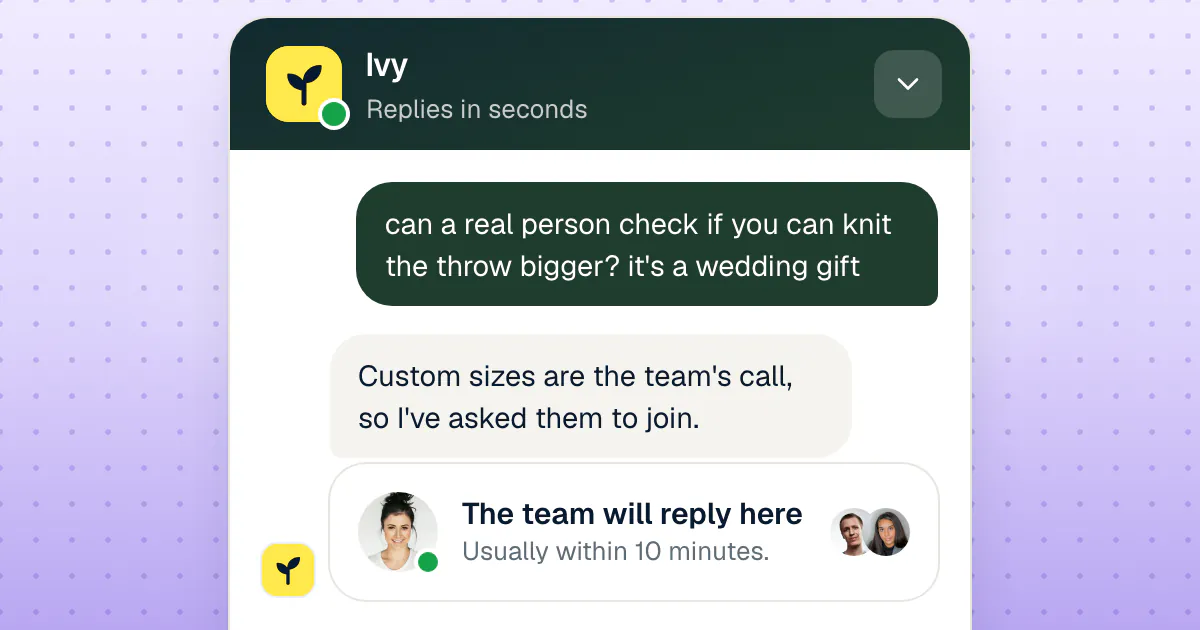
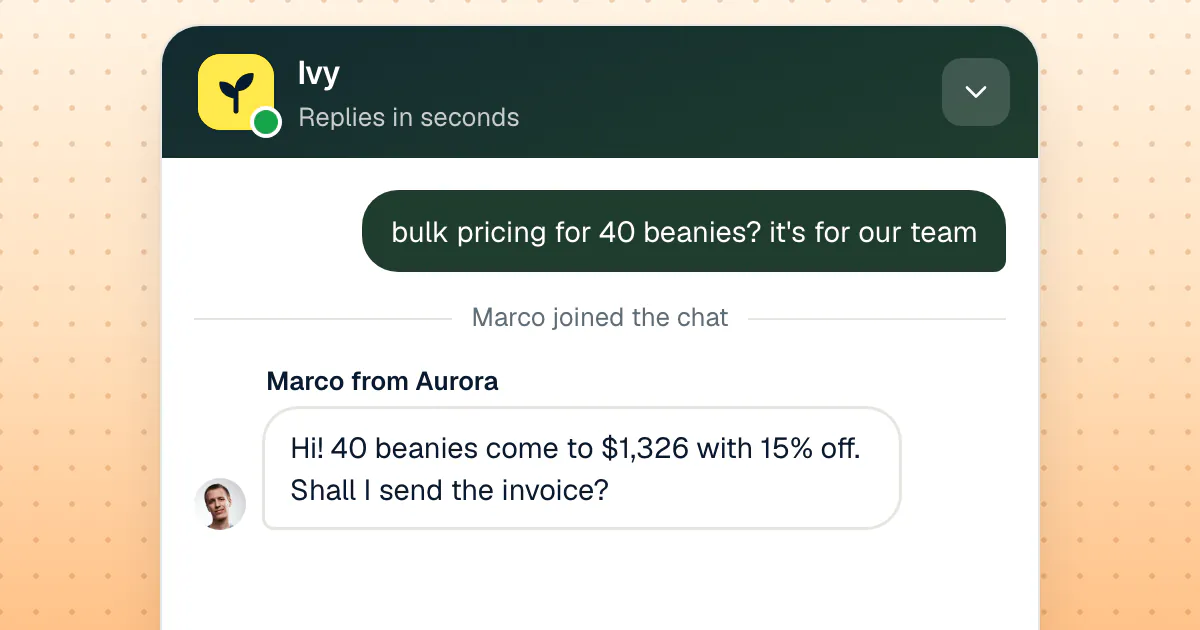
- Wholesale or bulk orders. Someone ordering 40 beanies for a team gift is worth a quote from a human.
- Words that mean risk, such as "chargeback", "lawyer", "fraud" or "never arrived": the conversation goes to the most experienced person on shift.
The same split holds the rest of the year; our guide to which questions a chatbot should take and which need live chat lays it out for an ordinary week.
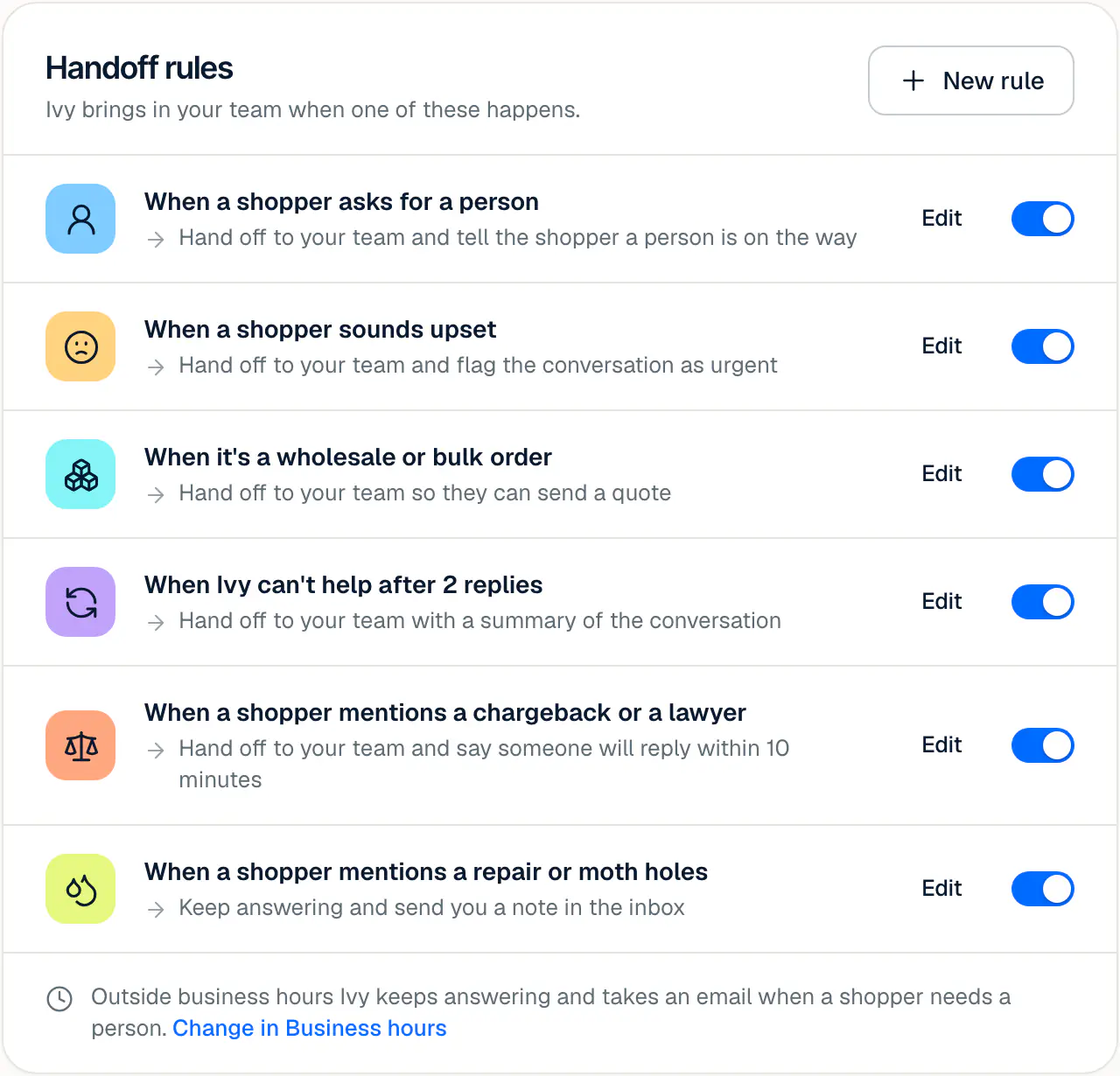
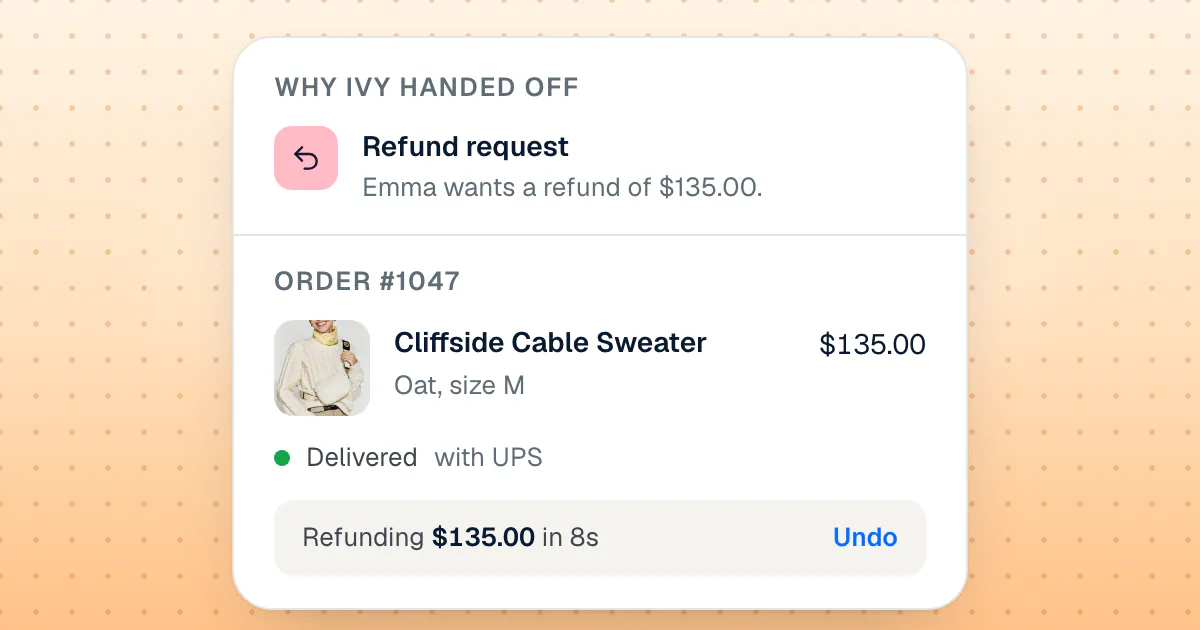
In Strathly these are switches in Ivy's Behavior, plus keyword rules you write, and each handoff arrives with Ivy's summary and a drafted reply; the handoff to your team, with a drafted reply shows the whole flow.
Business hours and Thanksgiving
Write down when a person is reachable, and say it to shoppers before they ask. Two decisions matter most:
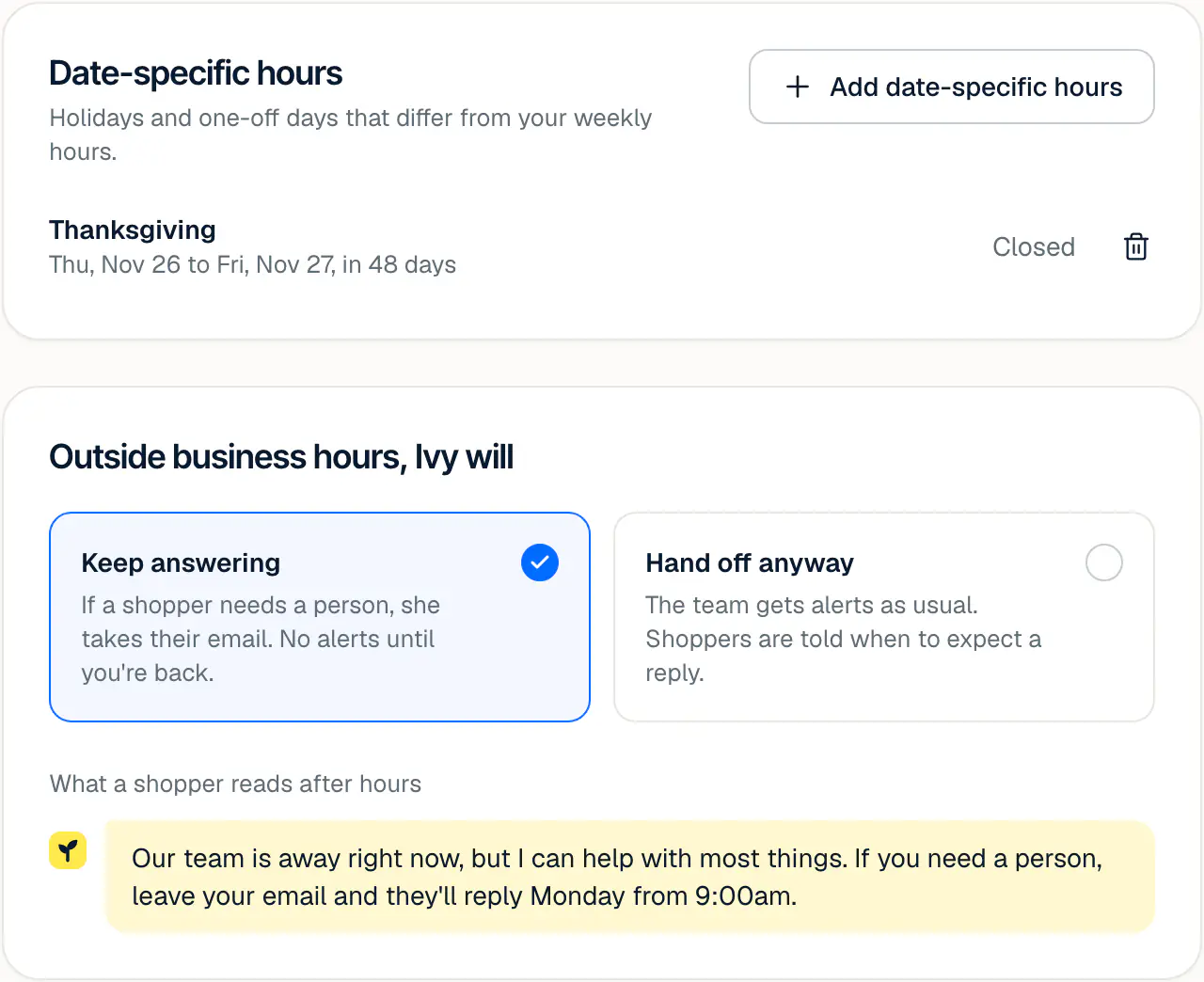
- Thanksgiving, November 26. Either someone covers it, or you close and say when you'll be back. Closing is fine; silence isn't.
- The weekend between Black Friday and Cyber Monday. Shorter hours with a clear promise ("we reply from 9 a.m. ET") beat long hours nobody can staff.
In Strathly, a date-specific closure sits next to your weekly hours, and you choose what Ivy does while you are closed: keep answering and take the shopper's email when a person is needed, or hand off anyway. Hours, holidays and who's available walks through the settings.
A reply target your team can keep
Pick a reply target for conversations that need a person, and pick it for the worst hour of Friday, not for a quiet Tuesday. A promise of "within an hour" kept all weekend is better than "within five minutes" broken by 10 a.m. In Strathly the reply target goes from 5 to 60 minutes (10 by default), and past it a waiting shopper turns late on Home and in the Inbox. The docs explain how the reply target works and what your team sees while a shopper waits.
Staffing the peak without guessing
You can estimate the hours of people you need with one line of arithmetic: conversations expected, times the share that needs a person, times the minutes each takes. Use last year's numbers if you have them, and last month's multiplied by your expected sales lift if you don't.
An example with stated assumptions (yours will differ): a store expects 1,200 conversations from Friday to Monday, about a quarter of them need a person after the repeat questions are answered by written answers or an assistant, and each takes about 6 minutes.
1,200 conversations × 0.25 × 6 minutes ÷ 60 = 30 hours of replies over four days
Thirty hours over four days is two people for about four hours a day, not a full team on call. Then add the parts arithmetic forgets:
- Peaks inside the day. Put the longest shifts on Friday morning and Monday, when the sale emails go out.
- Someone senior on shift. Refund exceptions, chargebacks and angry shoppers need a person who can decide, not only reply.
- A phone for whoever is off. One person carries notifications for the conversations that can't wait, with a clear rule about which those are.
- The week after. Keep half the sale-week hours from December 1 to December 4: that is when parcels are in transit and order questions climb.
- The seats on the bill. If your support tool bills per seat, every extra person on the rota is an extra seat; if you pay seats plus a fee per AI outcome today, our Intercom alternatives for online stores compares tools that price a busy season differently.
Black Friday to Cyber Monday: running the queue
During the four days, run the queue twice a day on purpose instead of all day by accident. A morning and an evening pass, with notifications on only for the rules you marked urgent, keeps the team on orders and shoppers rather than on the inbox.
On each pass:
- Oldest waiting first, not newest. A shopper who has waited three hours is closer to a chargeback than one who wrote a minute ago.
- Look for a repeat. If five people ask the same new question ("does the code work on bundles?"), answer it once in the FAQ and in your replies, and the sixth person gets the answer without waiting.
- Watch stock. When a best-seller sells out, update the product page and tell the team, so nobody promises a size that's gone.
- Write down what broke. A code that didn't apply, a shipping rate that was wrong, a page that was missing: the list is next year's checklist.
After Cyber Monday: the wave of "Where is my order?"
After Cyber Monday, the sale is over for you and just beginning for your shoppers: their parcels are in transit, and "Where is my order?" becomes the main question of early December. The questions are calmer but more numerous, and some turn into real problems: a parcel marked delivered that never arrived, a gift that came damaged, a delay that pushes past a promised date.
Three things keep this wave small:
- Answer status without a person. The order number and the email used at checkout are enough to find an order and its tracking link. Let Ivy answer "Where is my order?" on her own and only the problems reach your team.
- Send delay notices before shoppers ask. If a carrier slips past the dates you published, email the affected orders with a new date and the option to cancel, as the FTC rule above requires in the US.
- Treat "delivered, never arrived" as a handoff. Ask the shopper to check with neighbours and the front desk once, then hand it to a person who can open a carrier claim or send a replacement.
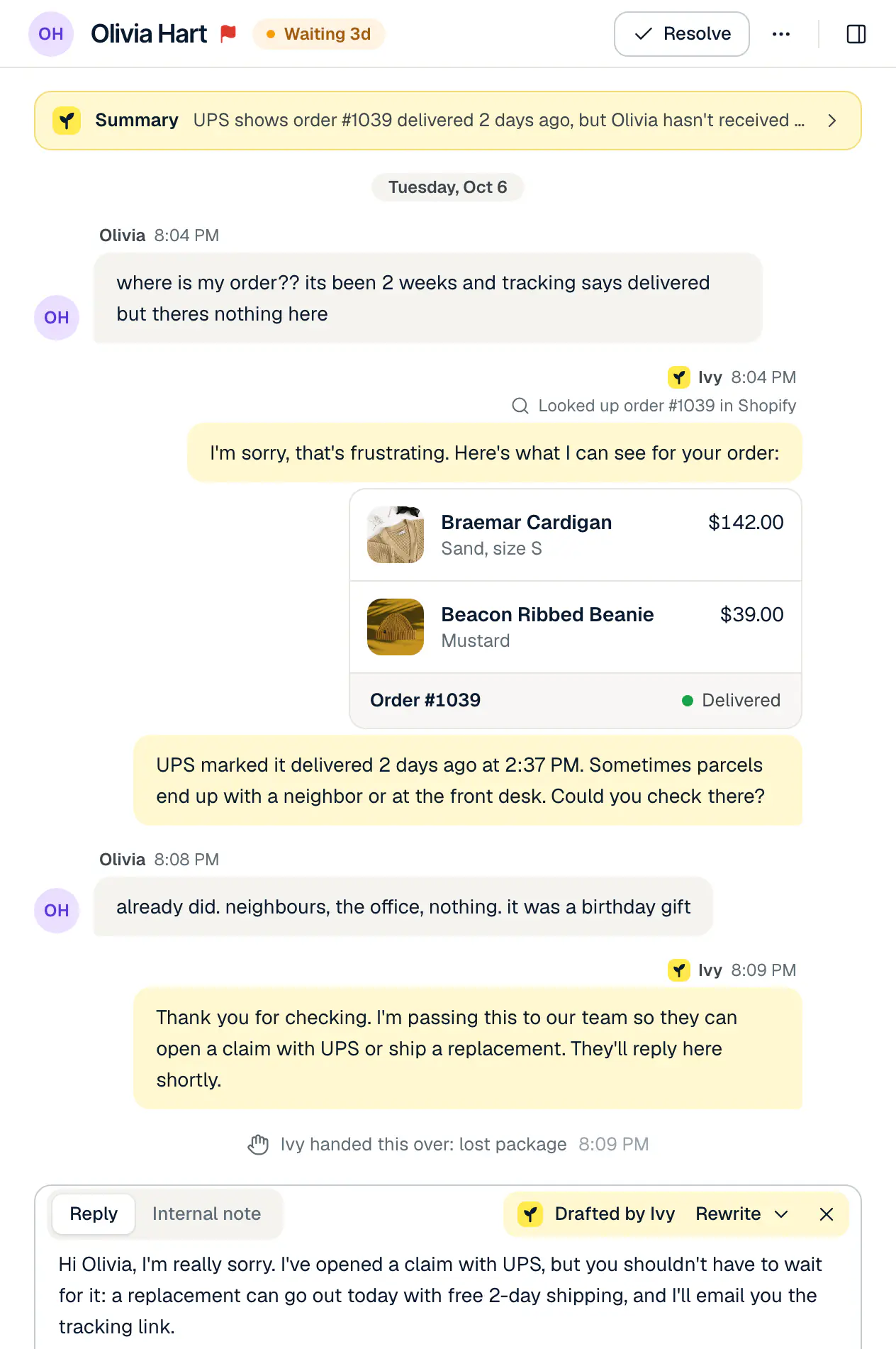
By December 7, open the list of questions nobody could answer during the sale and turn each recurring one into a written answer. That is the most useful half hour of the season: it makes the January returns wave smaller too.
How Strathly helps
Strathly puts Ivy, an AI sales and support agent, in your Shopify store's chat, so the repeat questions of Black Friday are answered from your own store in seconds, day and night, and the conversations that need a person reach your team ready to answer. Here is how that maps to the checklist.
Answers from the policies you just published
Ivy reads your Shopify store when you connect it: products and variants, policies, published pages, shipping zones and rates. When you update the return policy for the holidays, she answers from the new version once it syncs. She doesn't invent products, prices, dates or discount codes; when nothing in your store answers a question, she says so and the question goes to your team. Read how Ivy learns your store for what she reads and how often.
Order status in the chat, and order changes within your limits
With an order number and the email used at checkout, Ivy shows the shopper the order's status, the carrier and the tracking link, straight from Shopify. Address changes, cancellations, refunds and replacements are prepared as drafts your team approves with one click; if you switch an action on for Ivy, she does it herself within the money cap you set, only for a shopper who proved the order is theirs, and every action waits 10 seconds with Undo before it reaches Shopify. That is order tracking and order changes in the chat, the heart of the week after Cyber Monday.
Handoffs that arrive ready
Handoff rules for refunds, a request for a person, an upset shopper, wholesale orders and your own keywords send the conversation to the Inbox with Ivy's summary and a drafted reply. Business hours with date-specific closures decide whether she takes the shopper's email while you're away, and when your team replies later, the shopper who left gets the answer by email. Your team can reply from the web or from the iPhone app with a push when a shopper needs you (free on the App Store), so the person on call doesn't need a laptop at the Thanksgiving table.
One answer, taught once
When Ivy can't answer something during the sale, it goes on the Unanswered list. You write the answer once with Teach Ivy; she uses it from then on, and the shoppers who were waiting can get it right away.
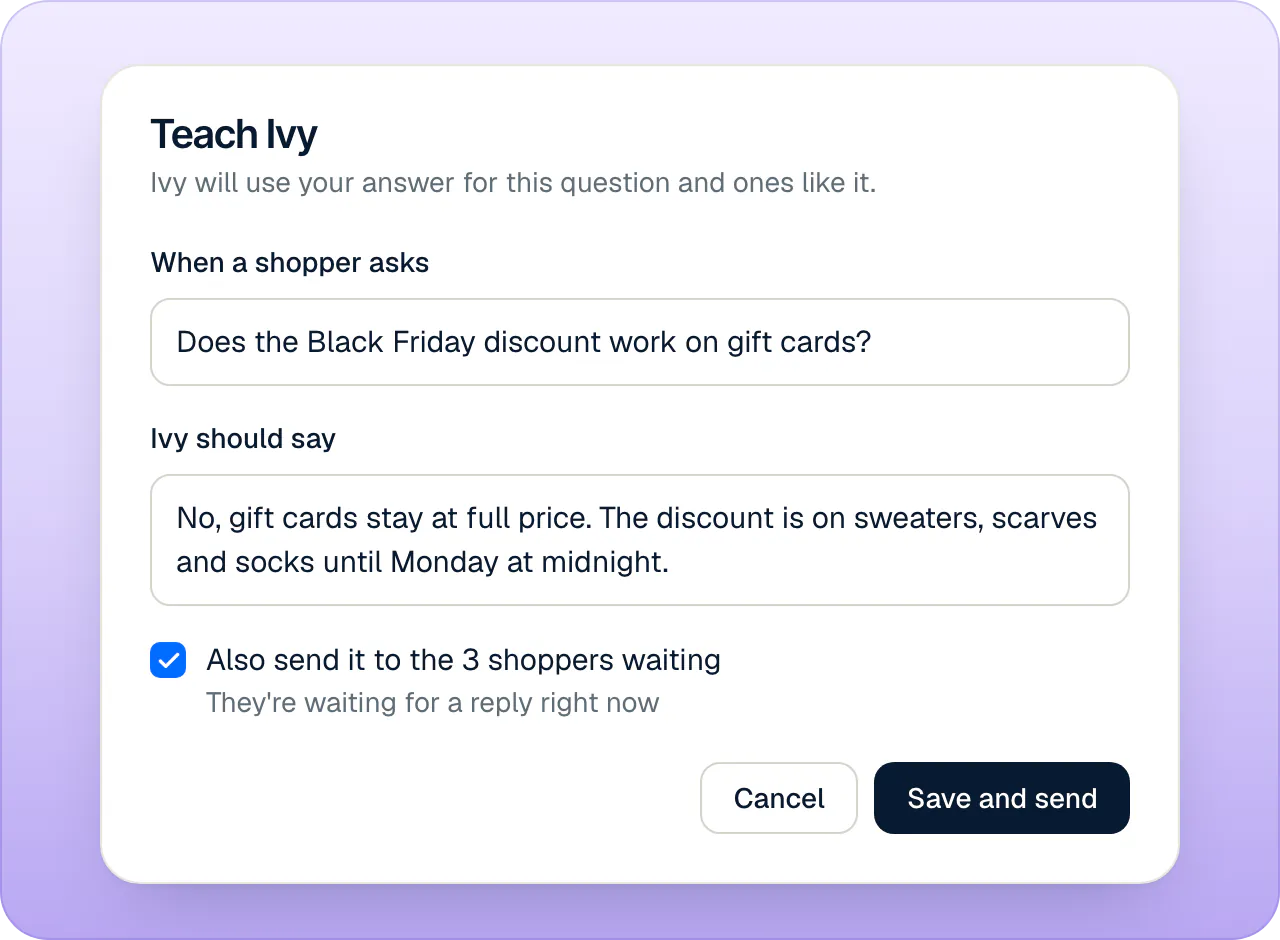
A price that doesn't punish a busy week
Only the conversations Ivy takes count toward your plan (what counts as a conversation); the conversations your team answers on its own are unlimited on every plan, and everything a shopper asks within 24 hours is one conversation. If the sale needs more than your plan includes, you buy extra conversations from 10 at a time, at $0.20 to $0.39 each depending on the plan; they never expire, so anything you don't use stays for January. There is no automatic overage: when the allowance and the extras run out, Ivy finishes the conversations she's in and new ones go to your team, and owners and admins are warned at 80% and at 100%. If your current chat bills its AI on a separate meter that pauses at your limit, Black Friday week is when you find out; our comparison of Tidio alternatives and what each one bills prices the same month in each tool's unit. If your current helpdesk bills a ticket and an AI fee for the same conversation, sale week is when that shows: what seven Gorgias alternatives charge for the same 200 chats puts numbers on it.
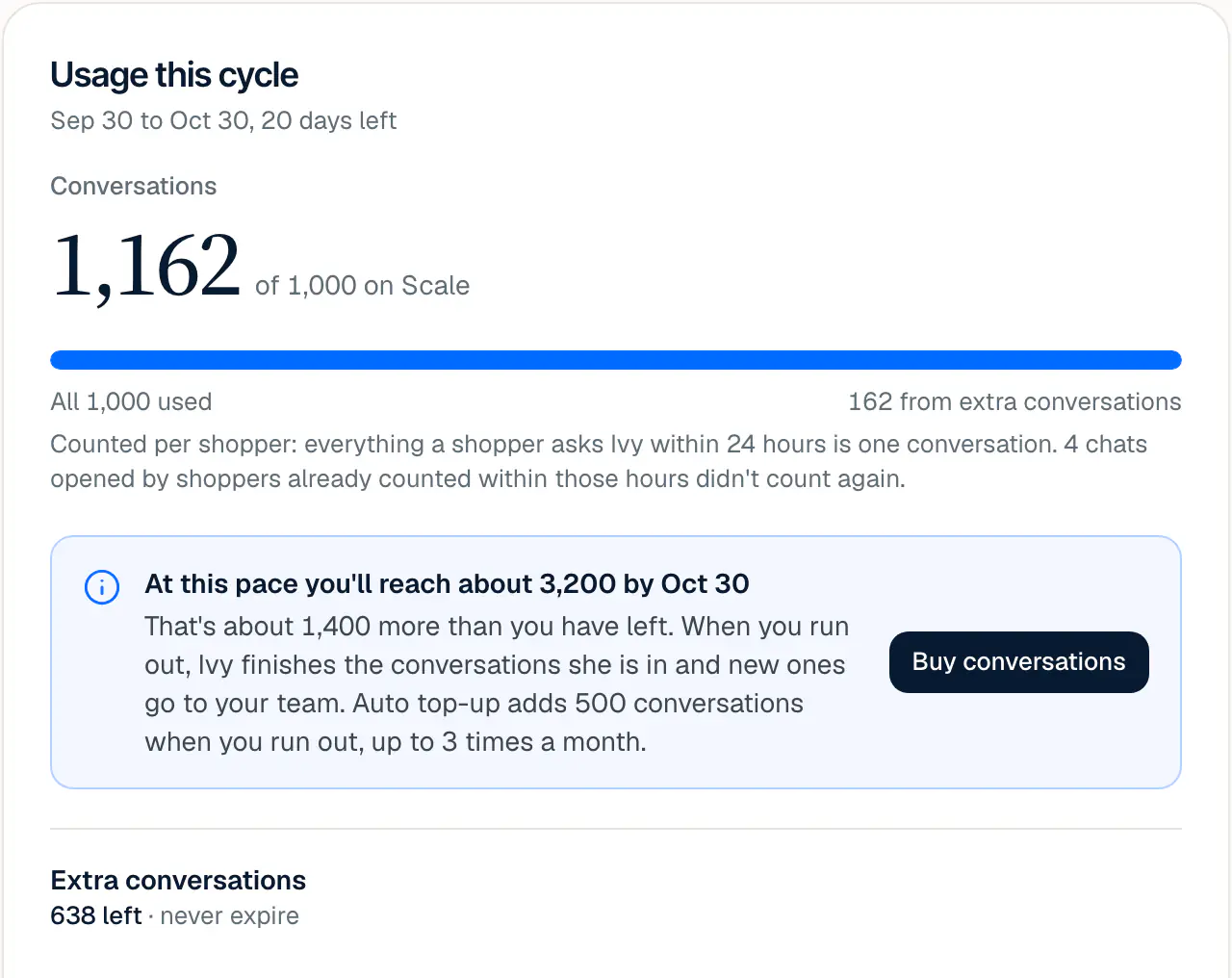
One timing note for this season: extra conversations aren't sold during the 14-day free trial on Growth. If you start close to Black Friday and expect a busy weekend, you can start your paid plan early from Billing. Setup takes about two minutes, and how Strathly goes from install to first answer walks through it.
Frequently asked questions
When should a Shopify store start preparing customer service for Black Friday?
Start four weeks before Black Friday, which in 2026 means by the end of October. Publish policies and cut-off dates first (by November 6), then handoff rules, hours and the team rota (by November 13), and test everything as a shopper the week before Thanksgiving. Later than that, keep the order and shorten the gaps.
What do shoppers ask during Black Friday Cyber Monday?
Before they buy, shoppers ask whether an item will arrive by a date, whether it can be returned after the holidays, whether a discount applies and which size to pick. After they buy, they ask where the order is and how to change it. Every one of those has an answer you can write before the sale.
Do I have to extend my return policy for the holidays?
No, an extended holiday window is a choice, not a legal duty, but gift buyers ask about it constantly, so state your rule either way. Where the law gives consumers a right to withdraw, such as 14 days from delivery in the EU and the UK, your holiday window adds to it and can't replace it.
What must I tell a customer if a Black Friday order ships late?
In the United States, tell them before the date you promised, give a revised shipping date or say you can't give one, and offer the choice to cancel for a full and prompt refund, as the FTC's Mail Order Rule requires. Send it by email to every affected order, and give the same answer in the chat.
How many people do I need on support for Black Friday?
Multiply the conversations you expect by the share that needs a person and by the minutes each takes, then divide by 60 for hours. For example, 1,200 conversations, a quarter needing a person and 6 minutes each come to 30 hours over four days. Put the longest shifts on Friday morning and Monday.
Can an AI assistant handle Black Friday customer service on its own?
It can answer most repeat questions on its own, delivery times, returns, order status and product questions, as long as it answers only from your store's content. Refunds above a limit, upset shoppers and lost parcels should still reach a person. Strathly is built that way: the quickstart connects Ivy in minutes and the handoff rules decide what reaches your team.
What does Strathly cost for a busy Black Friday month?
Plans start at $39 a month for 100 Ivy conversations, and only Ivy's conversations count: your team's are unlimited. For a busier month you buy extra conversations that never expire at your plan's rate, from 10 at a time. Every plan, with its teammates and rates, is on the pricing page.
Conclusion
A good Black Friday for your support starts with writing: the return rule for gifts, the shipping dates, the five replies and the handoff rules, all done by mid-November. Then the sale days are about running the queue on purpose, and the week after is about order status and the few parcels that go wrong. Do it once this year and next year's checklist is this one with new dates.