Answer “Where is my order?”
“Where is my order?” is the question shoppers ask most. Ivy answers it on her own, day and night: she asks for the order number and the email used at checkout, looks the order up in Shopify and shows a card with where it is. This page explains what she needs, what she shows and where she stops.
Updated · 5 min read
Feature overview:Order tracking in the chat
On this page
There is no form and no setting. Shoppers ask in the chat, in their own words and language, and Ivy does the rest. Your team sees every lookup in the Inbox. For the bigger picture of order tracking with Strathly, see order tracking.
What the shopper does#
- The shopper asks, for example "Where's my order?" or taps the suggested question Where is my order?.
- Ivy asks for what's missing: the order number, the email used at checkout, or both. She needs both, and they must match the same order. She asks in her own words, in the shopper's language.
- Ivy looks the order up in Shopify and answers with a short summary and the order card.
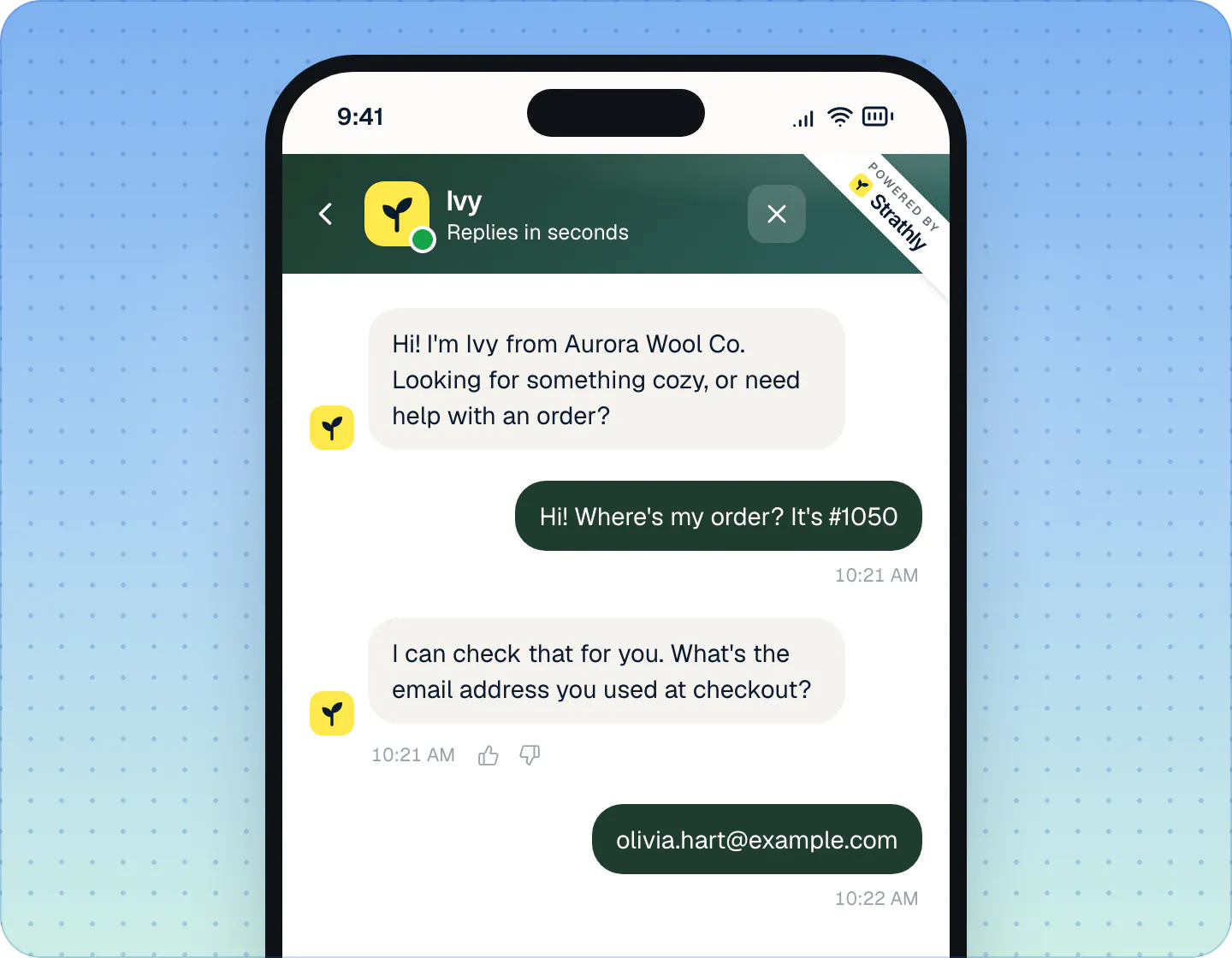
Order status never needs a login or a verification code. The number and the checkout email are enough to see where an order is. A verification code only comes into play when Ivy may change an order herself, which is off by default (see Let Ivy work on orders).
If the shopper hadn't given an email before, the one they typed is saved with their details, so your team can follow up by email.
What Ivy shows: the order card#
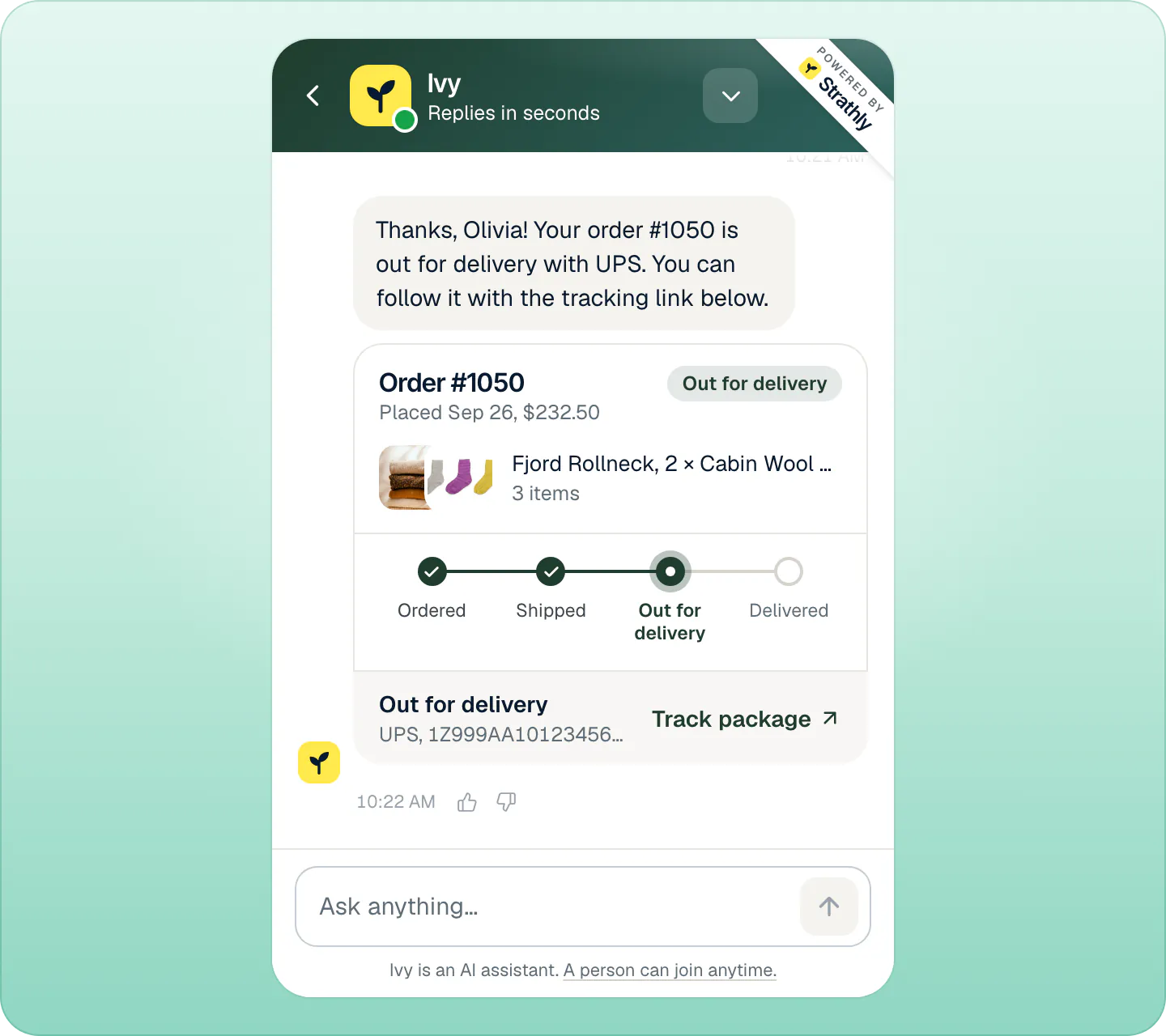
Under Ivy's one- or two-sentence summary, the chat shows a card:
- Order #1050 and Placed Sep 26, $232.50: the order's date and total.
- A chip with where the order is now, like Out for delivery.
- Up to three item photos with the item names, and how many items.
- Four steps: Ordered, Shipped, Out for delivery, Delivered, with the current one highlighted. They're hidden when the order left that track (cancelled or returned).
- A status line, then the carrier, the tracking number and the payment status when it's anything other than paid (Payment pending, Refunded).
- Track package, which opens the carrier's tracking page, when Shopify has a tracking link for the order.
The status line comes from Shopify's fulfillment status:
| Status line | When |
|---|---|
| We are packing it now | Nothing has shipped yet. |
| On its way to you | Shipped and in transit. |
| Out for delivery | The carrier has it out for delivery. |
| Delivered | The carrier marked it delivered. |
| On hold, Scheduled, Partially shipped | Shopify's status of the same name. |
| Cancelled, Returned | The order left the delivery track (no steps shown). |
When the order isn't found#
No card appears in these cases, and Ivy explains in her own words:
| What happened | What Ivy does |
|---|---|
| The email doesn't look valid | Asks the shopper to double-check it. |
| No order matches the number and the email | Asks them to check both, and reminds them it must be the email used at checkout. |
| The order is older than 60 days | Same as no match: Strathly can only read the last 60 days of orders. |
| Shopify can't be reached, or is disconnected | Apologizes and offers to bring in your team. |
The 60 days come from Shopify: Strathly asks for access to recent orders only, not to your whole order history. See Shopify permissions, one by one.
What Ivy won't do with an order#
- She doesn't invent or promise delivery dates. She reports Shopify's status and tracking; the carrier's page has the details.
- A lost package, a late return and an exchange always go to your team, with the reasons Lost package, Late return and Exchange in the Inbox.
- Refunds, cancellations, replacements and address changes go to your team by default. You can let Ivy do some of them herself, within limits: see Let Ivy work on orders.
What your team sees#
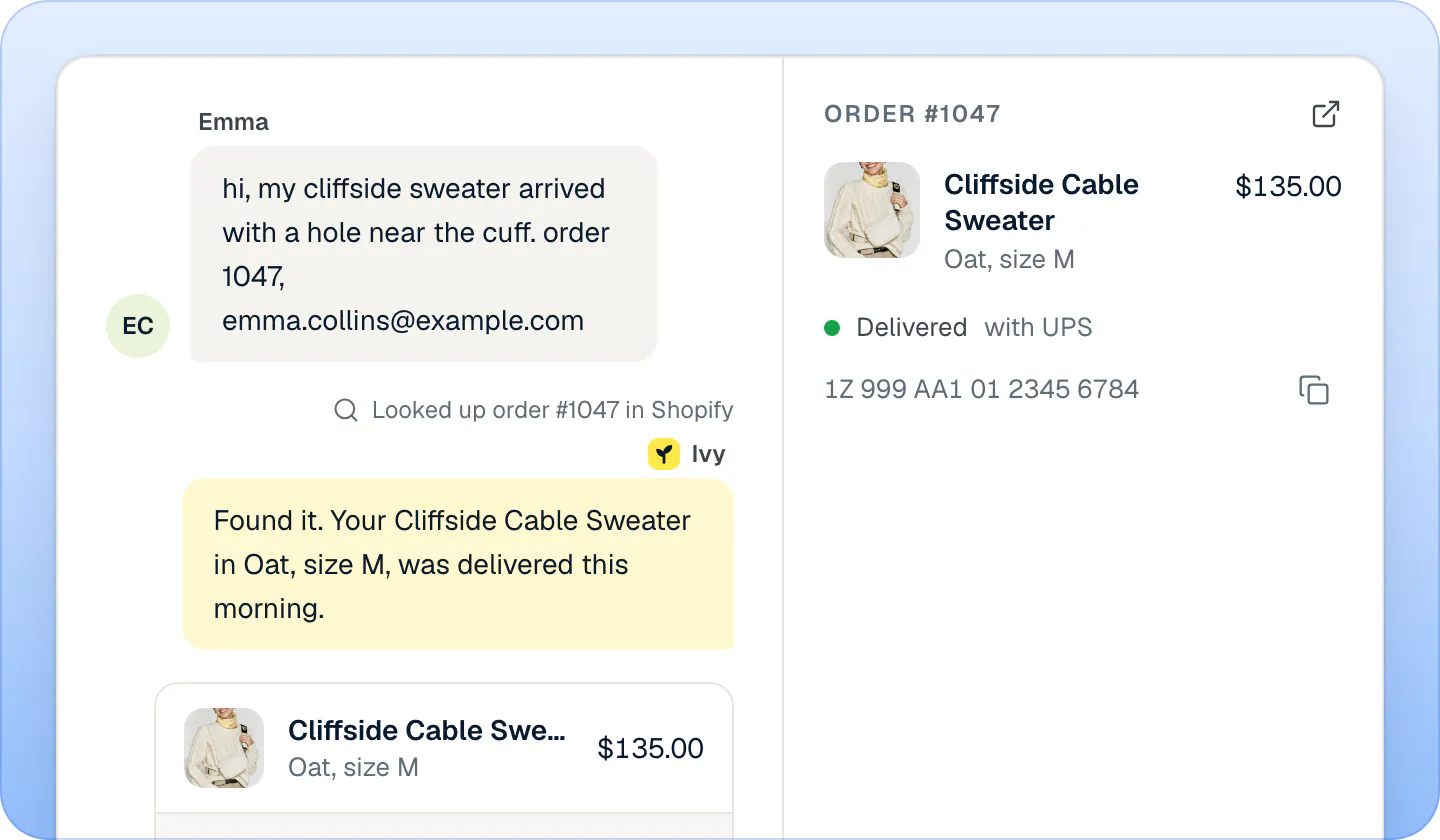
In the Inbox, above Ivy's reply, a small line says Looked up order #1047 in Shopify, and the order she showed is in the thread. The details column on the right has the order block: items, status and carrier, the tracking number (with a copy button) and Open in Shopify. See Orders next to the conversation.
Order questions peak the week after a sale: the BFCM support checklist covers delay notices and lost parcels.
Test it#
Open Ivy,Playground, ask "Where is my order?" and give a real order number from the last 60 days with its checkout email. Ivy looks it up exactly as she would for a shopper. Nothing is changed or sent, and the test doesn't count as a conversation. See Test Ivy in the Playground.
Limits#
| What | Limit |
|---|---|
| What Ivy needs | The order number and the email used at checkout |
| Orders she can find | Placed in the last 60 days |
| Item photos on the card | Up to 3 |
Frequently asked questions
Does the shopper need to log in?
No. The order number and the email used at checkout are enough to see an order's status.
Can Ivy find old orders?
Only orders placed in the last 60 days. Strathly can't read older orders in Shopify, so for Ivy an older order looks like a wrong number or email: she asks the shopper to check both, and your team can look it up in Shopify.
Does Ivy give a delivery date?
No. She shows Shopify's status, the carrier and the tracking link. The carrier's page has the delivery estimate.
What if Shopify is disconnected?
Ivy can't look orders up. She apologizes and offers to bring in your team.
Do I need to set anything up?
No. Order tracking works as soon as your store is connected and Ivy is live.
From the blog
Related pages
- IvyLet Ivy work on ordersOrder changes go to your team by default. Let Ivy refund, cancel, replace or change an address herself for verified shoppers, within limits you set.
- InboxOrders next to the conversationSee the shopper's order and past orders next to the chat, then refund, replace, change the address or cancel from the Inbox, with 10 seconds to undo.
- Shopify & dataShopify permissions, one by oneWhy Strathly needs each Shopify permission: products, pages, policies, shipping, markets, orders, customers, languages, themes. It never edits products, prices or themes.