Teach Ivy and correct her
Teach Ivy gives her an answer your store pages don't have. Correct this answer rewrites something she got wrong in a conversation. Both open the same short dialog, wherever you notice the gap, and she uses what you save from her next reply.
Updated · 7 min read
Feature overview:AI chatbot knowledge base
On this page
You don't need to write a page for every question. When a shopper asks something your pages don't cover, or Ivy says something you'd put differently, teach her the answer in a few seconds. Only admins and the owner can teach Ivy; the buttons are hidden for agents.
Where to teach Ivy#
It's one dialog, opened from many places, each filling in what it already knows:
| Where | Button | What it does |
|---|---|---|
| The sidebar | + Teach Ivy | Empty dialog, from any page |
| Knowledge | New › Teach Ivy | Empty dialog |
| Knowledge,Unanswered | Teach Ivy on a question | An answer box in the card, with Ivy's suggestion when she has one |
| Home | Teach Ivy on an Ivy couldn't answer card | The question, filled in |
| A conversation in the Inbox | Teach Ivy in the details, when Ivy couldn't answer | The shopper's question, filled in |
| One of Ivy's messages in the Inbox | Correct this answer | Her words to rewrite |
| The Inbox details | Correct Ivy's last answer | Her last answer to rewrite |
| Analytics,Quality | Correct this answer on an answer marked wrong | Her words to rewrite |
| A product's panel | Teach Ivy under What shoppers ask | The question about that product |
| Ivy,Playground | Teach Ivy or Correct this answer under Behind the answer | The question you tested |
If you renamed Ivy in Ivy,Behavior, the buttons and fields use her new name.
Teach Ivy a new answer#
- Press + Teach Ivy at the top of the sidebar.
- In When a shopper asks, write the question the way shoppers ask it: "Do you gift wrap?". One question per answer.
- In Ivy should say, write the answer with the facts she needs: prices, times, conditions. She replies in the shopper's language, in the tone set in Ivy,Behavior.
- If the question matches one shoppers already asked, a line says Asked 4 times. Saving also clears it from Unanswered.
- If shoppers are waiting for a reply on this question, Also send it to names them and is checked (from the Playground it starts unchecked). Keep it to reply to them too, or uncheck it.
- Press Save answer (Save and send when the box is checked), or ⌘Enter.
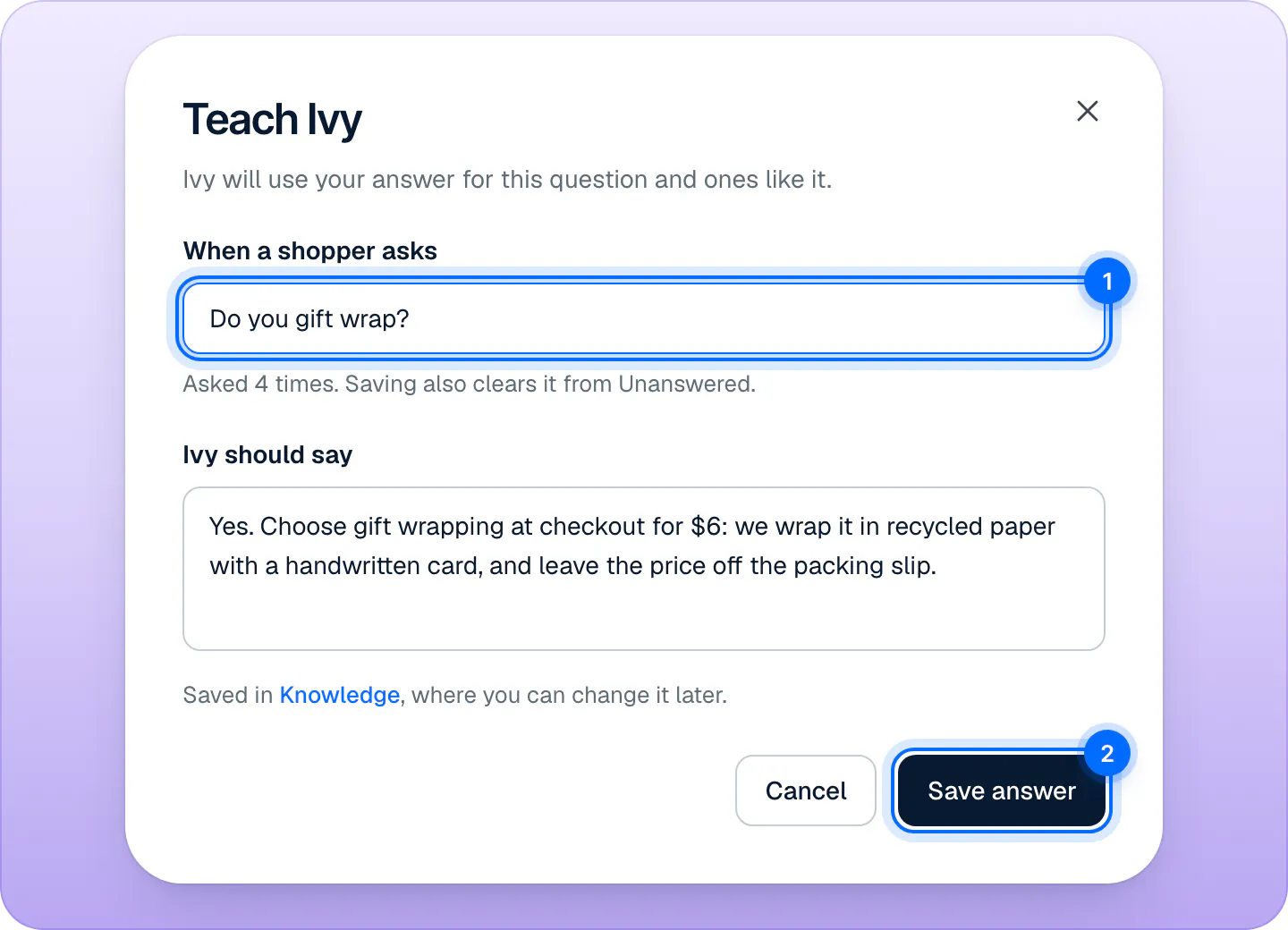
The save button turns on once both fields have at least 4 characters. The question can be up to 500 characters and the answer up to 6,000.
Tips for answers that work:
- Write the answer as you'd say it to a shopper, with the facts first.
- Keep one topic per answer. Two short answers beat one long one. For a long document, like a full size chart or a care guide, upload a file instead.
- Include the conditions: "Free returns within 30 days, unworn, tags on."
- Don't paste links to product pages: Ivy shows products as cards in the chat.
Correct one of Ivy's answers#
- In the Inbox, open the conversation and hover Ivy's message. A small toolbar appears beside it.
- Press the pencil, Correct this answer. In a narrow window, the same actions are behind …. You can also press Correct Ivy's last answer in the conversation's details.
- The dialog shows what Ivy said, struck through, and fills in the shopper's question. Check When a shopper asks.
- Rewrite her words in Ivy should say.
- Keep Also send it to checked to send the corrected answer to the shopper, if they're waiting for a reply.
- Press Save correction (or Save and send).
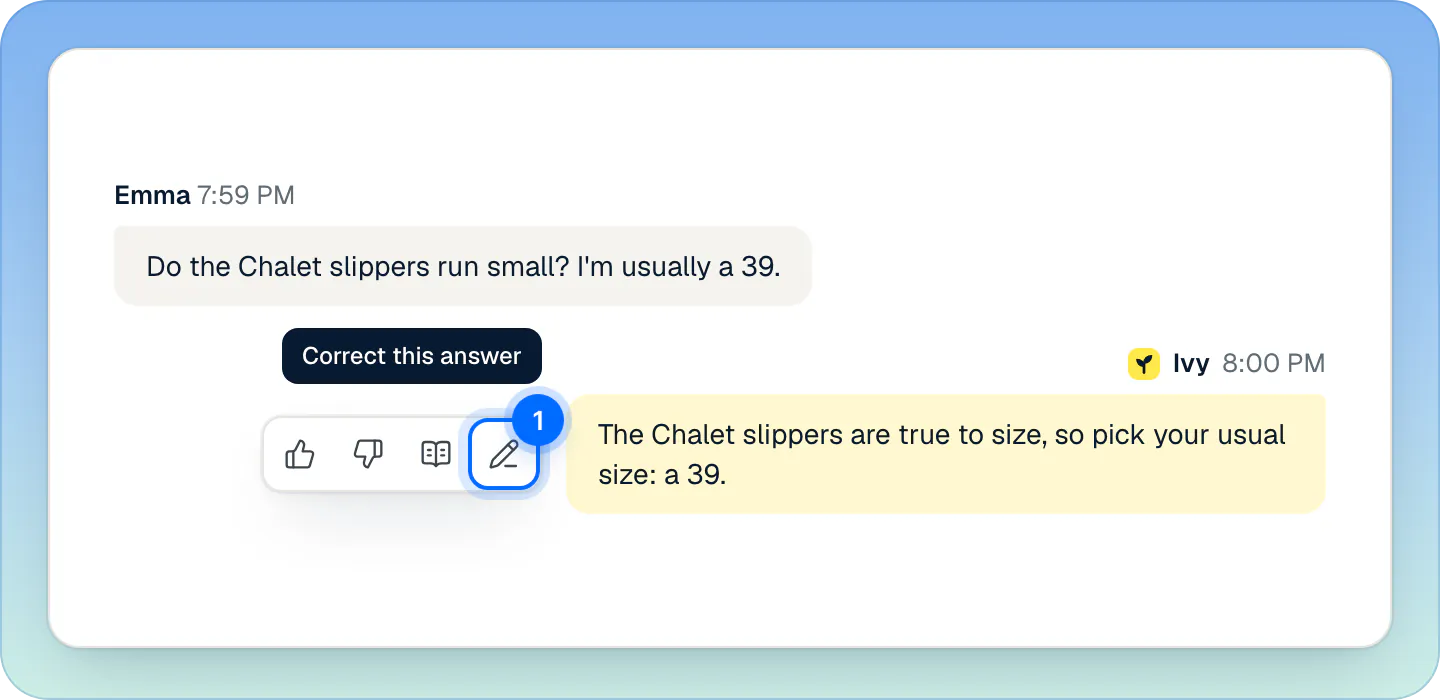
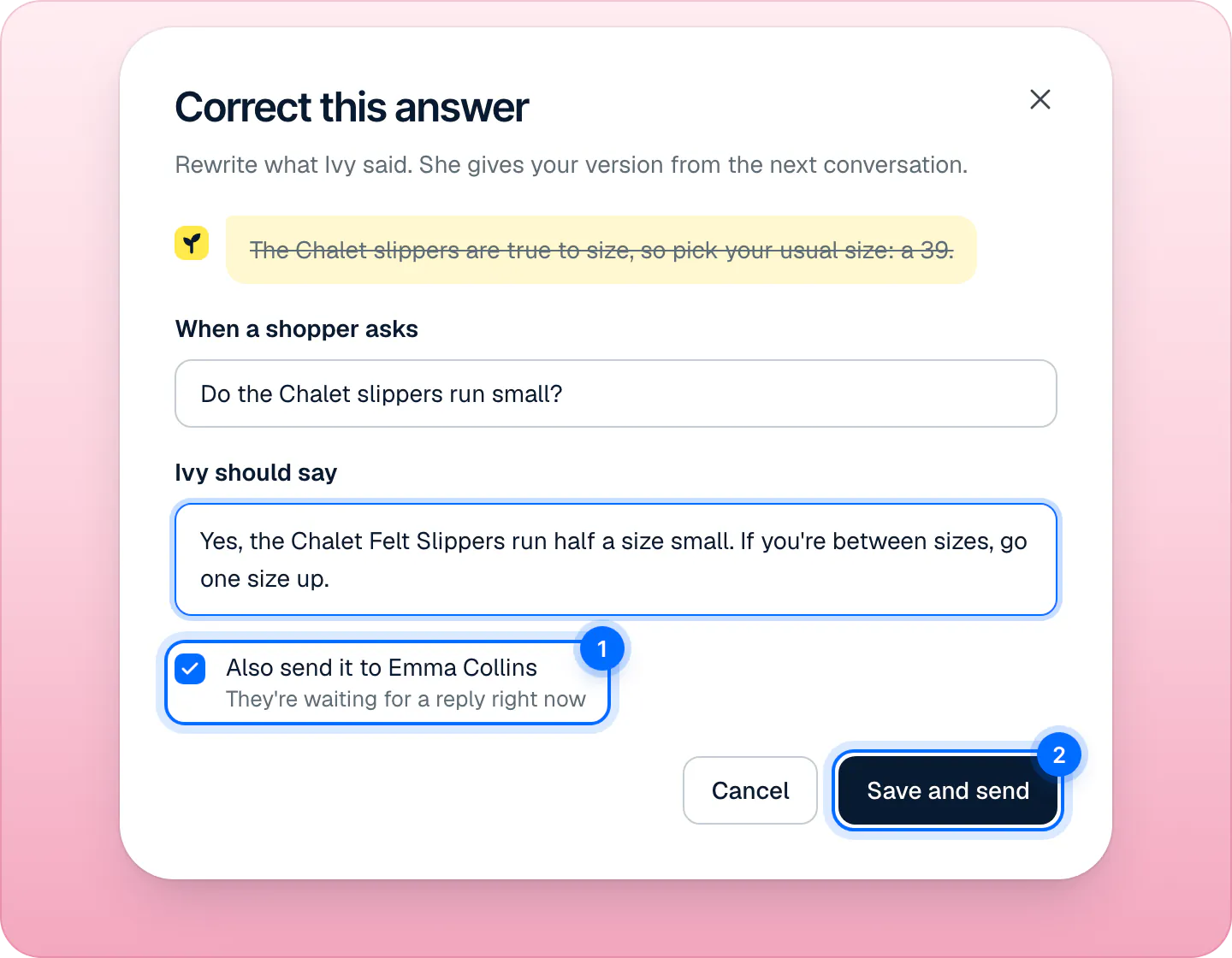
The corrected message is marked as a bad answer, and under it the conversation shows who corrected it, with See correction. The correction is saved in Knowledge,Answers with a violet Correction chip. When it fits a question, a correction comes before every other source, your other answers included.
When the answer is wrong because a page or a policy is wrong, fix the page in Shopify too: other questions may read it. Fix a wrong answer walks through finding the cause.
What Ivy fills in for you#
- The question: from the unanswered question, or the shopper's message in the conversation.
- Her draft, tinted yellow: when one of your sources already covers the question, she prepares an answer and says where it comes from: "Ivy drafted this from Shipping policy. Check the facts before saving." Read it before you save: it is a draft, not a checked fact.
- The shoppers waiting: those waiting for a person on the same question, unassigned or assigned to you, longest wait first.
What saving does#
- The answer is saved in Knowledge,Answers, where you can edit or delete it later.
- Ivy can use it right away, from her next reply.
- Open questions it answers, in Knowledge,Unanswered, move to Answered. See Fill the gaps Ivy found.
- With Also send it to checked, your answer goes out as your own reply in each waiting conversation, up to 20.
A toast confirms it, with two buttons:
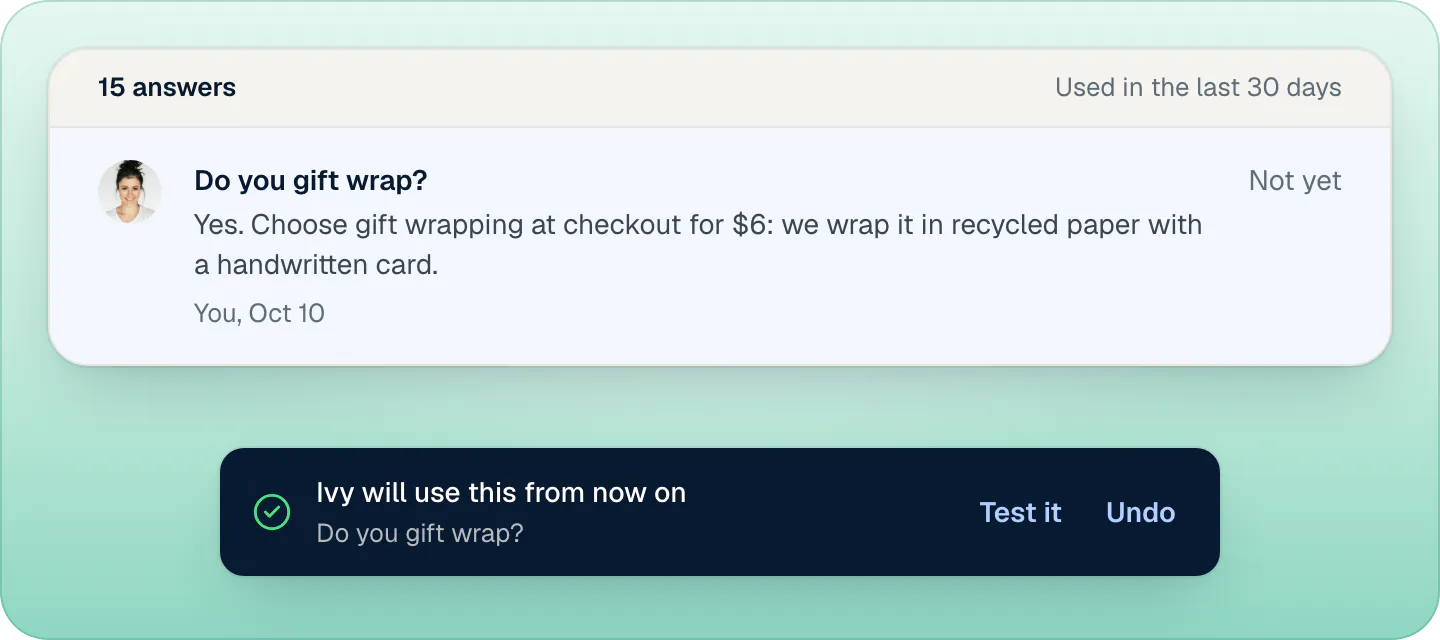
- Test it opens the Playground and asks the question, so you hear Ivy's new answer. Playground tests never reach shoppers. See Test Ivy in the Playground.
- Undo forgets the answer and reopens the questions it closed. If replies were already sent, a second toast says your reply "stays sent": Undo can't take back a message a shopper received.
What agents can do#
Agents don't see + Teach Ivy or Correct this answer. When they spot a wrong answer, they hover Ivy's message and press Bad answer (the thumbs down). The answer then appears in Analytics,Quality under Answers marked wrong, where an admin presses Correct this answer. A bad-answer mark on its own doesn't change what Ivy says. See Read your analytics.
Frequently asked questions
Who can teach Ivy?
Admins and the owner. Agents can mark an answer as bad so an admin reviews it.
How fast does Ivy use a new answer?
From her next reply. Press Test it on the toast to ask her the question in the Playground straight away.
Can I correct an answer from the Inbox?
Yes, on the web: hover Ivy's message and press the pencil, Correct this answer, or use Correct Ivy's last answer in the conversation's details.
Does Bad answer teach Ivy?
No. It flags the answer for review in Analytics › Quality. Only an answer or a correction changes what she says.
Can I teach Ivy from the iPhone app?
No. The iPhone app is for answering conversations; teaching and correcting happen in the dashboard on the web.
Does teaching in the Playground reach shoppers?
No, unless you choose to. The test itself never does, and when shoppers are waiting on the same question, the dialog's Also send it to box starts unchecked in the Playground: saving only saves the answer. Check it to send them your answer too.
From the blog
Related pages
- KnowledgeManage the answers you've taught IvyAnswers you teach Ivy win over your pages and policies. Find, edit, test or delete them in Knowledge › Answers and see how often each one is used.
- KnowledgeFill the gaps Ivy foundQuestions Ivy couldn't answer, grouped when shoppers ask the same thing, with a draft when your knowledge has one. Answer once, reply to who's waiting.
- IvyTest Ivy in the PlaygroundAsk Ivy anything on your store's real data before and after going live, see which sources she used, and fix answers on the spot. Tests never count.