What Ivy knows and where it comes from
You don't train a model. When you connect Shopify, Strathly imports your catalog and store content, and Ivy looks up the facts each time a shopper asks. This page lists every source she answers from, how each one stays current, and how to check or switch off what she reads.
Updated · 8 min read
Feature overview:AI chatbot knowledge base
On this page
Everything Ivy knows lives in Knowledge, in three tabs: Sources (what she reads), Answers (what your team wrote for her) and Unanswered (what she couldn't answer). Only admins and the owner see Knowledge; an agent who opens it lands in the Inbox.
Ivy is the assistant's default name. If you rename her in Ivy,Behavior, the app uses your name everywhere, Knowledge included.
Do I have to train Ivy?#
No. There is nothing to upload or label before she can answer. Setup's Import step reads your store from Shopify, and from then on Strathly keeps it in step. Each time a shopper writes, Ivy searches what you gave her for the passages that answer the question, and replies from them.
You add knowledge only for what Shopify doesn't hold:
- Files: a size chart, a care guide, a lookbook, as PDF, Word, text, Markdown or CSV. See Add files and web pages.
- Web pages: a page of your site that isn't a Shopify page, like a blog post or an FAQ hosted elsewhere.
- Answers: a question and what Ivy should say, written with Teach Ivy. See Teach Ivy and correct her, and Manage your answers to find and edit them later.
Ivy doesn't learn from conversations by herself. She changes what she says only when your sources change, or when your team teaches or corrects her. The whole path from a shopper's question to her reply is on how Strathly works.
What Ivy reads from Shopify#
| Source | Filter on the Sources tab | What it holds |
|---|---|---|
| Product catalog | All (always the first card) | Every product: title, description, options, prices, variants and stock. You manage it on the Products page. |
| Your Shopify policies | Policies | Refund, shipping, privacy, terms of service, terms of sale, contact information, legal notice and subscription policy. Empty policies are skipped. |
| Shipping zones and rates | Policies | A summary built from your Shopify shipping settings: where you ship, what it costs and when it's free. If your store uses market-based shipping, it's read from each market. |
| Your pages | Pages | Every published Online Store page that has text, like "Size guide" or "About us". |
| Store information | Pages | Your store's name, website, contact email, phone, address, currency, languages and the countries you ship to. |
What happens to products, and how to stop Ivy suggesting one, is on Your products in Strathly.
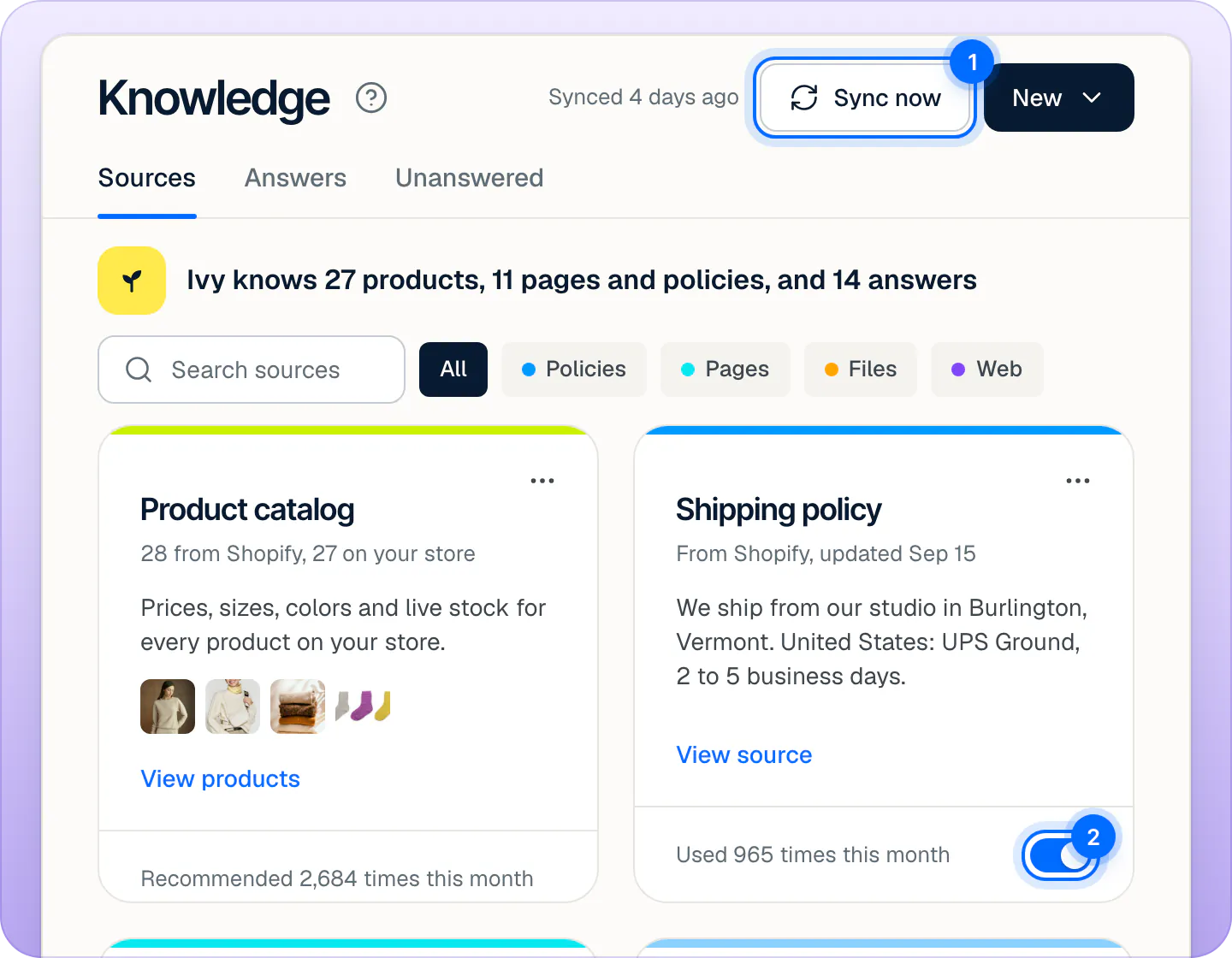
The line at the top of the tab sums up what she knows: the products on your store, the sources switched on and the answers your team wrote. The middle number counts every source that is on, your files and web pages included, even though it reads "pages and policies".
How Ivy uses her knowledge#
- A shopper asks a question.
- Ivy searches every source that is switched on, by meaning rather than exact words, and takes the passages that fit. Products are searched on their own, with their live prices and stock.
- Your written answers and corrections come first when they fit the question. An answer about something else doesn't jump ahead.
- She replies from what she found, and Strathly keeps which sources she used. In the Inbox, What Ivy used on her message shows them.
- If nothing fits, she doesn't guess. She says she isn't sure and offers your team, and the question lands in Knowledge,Unanswered. See Fill the gaps Ivy found.
Orders aren't knowledge: when a shopper asks about an order, Ivy looks it up in Shopify at that moment, with the order number and the checkout email. See Answer "Where is my order?".
How often does Ivy re-read my store?#
| What | When it updates |
|---|---|
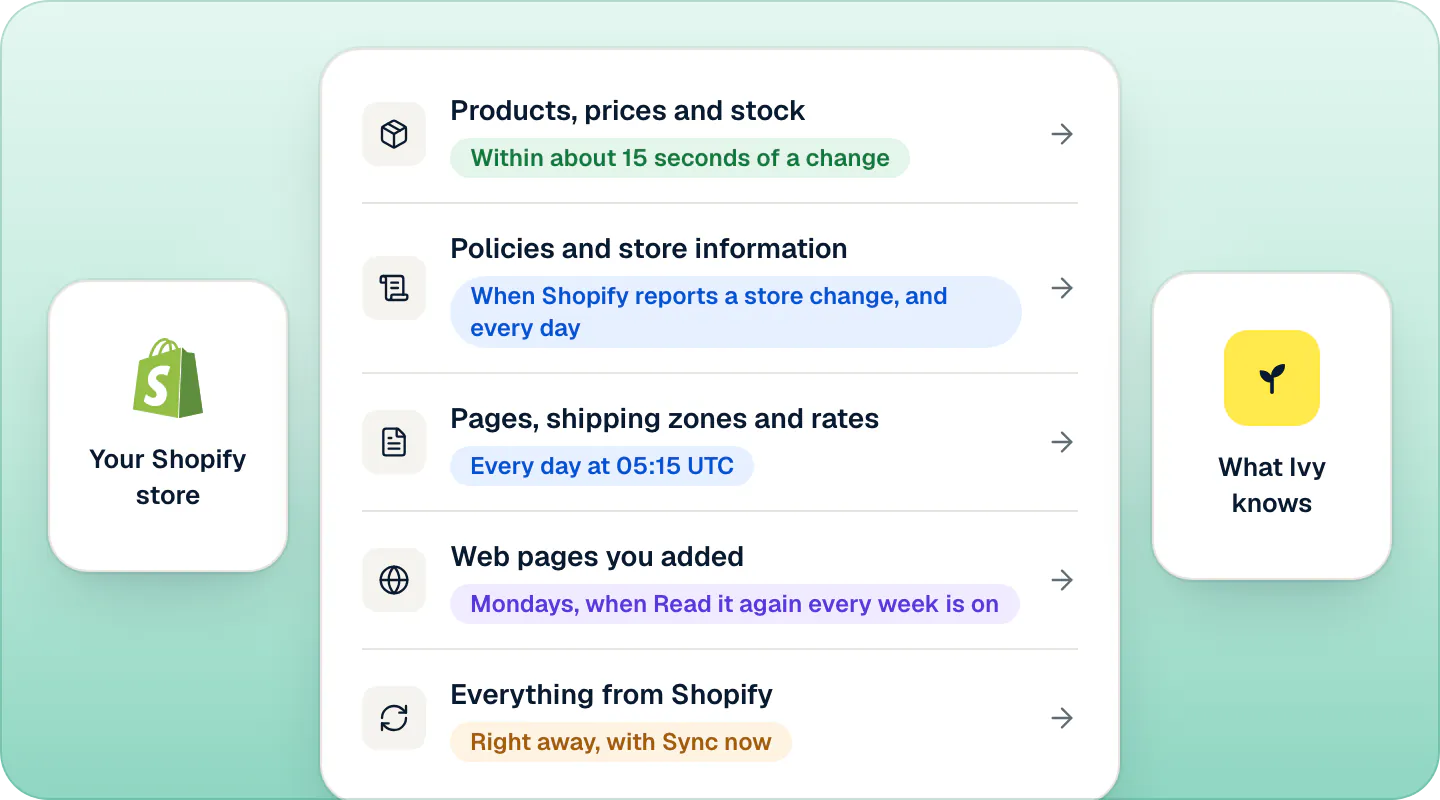
| Products, prices and stock | Within about 15 seconds of a change in Shopify. A deleted product goes at once. |
| Policies and store information | When Shopify reports a change to your store, and every day. |
| Pages, shipping zones and rates | Every day, at 05:15 UTC. |
| Web pages you added | Mondays from 06:00 in your store's time zone, when Read it again every week is on. |
| Files you uploaded | Only when you replace or edit them. |
| Everything from Shopify | Right away, when you press Sync now. |
A page or policy you delete in Shopify is removed from Knowledge at the next sync. A source you switched off stays off across syncs.
Read your store again now#
- Open Knowledge,Sources.
- Press Sync now at the top right. On a wide screen, the label next to it says when the last sync ran, like "Synced 4 days ago".
- A toast says Sync started, and the label reads Syncing with Shopify until it's done. When it finishes, Catalog synced appears in your notifications.
Sync now reads everything from Shopify again: products, policies, pages, shipping rates and store information. It doesn't report what changed. It's also on the Products page and in Settings,Integrations. If Shopify is disconnected, the sync can't start: reconnect it first.
Switch a source off#
When a page is out of date or shouldn't be quoted, switch it off instead of deleting it in Shopify.
- Open Knowledge,Sources. Narrow the cards with All, Policies, Pages, Files or Web, or type in Search sources.
- Turn off the switch at the bottom of the source's card.
- A toast says Ivy stopped reading it, with Undo.
A source that is off stays on the page, faded, and Ivy ignores it from her next answer. Nothing is deleted: turn it back on and she uses it again. Sources from Shopify can only be switched off. Files and web pages you added can also be removed.
The Product catalog card has no switch. To keep Ivy from suggesting a product, use its Ivy recommends switch on the Products page.
Check what Ivy reads from a source#
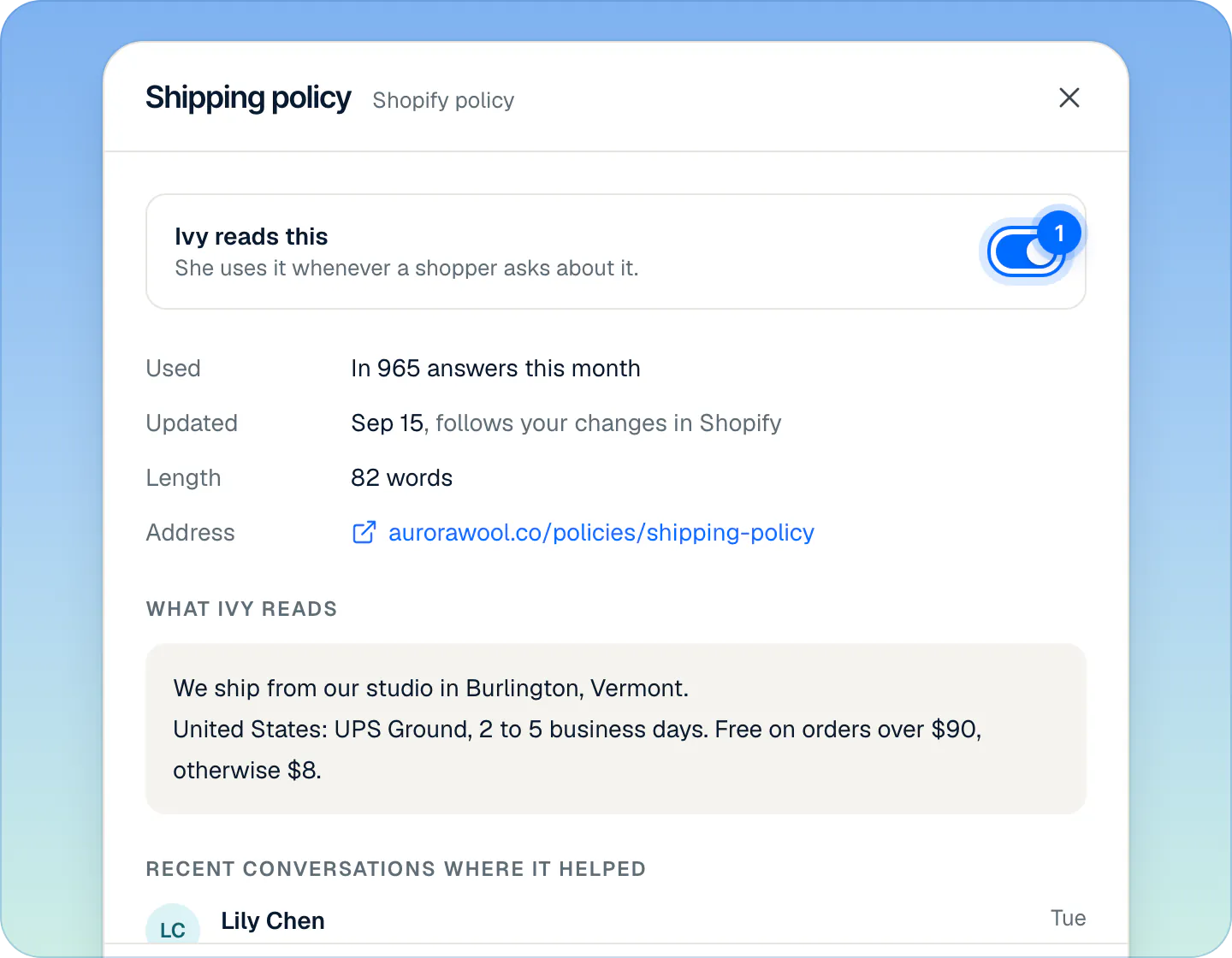
Press View source on a card. A panel opens with:
- Ivy reads this: the same switch as on the card.
- Used: how many of Ivy's answers used it in the last 30 days.
- Updated: when it last changed. Shopify sources add "follows your changes in Shopify".
- Length and Address: its word count, and its address on your store.
- What Ivy reads: the exact text she has. Shopify sources are read-only here: change them in Shopify, and the change arrives at the next sync. Files and web pages can be edited.
- Recent conversations where it helped: the latest conversations whose answers used it. Each one opens in the Inbox.
The card's … menu has View in Shopify, which opens the page or policy in your Shopify admin.
To hear how she answers from all of it, ask her in the Playground: Test in Playground is at the top right of the Sources tab. Tests there never reach shoppers. See Test Ivy in the Playground.
What doesn't Ivy read?#
- Blog posts. Shopify blog articles are not imported. Add a post with Add a web page if Ivy should know it.
- Menus and navigation, and text written in your theme (banners, footers, product page blocks).
- Unpublished pages, empty policies and archived products. Draft products are imported but never recommended.
- Images. She reads text only; product photos are used for the product cards in the chat.
- Pages built only with JavaScript, when you add them as web pages: they have no text for her to read.
Search Knowledge#
One search box works across the three tabs, and the words stay when you switch tabs. It looks inside each source's full text, not only its title, and it is forgiving: "canada" finds "Canadian", "shipping" finds "ships". A card that matches inside its text shows the matching sentence.
Frequently asked questions
How fast does a change in Shopify reach Ivy?
Product changes arrive within about 15 seconds. Pages, shipping rates and policies arrive with the next daily sync; policies also update when Shopify reports a change to your store. Press Sync now in Knowledge › Sources to read everything again right away.
Does switching a source off delete it?
No. Ivy ignores it until you switch it back on, and the source keeps its text and history. Only files and web pages you added can be removed.
Does Ivy read my blog?
No. Shopify blog articles are not imported. Add the posts Ivy should know one at a time, with Add a web page in Knowledge.
Is my store data used to train AI models?
No. Ivy's replies are written through OpenAI's API, whose terms say API data is not used to train their models unless the customer opts in, and Strathly has not opted in. Strathly doesn't train models on your data either. See security and the privacy policy.
Can agents see Knowledge?
No. Knowledge, Products and Teach Ivy are for admins and the owner. Agents answer conversations and can mark one of Ivy's answers as wrong, so an admin reviews it in Analytics.
Related pages
- KnowledgeAdd files and web pagesUpload a PDF, Word, text, Markdown or CSV file up to 20 MB, or add one web page at a time with a weekly re-read. What Ivy keeps, and the limits.
- KnowledgeManage the answers you've taught IvyAnswers you teach Ivy win over your pages and policies. Find, edit, test or delete them in Knowledge › Answers and see how often each one is used.
- KnowledgeYour products in StrathlyWhich product details Ivy reads from Shopify, how changes reach her (product webhooks or Sync now), and how to stop her suggesting a product or add a note.