Read your analytics
Analytics shows what Ivy sells, how conversations end, when shoppers write, which answers were marked wrong and how fast your team replies. This page explains every tab, every number and how a sale is tied to a conversation, so you can trust what you read and check it order by order.
Updated · 10 min read
Feature overview:Chatbot analytics
On this page
Open Analytics in the sidebar. The tabs are Overview, Sales, Conversations, Quality and Team; switching tabs keeps the period. Everyone on the team can open Analytics. Before Ivy's first conversation, each tab shows "No conversations yet" and a button to test her in the Playground.
Periods and comparison#
- The period: Last 7 days (the default), Last 30 days or Last 90 days, each ending today. Today is included and still growing: its bar is hatched and labelled "Today so far". Days follow your store's time zone. 7 and 30 days are charted by day, 90 days by week (the oldest week may be partial).
- Compare: Previous period (the default) compares each number with the same number of days just before. Off hides the changes. When your store went live after the previous period started, the only option is Not available, with the day Ivy went live.
- Changes are green when better and red when worse. They turn gray when the previous period is too small to compare (a base under 20), and read "No change" at zero.
When the period starts before your store went live, the dates next to the title read "Since" the day it went live. There is no Today range in Analytics; for today, use Home.
How are sales counted?#
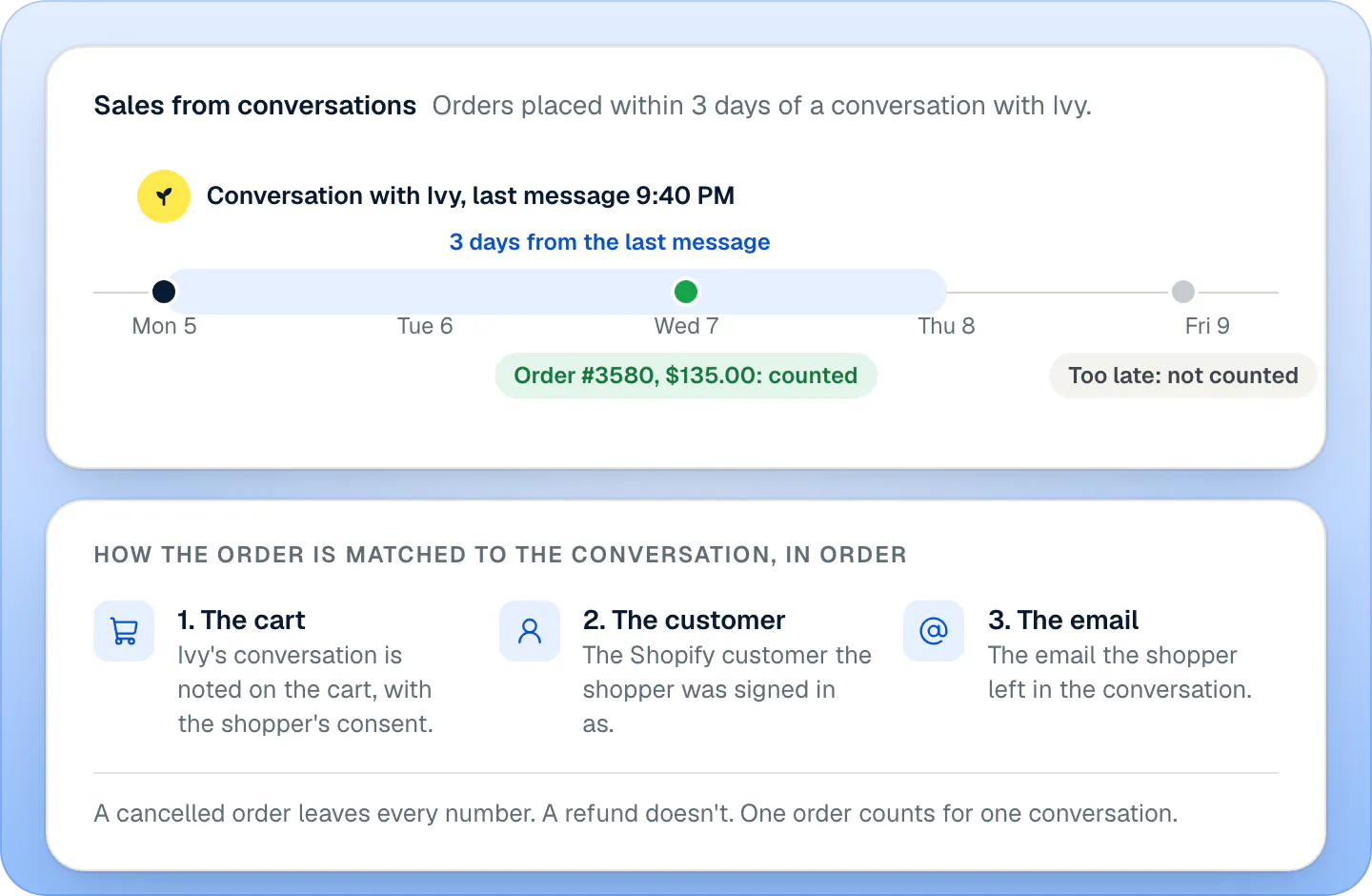
"Sales from conversations" means: orders placed within 3 days of a conversation with Ivy. In detail, an order counts for a conversation when:
- The order was placed after the conversation started and within 3 days of its last message.
- Ivy replied in that conversation at least once.
- The order can be tied to the conversation, tried in this order:
- the cart: Ivy's conversation is noted on the shopper's cart, and Shopify copies the note onto the order;
- the customer: the Shopify customer the shopper was signed in as during the conversation;
- the email: the email the shopper left in the conversation, matched to the order's email.
More rules:
- One order, one conversation. When several conversations qualify, the most recent one gets the order. An order is never counted twice.
- Cancelled orders drop out of every number once they're cancelled in Shopify. Refunds don't: a refunded order still counts.
- Sales count on the day the order was placed, in your store's time zone, and in your store's currency.
- The cart note follows the shopper's privacy choice. The chat adds the note to the cart only when the shopper allows analytics through Shopify's cookie banner (Shopify's Customer Privacy API), or when your store doesn't ask shoppers for consent. A shopper who declines can still be matched by their signed-in account or their email, never by the cart. See Privacy and shopper data.
- Store visits aren't read, so there is no conversion rate from visits. The share of your store's sales compares with every order your store received since Strathly was installed.
Strathly learns about orders from Shopify's order notifications (webhooks) for orders created and cancelled. Shopify sends them only to apps it has approved for protected customer data, because orders carry shoppers' names and emails.
The same rule feeds Home, Products and Analytics, so their sales numbers agree.
Overview#
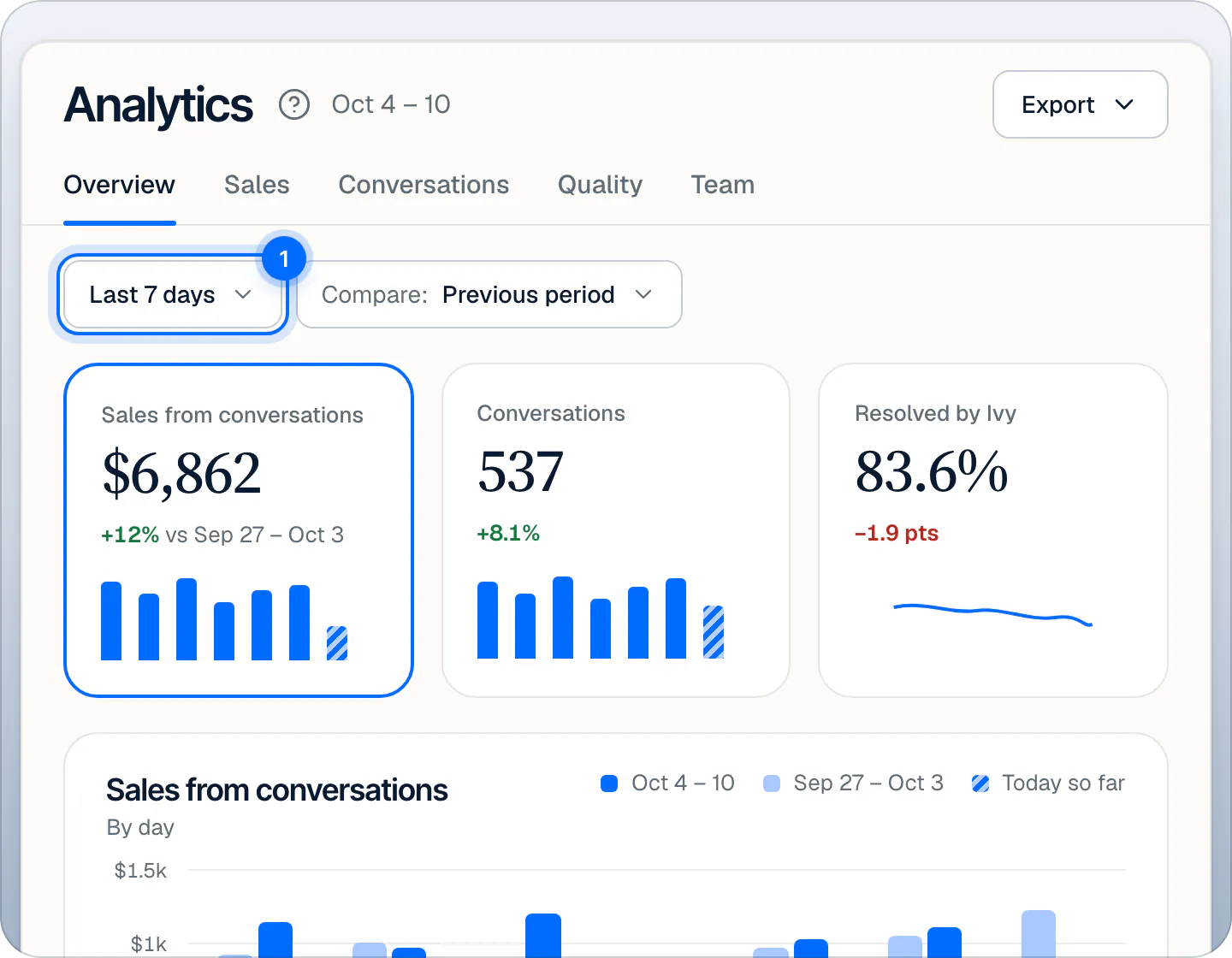
Three cards; click one to chart it in the large chart below.
| Card | Value | Without a comparison |
|---|---|---|
| Sales from conversations | Sales by the rule above | "56 orders, $122.54 average" |
| Conversations | Conversations shoppers started, with at least one message from the shopper, spam left out | How many a day |
| Resolved by Ivy | Share of finished conversations Ivy resolved without your team | "449 of 537 conversations" |
Under the chart:
- Where Ivy helps most: the topics of the conversations she resolved (Product question, Sizing, Order status, Shipping, Returns & refunds, Care, Discounts, Wholesale, Other), each with the share she resolved. A row opens those conversations in the Inbox. Underneath, how many questions she couldn't answer, with a link to teach her (admins).
- Why Ivy hands off: the reasons behind the conversations that went to your team (Refund request, Asked for a person, Ivy couldn't answer, Wholesale or bulk order and so on), each with its share of handoffs. Admins get Edit handoff rules. See Choose when Ivy hands off.
- When answers were marked wrong in the period, admins see a notice with Review answers, which opens Quality.
How outcomes are decided#
Every conversation gets one outcome, checked in this order:
- Handed to your team: Ivy passed it to your team at some point.
- In progress: Ivy is still in it, with a message in the last 30 minutes. Not counted as finished yet.
- Left without an answer: an unanswered question came from it, or the shopper's last message got no reply.
- Resolved by Ivy: everything else.
Sales#
- Sales from conversations with its chart; switch it to Orders to count orders instead ("19% of conversations led to an order"). The rule sentence is under the number.
- Conversations vs the whole store: your Share of store sales, the Average order after a conversation next to the whole store's, and Orders from conversations next to all your store's orders. Until your store's own totals cover the period, it reads "Not enough store data yet".
- Orders from conversations: every order behind the number (below).
- From conversation to order: of the conversations started in the period, how many got a product recommendation, how many added something to a cart, and how many placed an order. The step that loses the most is in red, with a sentence like "Biggest drop: 71 of 126 carts didn't become an order." It follows conversations started in the period, so its order count can differ slightly from the orders list, which follows orders placed in the period.
- Sold after a conversation: the top products by sales, with units sold, how many times Ivy recommended them, their share of your sales and a stock chip when they run low. Admins get All products, which opens the Products page.
Can I check each order?#
Yes. Orders from conversations lists the period's orders, newest first, grouped by day: the time, the shopper (or "Visitor"), the order number and products, the amount, and Open conversation, which opens the conversation that led to it. Ten per page.
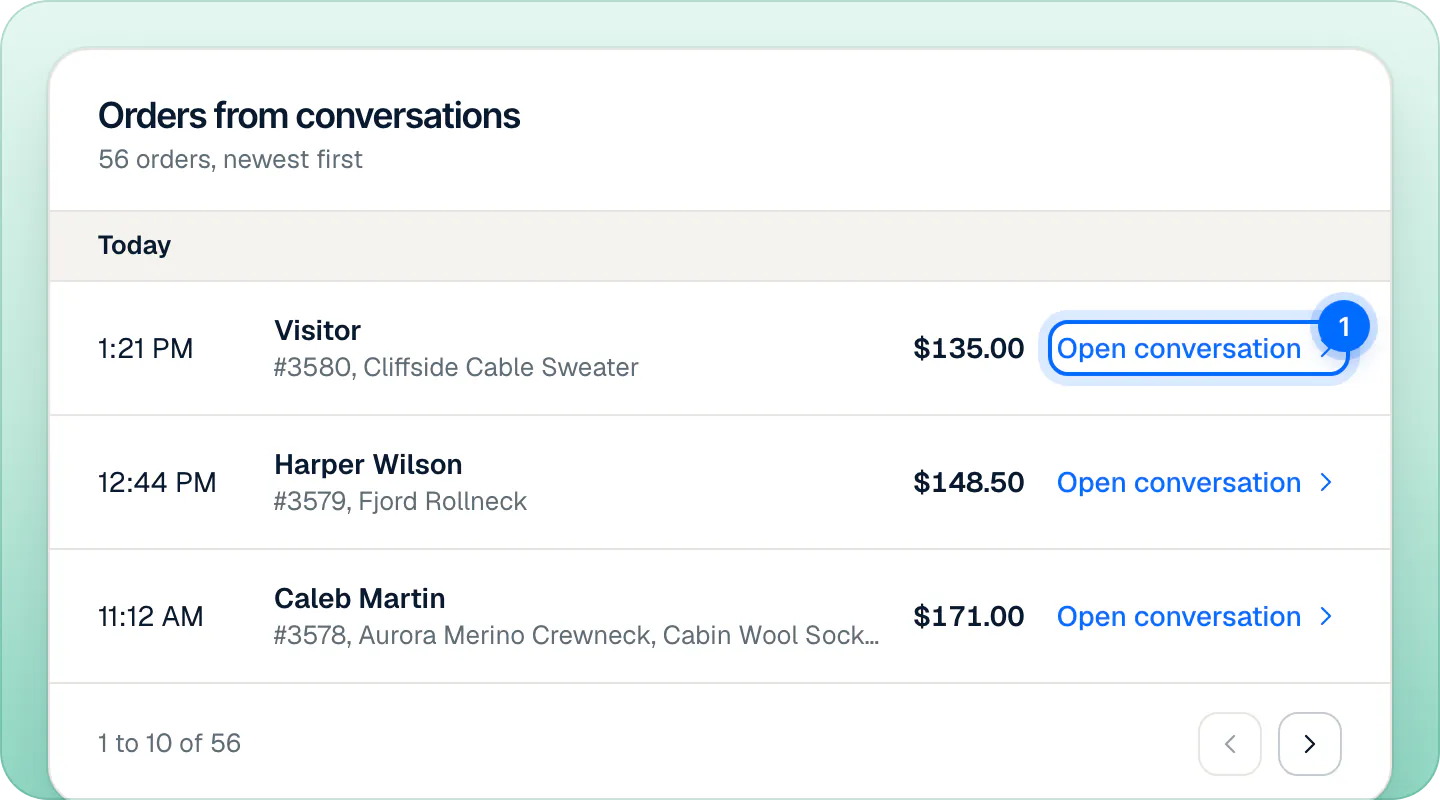
On Home, See sales opens this list.
Conversations#
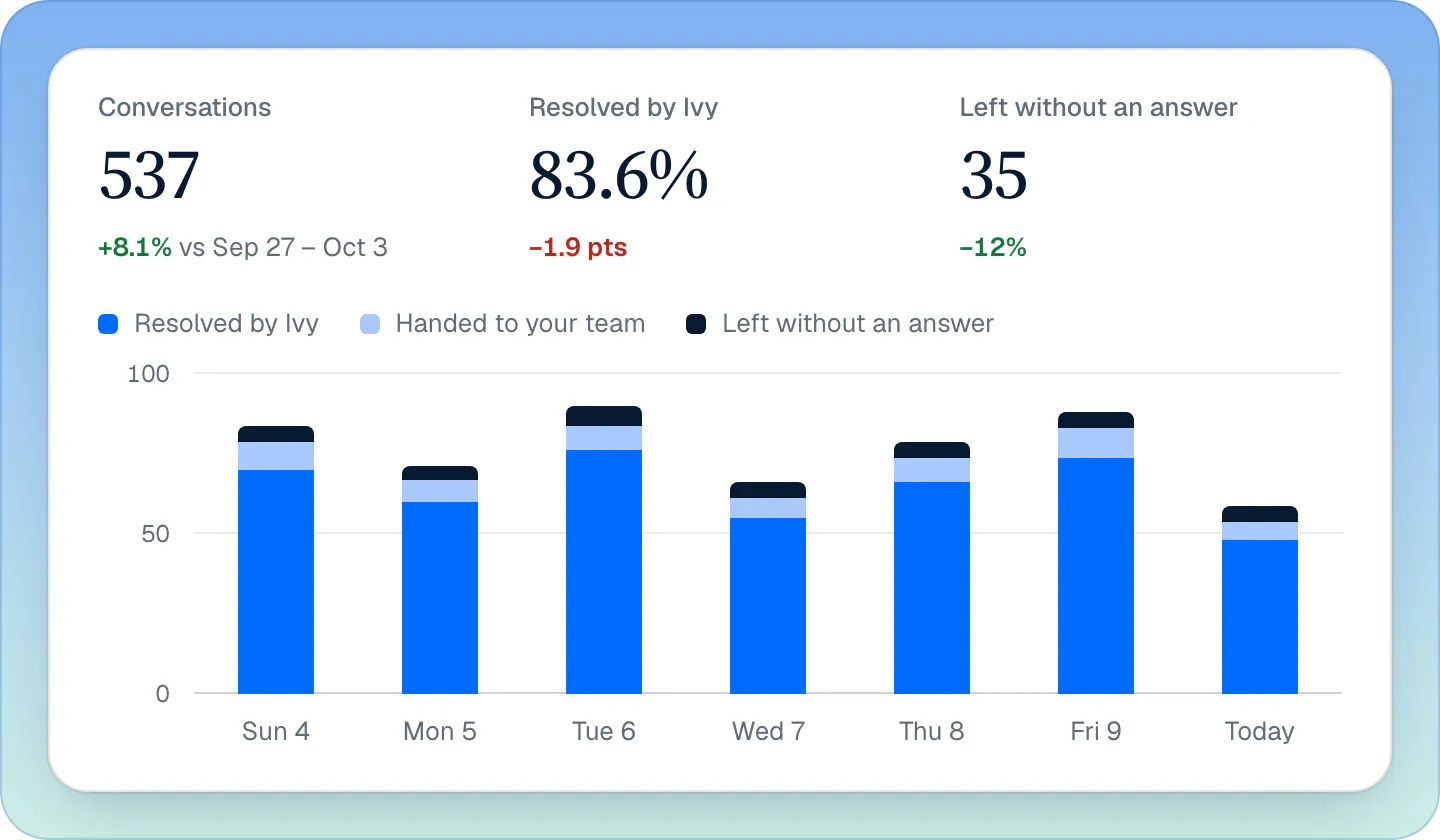
- Conversations, Resolved by Ivy and Left without an answer, and a chart of each day's conversations by how they ended: resolved by Ivy (blue), handed to your team (light blue), left without an answer (navy). The tooltip adds those still in progress.
- Languages: what shoppers write in, with the share Ivy resolved in each.
- Popular days and Popular times: the busiest weekdays and three-hour blocks.
- When shoppers chat: a grid of days by hours. When you've set Settings,Business hours, your team's hours are outlined, and a sentence says how many conversations come in while your team is off and Ivy answers alone.
Quality#
- Ivy's first reply: the median time from a conversation's first shopper message to Ivy's first reply, in seconds, with its daily line.
- Answers marked wrong: Ivy's messages that a shopper (thumbs down in the chat) or a teammate (Bad answer in the Inbox) marked as wrong, sent in the period. Three lists: To review, Corrected and Dismissed. Each row shows the shopper, their question and Ivy's answer.
Admins and the owner act on them:
- Correct this answer opens the correction dialog. The correction is saved in Knowledge, and Ivy uses it from her next reply. See Teach Ivy and correct her.
- In the row's … menu, Dismiss, the answer is fine moves it to Dismissed; Restore brings it back.
- On a corrected answer, Edit changes the correction, and Remove correction in the … menu deletes it.
Everyone can use Open conversation in the … menu.
Team#
- Handoffs: conversations handed to your team in the period.
- Median first reply: the median time from a handoff to your team's first reply.
- Answered within 10 min: the share of handoffs answered within your reply target, set in Settings,Team under Handoffs (10 minutes by default; the label follows your target).
Your team lists each teammate with their availability, the handoffs they answered first, their median first reply (red when over your target) and their share within the target. Click your own availability to switch between Available and Away. A teammate's … menu opens their conversations, and Nudge about waiting conversations sends one push to their iPhone about the shoppers waiting on them (anyone on the team can nudge). Invites that haven't been accepted show as Pending, with Resend invite for admins. See Invite your team.
Which exports are there?#
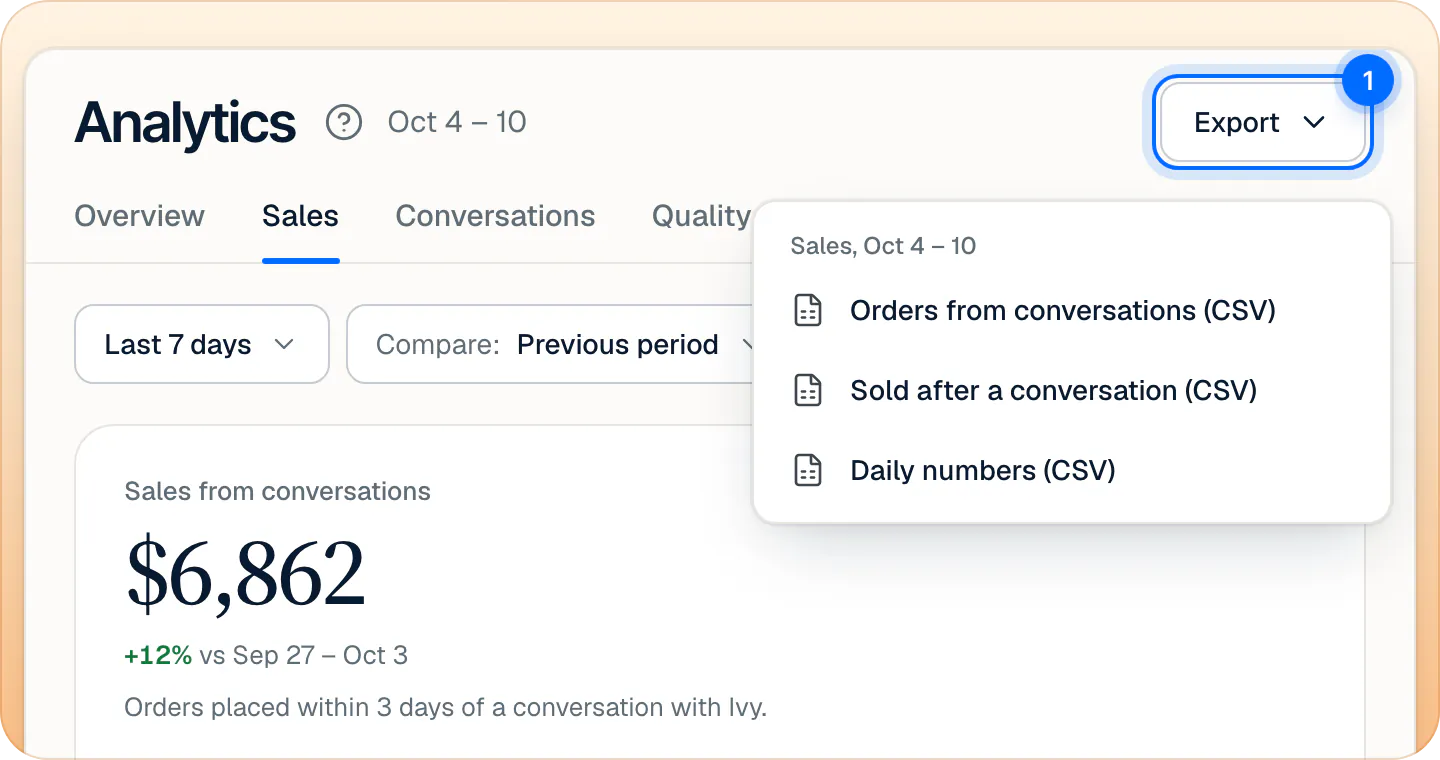
Export, at the top right, lists the CSV files of the tab you're on, for the period you picked.
| Tab | Files |
|---|---|
| Overview | Daily numbers |
| Sales | Orders from conversations, Sold after a conversation, Daily numbers |
| Conversations | Daily numbers |
| Quality | Answers marked wrong, Daily numbers |
| Team | Teammates, Daily numbers |
| File | Columns |
|---|---|
| Daily numbers | Date, Conversations, Resolved by Ivy, Handed to your team, Left without an answer, In progress, Orders, Sales |
| Orders from conversations | Order, Placed, Shopper, Items, Amount, Conversation (a link to it) |
| Sold after a conversation | Product, Units sold, Sales, Share of sales, Recommended |
| Answers marked wrong | Marked wrong, Shopper, Question, What Ivy said, Status, Correction |
| Teammates | Teammate, Email, Handoffs, Median first reply (s), Answered within 10 min (your reply target) |
Files are UTF-8 CSV that open in Excel, Numbers or Google Sheets, with dates in your store's time zone and amounts in its currency. Lists have caps: up to 500 orders, 200 products and 500 answers per file. Reports aren't emailed or sent as PDF.
Frequently asked questions
Do refunds lower the sales number?
No. A refunded order still counts. A cancelled order drops out of every number.
Why is an order missing from Orders from conversations?
It was placed more than 3 days after the conversation's last message, Ivy never replied in that conversation, or it couldn't be tied to it: the shopper declined analytics cookies, wasn't signed in and left no email in the chat. Orders cancelled in Shopify are left out too.
Why do Analytics and Billing show different conversation counts?
Analytics counts conversation threads. Billing counts shopper visits Ivy took part in, with its own rules. See What counts as a conversation.
Can agents see Analytics?
Yes, every tab, and they can export. Correcting answers, dismissing them, resending invites and the links to admin pages are for admins and the owner.
Can I get a weekly report by email?
No. Analytics lives in the dashboard; download the CSV files when you need the numbers elsewhere.
Related pages
- AnalyticsThe Home page: today at a glanceWhat Home shows: sales from conversations, who needs you, Ivy's week, who is chatting now, what sold and the questions Ivy couldn't answer, card by card.
- KnowledgeTeach Ivy and correct herUse Teach Ivy from the sidebar, a conversation, Unanswered or the Playground, and Correct this answer when she got it wrong. Live from her next reply.
- InboxHow the Inbox worksNeeds you, Mine, Ivy is handling, Resolved, All and Spam: what each Inbox view holds, what the status chip means and how the wait clock works.