Shopify permissions, one by one
When you connect your store, Shopify asks you to approve a list of permissions. Here is every one Strathly asks for, what it's used for, what Strathly never does with them, and how to fix a permission your store is missing.
Updated · 6 min read
Integration overview:Shopify integration
On this page
At a glance#
Shopify shows these permissions together when you install or reconnect Strathly. You approve them all at once: Shopify doesn't let you untick one.
| Permission | What Strathly uses it for |
|---|---|
read_products | Importing your catalog (products, variants, prices, images) and keeping it in step when you change a product. |
read_inventory | Stock, so Ivy says whether a size or color is available. |
read_content | Your store's content, together with pages and policies. |
read_online_store_pages | Your published pages (About, FAQ, size guide…), which Ivy reads in Knowledge. |
read_legal_policies | Your shop policies (refund, shipping, privacy, terms), which Ivy reads in Knowledge. |
read_shipping | Your shipping zones and rates, summarized in Knowledge as "Shipping zones and rates". |
read_markets | Your shipping rates when your store uses market-based shipping, where Shopify keeps them in each market. They go in the same "Shipping zones and rates" summary. |
read_orders | Looking up an order's status and tracking when a shopper asks. |
write_orders | Refunds, address changes and cancellations. |
write_draft_orders | Replacements, sent as a $0.00 draft order. |
read_customers | Recognizing returning shoppers and their past orders. |
read_locales | Your store's languages, listed in the "Store information" document. |
read_themes | Checking that the chat is switched on in your live theme, so Strathly can tell you when a newly published theme leaves Ivy off your store. Strathly only reads the theme's settings and never changes them. |
Lookups cover orders from the last 60 days: Strathly doesn't ask for access to older orders. What Ivy reads from your store, and how often it's read again, is on what Ivy knows.
What Strathly never does#
- It never edits products, prices or theme code. The theme permission is read-only: Strathly reads your live theme's settings to see whether the chat is switched on, and the chat stays a theme app embed you switch on and off yourself.
- It changes an order only when someone decides to. A refund, address change, cancellation or replacement happens when a teammate confirms it in the Inbox, or when you allow Ivy to do it herself in Ivy,Behavior,Orders. Every Ivy order switch is off by default, and with one on, she acts only for a shopper who proved the order is theirs. Every order action can be stopped within 10 seconds. See order actions.
- It doesn't change anything else in Shopify. Disconnecting leaves your products, orders and customers as they are.
Where you approve them#
At Connect your store, See what Ivy reads shows what Strathly will be able to see, in two groups, Store data and Customer data, with the note "Strathly never edits products, prices or theme code." Press Install on Shopify (1). Shopify then shows its own screen with the full list, where you pick your store and approve it.
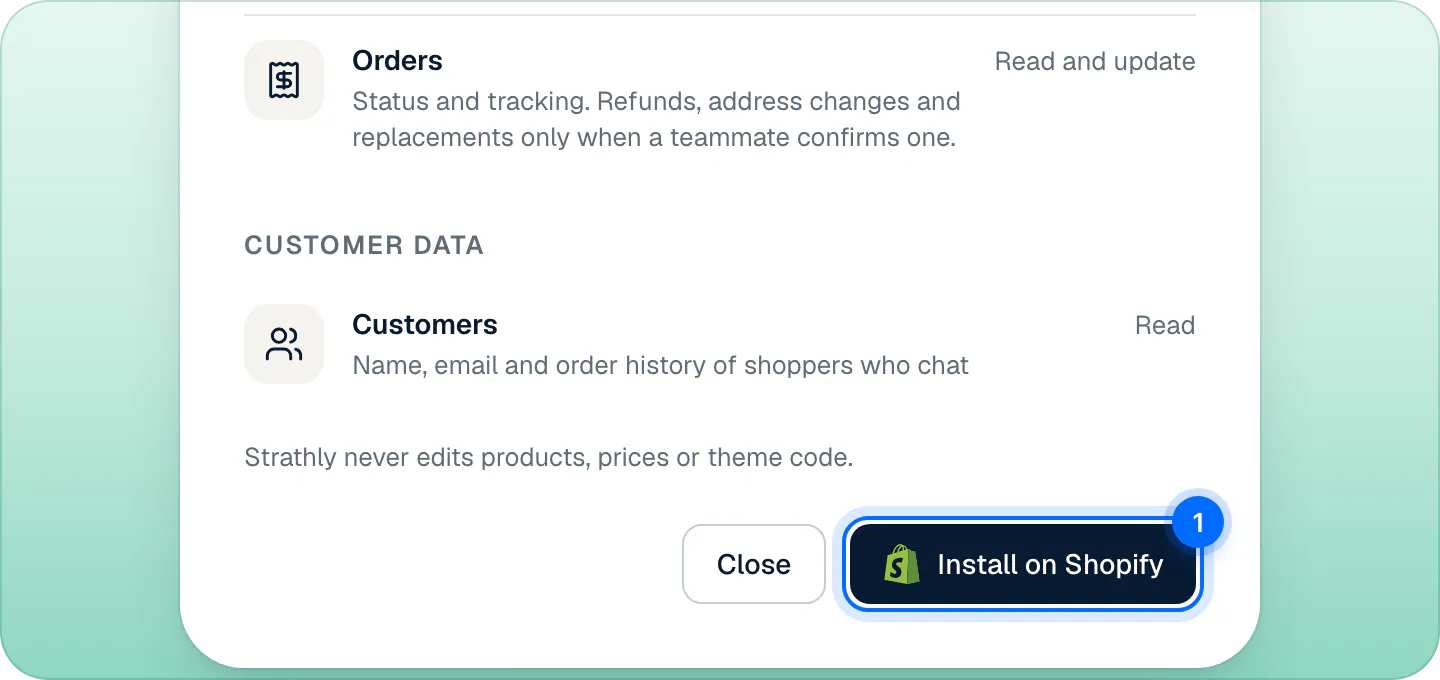
Shopify shows the list on its install screen. Approve it, then create your Strathly account. See install from Shopify.
The owner or an admin connects the store in Strathly. In Shopify, the person installing needs permission to manage apps.
What each write permission switches on#
| Order action | Permission it needs | Note |
|---|---|---|
| Refund | write_orders | |
| Edit address | write_orders | Unfulfilled orders only. |
| Cancel order | write_orders | Unfulfilled orders only. |
| Replace | write_draft_orders and read_orders | Creates a $0.00 draft order. |
Without one of these permissions, the action is unavailable in the Inbox and its switch can't be turned on in Ivy,Behavior,Orders.
See what your store granted#
Open Settings,Integrations and press Manage on the Shopify card. The panel lists, under Read access, only what your store granted. What Ivy can change appears when at least one order action is allowed.
Fix a missing permission#
A store approved before Strathly asked for a permission, for example before order actions existed, doesn't have it yet. You'll see:
- In Settings,Integrations: the Shopify card says Needs permissions, for example "Ivy needs new Shopify permissions to change orders.", with an Update permissions button. The same note is at the top of its Manage panel.
- In a conversation's order block in the Inbox: Needs new Shopify permissions with a Reconnect button (1).
- In Ivy,Behavior,Orders: a line such as "Refunds need new Shopify permissions." with Reconnect Shopify.
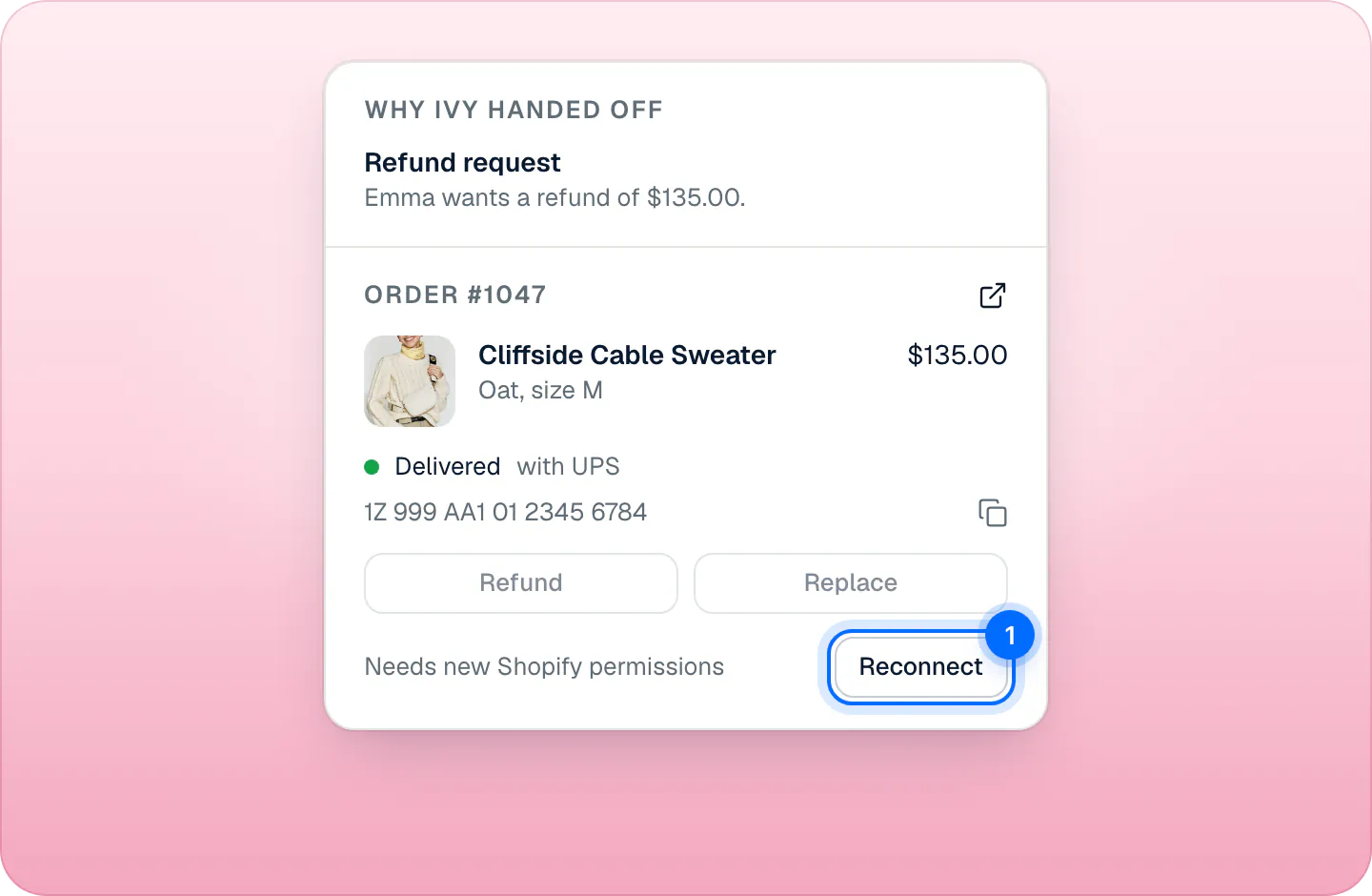
Press any of them: they do the same thing. Shopify shows its permission screen with the current list; approve it and you're back on the page you started from, with the new permissions. You don't need to disconnect first, and your store stays connected the whole time.
Updating permissions is for the owner and admins. An agent who presses Reconnect in the Inbox is asked to get an owner or admin to do it. The iPhone app only says to reconnect on the web: do it on a computer.
Other parts of the Shopify app#
Besides the permissions, the Strathly app adds to your store:
- The app embed "Strathly AI chat", which puts the chat on your storefront. You switch it on in the theme editor. See add the chat to your theme.
- An app proxy at
/apps/strathly, which lets the chat know when a shopper is signed in to your store. - The cart attribute
_strathly_conversation, set only with the shopper's consent to analytics, so a sale can be credited to the conversation. - Webhooks for product, collection and shop changes, new and cancelled orders, uninstalling, and Shopify's privacy requests. See privacy and shopper data.
Strathly opens in its own tab, not inside the Shopify admin.
Frequently asked questions
Why does Strathly need write_orders?
For refunds, address changes and cancellations that a teammate confirms in the Inbox, or that you allow Ivy to make in Ivy › Behavior. Nothing changes an order otherwise.
Does Strathly edit my theme or my prices?
No. It has no permission to edit products, prices or themes. It only reads your live theme's settings, to tell you when the chat is switched off in it.
What if I don't want order actions?
Leave Ivy's order switches off, which is the default. Orders then change only when someone on your team presses an action in the Inbox. Shopify asks for the permissions together, so you can't leave one out at install.
Why can't Ivy find an older order?
Order lookups cover the last 60 days.
Does Strathly read all my customers?
It looks up the shoppers who chat, to recognize them and show their past orders to your team.
Related pages
- Get startedInstall Strathly and connect ShopifyTwo ways to start Strathly: install it from Shopify, or sign up on strathly.com and install it after. Same setup, billed through Shopify. How connecting works.
- IvyLet Ivy work on ordersOrder changes go to your team by default. Let Ivy refund, cancel, replace or change an address herself for verified shoppers, within limits you set.
- Shopify & dataDisconnect or uninstallDisconnect Shopify or uninstall the app: what stops at once, what happens to your plan and data 48 hours later, and how reconnecting brings it all back.