Strathly's iPhone app
The Strathly iPhone app is for answering shoppers away from your desk: a push when Ivy hands one off, the Inbox on your phone, Ivy's drafted replies, and the actions to take over, assign and resolve. Everything else stays on the web dashboard. The app is free on the App Store, for every teammate with a Strathly login; this page describes how it works.
Updated · 7 min read
Feature overview:iPhone app for store chats
On this page

Strathly for iPhone is free on the App Store. Prefer not to install it? Answer from the web dashboard on any browser, on a computer or a phone, and get handoffs by email or desktop alert: see notifications.
The app is for iPhone. It does one job, answering the conversations that need your team, and it works with the same Inbox as the web: a reply sent from the phone shows on the web at once, and the other way around.
Log in#
Open the app and log in with your Strathly Email and Password: the same as on the web. Forgot password? opens the password reset of the web dashboard.
There is no sign-up in the app ("New to Strathly? Set up your store on the web."). Not set up yet? On the Log in screen, Explore a demo store opens Aurora Wool Co., a sample store with its own conversations, with no account needed: reply, take and resolve as you would on your store, and nothing reaches a real shopper or Shopify. When you're ready, the app asks for your email and Email me the link sends you the setup link, to connect your store from a computer. A teammate who doesn't have a login yet accepts their invite first. If your login has no store yet, the app asks you to set it up on the web.
You stay logged in for 30 days after you last used the app. After three login attempts within two minutes, the app asks you to wait two minutes before trying again.
Turn on push#
Right after your first login, the app shows A push only when it matters: Ivy answers shoppers on her own, and you get a push when one of them needs a person. Press Turn on notifications and allow them in the iPhone's prompt (or Not now).
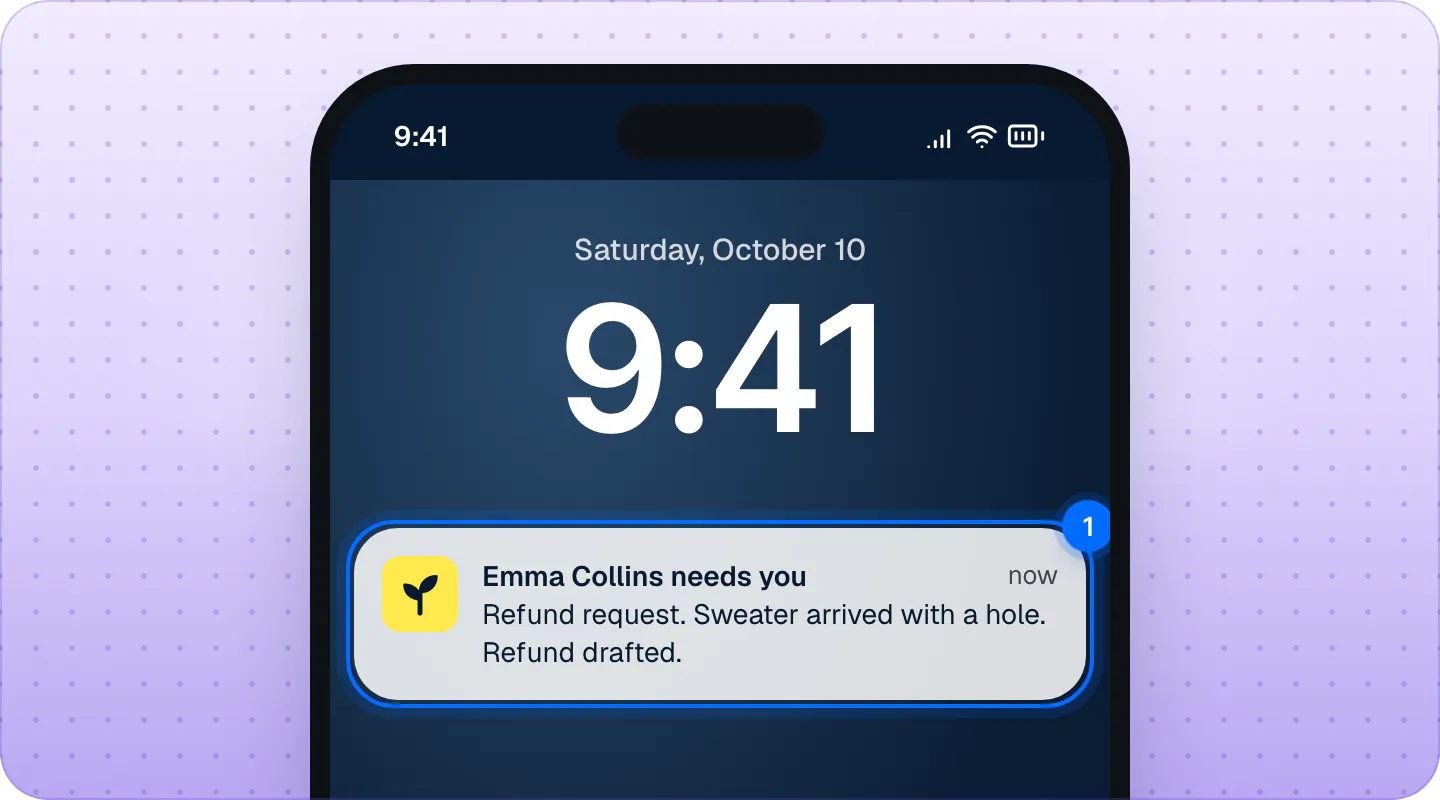
Later, change them in the app's Settings › Notifications, under Push me when: New handoff, Mentioned in a note, Assigned to me, and Pause while I'm away. They are the same switches as the iOS push column of Settings,Notifications on the web. Alert me about (every handoff, or only yours and unassigned) is set on the web.
The Inbox on your phone#
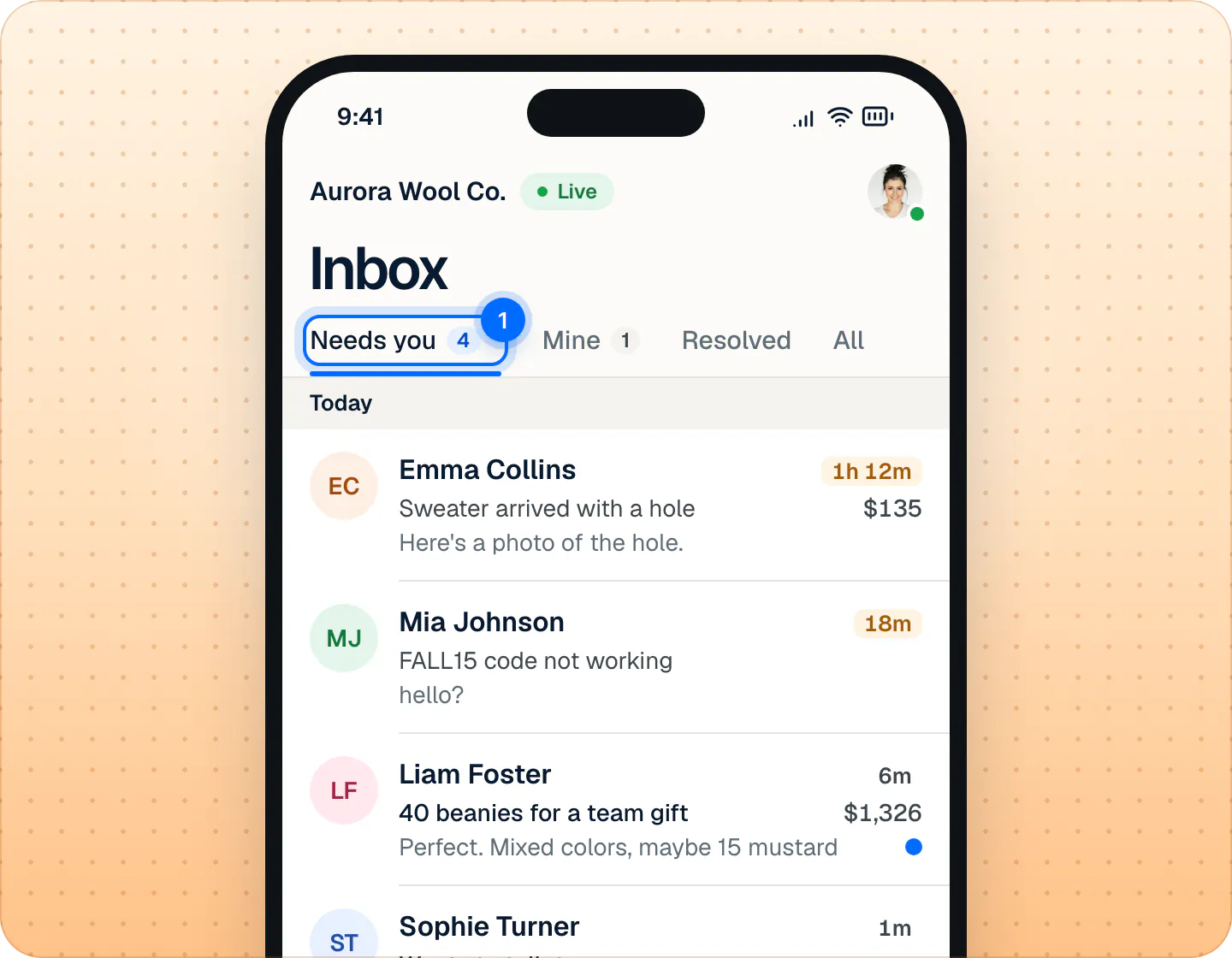
- At the top, your store and Ivy's status (Live, Paused, Offline), and your photo, which opens Settings.
- Four tabs: Needs you (it opens first), Mine, Resolved and All. Ivy's own conversations are in All, with her mark on the photo.
- Each row shows the shopper, how long they've waited (orange past your reply target), the subject, the money at stake and the last message.
- Pull down to refresh. The app's icon shows your Needs you count.
Swipe a row for the most common action, or press and hold it for all of them:
| The conversation | Swipe right | Swipe left |
|---|---|---|
| Waiting, not yours | Assign to me | Resolve |
| With Ivy | Take over | Resolve (not while she is chatting live) |
| Yours | Mark as read / Mark as unread | Resolve |
| Resolved | Reopen |
Each action, except read and unread, shows a toast with Undo. When Ivy is paused, a notice says so, with Resume for admins and the owner. When your notifications are off, or you are set to Away, Needs you says so, with a button to fix it.
Reply from your phone#
Open a conversation. Under the shopper's name, a strip says why Ivy handed it off; tap it to read her summary and see the order.
- Ivy's draft is already in the reply box, marked Drafted by Ivy. Rewrite offers Shorter, Friendlier and More formal, and × clears the draft.
- In an empty box, Draft with Ivy writes a reply for you.
- Press the send button. Press and hold it, or use its arrow, for Send and resolve.
There's no confirmation message: your reply appears in the thread. If it couldn't be sent, it says Not sent. Tap to retry. How replies reach a shopper who has left is the same as on the web: see reply to a shopper.
Order actions on the phone#
When Ivy prepared an order action in her draft, it shows under the text, checked: a refund, a free replacement or a new shipping address. The button becomes Send and refund, Send and replace or Send and update address.
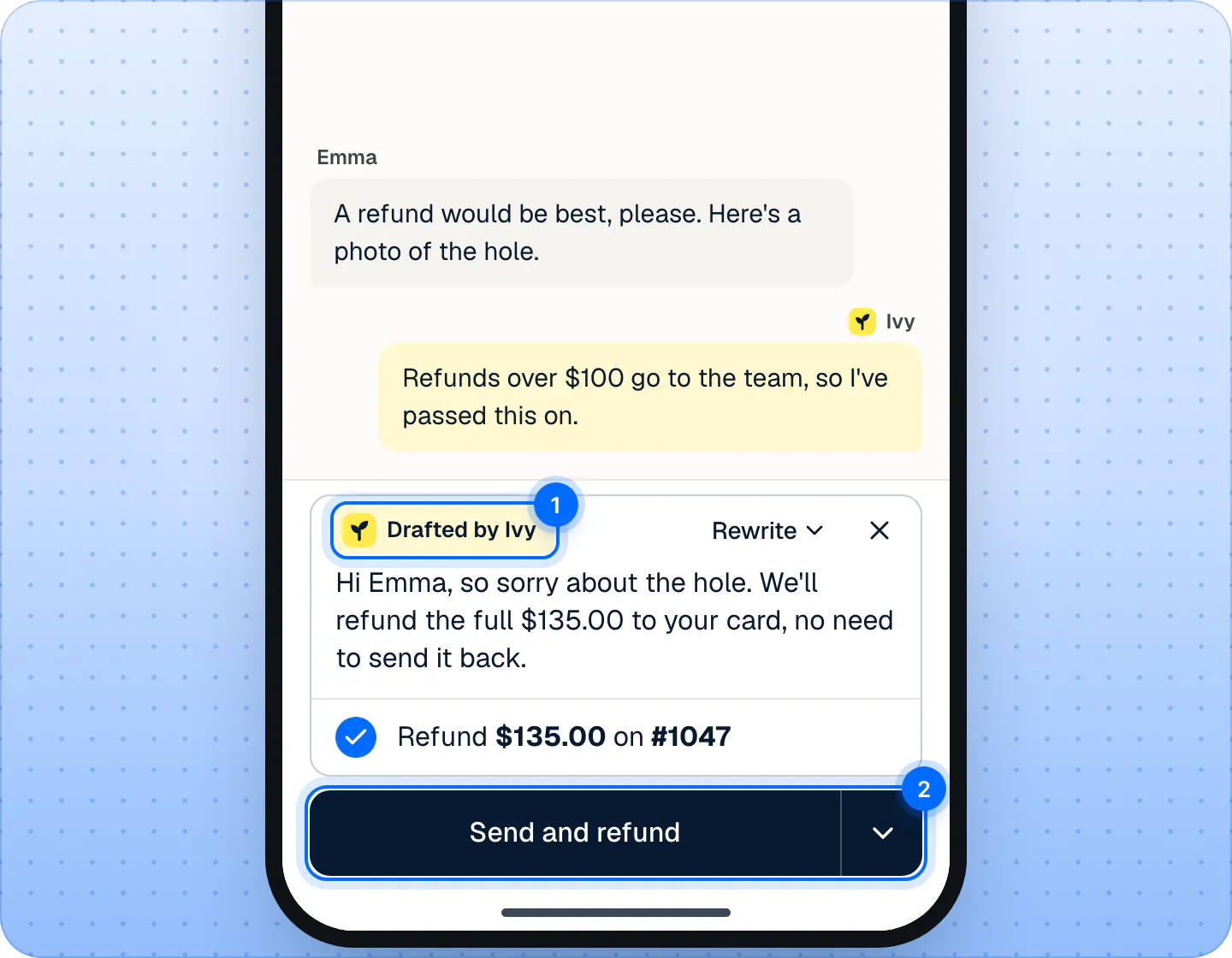
For a new address, a form opens first, filled in with the address Ivy wrote down: check the fields (country, street, city, postal code and province where the country has them) and tap Send and update address. Your reply and the action wait 10 seconds ("Refunding $135.00 in 8s"), with Undo. An agent on a store that keeps refunds to admins sees the refund grayed: "Ask an admin to refund this order". If the store hasn't given Strathly the Shopify permissions for it, the line is grayed: "Needs new Shopify permissions. Reconnect Shopify on the web." On the web, press Reconnect in the conversation's order block (or Reconnect Shopify in Ivy,Behavior,Orders) and approve the permissions in Shopify: see fix a missing permission.
Cancelling an order, and the order's own Refund, Replace and Edit address buttons, are on the web only: see orders next to the conversation.
Conversation actions#
The … button of a conversation has: Take over (or Assign to me), Assign to a teammate, Resolve, Return to Ivy, Reopen, Mark as unread, Not spam and Mark as spam. They work as on the web: see assign and resolve. Tap the shopper's name for the details: who they are, why Ivy handed off, the order and previous orders.
What's only on the web#
- Writing internal notes (the phone shows them, but you write them on the web).
- Marking a conversation urgent, and rating or correcting Ivy's answers.
- Cancelling orders and the order block's buttons.
- Search, the Topic and Assignee filters, and the Ivy is handling and Spam views.
- Teaching Ivy, Knowledge, Products and Ivy's settings, and pausing Ivy (admins and the owner can resume her from the app).
- Every setting except your availability and your push notifications, including Alert me about.
The app's Settings has your availability (Available / Away), Notifications, Open the web dashboard, Contact support and Log out.
Which notifications reach my phone?#
Tapping a notification opens its conversation.
| Notification | When |
|---|---|
| "Emma Collins needs you" | Ivy hands off a shopper. The text says why, the subject, and whether a reply is drafted. |
| "Emma Collins replied" / "is waiting" | The shopper writes again in a conversation your team has. |
| "Marco mentioned you" | A teammate mentions you in a note. |
| "Marco assigned you a conversation" | A teammate assigns you a conversation. |
| "Ivy sent you a note" / "Ivy refunded $35.00 on #1052" | One of Ivy's rules notifies the team, or she ran an order action on her own. |
| "3 shoppers waiting for a reply" | A teammate nudges you from Analytics. |
| "Test from Strathly" | You pressed Send a test on the web. |
Which of these you get follows your notification settings; a nudge and a test arrive whatever your switches.
Log out or remove a phone#
In the app, open Settings and press Log out: that iPhone stops getting notifications. From the web, open Settings,Notifications: the iOS app card lists your phones, each with Send a test and Log out. Logging a phone out from there ends its session at once.
Frequently asked questions
Is there an Android app?
No. On an Android phone, open the web dashboard in the browser: the Inbox works on a phone screen.
Where do I download it?
From the App Store: it is called Strathly: AI Live Chat Support. In the dashboard, Settings,Notifications has the same link, and Email me the link sends it to your inbox.
Does it cost extra?
No. Every plan includes the iPhone app and its push notifications, for every teammate with a Strathly login.
Can I write notes or teach Ivy from the phone?
No. Both are on the web dashboard. The phone shows your team's notes.
Related pages
- TeamChoose your notificationsChoose which handoffs reach you, every handoff or only yours and unassigned, and where they reach you: by email, desktop alert or iPhone app push.
- InboxReply to a shopperSend Ivy's drafted reply or rewrite it, reach shoppers who left by email when they gave one, and leave internal notes that @mention a teammate.
- InboxAssign and resolve conversationsTake a conversation, assign it to a teammate, return it to Ivy, resolve or reopen it, and choose how new handoffs are assigned. Most actions can be undone.