Your products in Strathly
Ivy recommends and answers from your Shopify catalog, with live prices and stock. The Products page shows what she knows about each product and how it does in conversations, and lets you take a product out of her suggestions or give her a note about it.
Updated · 7 min read
Feature overview:AI chatbot knowledge base
On this page
Open Products in the sidebar. Only admins and the owner see it. Product details come from Shopify and stay read-only here: the page is for steering Ivy, not for editing your catalog.
What Ivy reads from Shopify#
For each product: the title, description, product type, vendor, tags, the collections it's in, its options (sizes, colors, materials) and every variant with its price, compare-at price, availability, stock and SKU. Images are used for the product cards in the chat, and the storefront address for the card's link.
| Shopify status | In Strathly | Does Ivy use it? |
|---|---|---|
| Active | Imported | Yes. With Ivy recommends off she doesn't suggest it, but still answers when asked about it. |
| Draft | Imported, marked Draft | No, never recommended. Publish it in Shopify first. |
| Archived | Removed | No |
How quickly does a change reach Ivy?#
Shopify tells Strathly when a product is created, updated or deleted. The change reaches Ivy within about 15 seconds; a deleted product is removed at once. When a collection changes, its products are read again.
To read the whole catalog again, press Sync now at the top of the Products page. A toast says Sync started, the label next to the button reads Syncing with Shopify, and Catalog synced appears in your notifications when it's done. Sync now also reads your pages and policies again (see What Ivy knows). If Shopify is disconnected, the sync fails with a message: reconnect Shopify first.
Does Ivy see stock?#
Yes, per variant, as last synced. When Ivy looks at a product's details she sees which variants are available and which are low on stock, with 1 to 3 left. She won't add a sold-out variant to a cart: she tells the shopper it's out of stock and suggests something else.
On the Products page, a product with 10 or fewer units shows an orange chip like 3 left, and Sold out when nothing is left. Products that don't track stock show In stock.
The Products page#
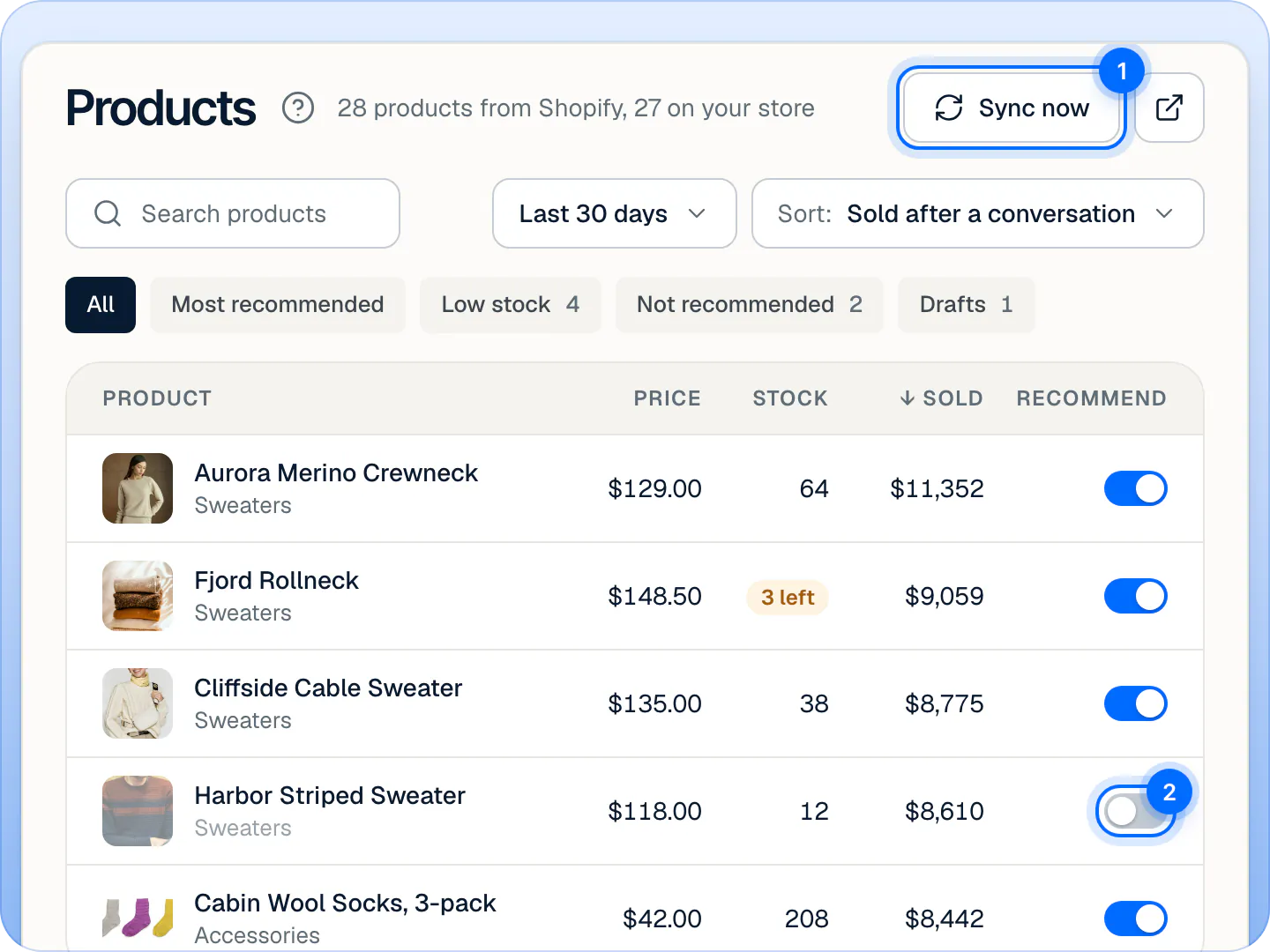
- The header says how many products come from Shopify and how many are on your store (drafts aren't). Open in Shopify opens your Shopify products.
- Search products looks in names, types, options like colors and materials, tags and vendors.
- The period (Today, Last 7 days, Last 30 days, Last 90 days) sets the numbers in the table.
- Sort: Sold after a conversation (the default), Recommended most, Added to cart, Most questions, Lowest stock, Price or Name.
- The tags: All, Most recommended (the 10 Ivy showed most), Low stock, Not recommended and Drafts, with their counts.
| Column | What it shows |
|---|---|
| Product | Photo, name and type |
| Price | The lowest variant price ("From" when variants differ), with the compare-at price struck through |
| Stock | Units in stock, N left at 10 or fewer, Sold out, In stock or Draft |
| Recommended | How many times Ivy showed it in the period |
| Added to cart | Conversations where it went into a cart |
| Sold | Sales after a conversation: orders placed within 3 days of a conversation with Ivy (how sales are counted) |
| Questions | Open unanswered questions that name it |
| Ivy recommends | The switch |
On a narrower window some columns are hidden. On a store's first day the number columns are hidden until Ivy has her first conversations.
Stop Ivy recommending a product#
- Open Products and find the product. Search products or the tags narrow the list.
- Turn off its Ivy recommends switch. (Or open the product and turn off Ivy can recommend it.)
- A toast confirms it, with Undo.
The setting stays across syncs. Find switched-off products with the Not recommended tag. A draft's switch can't be turned on: publish the product in Shopify first. How Ivy picks products and builds carts is on Recommend products and build carts.
Add a note for Ivy#
A note tells Ivy something about a product that isn't in its description: a fit tip, who it's for, what to suggest with it. Shoppers never see it.
- Open the product: click its row.
- Under Note for Ivy ("only she sees it"), write the note, like "Runs small, suggest a size up."
- Press Save note, or ⌘Enter. The toast says Note saved.
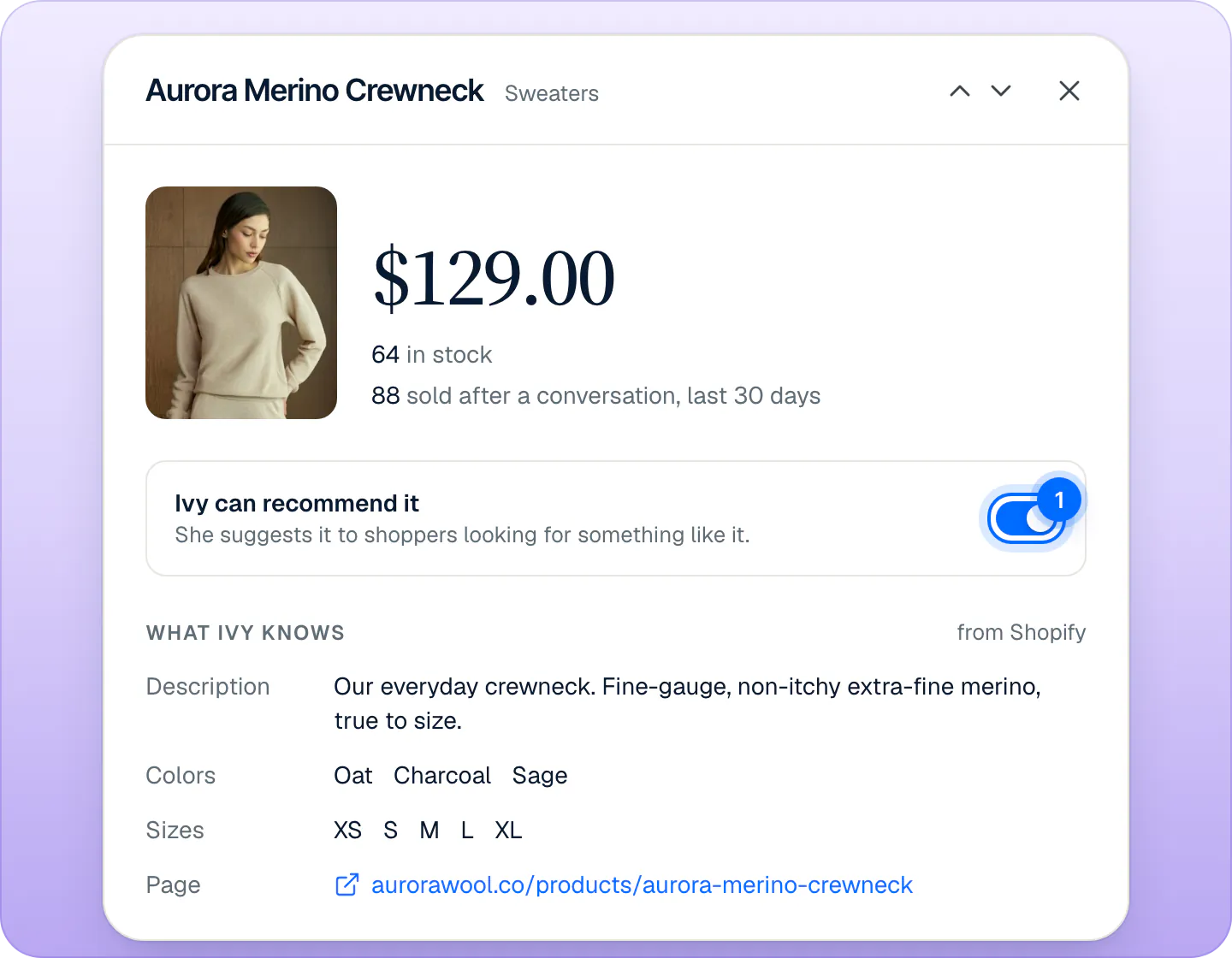
Ivy follows the note without quoting it word for word. It can be up to 1,000 characters, but keep it short: when she searches the catalog she sees the first 400 characters, and the whole note only when she opens the product's details. Notes are kept across syncs. Empty the box and save to remove a note.
See how a product does in conversations#
Lower in the product's panel:
- In conversations, for the period you picked: Sold after a conversation with a small chart, how many times Ivy Recommended it, and how often it was Added to cart.
- What shoppers ask: open unanswered questions that name the product, each with Teach Ivy. See Fill the gaps Ivy found and Teach Ivy and correct her.
- At the bottom: when the catalog was last synced, Test in Playground (asks Ivy about this product, see Test Ivy in the Playground) and View in Shopify.
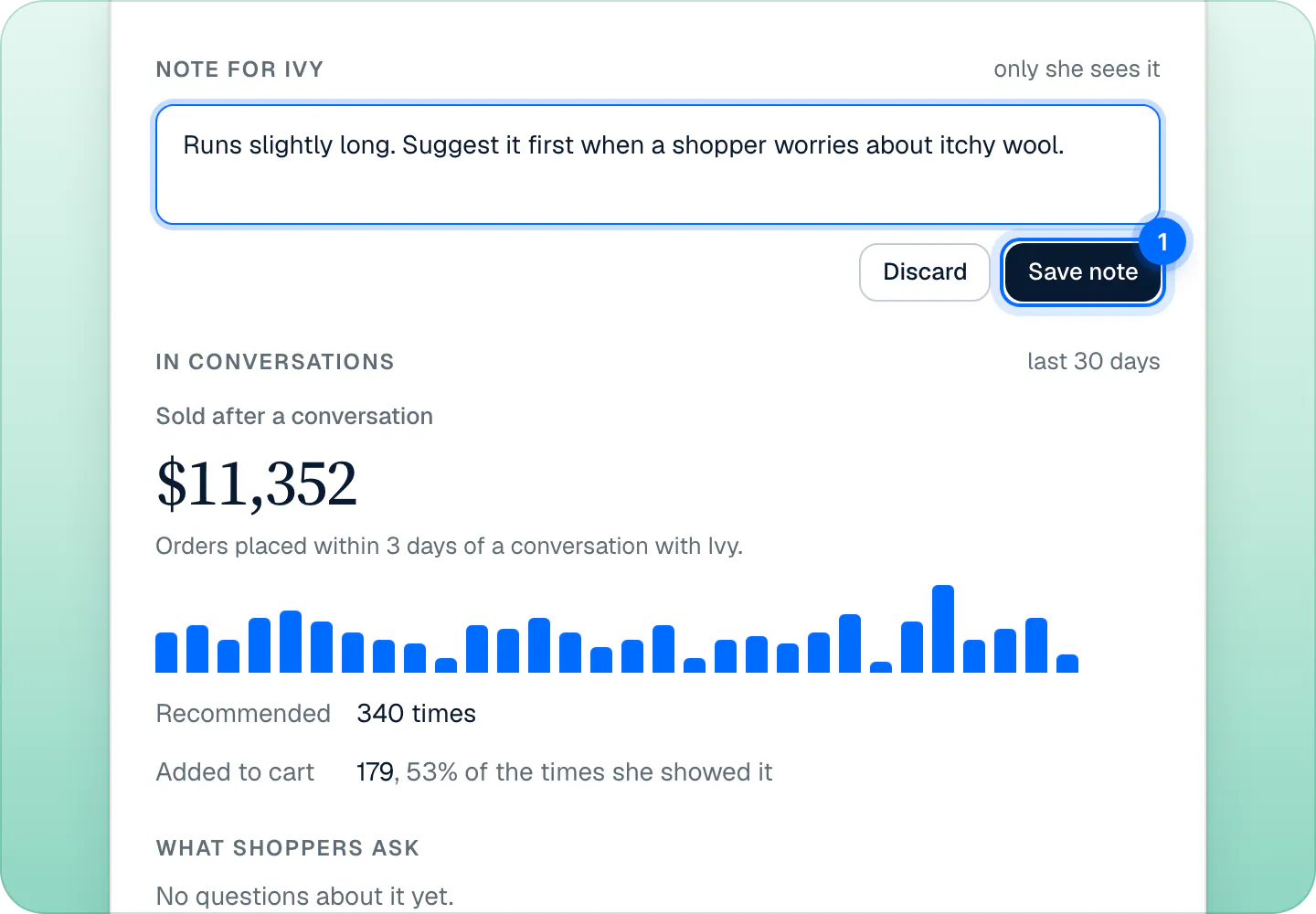
Use the arrows at the top of the panel, or J and K, to move to the next or previous product.
Change a product's details#
Title, description, price, stock, images and options can only be changed in Shopify. Press View in Shopify in the product's panel, edit it there, and the change reaches Ivy within seconds.
Frequently asked questions
How quickly does a price change reach Ivy?
Within about 15 seconds of saving it in Shopify. If something looks out of date, press Sync now on the Products page.
Does Ivy read draft products?
They're imported and listed under Drafts, but Ivy never recommends or looks them up. Publish the product in Shopify and she can.
Can I change a description just for Ivy?
No, descriptions come from Shopify. Add a Note for Ivy instead: she follows it, and shoppers never see it.
Why doesn't Ivy recommend a product?
Its Ivy recommends switch is off, or it's a draft. With the switch off she still answers when a shopper asks about it by name; she just never suggests it. Otherwise she picks the products that fit the shopper's question best, and she never puts a sold-out variant in a cart. Check its row on the Products page.
Is there a daily product refresh?
No, and none is needed: products update from Shopify within seconds of each change. The daily sync covers pages, policies and shipping rates.
Related pages
- KnowledgeWhat Ivy knows and where it comes fromIvy reads your products, policies, pages and shipping rates from Shopify, plus files, web pages and answers you add. What she reads and when it updates.
- IvyRecommend products and build cartsHow Ivy picks products from your catalog, what the product cards and Add to cart do, how she builds a cart with a checkout button, and how to steer her picks.
- AnalyticsRead your analyticsSales from conversations (orders within 3 days of a chat with Ivy), outcomes, topics, languages, busy hours, answers marked wrong, team stats and exports.