Pause Ivy or hide the chat
Sometimes you want Ivy to stop taking new chats for a while, or the chat to disappear from part of your store. Pausing keeps the chat on your store with a contact form; hiding takes it off the page. This page explains both, what shoppers and your team see, and what happens to billing.
Updated · 7 min read
On this page
Pick what you need first. Business hours never pause Ivy: outside them she keeps answering, and Settings,Business hours decides what happens when a shopper needs a person.
| You want to | Do this | Shoppers see |
|---|---|---|
| Stop Ivy taking new chats for a while | Pause Ivy from the account menu | The chat, with a contact form for new shoppers |
| Hide the chat on phones | Show on phones off in Ivy,Widget | Nothing on small screens |
| Hide the chat on the cart page | Hide on the cart page in your Shopify theme | Nothing on the cart page |
| Hide the chat everywhere | Show chat widget off in your Shopify theme | Nothing, not even a contact form |
Pause Ivy#
Owners and admins can pause Ivy. Agents don't see the option.
Open the account menu: your name at the bottom of the sidebar.
Choose Pause Ivy. The line under it says where she is live.
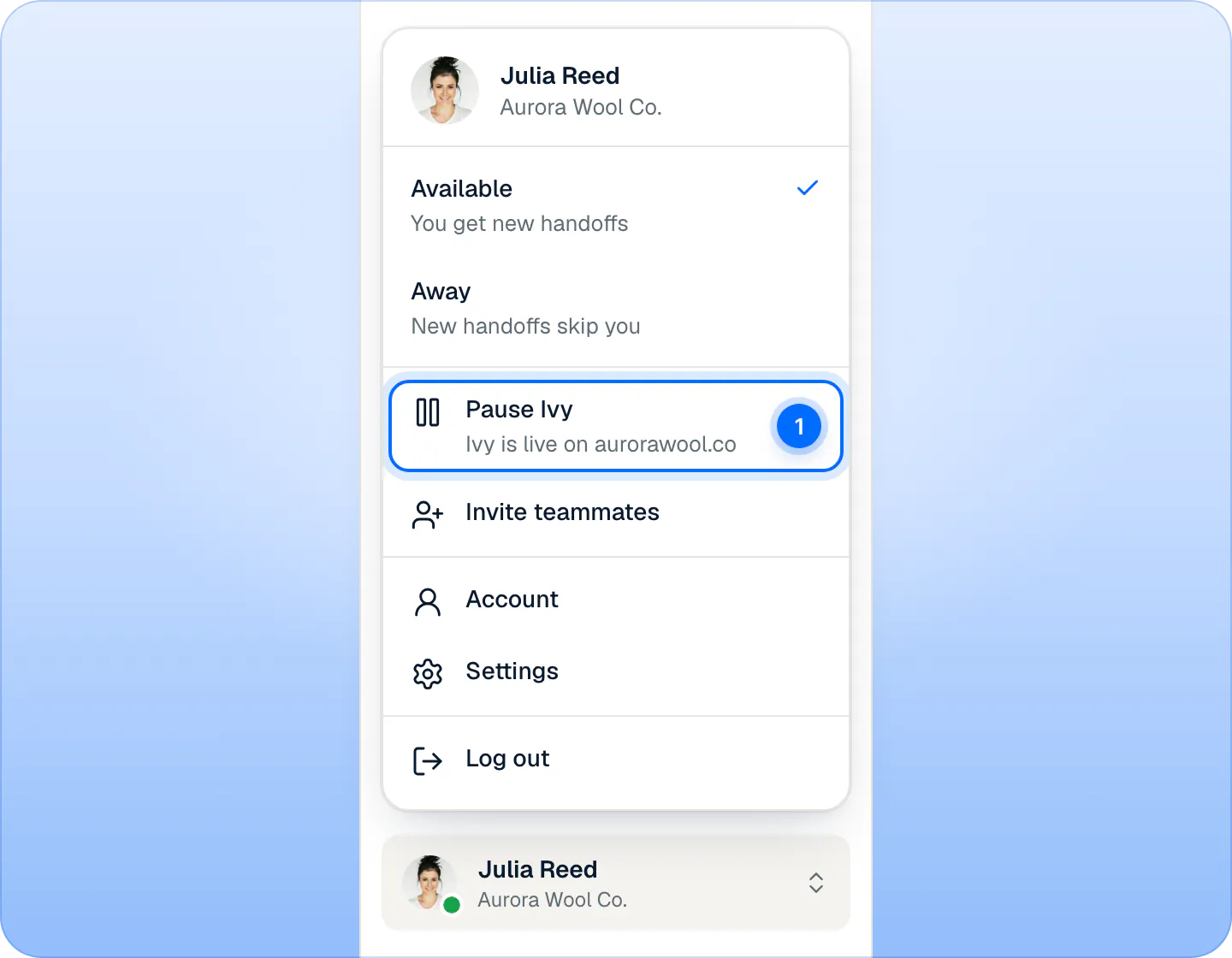
Pause Ivy (1) lives in the account menu at the bottom of the sidebar. Owners and admins see it; agents don't. The Pause Ivy? dialog says what will happen: new shoppers will see a contact form instead of chatting with Ivy, and what they write lands in your Inbox. It also says how many conversations Ivy will finish (the shoppers chatting with her right now), or that conversations your team has open are not affected.
Press Pause Ivy.
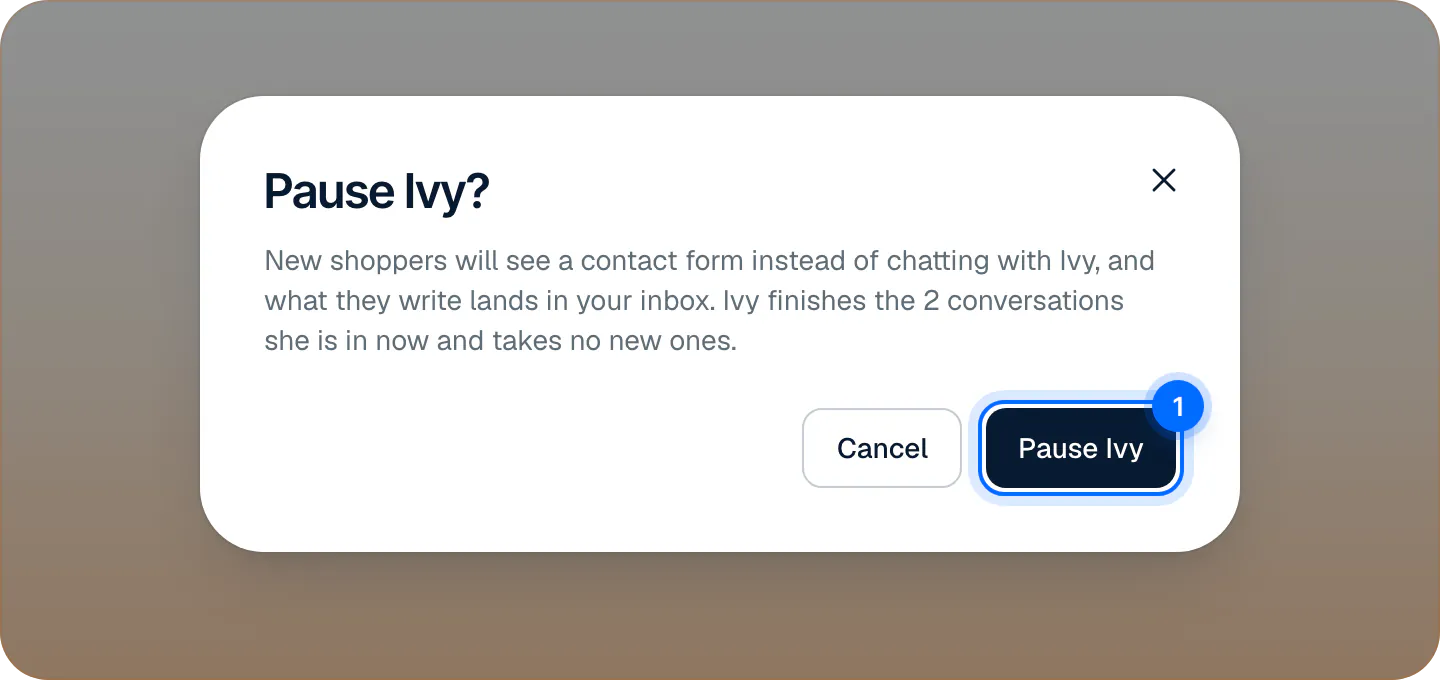
The dialog says how many conversations Ivy will finish. Pause Ivy (1) confirms.
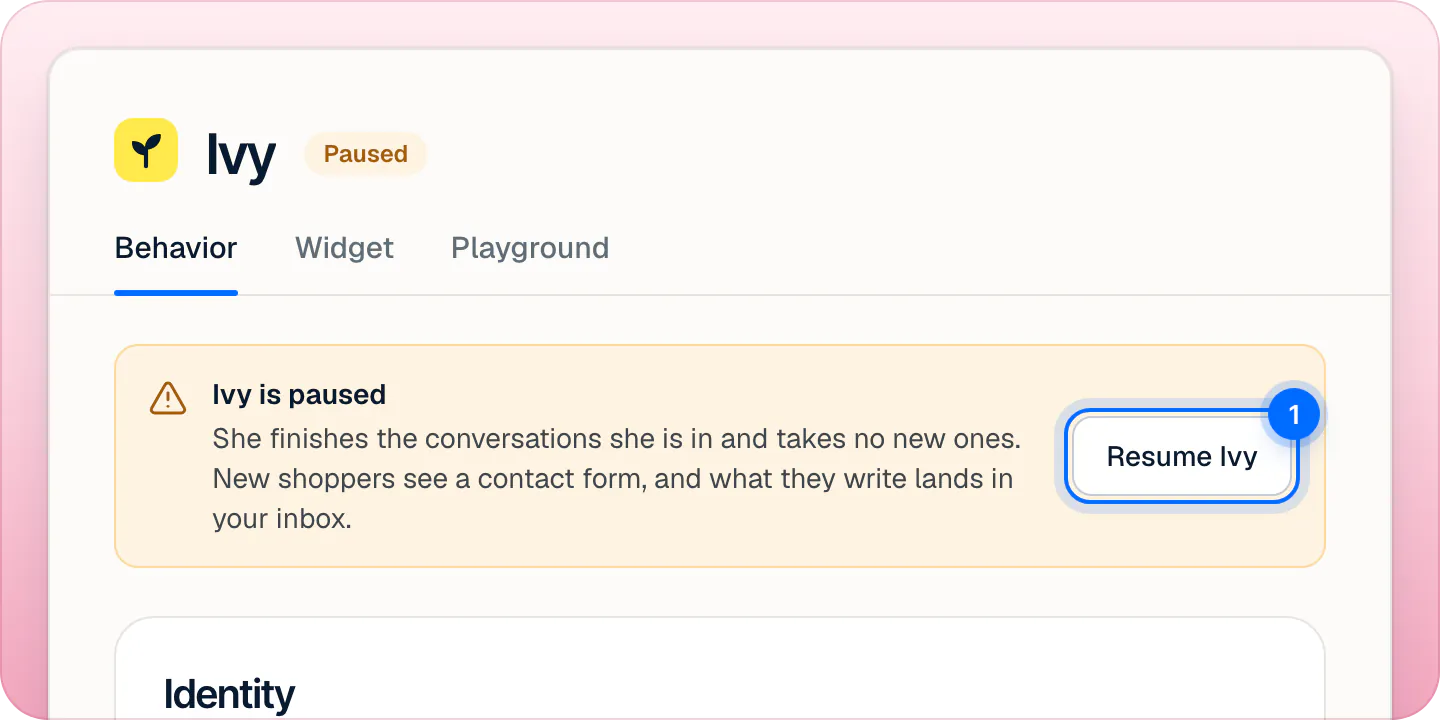
A message confirms Ivy is paused, with Undo. From then on the status chip reads Paused in orange, the dot of the Ivy row in the sidebar turns amber, and a notice Ivy is paused shows on Home, in the Inbox and on Ivy's pages.
Pausing changes nothing else: Shopify stays connected, your settings stay as they are, and you can keep editing Ivy,Behavior and Ivy,Widget. The Playground keeps answering, so you can test while she's paused.
What do shoppers see when Ivy is paused?#
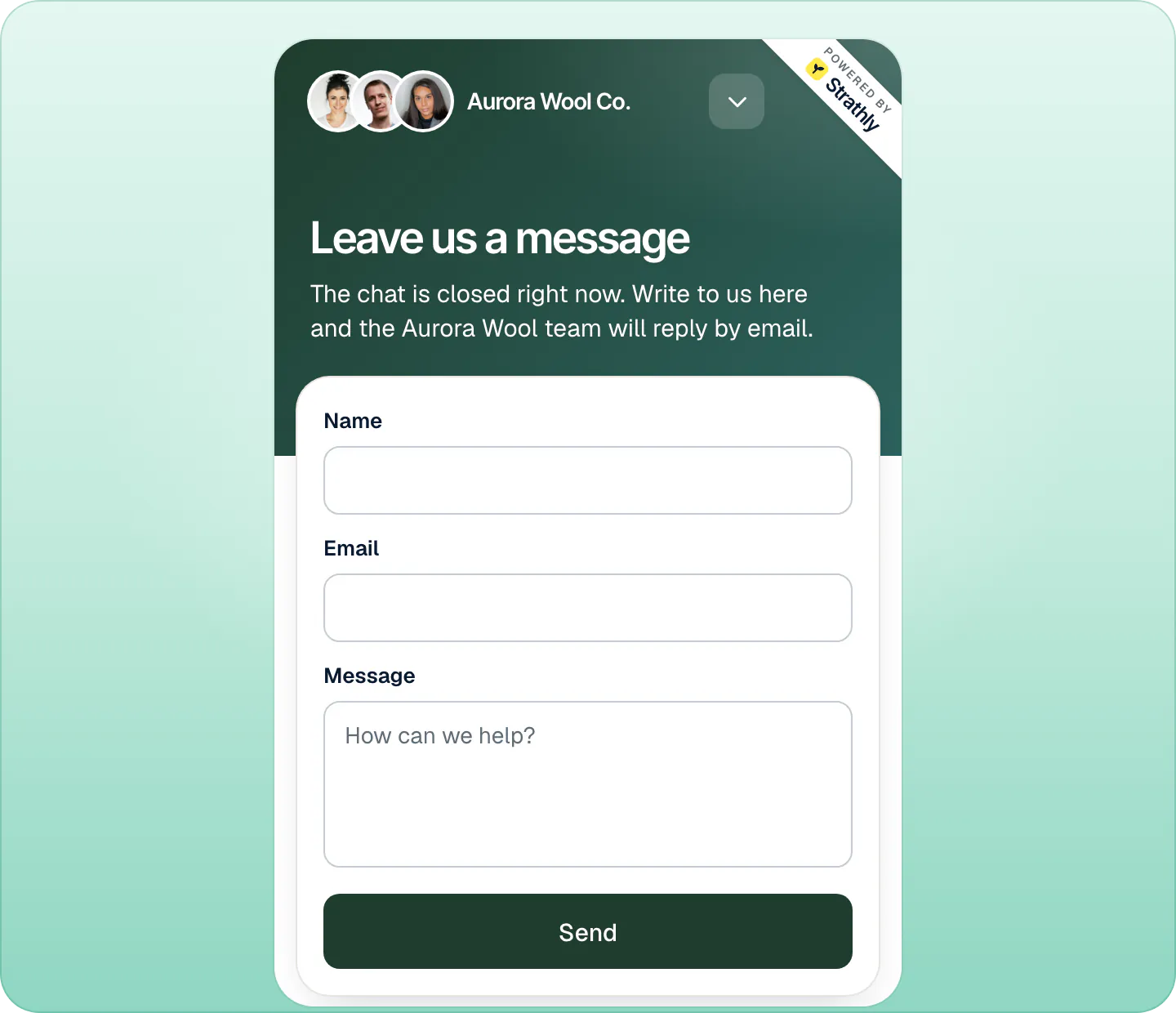
New shoppers open the chat and find a form instead of Ivy: Leave us a message, "The chat is closed right now. Write to us here and the" your store's "team will reply by email.", with Name, Email, Message and Send. After sending, they see Message sent and the address your team will write to. They aren't told why the chat is closed.
Shoppers already chatting carry on. Ivy finishes the conversations she's in. If a shopper writes in a conversation Ivy hasn't answered in yet, they get "Thanks for your message. Our team will reply here as soon as possible." and the conversation goes to your team. A conversation your team already has continues as usual.
For a minute or so after you pause, a store page can still show the usual welcome screen. If a shopper writes there, the chat switches to the form and keeps what they typed in Message.
What your team sees#
Messages from the contact form land in Inbox,Needs you with the reason Contact form while Ivy is paused, and your team is notified as for any handoff. Replies go to the shopper by email, and they find them in the chat when they come back. See Reply to a shopper.
Resume Ivy#
Any of these brings Ivy back at once, with no confirmation:
- Resume Ivy on the Ivy is paused notice (Home, the Inbox or Ivy's pages).
- Resume Ivy in the account menu, where Pause Ivy was.
- Resume Ivy in the iPhone app. You can't pause from the app.
A message confirms Ivy is live again, and new shoppers chat with her again.
Does pausing stop billing?#
No. Pausing Ivy doesn't pause your plan or your free trial: they run as usual. While she's paused, conversations that reach your team through the contact form don't count. Ivy's replies in the conversations she finishes count as usual. See What counts as an Ivy conversation.
To stop paying, change or cancel your plan: see Change your plan or cancel.
Paused because you're out of conversations#
When your plan's conversations and your extra conversations are all used, Ivy behaves as if paused: the chip reads Paused, she finishes the conversations she's in, and new shoppers get the same contact form. The notice says Ivy is paused: you're out of conversations, with a button such as Buy conversations.
Resume Ivy doesn't apply here. Add conversations, or wait for your plan to renew, and she takes new chats again on her own. See Extra conversations and auto top-up.
Paused, out of conversations or offline#
The chip next to Ivy's name tells you which state she is in, and shoppers see something different in each:
| Chip | Why | New shoppers see |
|---|---|---|
| Live | Everything is set and running. | The chat with Ivy |
| Paused | You paused Ivy. | The contact form |
| Paused, with the notice "Ivy is paused: you're out of conversations" | Your conversations and extras are used up. | The contact form |
| Offline | Shopify is disconnected, your trial or plan has lapsed, or setup isn't finished. | Nothing: the chat doesn't load |
Only one state shows at a time, the most serious first. When Ivy reads Offline, see Fix a chat that doesn't show.
How do I hide the chat on one page?#
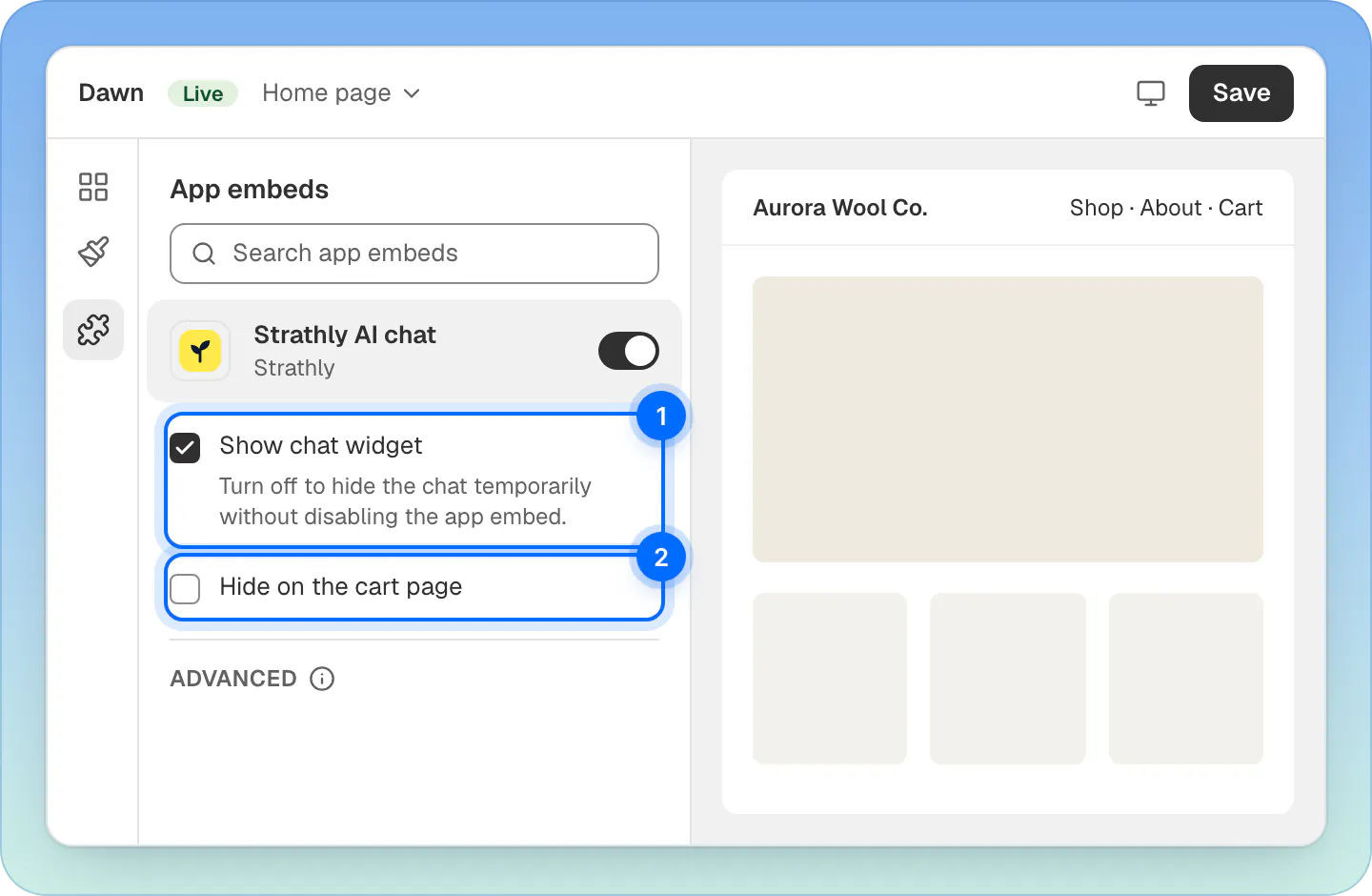
The cart page is the only page you can target. In your Shopify admin:
- Go to Online Store › Themes and press Customize on your theme.
- Open App embeds and click Strathly AI chat to open its settings.
- Tick Hide on the cart page.
- Press Save.
There is no setting to show or hide the chat on other pages, by URL or by template.
Hide the chat everywhere#
To take the chat off your store without removing Strathly, use the same place in your theme editor: untick Show chat widget ("Turn off to hide the chat temporarily without disabling the app embed.") and press Save. Switching off the Strathly AI chat app embed also hides it, but then Strathly treats it as a mistake and tells the owner and admins that Ivy is off your store.
- Shoppers see nothing: no chat button, no contact form.
- In Strathly, Ivy still reads Live: hiding the chat doesn't pause her or change billing.
- Ivy,Widget › Installation says the chat is Hidden in your live theme.
- The setting belongs to the theme you edit. A theme you publish starts with the embed off, and Strathly tells you so (see when you publish a new theme).
To stop using Strathly altogether, see Disconnect or uninstall.
Hide the chat on phones#
In Ivy,Widget, card Options, switch off Show on phones and press Save changes. The chat doesn't load at all on screens up to 480 pixels wide; tablets and computers still get it. Owners and admins can change this. See Make the chat look like your store.
Frequently asked questions
What do shoppers see when Ivy is paused?
A contact form. What they send lands in your Inbox and your team replies by email. Shoppers already chatting with Ivy carry on.
Does pausing stop billing?
No. Your plan or trial keeps running. Contact-form messages aren't counted as conversations.
How do I hide the chat on one page?
Only the cart page can be targeted: tick Hide on the cart page in the Strathly AI chat app embed of your Shopify theme, then press Save.
Can an agent pause Ivy?
No. Only owners and admins see Pause Ivy and Resume Ivy.
Does Ivy pause outside business hours?
No. She keeps answering. Settings,Business hours decides what happens when a shopper needs a person while your team is out.
Does disconnecting Shopify pause Ivy?
Disconnecting takes the chat off your store, but it isn't a pause, and pausing never disconnects Shopify. To take a break, pause Ivy.
Related pages
- Storefront widgetPut the chat on your storeOpen the theme editor from Strathly with the app embed already on, then press Save. No theme code to edit, nothing to paste. Plus a chat link for emails.
- Billing & accountChange your plan or cancelSwitch plans or cancel on Shopify's plan page, opened from Settings › Billing, and see what happens to Ivy, your extra conversations and your data.
- Billing & accountExtra conversations and auto top-upBuy extra conversations from 10 at your plan's rate. They never expire. Set auto top-up, and see what happens if you run out of conversations.