How Strathly works
Strathly puts an AI assistant, Ivy, in a chat on your Shopify store. She answers from your store's own data, recommends products and builds carts, tracks orders, and passes what needs a person to your team. This page explains where her answers come from, what she does on her own, and when your team takes over.
Updated · 7 min read
Product tour:How Strathly works, from install to first sale
On this page
Ivy is the assistant's default name: you can rename her in Ivy,Behavior, card Identity, and the chat and the dashboard then use your name everywhere. To set Strathly up, follow the quickstart.
Where do Ivy's answers come from?#
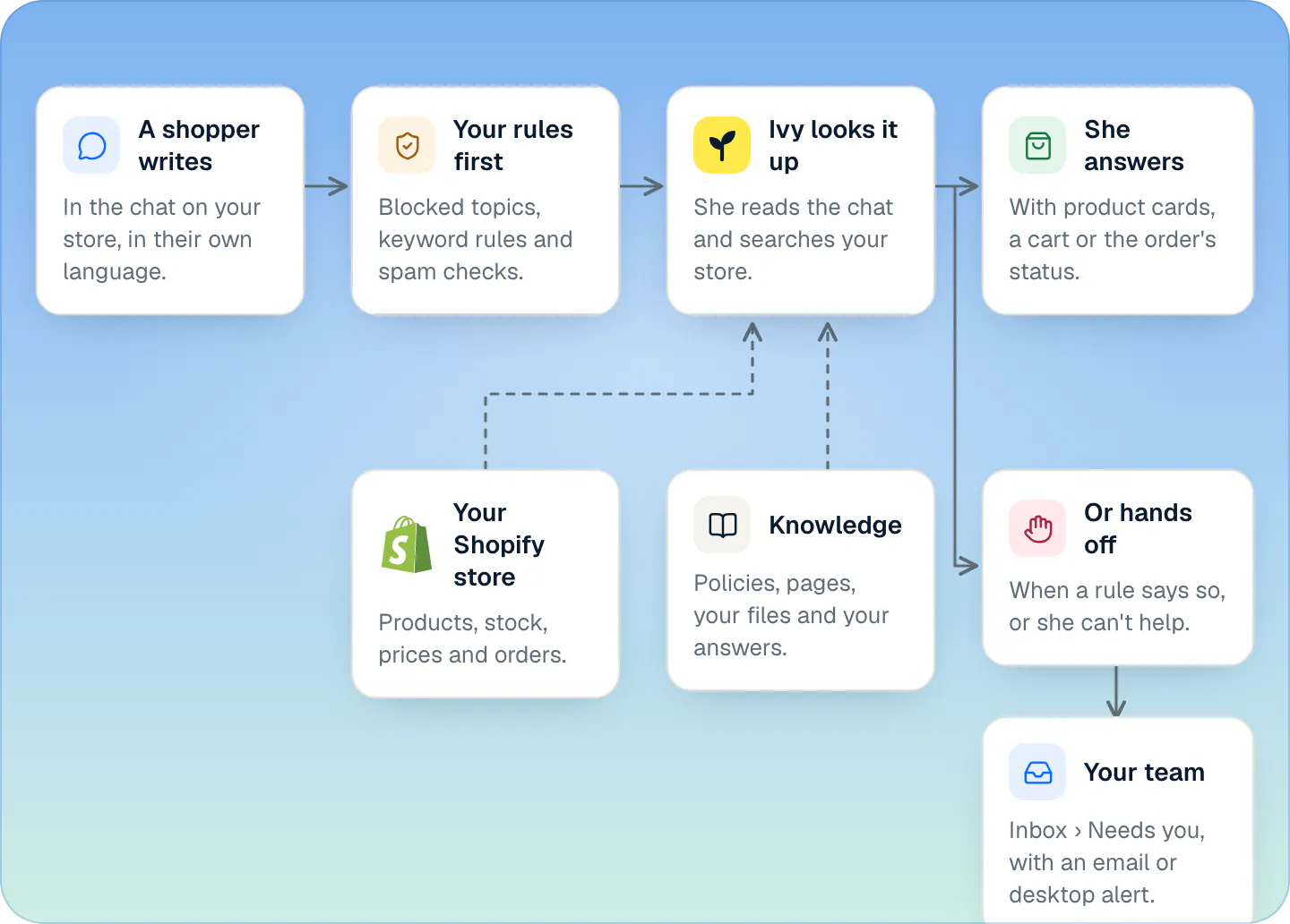
From your store, looked up fresh for every question.
Your Shopify store, read when you connect and kept in sync:
- Your shop's details: name, contact email, domains, currency, time zone, address, languages and the countries you ship to.
- Your products, with variants, prices, compare-at prices, stock, options, images, tags, vendor, type and collections.
- Your shop policies (refund, shipping, privacy, terms and the others you've filled in), a summary of your shipping zones and rates, and every published page.
Products update about 15 seconds after a change in Shopify. Policies, shipping and pages are read again once a day, and whenever you press Sync now in Settings,Integrations. Orders aren't copied: Ivy looks an order up in Shopify when a shopper asks about it.
What you add in Knowledge: files (PDF, Word, text, Markdown or CSV, up to 20 MB), web pages, and answers you teach her. When one of your answers covers a question, it wins over the other sources. See what Ivy knows.
For each question, Ivy searches all of this and reads the few passages and products that match best. She isn't trained on your store, and she doesn't learn from conversations on her own: she gets better when you add or correct something. What she couldn't answer is listed in Knowledge,Unanswered for you to fill in.
What happens when a shopper writes#
- If your team has the conversation, Ivy stays quiet. When it's waiting for the team, she tells the shopper once: I've connected you with our team: someone will reply here shortly.
- If Ivy is paused, or your store is out of conversations, new shoppers get a contact form instead of Ivy, and what they write goes to your team. See pause Ivy or hide the chat.
- Your rules come first. Before Ivy writes anything, Strathly checks the shopper's words against the topics you blocked and your keyword handoff rules, and looks for spam.
- Ivy reads the conversation and looks things up. She reads the last 30 messages, searches your products and knowledge, or looks up an order, and writes her reply in your tone and length.
- The reply comes with what it needs: product cards, a cart with a checkout button, an order card, or a card telling the shopper the team will reply.
- If nothing in your knowledge answered, the question is added to Knowledge,Unanswered.
What can Ivy do on her own?#
| She can | When |
|---|---|
| Answer questions from your store's information | Always |
| Recommend products as cards with Add to cart and View | Always, from active products you haven't switched off for her in Products. At most three recommendations per message. |
| Build a cart with a Checkout button | Always. The cart is tagged so a sale that follows counts as a sale from a conversation. |
| Look up an order and its tracking | When the shopper gives the order number and the email used at checkout. No code needed. |
| Take the shopper's email | When your team will reply by email. |
| Refund, change a shipping address, send a replacement, cancel an order | Only if you switch it on in Ivy,Behavior,Orders (all off by default), Shopify granted the order permissions, the shopper proved who they are (signed in to your store, or a 6-digit code sent to the order's email) and it's their own order, within your limit. Your team can undo it for 10 seconds. |
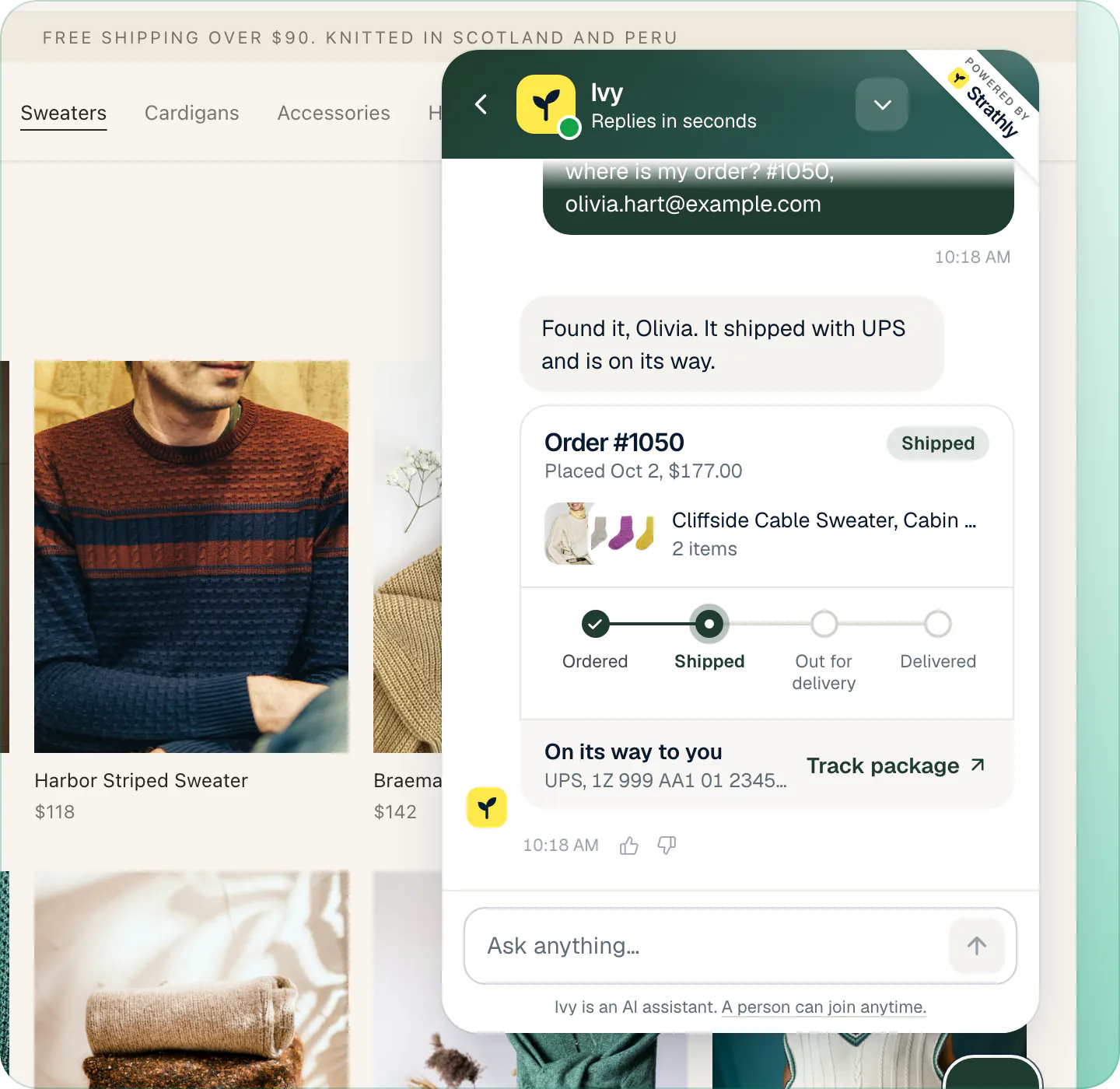
The details are on product recommendations, order status and order actions.
Can Ivy invent prices or discounts?#
No. Prices, stock, delivery times and policies come only from what she looks up. If nothing she finds answers the question, she says she isn't sure and offers your team instead of guessing.
Discount codes follow your setting in Ivy,Behavior, card Discounts: Never offer one (the default), offer the one welcome code you set, or send the question to your team. She never makes a code up. By default she also doesn't compare you with competitors or make health or skin claims; you can allow both in Guardrails.
When does your team step in?#
Ivy hands a conversation to your team when:
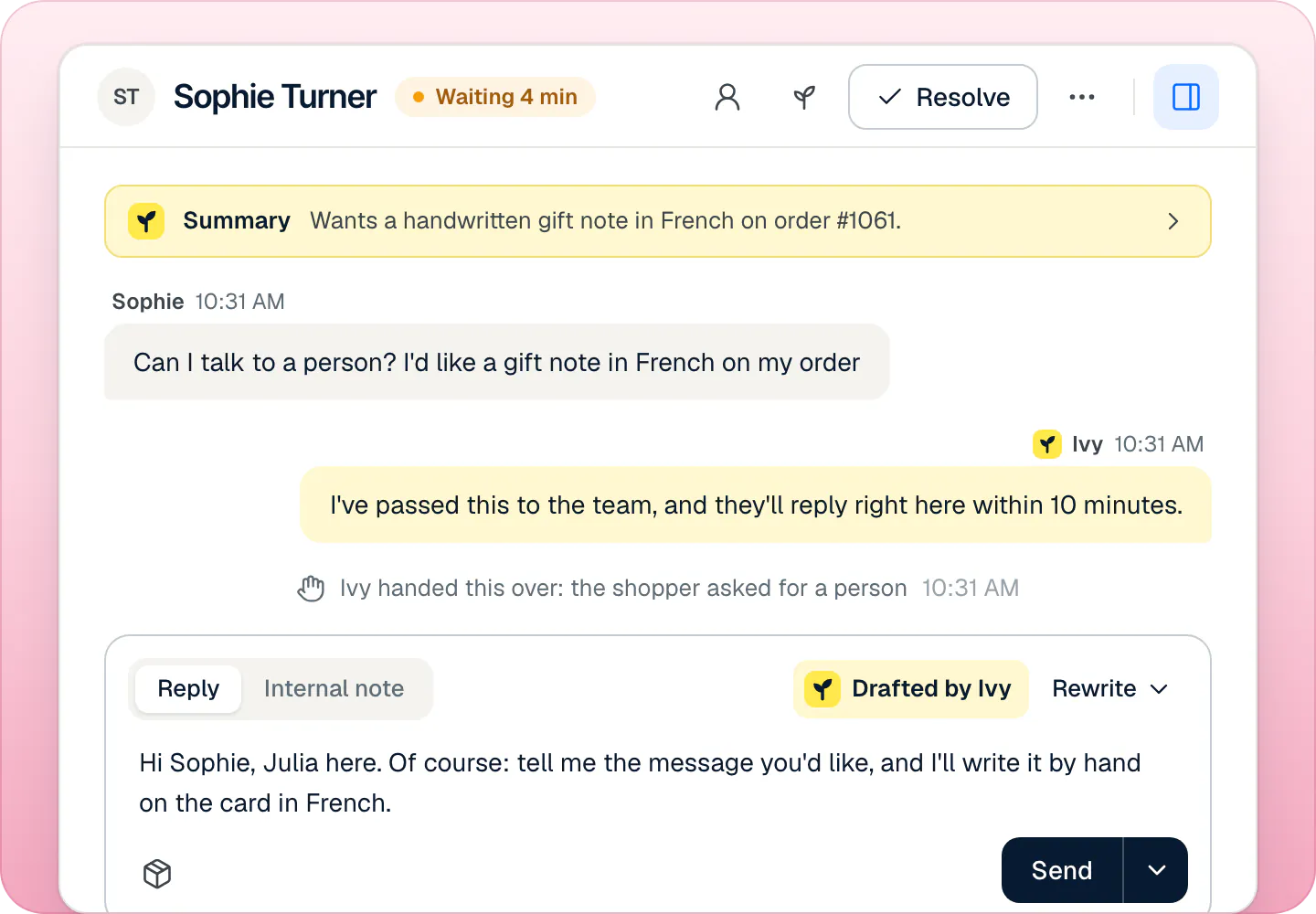
- One of the built-in rules applies: the shopper asks for a person, sounds upset (the conversation is marked urgent), wants a wholesale or bulk order, or Ivy couldn't help after 2 replies (you can set 1 to 3). All four are on by default and hand off to your team. Refund requests go to your team by default too.
- It's something she always passes on: order changes and cancellations she isn't allowed to do, lost packages, exchanges, late returns, and questions nothing in your knowledge answers.
- One of your keyword rules matches, the rules you add with New rule.
What the shopper is told depends on who's around:
- Someone is available, within your business hours: the conversation goes to Inbox,Needs you, and Ivy tells the shopper the team usually replies within your reply target (10 minutes by default).
- Nobody is available: Ivy asks for the shopper's email, and your team replies by email.
- Outside business hours: what you chose in Settings,Business hours: Keep answering (she takes the shopper's email when a person is needed) or Hand off anyway.
Your team gets the conversation with a short summary and a reply Ivy drafted, plus a notification by email, desktop alert or the iPhone app, as each person chose. See handoff rules and the Inbox.
Which language does Ivy reply in?#
The language the shopper writes in, switching if they switch. You can limit her to the languages you choose in Ivy,Behavior; then other languages get your main one. The chat's own buttons and labels follow your storefront's language (or else the shopper's browser) when it's English, Italian, Spanish, French or German, and are in English otherwise. See languages.
What counts toward your plan#
Your plan counts Ivy conversations: one per shopper visit Ivy takes part in, where a visit ends after 24 hours of quiet, plus one more for every 30 replies in a very long chat. Your team's own conversations are unlimited. Spam, protected chats, contact-form messages and Playground tests never count. The exact rules: what counts as a conversation.
What happens to the data#
Ivy's requests to the AI provider are sent with storage turned off, so the provider doesn't keep the conversations. Strathly keeps a conversation for 24 months after its last message, then deletes it. More on privacy and shopper data and on our security page.
Frequently asked questions
Does Ivy learn from my conversations by herself?
No. She answers from what your Shopify store, your files, your web pages and your answers say. What she couldn't answer is listed in Knowledge,Unanswered, so you can teach her.
Will Ivy refund orders without asking me?
Not by default. Every refund request goes to your team unless you switch refunds on in Ivy,Behavior,Orders, and even then only for a verified shopper on their own order, within the limit you set.
Does Ivy know what's in stock?
Yes. She sees the stock of every variant from Shopify, including when only 1 to 3 are left. A cart she builds never includes a sold-out variant.
Do shoppers know they're talking to an AI?
Yes. Under the message box the chat says Ivy is an AI assistant., and A person can join anytime. when handoff is on. See what shoppers see.
Related pages
- Get startedSet up Strathly in five stepsSet up Strathly on Shopify in five steps: connect your store, let Ivy read your catalog and policies, make her yours, test her, then switch on the chat.
- KnowledgeWhat Ivy knows and where it comes fromIvy reads your products, policies, pages and shipping rates from Shopify, plus files, web pages and answers you add. What she reads and when it updates.
- IvyChoose when Ivy hands offThe rules that bring in your team (a person, an upset shopper, wholesale, your own keywords) and what each does: hand off, ask for an email or notify you.