How the Inbox works
The Inbox is where your team answers the shoppers Ivy hands over, follows the chats she is having and finds every past conversation. This page explains what each view holds, how to read a row and a conversation, and when a waiting shopper counts as late.
Updated · 9 min read
Feature overview:AI chatbot with human handoff
On this page
Open it from Inbox in the sidebar. The badge on it is the number of shoppers who need you right now. Every conversation comes from the chat on your store: there are no emails or social messages in the Inbox.
Ivy is the assistant's default name. If you rename her in Ivy,Behavior, the Inbox uses her new name in its views and labels.
The views#
The views are the tabs at the top of the Inbox. Needs you opens first.
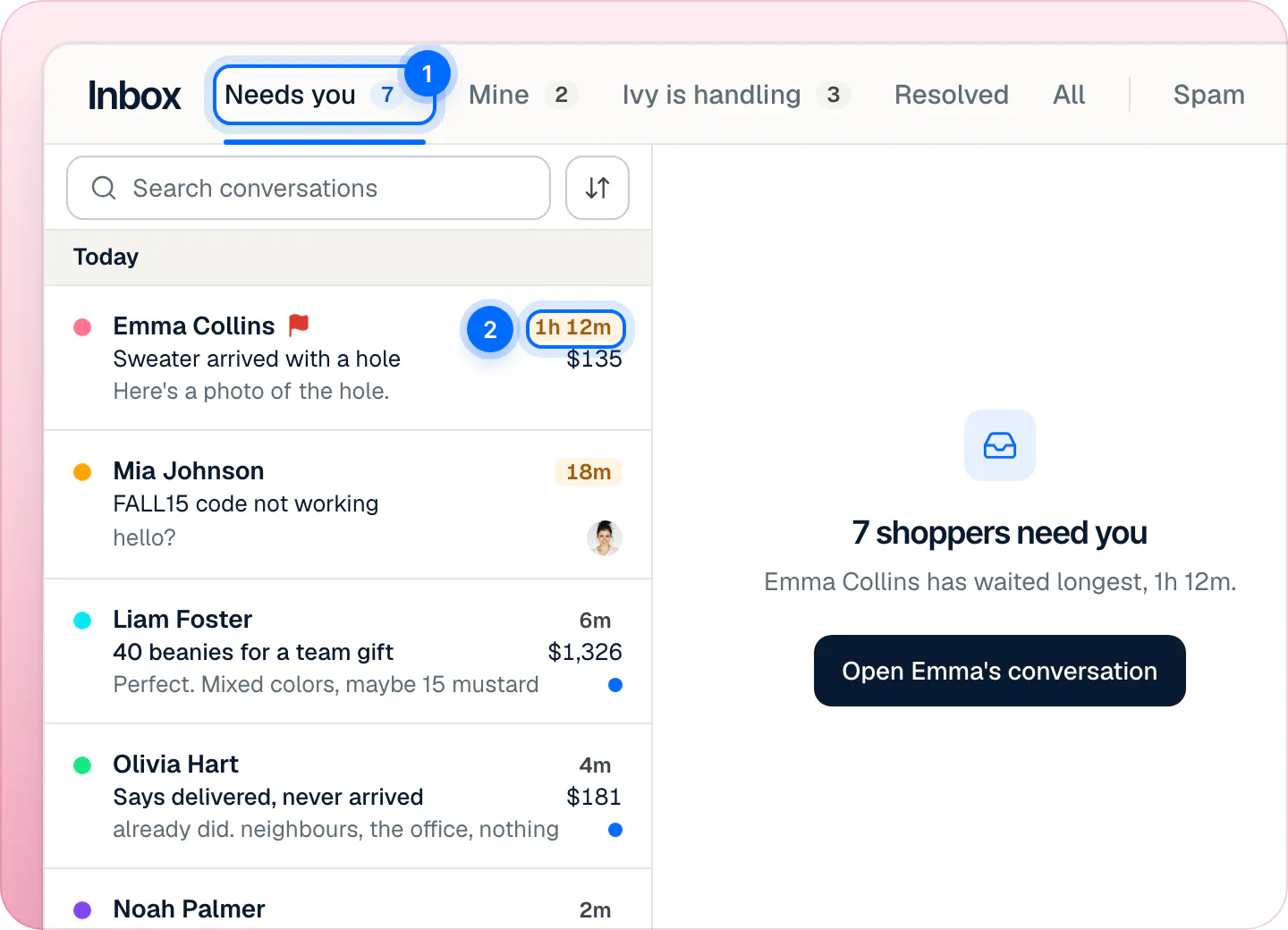
| View | What it holds | Count beside it |
|---|---|---|
| Needs you | Shoppers waiting on a person who are unassigned or assigned to you, the longest wait first. | Yes |
| Mine | Conversations assigned to you that are still open, whether the shopper waits on you or you wait on the shopper. | Yes |
| Ivy is handling | Conversations Ivy is answering. When she isn't at work, the tab shows her state instead, for example "Ivy is offline". | Yes |
| Resolved | Closed conversations, Ivy's and your team's. | No |
| All | Every conversation except Spam, newest first. | No |
| Spam | Conversations marked as spam, and anything new from a blocked shopper: see block a spammer. | Marked in the last 30 days |
A view with nothing in it shows no count. When an action moves the open conversation out of the view (you resolve it, or return it to Ivy), its row stays in place, dimmed, with a label such as Resolved or With Ivy, until you open another one.
What is Needs you?#
Needs you is the list of shoppers who wait for a person and who are either unassigned or yours. A shopper waiting on another teammate is in their Needs you, not in yours. It is the same number as the Inbox badge in the sidebar, the Needs you card on Home and the badge of the iPhone app.
With nothing open, the right side of the Inbox says how many shoppers need you and who has waited longest, with a button to open that conversation.
Read a row#
A row reads, from left to right and top to bottom:
- The dot on the left: why Ivy handed the conversation off (a refund request, a wholesale order, a lost package…) while the shopper waits, otherwise the conversation's topic. Hover it to read the label.
- The name: the shopper's name, else their email, else "Visitor in" their city, else "Visitor". A red flag means the conversation is marked as urgent.
- Top right: how long the shopper has waited ("4m", "1h 12m", "2d"), orange once it passes your reply target. A pulsing Live means Ivy is chatting with a shopper who is on your store right now. Otherwise, the time of the last message.
- The subject Ivy gave the conversation, and on the right the money at stake: the order, or a cart (in green once the shopper bought).
- The preview: while the shopper waits, their own last words; otherwise the last message, starting with "Ivy:", "You:" or a teammate's first name.
- The assignee's photo when someone has the conversation, and a blue dot while it is unread.
Unread is shared by the whole team: when one teammate opens a conversation, it is read for everyone.
The status chip#
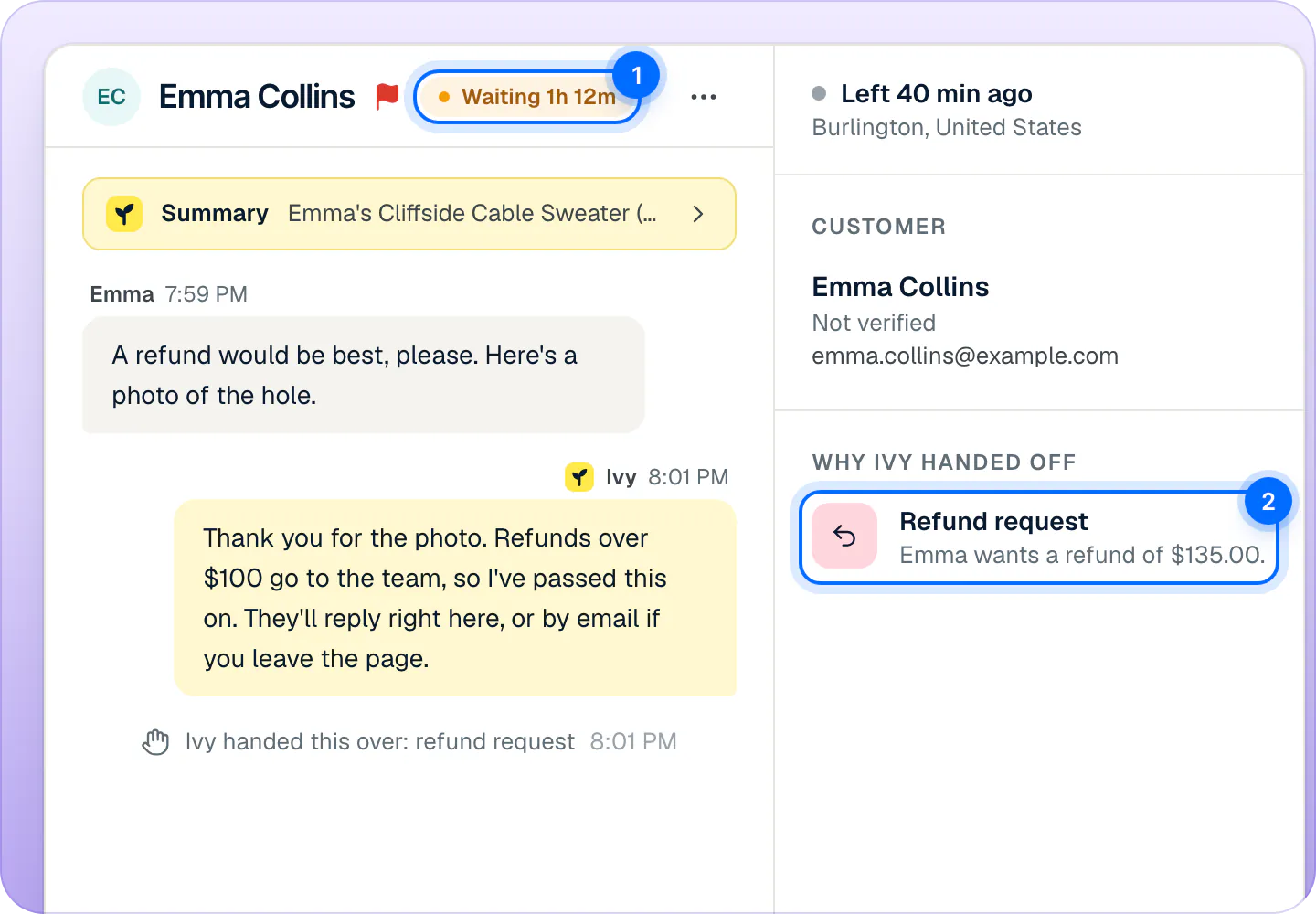
Next to the shopper's name, at the top of an open conversation, one chip says where the conversation stands and whose turn it is.
| Chip | Meaning |
|---|---|
| Ivy is handling | Ivy is answering. In a narrow window it reads With Ivy. |
| Waiting 14m | The shopper waits on you. Under a minute it reads Waiting on you. Orange past the reply target. |
| Waiting on Marco, 12m | The shopper waits on a teammate, or on the team when nobody has it. |
| Waiting on Emma / Waiting on the shopper | A teammate replied last, so it is the shopper's turn. The chip names the shopper when it knows their name. |
| Resolved by Ivy / Resolved | Closed, by Ivy or by your team. |
| Spam | Marked as spam. |
When is a chat late?#
A shopper's wait starts when Ivy hands the conversation to your team, or when the shopper writes again in a conversation your team has. It stops when a teammate sends a reply, resolves the conversation, returns it to Ivy or marks it as spam. Assigning, taking over and internal notes don't stop it.
Past your reply target the wait turns orange: on the row, on the status chip, on Home and on the iPhone app. The reply target is 10 minutes unless an admin changes it in Settings,Team, under Handoffs (5, 10, 15 or 30 minutes, or 1 hour). It is also what Ivy promises the shopper when she hands off: "they'll reply right here within 10 minutes".
The clock doesn't pause outside your business hours: a shopper who wrote at night is late in the morning. See hours, holidays and who's available for what Ivy does when your team is away.
Search, filter and sort#
- Search conversations (press / to jump to it) searches the open view: shoppers' names and emails, the subject, Ivy's summary and the text of every message. An order number is found when it appears in that text. When nothing matches in the open view, the Inbox says how many matches the other views have, with a link to each.
- Topic: shows one or more topics: Returns & refunds, Order status, Product question, Sizing, Shipping, Discounts, Wholesale, Care, Other. Ivy sets each conversation's topic.
- Assignee: Anyone, Me, Unassigned, or one teammate.
- Sort (the arrows beside the search): Waiting longest first in Needs you (Oldest first in the other views) or Newest first.
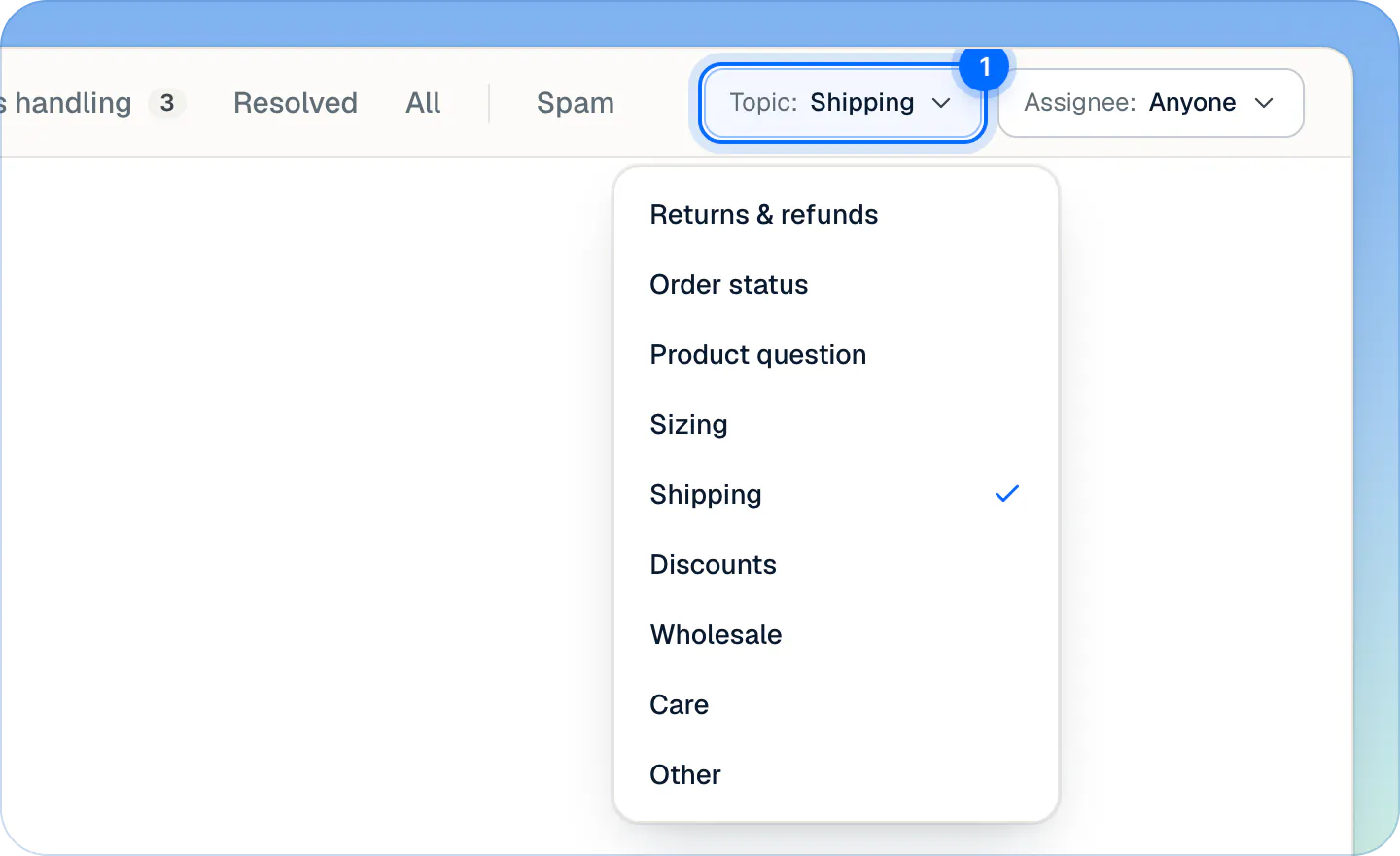
A filter that is on turns blue. The search and the filters stay when you switch views; the sort is kept per view until you reload the page. Lists load 100 conversations at a time, and more as you scroll.
Inside a conversation#
Open a row to see the conversation:
- Ivy's summary, a yellow bar at the top of the thread. Click it to read it in full.
- The thread: the shopper on the left, Ivy on the right in yellow, teammates on the right in blue, internal notes in amber. Quiet lines in the middle say what happened: "Ivy handed this over: refund request", "Marco assigned this to you", "Looked up order #1047 in Shopify".
- The composer under the thread, to reply to the shopper or write an internal note.
- The details column on the right (press ] to show or hide it): whether the shopper is online, Customer (their email, location, orders and lifetime spend from Shopify), Why Ivy handed off, the Order or Open cart, Previous orders, What Ivy used for her answers, and Details (when it started, the page it came from, the language and the topic).
The order and what you can do with it are in orders next to the conversation. The buttons in the header (take over, assign, resolve, return to Ivy) are in assign and resolve conversations.
Can I see Ivy's conversations too?#
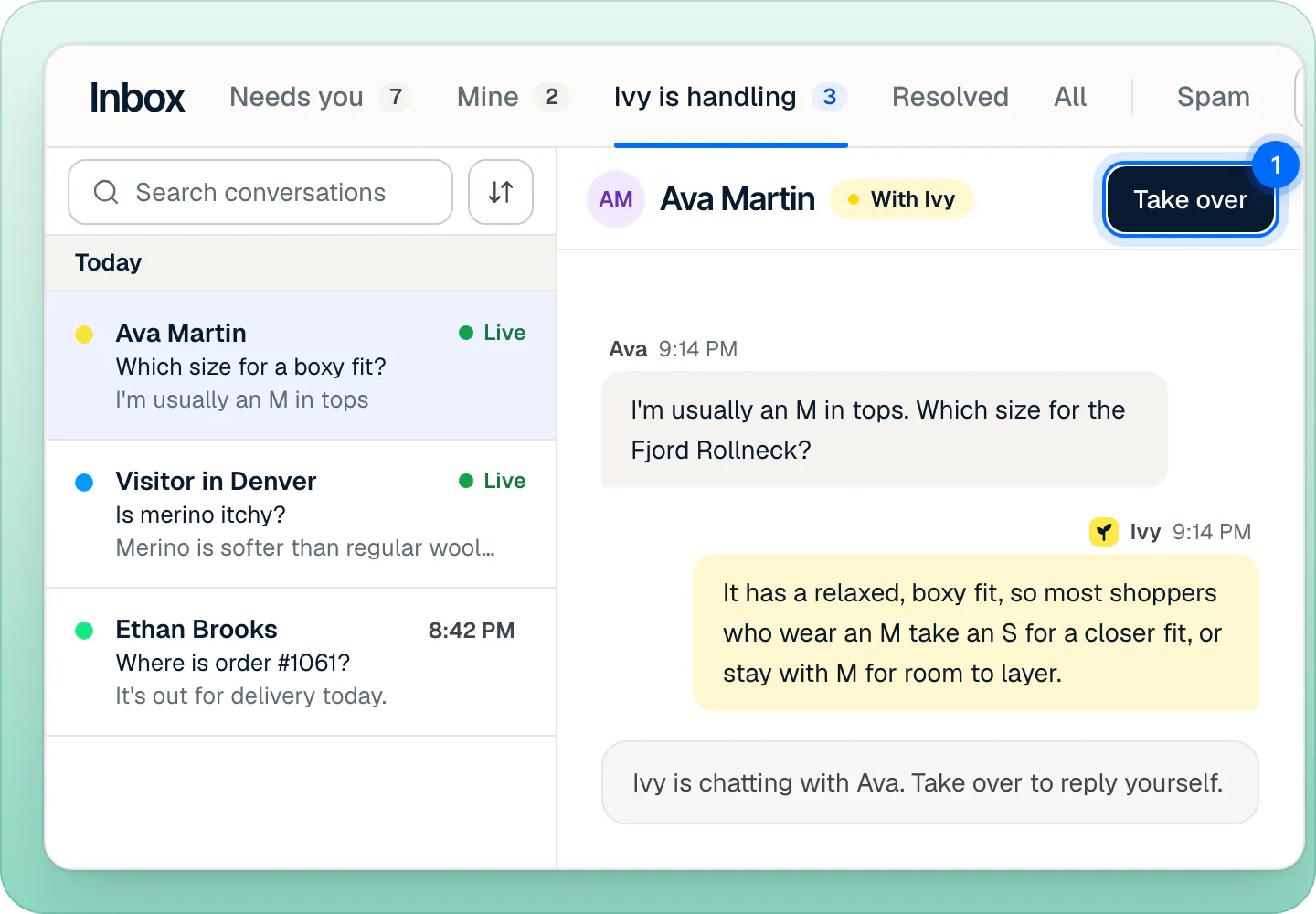
Yes. Ivy is handling lists the conversations she is answering, with Live on those where the shopper is on your store right now. Open one to read along as she types. Press Take over at any time: the conversation becomes yours and Ivy stops replying to that shopper.
How conversations move#
- A shopper opens the chat on your store: the conversation is in Ivy is handling.
- When Ivy can't solve it, or one of your handoff rules applies, she hands it off: it lands in Needs you and the wait clock starts.
- A teammate takes it, is assigned it, or replies: it is theirs, in their Mine.
- Someone resolves it: it moves to Resolved.
A conversation Ivy is handling resolves itself after 24 hours without a message, as Resolved by Ivy. Conversations with your team are never resolved on their own. If a shopper writes again in a resolved conversation, it goes back to Ivy, unassigned (or to your team while Ivy is paused or out of conversations).
Keyboard shortcuts#
Shortcuts work when you aren't typing in a field.
| Key | Does |
|---|---|
| J / K | Next / previous conversation |
| E | Resolve the open conversation, or reopen it when it is resolved |
| A | Assign the open conversation to you |
| R | Write a reply |
| N | Write an internal note |
| ] | Show or hide the details |
| / | Search |
| Esc | Close the conversation |
On a phone or a narrow window#
In a narrow browser window the Inbox shows one pane at a time: the list, then the conversation with a back arrow. The details open as a panel from the side, and rating Ivy's answers needs a wider window. For a phone, the iPhone app is on the App Store.
Frequently asked questions
Is unread per person?
No. Unread is shared by the whole team: once anyone opens a conversation, it is read for everyone. Use Mark as unread in the conversation's … menu to flag it for the team again.
Can agents use the Inbox?
Yes. Agents see every conversation and can reply, assign, resolve, mark spam and run order actions. What they don't see is teaching Ivy or correcting her answers, which admins and the owner do. See roles.
Are emails or social messages in the Inbox?
No. Conversations come from the chat on your store. When a shopper has left the chat, your reply can reach them by email if they gave one: see reply to a shopper.
Why is the count beside a view one less than the rows?
A conversation you just moved out of the view keeps its row, dimmed, until you open another one. The count already leaves it out.
Related pages
- InboxReply to a shopperSend Ivy's drafted reply or rewrite it, reach shoppers who left by email when they gave one, and leave internal notes that @mention a teammate.
- InboxAssign and resolve conversationsTake a conversation, assign it to a teammate, return it to Ivy, resolve or reopen it, and choose how new handoffs are assigned. Most actions can be undone.
- InboxOrders next to the conversationSee the shopper's order and past orders next to the chat, then refund, replace, change the address or cancel from the Inbox, with 10 seconds to undo.