Orders next to the conversation
When a conversation is about an order, the Inbox shows that order beside the thread, read live from Shopify, with the shopper's previous orders. From there you can refund it, send a replacement, change the shipping address or cancel it, without opening Shopify.
Updated · 9 min read
Feature overview:AI chatbot with human handoff
On this page
- Which orders appear?
- Read the order block
- Refund an order
- Send a replacement
- Change the shipping address
- Cancel an order
- Reply and act in one step
- Can I undo an action?
- Orders not verified in this chat
- What if Shopify refuses the action?
- Actions Ivy takes on her own
- From the iPhone app
- Frequently asked questions
Which orders appear?#
In the details column on the right of a conversation (press ] if it is hidden):
- Order #… is the order the conversation is about: the one Ivy showed the shopper in the chat, else the order at stake in the handoff, else the order in Ivy's drafted reply.
- Previous orders lists up to 5 other orders of the shopper, each with its number, date, first item and total. Each one opens in your Shopify admin.
When the conversation is about a cart rather than an order, the column shows Open cart with the items and the total instead.
The order is read live from Shopify each time you open the conversation. If Shopify can't be reached, the column shows what Strathly already knows about the order, and the buttons are off with "Shopify can't be reached for this order right now".
Read the order block#
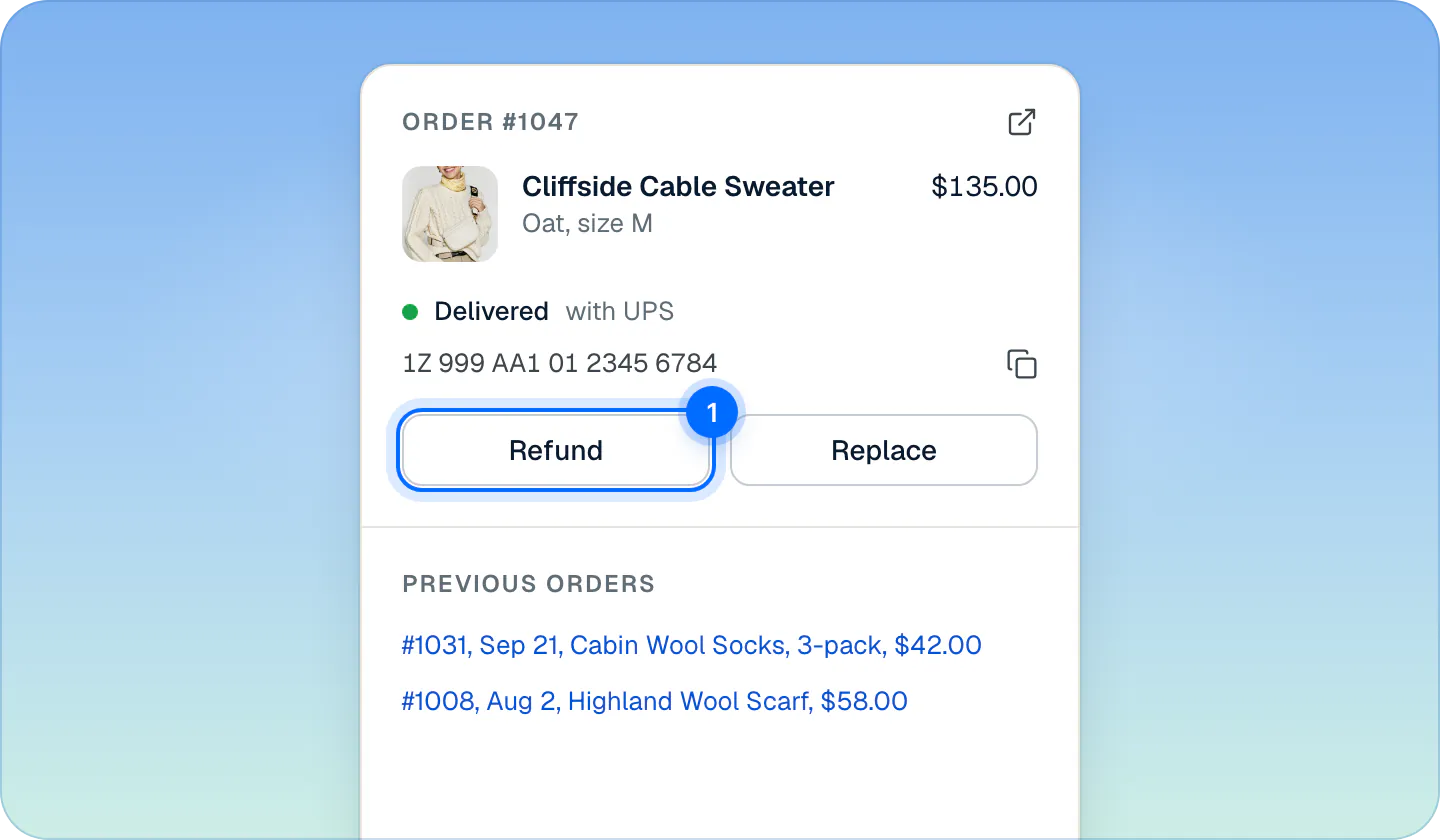
- The items: photo, name, variant and price.
- The status: Delivered, Out for delivery, On its way, Not shipped yet or Cancelled, with the carrier. After an action from Strathly it reads Refunded, Replaced or Cancelled.
- The tracking number, with a button to copy it.
- The shipping address, for an order that hasn't shipped.
- The arrow at the top right opens the order in your Shopify admin.
- Not verified in this chat means Ivy didn't match the order to this shopper with the order number and email. Check it before you act: see orders not verified in this chat.
Under it are the buttons for what the order allows:
| Order | Buttons |
|---|---|
| Not shipped yet | Refund, Edit address, Cancel order |
| Shipped or delivered | Refund, Replace |
| Refunded, replaced or cancelled from Strathly | None: the block says what was done, by whom and when |
While an action is waiting to go out, the buttons are hidden too. An agent on a store that keeps refunds to admins sees Refund and Cancel order grayed out, with "Ask an admin to refund this order" (or "…to cancel this order") when they point at them.
Refund an order#
Press Refund.
Amount starts at what Shopify can still refund on the order, usually the full order. Lower it for a partial refund.
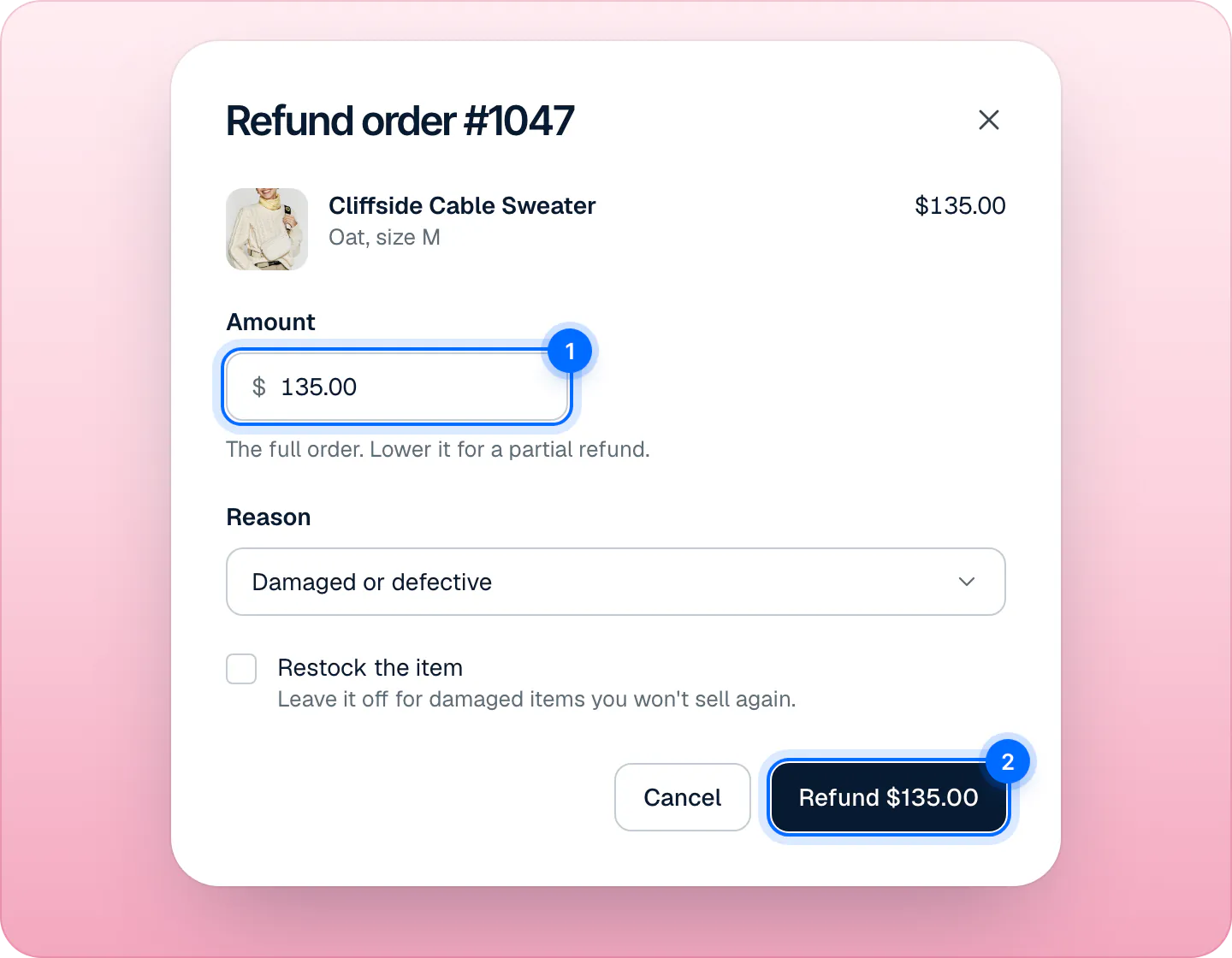
The amount starts at the full order; lower it for a partial refund. Pick a Reason: Damaged or defective, Wrong size, Lost in transit or Other.
Tick Restock the item if you'll sell it again. Leave it off for damaged items.
Press Refund $135.00 (the button shows your amount).
After the 10-second hold, Shopify refunds the shopper on the payment method they used and emails them the receipt. The amount can't be more than Shopify can still refund on the order: Strathly checks it with Shopify when you press the button, and again right before the refund goes out. Pressing the button twice, or a connection that sends it again, starts one refund only.
Send a replacement#
For an order that has shipped. Press Replace, check the items, then Create replacement. Strathly creates a new $0.00 order in Shopify with the same items and free shipping, for the same customer and address, tagged Strathly replacement and noted as a replacement for the original order. You ship it as any other order.
An order can be replaced once. Creating the replacement emails nothing to the shopper, so tell them in your reply. When the replacement is fulfilled, Shopify sends them its shipping confirmation with the tracking link, as for any order.
Change the shipping address#
For an order that hasn't shipped yet:
- Press Edit address. The dialog shows the Current address, and a form filled in with it, field by field.
- Change what's needed. The form follows the country, as Shopify's checkout does: Country, First name and Last name, the street and apartment lines, then the city, the postal code and the province or state where the country has them (in Italy the postal code comes before the city, in the US the state and ZIP after it). If the shopper asked for a new address and Ivy wrote it down, the form is already filled in with it: check each field.
- Press Update address.
The street, the city and the country are required, and the postal code where the country has one. Names and phone left empty stay as they are on the order.
Cancel an order#
For an order that hasn't shipped yet. Press Cancel order: the dialog says exactly what Shopify will refund, for example "Shopify refunds Noah $160.00 in full to how they paid, puts the items back in stock and emails Noah. A cancelled order can't be reopened." Press Cancel order to confirm, or Keep order.
A cancellation is final: nothing else can be done on the order afterwards. Cancelling is only in the order block, never attached to a reply.
Reply and act in one step#
When Ivy prepared the action in her draft (a refund, a replacement or a new address), the composer shows it under the text, checked: for example Refund $135.00 on #1047. The Send button becomes Send and refund, Send and replace or Send and update address, and its menu adds the same with …and resolve.
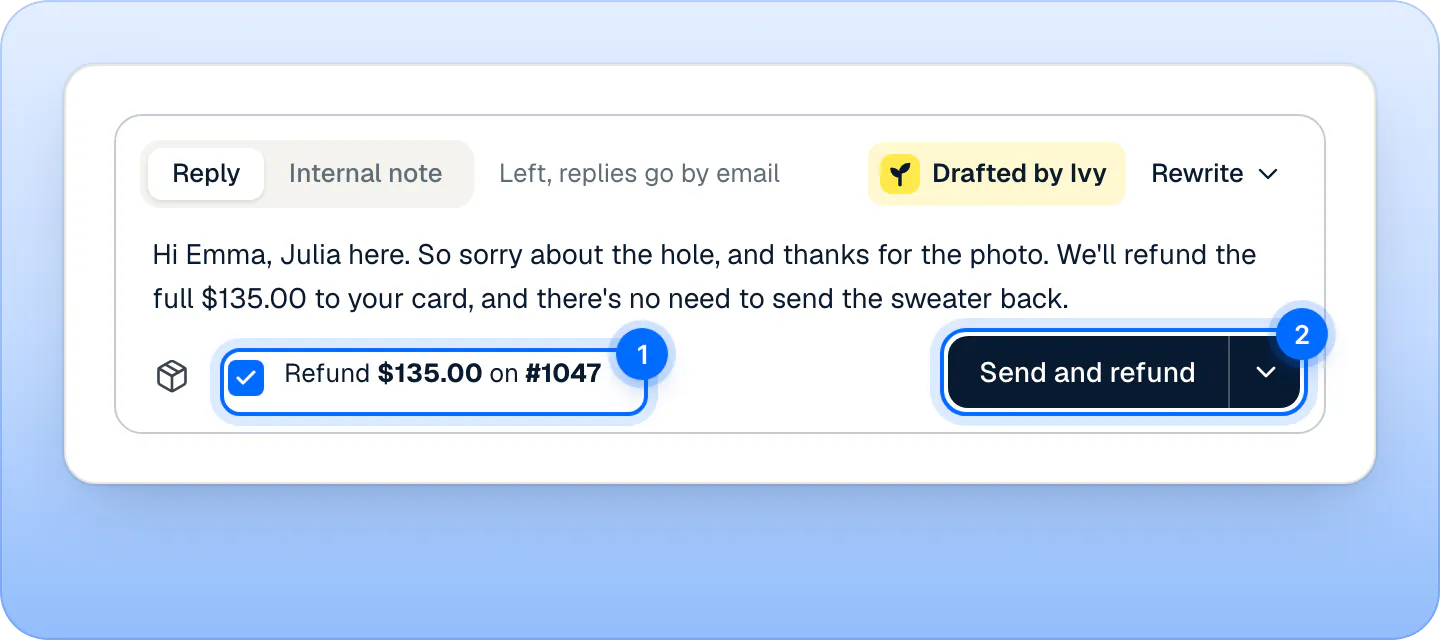
Press it, and your reply and the action wait 10 seconds together. For a new address, the Edit address form opens first, filled in with the address Ivy wrote down: check the fields and press Send and update address. If the action goes through, the reply goes out; if Shopify refuses it, the reply isn't sent either, and a message says why. A refund sent this way uses Ivy's amount, without restocking.
Uncheck the action to send a plain reply. If your text then still says the refund is done, Strathly warns you before you send: see reply to a shopper.
Can I undo an action?#
Yes, for 10 seconds. Every action, yours or Ivy's, waits that long before it reaches Shopify. Stop it with Undo:
- in the toast ("Refunding $135.00 on #1047"),
- in the order block ("Refunding $135.00 in 7s"),
- or, for a reply with an action, in the composer: your reply comes back into the box.
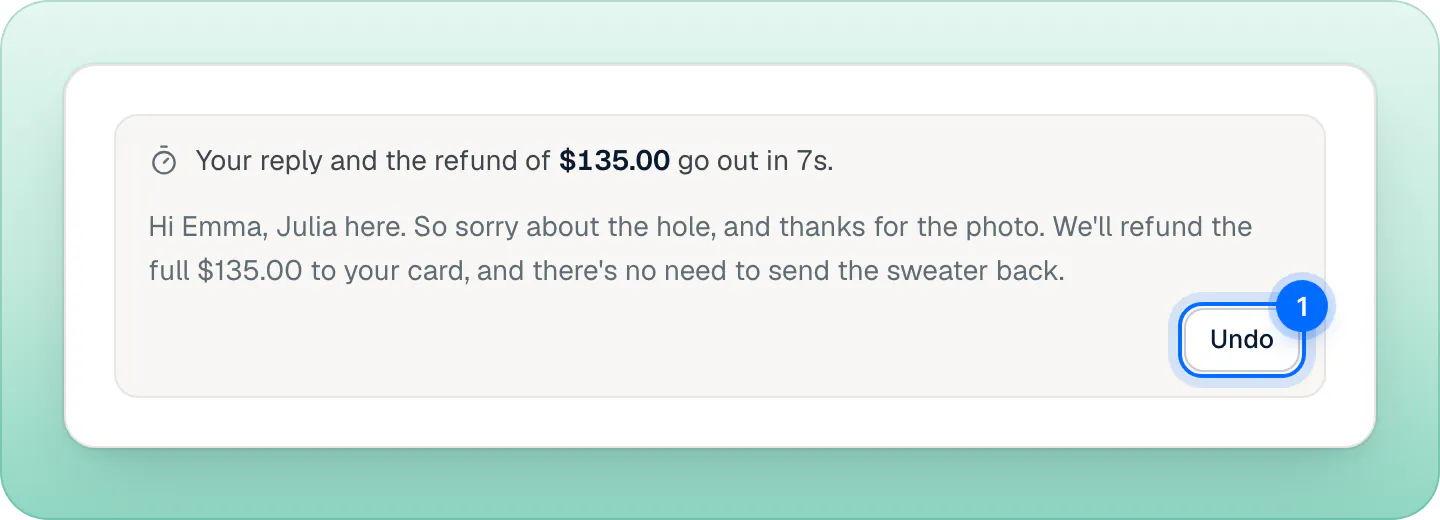
After 10 seconds, Undo says "It already went out": Shopify can't reverse a refund or reopen a cancelled order. Only one action can be on its way per order at a time.
Orders not verified in this chat#
If Ivy didn't confirm that the order belongs to this shopper (with the order number and email, a sign-in to your store, or a purchase from her cart), every order dialog says so and asks you to tick I checked: #1047 is Emma's order. Check the name and email on the order first. Without the tick, the action doesn't run.
What if Shopify refuses the action?#
Nothing changes on the order, and a message says why:
| Message | What to do |
|---|---|
| "#1052 has shipped, so it can't be cancelled" (or "its address can't change") | Refund or replace it instead. |
| "#1047 was already replaced" / "was already cancelled" | Nothing more to do on that order. |
| "That is more than Shopify can refund on this order" | Lower the amount. |
| "Check the address: the street, the city, the country and the postal code" | Fix the fields the form highlights. |
| "Only the owner and admins can refund orders on this store" | Ask an admin, or ask them to let agents refund in Settings,Team. |
| "An action on #1047 is already on its way" | Wait 10 seconds for the first one. |
| "Shopify is disconnected, so nothing can change on the order" | Connect your store again. |
| Needs new Shopify permissions on the buttons | An owner or admin presses Reconnect under the buttons (or Update permissions in Settings,Integrations) and approves the new permissions in Shopify. Your store stays connected. See fix a missing permission. |
Actions Ivy takes on her own#
By default Ivy never changes an order: she prepares the action in her draft, and a teammate sends it. An admin can let her refund, replace, change addresses or cancel by herself, within limits, in Ivy,Behavior: see let Ivy work on orders.
When she does, her action waits the same 10 seconds, and the order block shows "Ivy is refunding $35.00 in 7s" with Undo. Stopping it makes the conversation yours, so you can tell the shopper. Once it is done, everyone on the team gets a notification such as "Ivy refunded $35.00 on #1052".
From the iPhone app#
In the iPhone app, you can send an action Ivy prepared, with Send and refund, Send and replace or Send and update address (the address form opens first, as on the web), and stop it within the same 10 seconds. The order buttons and cancelling are on the web only.
Frequently asked questions
Can agents refund?
Only if your store allows it. Refunds and cancellations are for the owner and admins until an owner or admin switches on Agents can refund and cancel orders in Settings,Team. Agents can always send a replacement or change an address.
Can I refund part of an order?
Yes. In the refund dialog, lower the Amount before you press the button.
Can I refund an order twice?
Once an order is refunded, replaced or cancelled from Strathly, its buttons go away. For a second refund, use your Shopify admin. Strathly never starts a second refund while one is waiting to go out, and never refunds more than Shopify can still refund.
Does Strathly change orders without asking?
No. Nothing happens to an order until a teammate presses a button, unless an admin allowed Ivy to act on her own in Ivy,Behavior. Every action waits 10 seconds and can be stopped.
Related pages
- IvyLet Ivy work on ordersOrder changes go to your team by default. Let Ivy refund, cancel, replace or change an address herself for verified shoppers, within limits you set.
- IvyAnswer “Where is my order?”Ivy looks up an order from its number and checkout email and shows its status, items, carrier and tracking link. Nothing to set up, no login for shoppers.
- Shopify & dataShopify permissions, one by oneWhy Strathly needs each Shopify permission: products, pages, policies, shipping, markets, orders, customers, languages, themes. It never edits products, prices or themes.