How the chat is protected from abuse
A chat open to anyone attracts bots, spammers and people who try to use Ivy for something else. Strathly guards against them on its own: nothing to set up, and a real shopper is never shut out with an error. This page explains each protection, what the shopper and your team see, and what it means for your plan.
Updated · 6 min read
Feature overview:Shopify chat widget
On this page
The rule behind every protection: when one fires, the chat looks normal to the shopper, Ivy stops answering, the conversation goes to your team or quietly to Spam, and it doesn't count toward your conversations. A person always decides; a real shopper caught by mistake still gets an answer from your team.
What's checked when a chat starts#
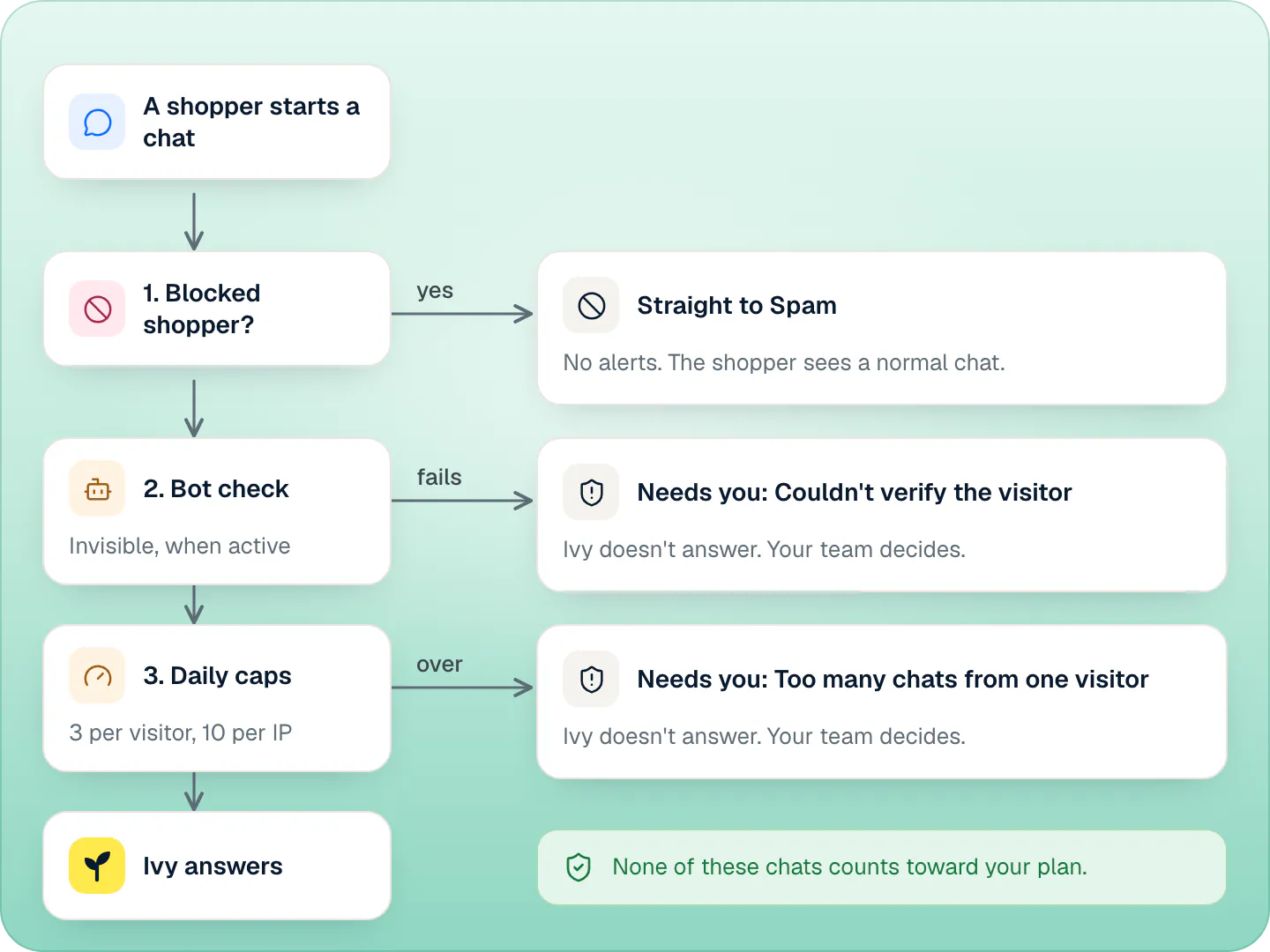
The checks run when a shopper starts a new conversation with Ivy (including New conversation, or coming back after a day), in this order:
| Check | It stops a chat when | The shopper sees | Your team sees |
|---|---|---|---|
| Blocked shopper | Your team marked this shopper as spam: their browser until someone presses Not spam, their IP address for 30 days | A normal chat, with the line that the team will reply | Nothing new: the conversation goes straight to the Spam view, with no alerts |
| Bot check (when active) | The browser fails Cloudflare's invisible check | A normal chat, waiting for the team | The conversation in Needs you, reason Couldn't verify the visitor |
| Visitor cap | The 4th new conversation from one visitor within 24 hours | A normal chat, waiting for the team | The conversation in Needs you, reason Too many chats from one visitor |
| IP cap | The 11th new conversation from one IP address within 24 hours | The same | The same |
The caps count per store, over 24 hours from the first chat. Past them, the conversation still opens and reaches your team, with the usual notifications; only Ivy steps aside.
When the bot check is active on Strathly's side, it is invisible: no puzzle, no box to tick. It runs in a hidden frame on Strathly's own address, not on your store's page, and only once the shopper opens the chat. If Cloudflare is slow or unreachable, the chat goes through: a shopper is never held back by an outage. When it isn't active, the other checks still run.
Ivy's own spam check#
Ivy also watches the conversation. She flags:
- gibberish and floods of messages, or the same message sent 4 times in a row;
- advertising and link spam, like SEO services, crypto or "partnership" offers;
- harassment, threats and abusive content;
- attempts to make her break her rules or reveal her instructions;
- someone using her as a general chatbot after she declined twice;
- a topic you blocked in Ivy,Behavior,Guardrails, pushed for the 3rd time in a row.
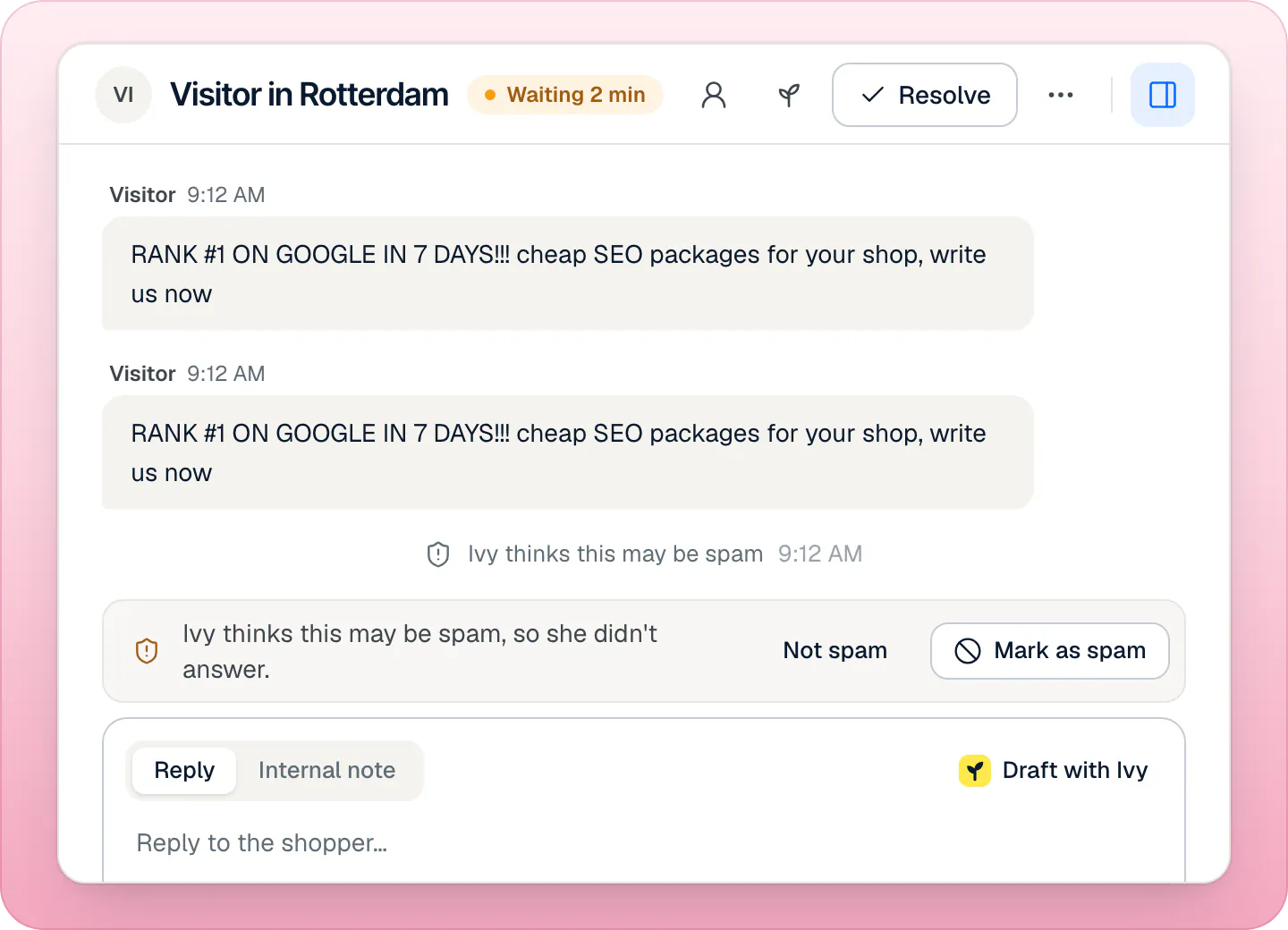
When she flags a conversation, the shopper sees one neutral line, I'll pass this to the team., and the conversation goes to Needs you with the reason Looks like spam. It doesn't go to the Spam view: a teammate decides.
She doesn't flag upset or rude customers with a real problem, short or misspelled messages, any language, a single off-topic question, complaints, competitor names or "are you a bot?". When in doubt, she doesn't flag.
Do spam chats count against my plan?#
No. A conversation stopped by a block, the bot check or a cap, or flagged by Ivy, doesn't count toward your conversations while the protection is on, even if your team replies in it. If a teammate presses Not spam, it is counted by the usual rules again. How the rest is counted: what counts as a conversation.
What you can do#
Everything happens in the Inbox, and any teammate can do it, agents included:
- Mark as spam: blocks the shopper (their browser until Not spam, their IP address for 30 days), resolves the conversation and moves it to Spam. Undo reverses it.
- Not spam: lifts the blocks and Ivy's suspicion.
- Reply: a suspected conversation is still a conversation. Once a teammate replies, the spam line goes away.
- Return to Ivy: hands the conversation back to Ivy, which lifts every protection on it.
There's no list of blocked shoppers: to unblock someone, open their conversation in the Spam view and press Not spam. The steps are on mark spam and block a visitor.
Will real shoppers get blocked?#
Only if your team marks them as spam. The caps don't block anyone: past them, the conversation goes to your team instead of Ivy. Shoppers who share an IP address, like an office or a café, share the 10-a-day IP cap, so the 11th of them reaches your team rather than Ivy, still without an error.
Speed limits#
One protection does show a message. A shopper who sends messages very fast, more than 12 a minute or 200 a day, sees You're sending messages too quickly. Please wait a moment. above the message box, and can carry on a moment later.
Blocked topics aren't spam#
Topics you list in Ivy,Behavior,Guardrails get a polite refusal: That's outside what I can help with here. I'm happy to help with our products, sizing, shipping or your order. Only pushing the same topic a third time in a row is treated as spam. See Ivy's behavior.
Privacy#
IP addresses are stored only as a keyed fingerprint that can't be turned back into the address, and the raw addresses are cleared within hours. The bot check runs in a frame on Strathly's domain, so Cloudflare's script never runs on your store's page. More on privacy and shopper data.
Frequently asked questions
What happens past the daily cap?
The conversation still opens. Ivy doesn't answer it, and your team gets it in Needs you as Too many chats from one visitor, with the usual notifications. It doesn't count toward your conversations.
Can I change the caps or turn off the bot check?
No. The caps, the bot check and the 30-day IP block have no settings: they work the same way for every store.
How do I unblock someone?
Open their conversation in the Inbox's Spam view and press Not spam. That lifts both the browser block and the IP block.
Does a blocked shopper know they're blocked?
No. Their chat looks normal, and what they write goes quietly to Spam, without alerting your team.
Related pages
- InboxBlock a spammerMark a chat as spam to block the visitor, and their IP address for 30 days. Anything new from them goes quietly to Spam. Not spam lifts the block.
- Billing & accountWhat counts as an Ivy conversationOnly Ivy's conversations count, one per shopper visit within 24 hours. Your team's replies are unlimited; spam and Playground tests never count.
- IvySet Ivy's name, tone and rulesRename Ivy, set her tone and reply length, choose her languages, decide what she does with discount codes and topics she won't discuss, then save.