Install Strathly and connect Shopify
You can start Strathly from Shopify, or create your account on strathly.com first. Either way Strathly is installed in Shopify, where you pick your store, and both lead to the same setup, the same product and the same billing through Shopify; what differs is the first few screens. This page explains both ways, what connecting your store creates, and what to do if the connection fails.
Updated · 6 min read
Integration overview:Shopify integration
On this page
Whichever way you start, you end up in the same setup: Ivy reads your store, you make her yours, test her and go live. The steps after connecting are in the quickstart. The person who connects the store becomes its Owner in Strathly; invite the rest of your team afterwards from Settings,Team.
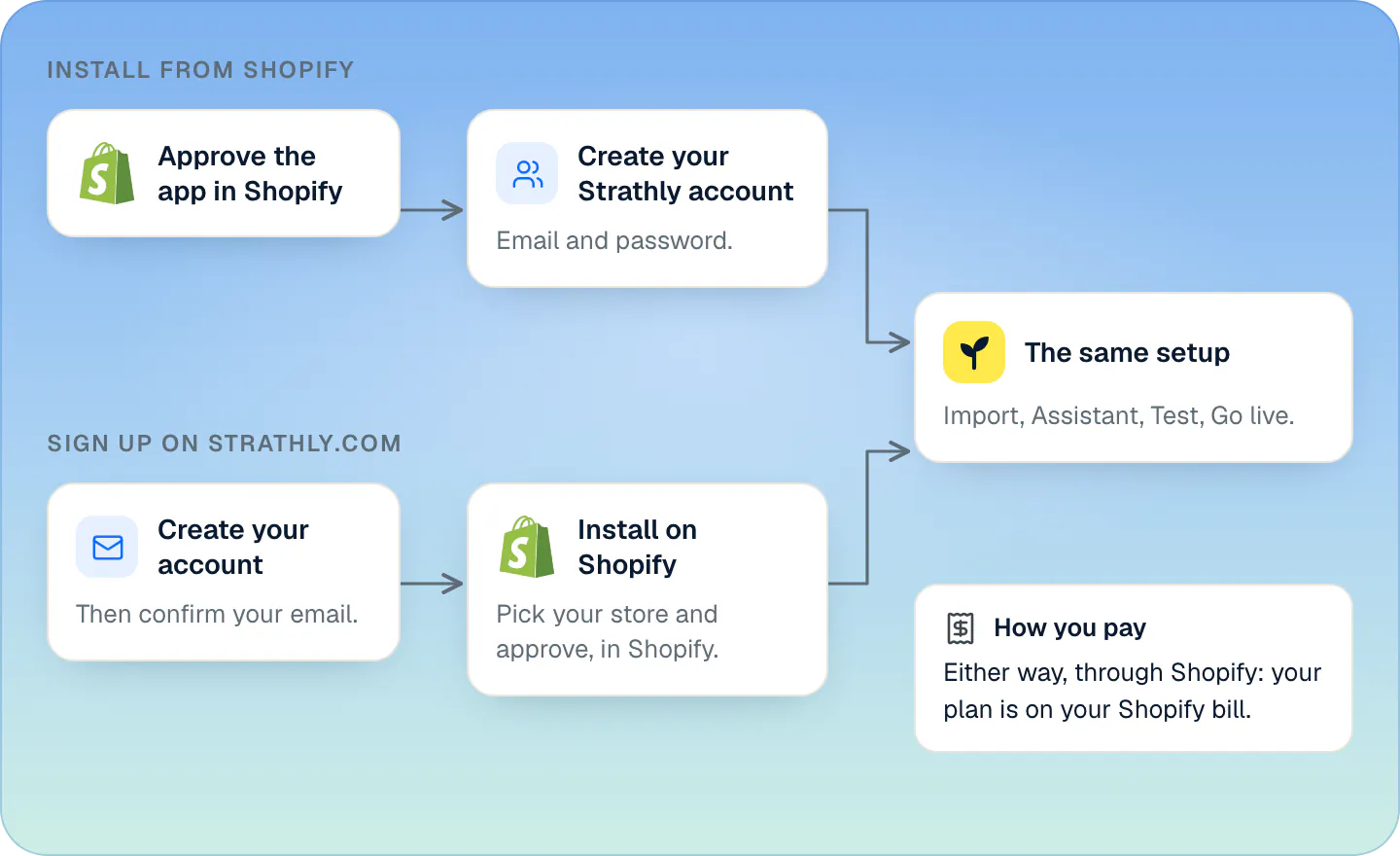
Install from Shopify or sign up on strathly.com: which one?#
| From Shopify | Sign up on strathly.com | |
|---|---|---|
| Where it starts | Shopify's install screen for Strathly | The sign-up page on strathly.com |
| Your account | You create your Strathly login once your store is connected, or log in if you have one | Email and password first |
| Connecting the store | Done right after Shopify's screen, before your account | The Connect step sends you to Shopify, where you pick your store and approve the app |
| How you pay | Through Shopify: the plan is on your Shopify bill, monthly | The same: through Shopify, once your store is connected |
Both come with the same plans, the same prices (in US dollars, excluding VAT and sales tax, which Shopify adds where they apply) and the same 14-day free trial. See plans and the free trial and our pricing.
Strathly is on the Shopify App Store: installing from the listing is the Install from Shopify way below.

Install from Shopify#
- On Shopify's install screen, review the permissions Strathly asks for and approve the app. Strathly connects your store and starts reading it right away.
- Create your Strathly account. The page names your store, and your shop's email and owner's name are filled in: change them if you like. Add a password of at least 10 characters, tick the two boxes accepting the Terms and press Create account. If you already have an account, press Log in instead.
- Your account becomes the store's Owner and you land on Ivy is reading your store, step 2 of setup. Carry on from Let Ivy read your store.
If you close the tab before creating your account, open Strathly again from your Shopify admin's apps list: you come back to the same page. A store nobody creates an account for within 30 days is removed, and the app uninstalled; install it again to start over.
You don't see a "check your inbox" page on this path, but we still send you a confirmation email. Open its link before you go live: going live needs a confirmed email.
Later, opening Strathly from your Shopify admin's apps list takes you straight in if you're signed in: to Home once setup is done.
Sign up on strathly.com, then install on Shopify#
Create your account with your work email, your full name and a password, and confirm your email from the link we send you. The link works for 24 hours.
Setup opens on Connect your store. Press Install on Shopify. To see first what Strathly will be able to read (your products and stock, your store's pages and policies, your orders, and the customers who chat), press See what Ivy reads.
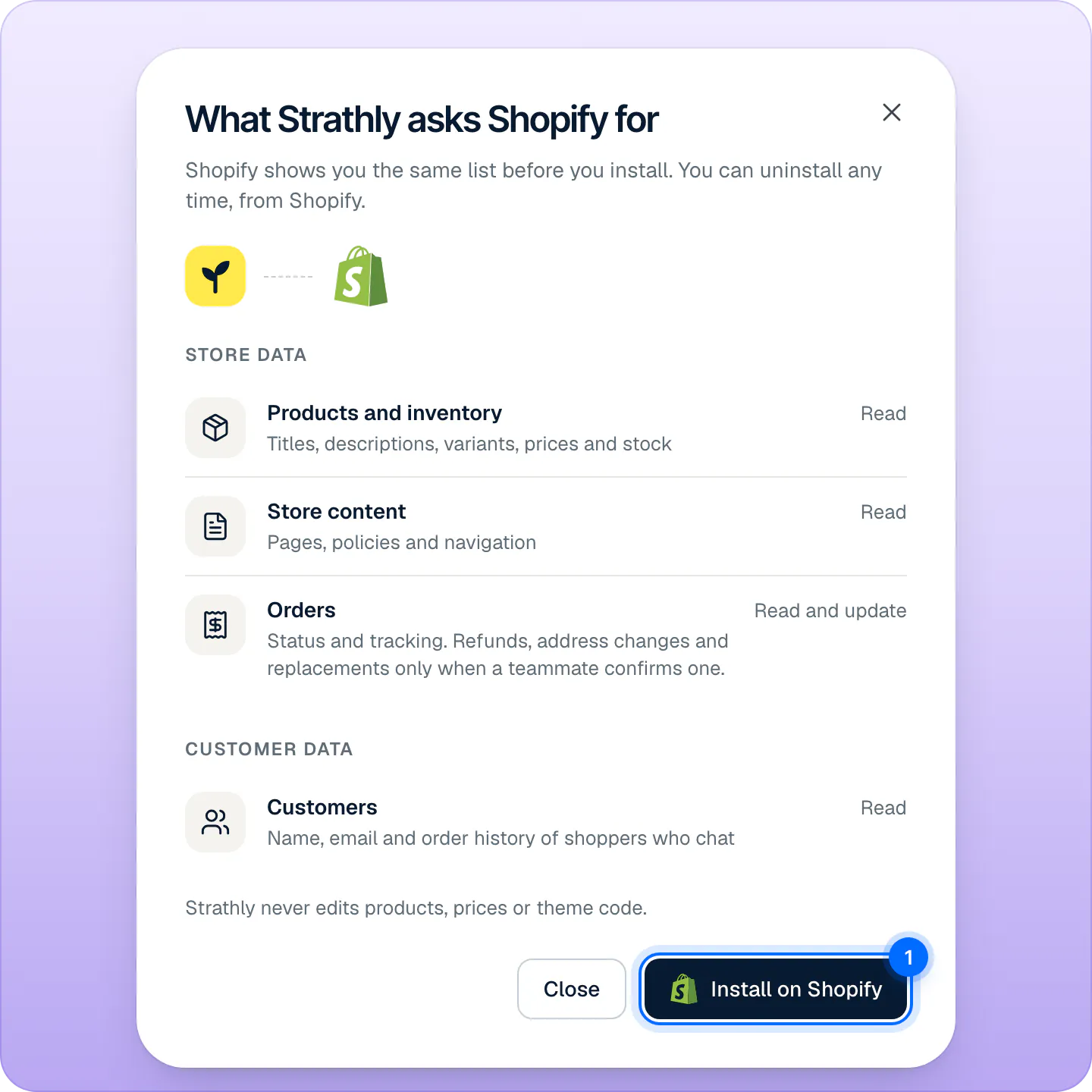
What Strathly will read, before Shopify's own screen. Press Install on Shopify to continue in Shopify. Shopify opens in the same tab. Sign in if it asks, pick your store, review the permissions and approve the app.
Shopify brings you back to Strathly on the Import step.
Already installed Strathly in Shopify? Open it from your Shopify admin's apps list while you're signed in, and you land back in setup, connected. Check again on the Connect step does the same once the install is done. Every permission, and why it's needed, is on Shopify permissions.
How do I pay?#
Through Shopify, whichever way you started. At the last step of setup you approve your plan on Shopify's plan page, and from then on your plan and any extra conversations appear on your Shopify bill. You change or cancel the plan on the same Shopify page, opened from Settings,Billing. See plans and the free trial.
What connecting creates#
When your store connects, Strathly:
- creates your Strathly store, named after your shop, with you as its Owner (from Shopify, as soon as you create your account);
- starts reading your products, policies and pages;
- listens for your Shopify orders, to count the sales that follow a conversation;
- keeps the chat off your store until you press Go live at the end of setup.
Strathly reads your store. It never edits your products, prices or theme code. Orders are read for status and tracking; a refund, an address change or a replacement happens only when you allow it in Ivy,Behavior,Orders or a teammate confirms one.
If the connection fails#
| Message | What happened | What to do |
|---|---|---|
| Connection link expired | More than 10 minutes passed, or you finished in another browser. | Start again from the same browser. It only takes a few seconds. |
| Invalid signature | Strathly couldn't confirm the request came from Shopify. | Try connecting again. |
| Connection failed | Shopify didn't confirm access to your store. | Try again in a moment. |
| This Shopify store is already connected | The store is linked to another Strathly account. | Uninstall Strathly from that store first, or connect a different one. |
Can I connect a second store?#
One Strathly login opens one store; there's no store switcher. For another Shopify store, sign up again with a different email address, or install Strathly from that store. A Shopify store can be linked to only one Strathly store at a time, and each one has its own plan on its own Shopify bill.
Frequently asked questions
Do I need a Strathly account if I install from Shopify?
Yes: an email address and a password. Your store is already connected when you create it, and the account makes you its Owner.
I signed up on strathly.com. Who bills me?
Shopify, like every store. Once your store is connected, you approve your plan on Shopify's page and it appears on your Shopify bill.
Does Strathly appear inside my Shopify admin?
No. Strathly opens in its own tab, at app.strathly.com. You reach it from your Shopify admin's apps list or directly.
Is Strathly on the Shopify App Store?
Yes. Find Strathly on the Shopify App Store and press Install: the steps are the ones of Install from Shopify.
How do teammates get access?
Invite them from Settings,Team. They join with their own login and the role you give them. See invite your team.
Someone on my Shopify staff opened Strathly. Are they on my team?
No. Opening Strathly from your Shopify admin doesn't add anyone: a person who isn't on your team sees that your store already uses Strathly and that they need an invite, and you get an email with a button to invite them. See when someone asks to join from Shopify.
Related pages
- Get startedSet up Strathly in five stepsSet up Strathly on Shopify in five steps: connect your store, let Ivy read your catalog and policies, make her yours, test her, then switch on the chat.
- Shopify & dataShopify permissions, one by oneWhy Strathly needs each Shopify permission: products, pages, policies, shipping, markets, orders, customers, languages, themes. It never edits products, prices or themes.
- Billing & accountPlans, prices and the 14-day free trialThree plans that differ only by Ivy conversations and seats, a 14-day free trial that starts when you go live, and billing through Shopify, on your Shopify bill.