Set Ivy's name, tone and rules
Ivy › Behavior is where you shape how Ivy talks and what she will and won't do: her name and tone, discount codes, guardrails, your own instructions, and the rules for orders and handoffs. This page walks through every card, in the order you see them.
Updated · 8 min read
On this page
Open Ivy,Behavior from the sidebar. The sidebar row carries Ivy's name and a dot for her status: green when she is live, amber when she is paused. The page header shows her name, a chip with her status ("Live on" your store's address, Paused or Offline) and three tabs: Behavior, Widget and Playground.
Owners and admins see this page. An agent doesn't have the Ivy row in the sidebar and lands on the Inbox instead. Behavior stays editable whatever the state of your store: during setup, live or paused.
How saving works#
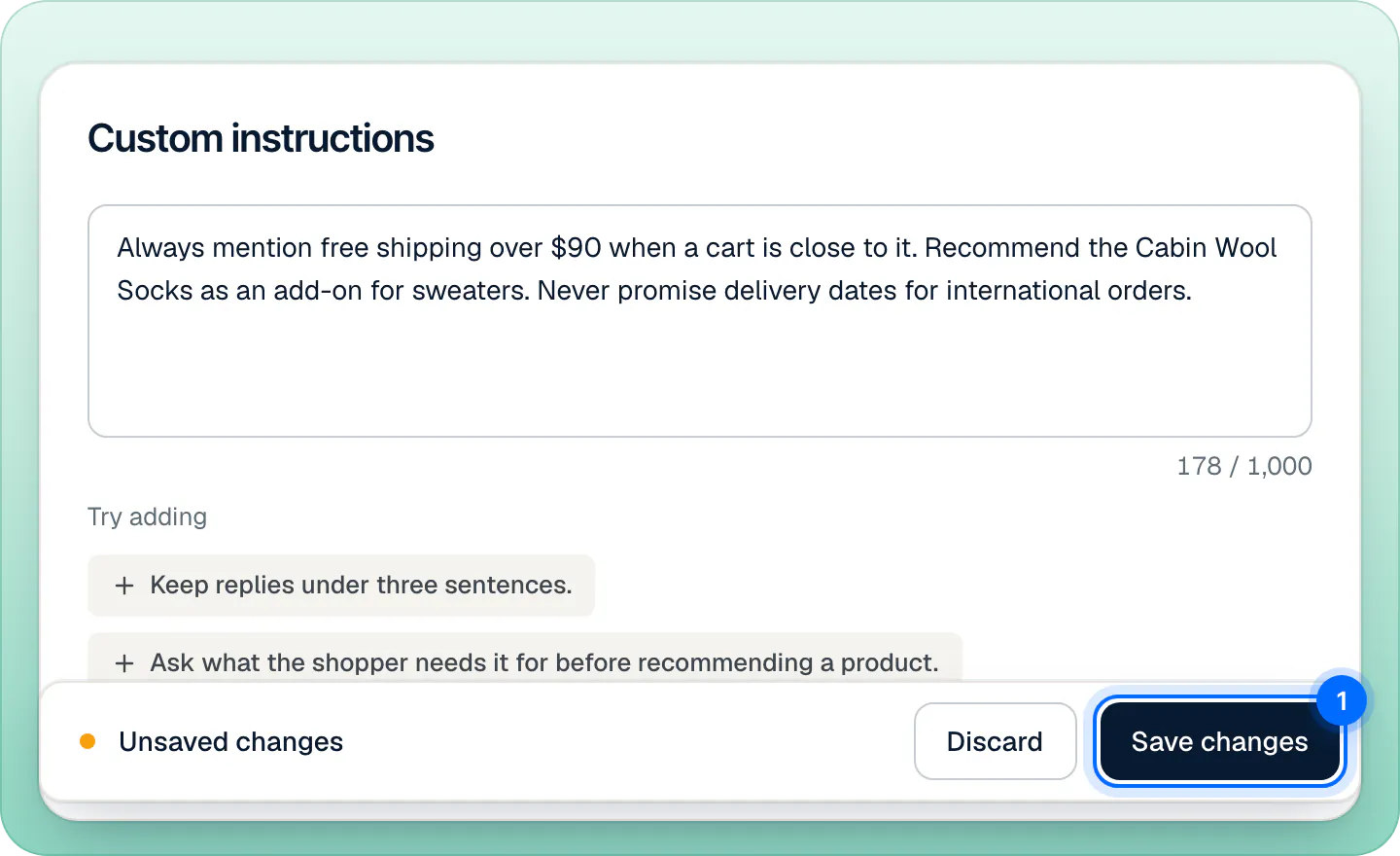
Every change you make on this page goes into a draft. While the draft differs from what is saved, a bar floats at the bottom of the page: Unsaved changes, with Discard and Save changes. You can also press ⌘S (or CtrlS).
- After saving, a message confirms Changes saved and that Ivy works this way from her next reply. It has an Undo button that puts the previous settings back.
- Conversations already open pick up the change on Ivy's next turn.
- If you leave the page with unsaved changes, Strathly asks Leave without saving? with Discard, Keep editing and Save and leave.
- There is no reset to defaults: change a setting back by hand, or press Undo right after saving.
The bar turns red and Save changes is disabled while something is missing or too long:
| The bar says | What to fix |
|---|---|
| Give her a name first | The Name field is empty. |
| Add the welcome code | Discounts is set to Offer the welcome code but the code is empty. |
| Shorten the custom instructions | Custom instructions is over 1,000 characters. |
| A limit of 0 allows nothing: leave it empty for no limit | An order rule in Orders is on with a limit of 0. |
Identity: name, reply length and tone#
Can I rename Ivy?#
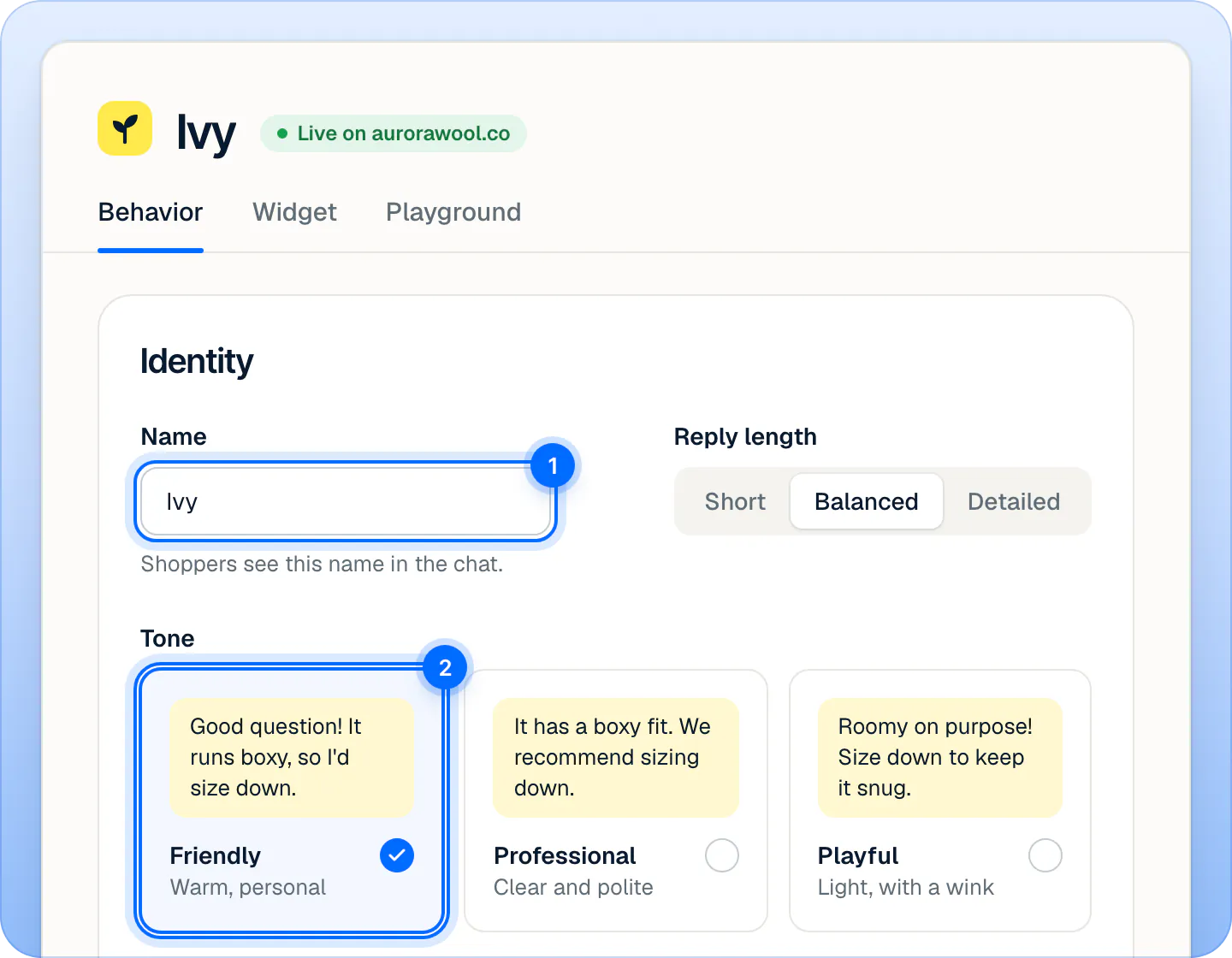
Yes. Ivy is the default name. Type another one in Name, up to 20 characters, and press Save changes. Shoppers see the new name in the chat, and your team sees it across the dashboard: the sidebar, the Inbox and notifications. The docs keep calling her Ivy.
Reply length#
| Option | How long Ivy writes |
|---|---|
| Short | One or two sentences. |
| Balanced (default) | Usually two to four sentences. |
| Detailed | Up to six sentences, with the useful details. |
Tone#
Each card shows the same answer written in that tone.
| Tone | How Ivy sounds |
|---|---|
| Friendly (default) | Warm and personal, at most one emoji per message. |
| Professional | Clear and polite, formal address, no emoji. |
| Playful | Light, with a bit of humor and the odd emoji. |
Languages and default language#
By default Ivy replies in the language each shopper writes in. Only reply in these languages limits her to the languages you pick, and Default language is the one she uses when she can't tell. Both are explained on Languages.
What Ivy does on her own#
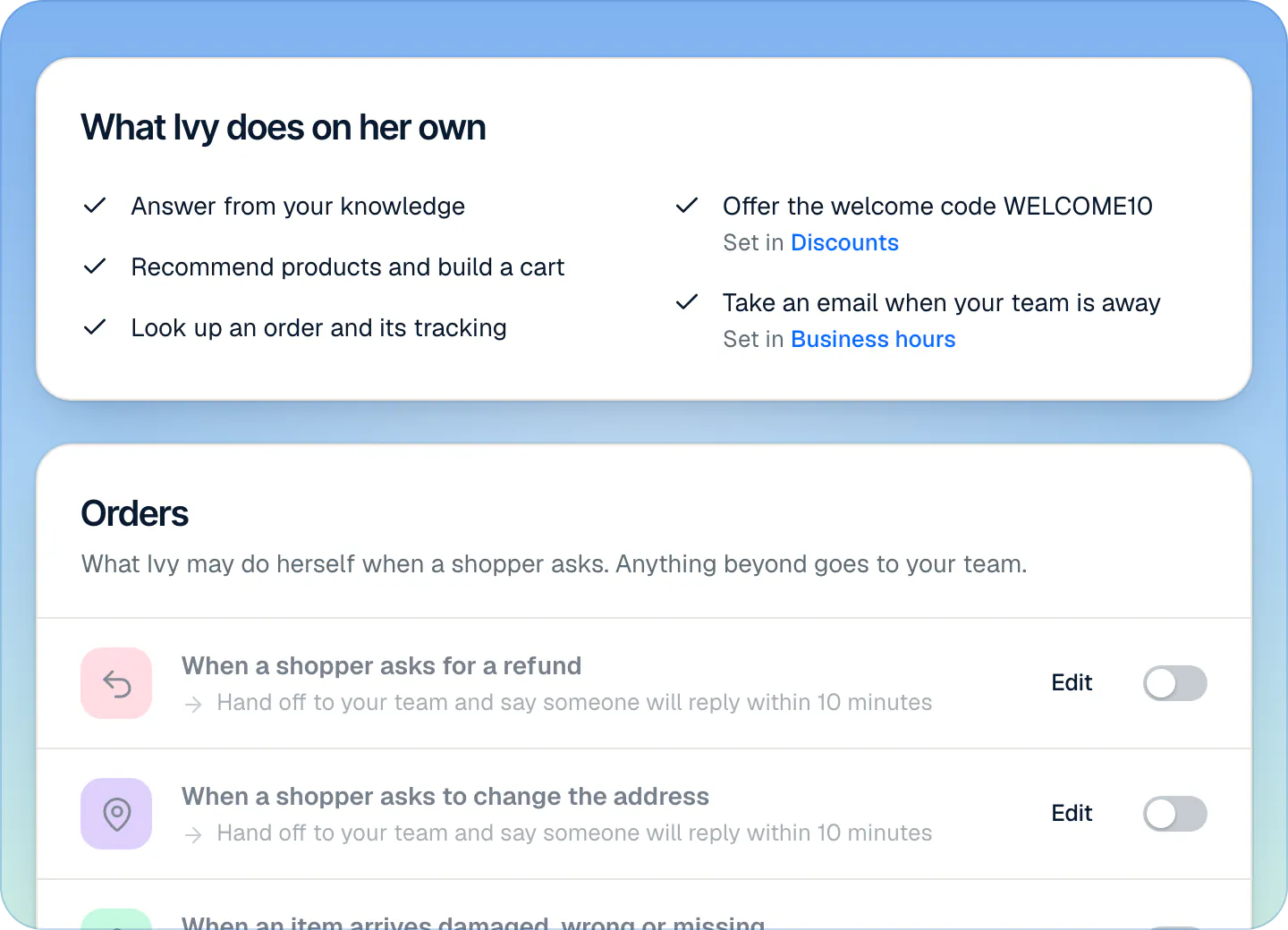
This card is a read-only checklist of what Ivy always does. There is nothing to switch here:
- Answer from your knowledge: your policies, pages, files and the answers you taught her.
- Recommend products and build a cart: see Recommend products and build carts.
- Look up an order and its tracking: see Answer "Where is my order?".
- What she says about discounts, which follows the Discounts card below (Set in Discounts).
- What she does when your team is away, which follows Settings,Business hours (Set in Business hours).
Orders#
The Orders card decides what Ivy may do to an order herself: refund it, change its shipping address, send a replacement or cancel it. All four are off by default, so every order change goes to your team. Each one needs a Shopify permission, a limit you choose and a shopper who proved who they are. Everything about it is on Let Ivy work on orders.
Handoff rules#
The Handoff rules card decides when Ivy brings in your team: a shopper asks for a person, sounds upset, places a wholesale order, or Ivy can't help after a few replies. You can add your own rules from templates, triggered by words you choose. Each rule and each action is on Choose when Ivy hands off.
Discounts: will Ivy offer a code?#
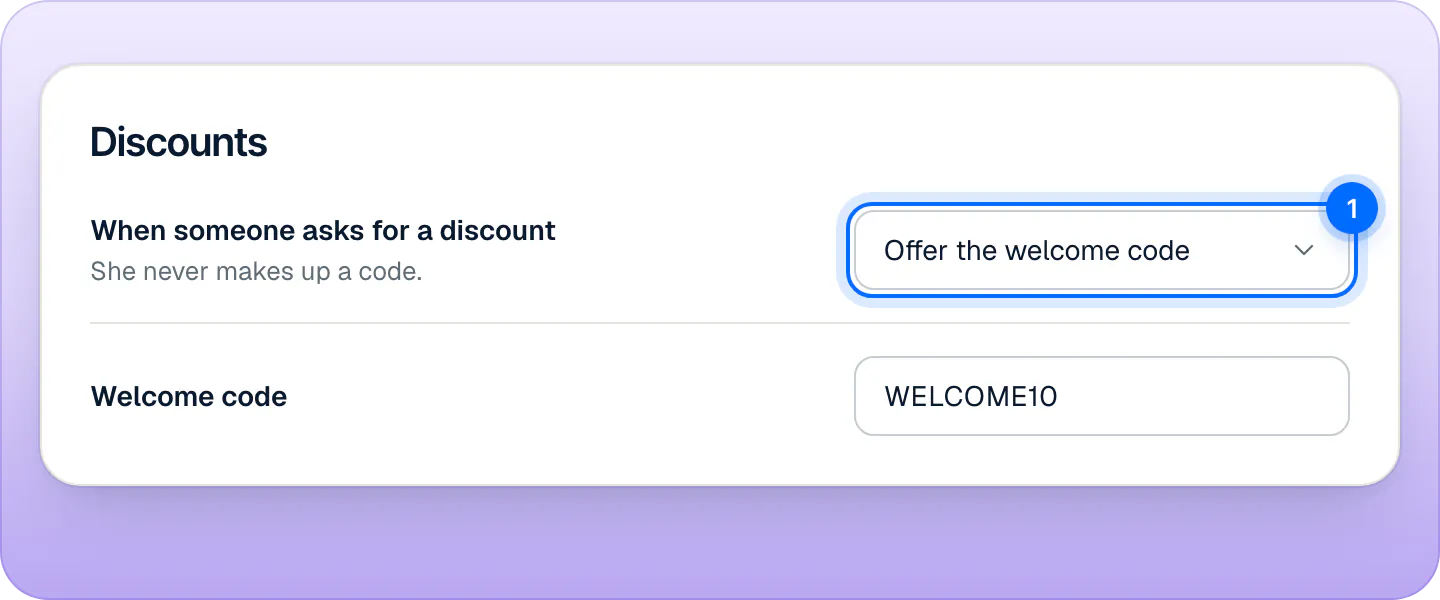
Ivy never makes up a discount code. Under When someone asks for a discount, pick what she does:
| Option | What happens |
|---|---|
| Never offer one (default) | Ivy says you have no discount codes right now. |
| Offer the welcome code | Ivy shares the code you type in Welcome code, and only that one. |
| Ask your team | Ivy hands the conversation to your team, with the reason Discount code. |
The Welcome code field takes up to 24 characters: letters, numbers, _ and -. Strathly writes it in capitals and removes spaces.
Guardrails: topics Ivy won't discuss#
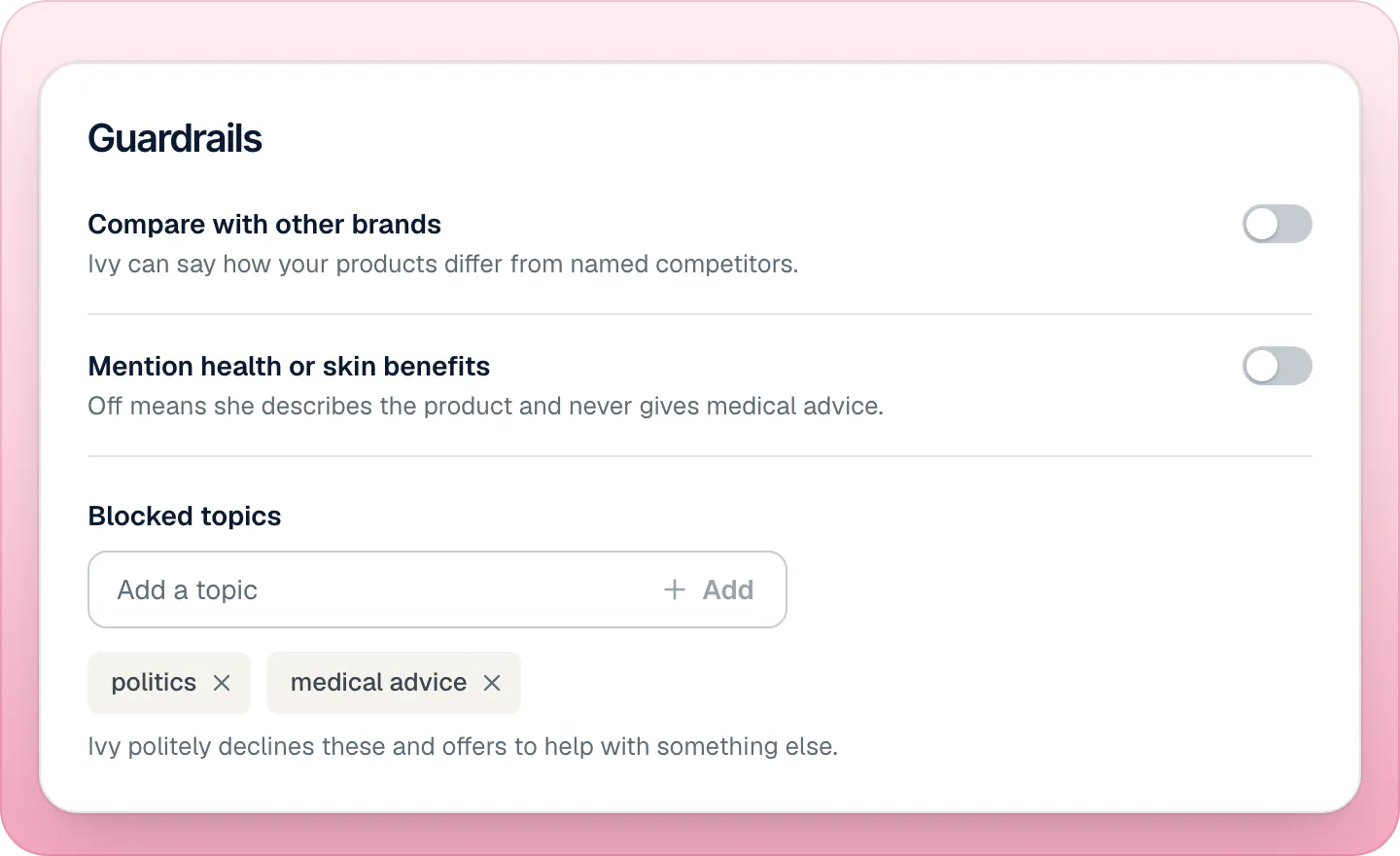
| Setting | Off (default) | On |
|---|---|---|
| Compare with other brands | Ivy doesn't compare your products with other brands and names no competitors. | Ivy can say how your products differ from named competitors. |
| Mention health or skin benefits | Ivy describes the product and never gives medical advice or health claims. | Ivy may talk about health or skin benefits, from your product information. |
Blocked topics are subjects Ivy politely declines. Type a topic and press Add (or Enter). Up to 30 topics, 60 characters each. When a shopper's message contains one, Ivy doesn't think it over: she answers with a fixed line, "That's outside what I can help with here. I'm happy to help with our products, sizing, shipping or your order." A shopper who keeps pushing the same blocked topic is passed to your team as Looks like spam.
Custom instructions#
Write, in plain words, anything Ivy should always or never do: up to 1,000 characters. Under the box, Try adding offers three examples you can add with one click: "Keep replies under three sentences.", "Ask what the shopper needs it for before recommending a product." and "Suggest a gift note when someone is buying a gift."
Ivy follows your instructions unless they conflict with her built-in rules: they can't switch off a guardrail, a handoff rule or the safety checks on orders. There is no separate setting for upselling: ask for it here ("Suggest the Cabin Wool Socks with any sweater"), or add a Note for Ivy on a product in Products.
Preview and test#
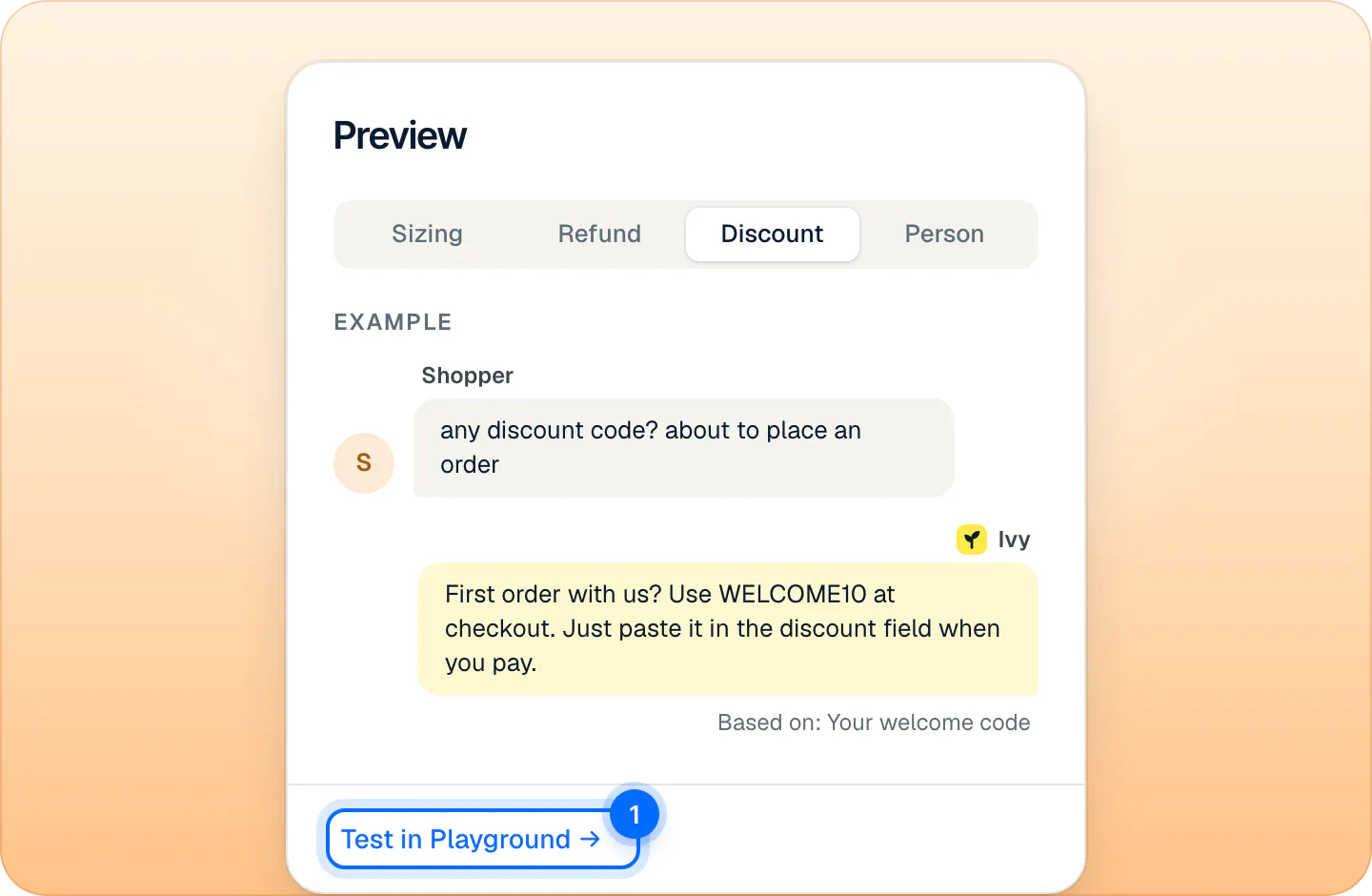
The Preview card, on the right of the page (under Identity on narrow screens), shows a sample exchange that rewrites itself as you change your draft. Its tabs are Sizing, Refund, Discount and Person, and it switches to the one your last change affects. The sample text is a neutral example, not your store's data.
Test in Playground asks the same question to the real Ivy in Ivy,Playground. The Playground uses your saved settings, so save first: if you have unsaved changes, Strathly asks whether to save before leaving. See Test Ivy in the Playground.
Limits#
| What | Limit |
|---|---|
| Name | 20 characters |
| Custom instructions | 1,000 characters |
| Welcome code | 24 characters: letters, numbers, _ and - |
| Blocked topics | 30 topics, 60 characters each |
| Languages in the Only reply in these languages menu | 12 |
| When changes apply | From Ivy's next reply after Save changes |
Frequently asked questions
Will Ivy make up a discount code?
No. She offers only the one welcome code you set, says you have no codes, or hands the request to your team, depending on Discounts.
Can I make Ivy more formal?
Yes. Pick the Professional tone: she uses a formal address and no emoji. Short replies help too.
Do changes apply right away?
From Ivy's next reply after you press Save changes, including in conversations already open.
Can agents change Ivy's behavior?
No. Only owners and admins can open Ivy › Behavior. Agents answer conversations in the Inbox.
Is any of this limited to a plan?
No. Every Behavior setting works on every plan, the free trial included. Plans differ only in conversations and teammates: see pricing.
Related pages
- IvyChoose when Ivy hands offThe rules that bring in your team (a person, an upset shopper, wholesale, your own keywords) and what each does: hand off, ask for an email or notify you.
- IvyLet Ivy work on ordersOrder changes go to your team by default. Let Ivy refund, cancel, replace or change an address herself for verified shoppers, within limits you set.
- IvyHow Ivy chooses the shopper's languageIvy replies in the language each shopper writes in. Limit her to the languages you choose, set a default, and see which parts of the chat are translated.