Fix a wrong answer
When Ivy says something wrong, it's almost always because a source told her so: an outdated policy, a page that disagrees with another, a vague question. Find the source, correct her answer once, fix the source, and test it.
Updated · 5 min read
Feature overview:AI chatbot knowledge base
On this page
Ivy answers facts only from your catalog, your knowledge and your orders. When she has nothing to go on, she says she isn't sure and offers your team; she doesn't invent prices, discounts or policies. So a wrong answer has a cause you can find and fix. (Ivy is the assistant's default name; if you renamed her in Ivy,Behavior, the app shows your name in the labels below.)
1. See what she based it on#
- Open the conversation in the Inbox.
- Point at Ivy's message. Buttons appear next to it: Good answer, Bad answer, What Ivy used and Correct this answer. In a narrow thread they're behind one … button, Rate or correct this answer.
- Choose What Ivy used (1). You'll see the pages, policies, answers, handoff rule or order she used for that reply, or "Nothing from your knowledge. Ivy answered from the conversation itself."
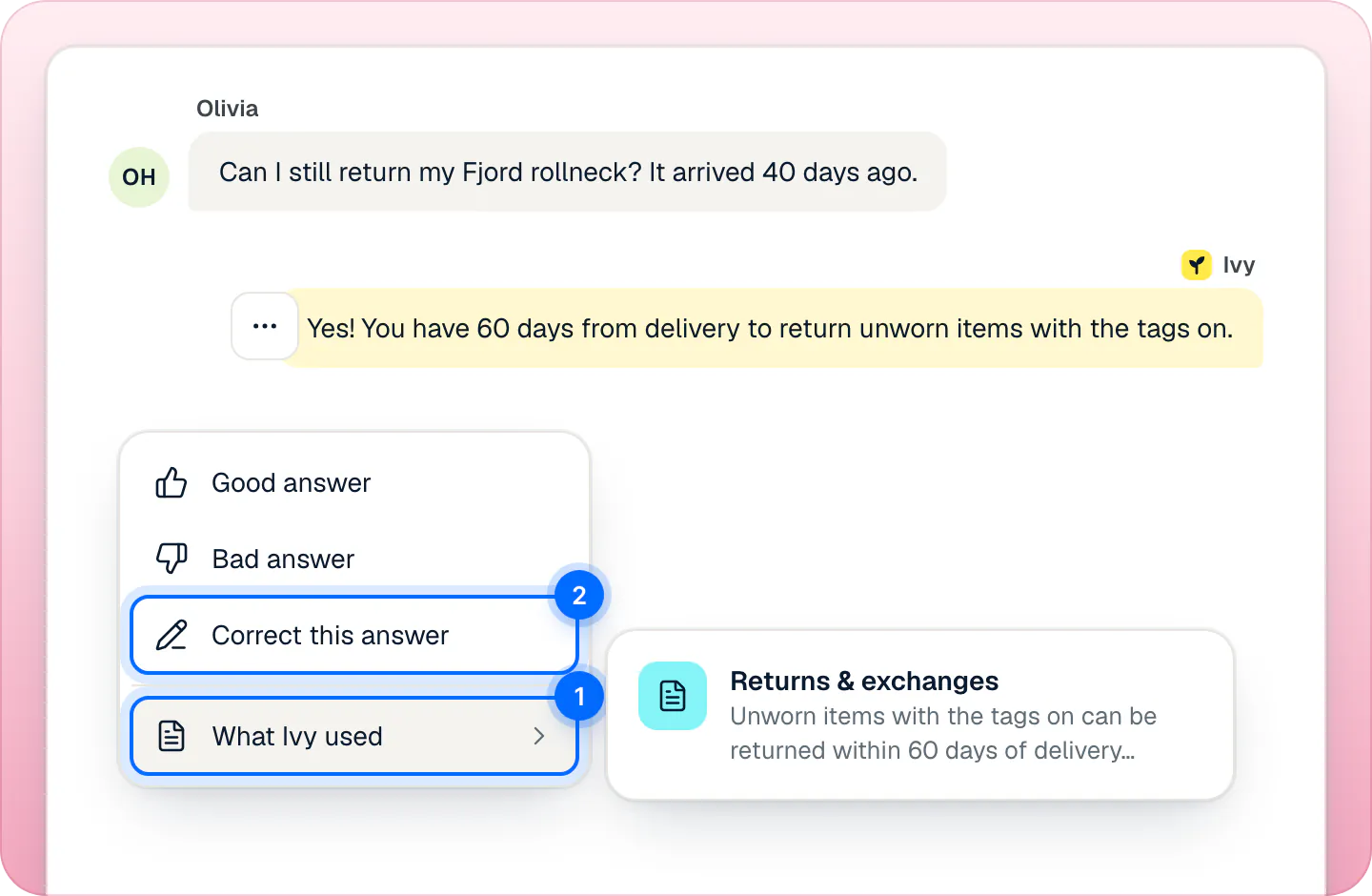
The conversation's details panel also has a What Ivy used block for her last answer. In the Playground, Behind the answer shows the same thing under What she used.
2. Correct the answer#
Owners and admins can correct Ivy.
On her message, choose Correct this answer (2). In the details panel, the button is Correct Ivy's last answer.
The dialog shows her answer struck through. Check When a shopper asks: it's filled with the shopper's question, and you can make it clearer.
Write what she should have said in Ivy should say.
Press Save correction (1).
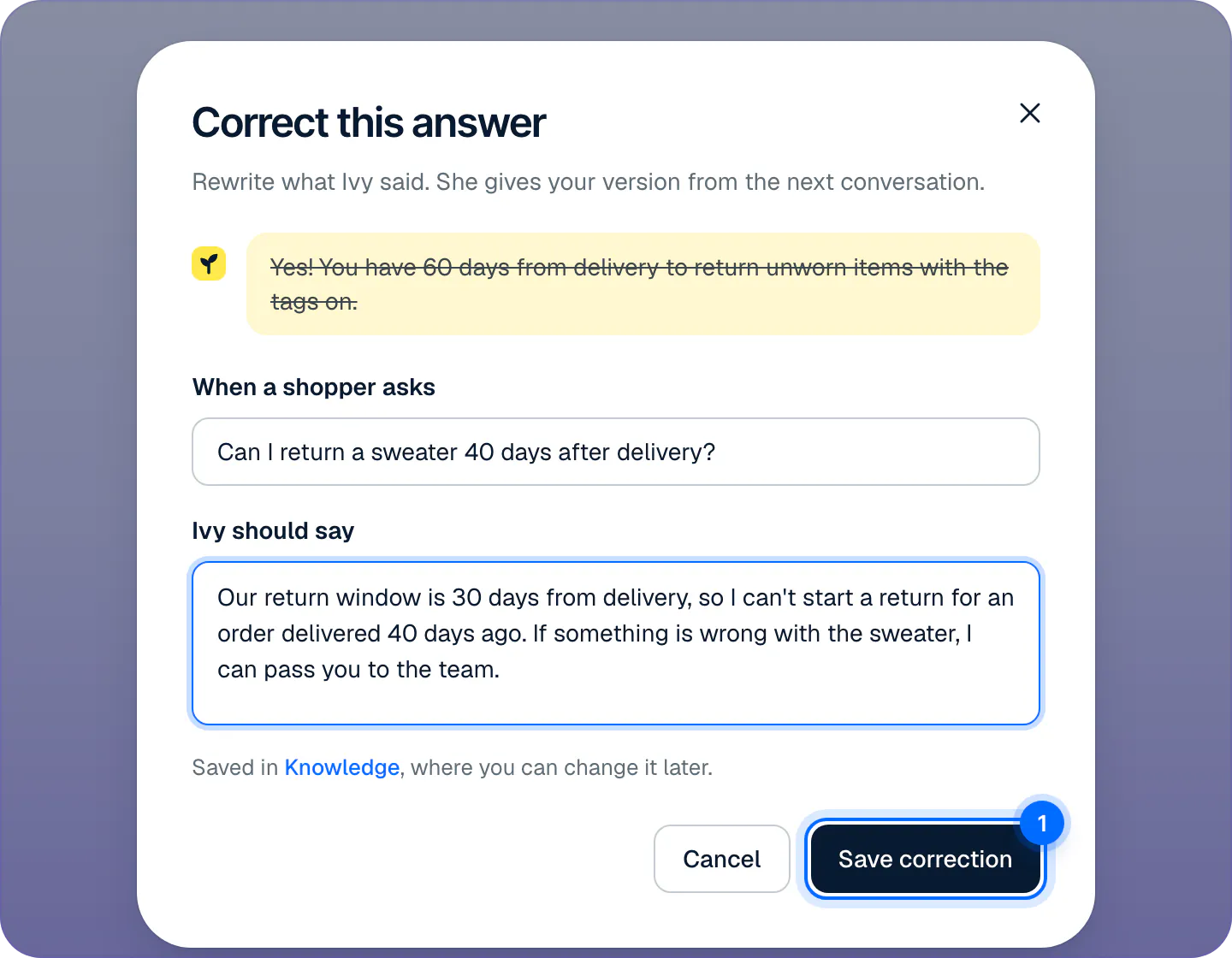
Write what Ivy should have said. She uses it from her next reply, for this question and ones like it.
If shoppers are waiting for an answer to the same question, the dialog shows Also send it to with their name, ticked. Saving then sends your words to them as your reply, and the button reads Save and send. Untick it to save the correction only.
You'll see "Ivy will use this from now on", with Test it and Undo. The correction is saved in Knowledge,Answers with the Correction label. Your answers come before pages and policies when they disagree, for this question and ones asked in other words. A correction doesn't change messages already sent.
3. Fix the source#
A correction covers that question. To stop the wrong fact coming back in other answers, fix where it came from:
| Where Ivy found it | Fix it |
|---|---|
| A Shopify policy or page | Edit it in Shopify. Strathly reads pages and policies again once a day; to read them now, press Sync now in Settings,Integrations (Manage on the Shopify card). |
| A file or web page you added | Fix it in Knowledge: edit its text, or remove it and add the new version. See files and web pages. |
| A product fact | Change the product in Shopify, or add a note for Ivy on the product in Products. See products. |
| A rule, a discount or her tone | Change it in Ivy,Behavior. |
| One of your answers | Edit it in Knowledge,Answers. |
4. Test it#
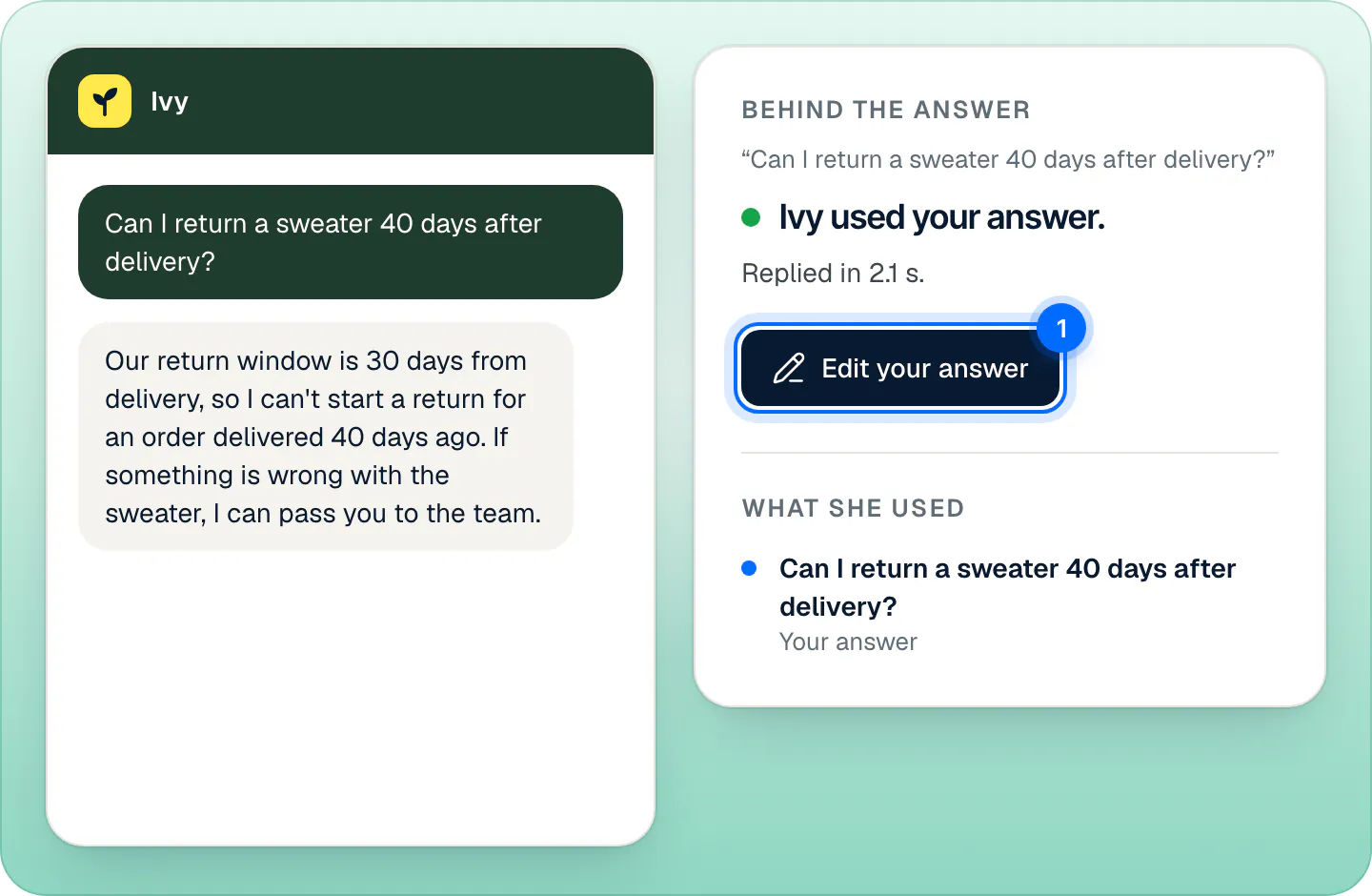
Press Test it in the confirmation, or open Ivy,Playground and ask the same question. Behind the answer should read "Ivy used your answer." (1). Questions you ask in the Playground never reach shoppers and don't count as conversations. If you correct an answer from the Playground, check Also send it to in the dialog: when shoppers are waiting for the same answer it's ticked, and saving sends them your words. See the Playground.
When Ivy couldn't answer#
If she didn't answer wrongly but couldn't answer at all, the question is in Knowledge,Unanswered. Press Teach Ivy there and write the answer once. See unanswered questions and teach Ivy.
Flag an answer for review#
Anyone on the team, agents included, can choose Bad answer on one of Ivy's messages. A shopper's thumbs down in the chat does the same. Both put the answer in Analytics, tab Quality, under Answers marked wrong, To review (see the Quality tab). There an owner or admin presses Correct this answer, or chooses Dismiss, the answer is fine.
Marking an answer, good or bad, doesn't change Ivy by itself. Only a correction does.
Why answers go wrong#
- Two sources disagree, for example a returns page that says 60 days and a refund policy that says 30.
- A source is out of date: an old policy, a page you haven't changed since a promotion ended.
- The question was vague and she answered from the closest source.
Keeping one place for each fact, and correcting her when she slips, keeps her answers right. Other common questions are in the FAQ.
Change or remove a correction#
Open Knowledge,Answers, filter by Corrections and press the answer to edit it, or use Delete in its menu. You can also use Remove correction in Analytics, tab Quality, list Corrected.
Frequently asked questions
Why did Ivy say that?
Open the conversation in the Inbox and choose What Ivy used on her message: it lists the pages, policies, answers, rule or order behind that reply.
Will a correction stick?
Yes. Ivy uses it from her next reply, for that question and the same question asked in other words.
How do I stop her guessing?
Give her the source or the answer: a page or policy in Shopify, a file or web page in Knowledge, or an answer you teach her. Without one, she says she isn't sure and offers to pass the shopper to your team.
Can agents correct Ivy?
No. Correcting and teaching Ivy is for owners and admins. Agents choose Bad answer, and an owner or admin corrects it from the Quality tab of Analytics.
Does Good answer teach her?
No. It's a mark for your team and doesn't change her answers.
Related pages
- KnowledgeTeach Ivy and correct herUse Teach Ivy from the sidebar, a conversation, Unanswered or the Playground, and Correct this answer when she got it wrong. Live from her next reply.
- KnowledgeManage the answers you've taught IvyAnswers you teach Ivy win over your pages and policies. Find, edit, test or delete them in Knowledge › Answers and see how often each one is used.
- IvyTest Ivy in the PlaygroundAsk Ivy anything on your store's real data before and after going live, see which sources she used, and fix answers on the spot. Tests never count.