Let Ivy work on orders
When a shopper wants a refund, a new address, a replacement or a cancellation, Ivy hands it to your team unless you let her act. This page explains the default, how to switch on each action safely, how shoppers prove who they are, and how the 10-second hold lets you stop anything before it reaches Shopify.
Updated · 11 min read
Feature overview:Order tracking in the chat
On this page
- By default, order changes go to your team
- The refund rule when Ivy doesn't refund herself
- Let Ivy act herself
- When can Ivy act?
- What each action does
- What the shopper sees for an address change
- How is the shopper verified?
- Can I undo an action? The 10-second hold
- Who can do what
- Shopify permissions
- Limits
- Frequently asked questions
Looking up an order is always on (see Answer "Where is my order?"). Changing one is different: money moves and Shopify sends emails. So Ivy changes nothing on an order unless you decide she may, and every change can still be stopped for 10 seconds.
By default, order changes go to your team#
Out of the box, the four switches of the Orders card in Ivy,Behavior are off:
- Refund requests follow the refund row's Action (below). By default Ivy hands the conversation to your team and tells the shopper when to expect a reply.
- Address changes, replacements and cancellations are handed to your team, with a reason such as Order change in the Inbox.
- Exchanges, lost packages and late returns always go to your team, whatever you switch on.
Ivy doesn't promise the shopper anything she can't do: she never says a refund is done or gives a date for it.
When she hands a conversation off, Ivy drafts a reply for your team. When Shopify allows it and the order was shown in the chat, the draft can carry a refund, a replacement or an address change, ready to go: the teammate checks it and presses Send and refund, Send and replace or Send and update address. Ivy never prepares a cancellation: a teammate cancels from the order block. See Orders next to the conversation.
The refund rule when Ivy doesn't refund herself#
Open the refund row of Orders, When a shopper asks for a refund, and pick its Action. It applies to every refund while the switch is off, and above your limit once it's on.
| Action | What happens |
|---|---|
| Hand off to your team (default) | The conversation moves to the Inbox and the shopper is told when to expect a reply. |
| Collect the shopper's email | Ivy asks for an email so your team can follow up when they're in. The conversation then reaches the Inbox. |
| Prepare the refund and notify me | Ivy prepares the refund for a teammate to confirm with one click and sends you a note in the Inbox. Offered only when Shopify lets Strathly refund. |
Let Ivy act herself#
Owners and admins can switch on each action. Do it one at a time, and test in the Playground, where actions are only simulated.
Open Ivy,Behavior and scroll to Orders.
Click a row, or its Edit button: When a shopper asks for a refund, When a shopper asks to change the address, When an item arrives damaged, wrong or missing or When a shopper wants to cancel an order. The Edit rule panel opens.
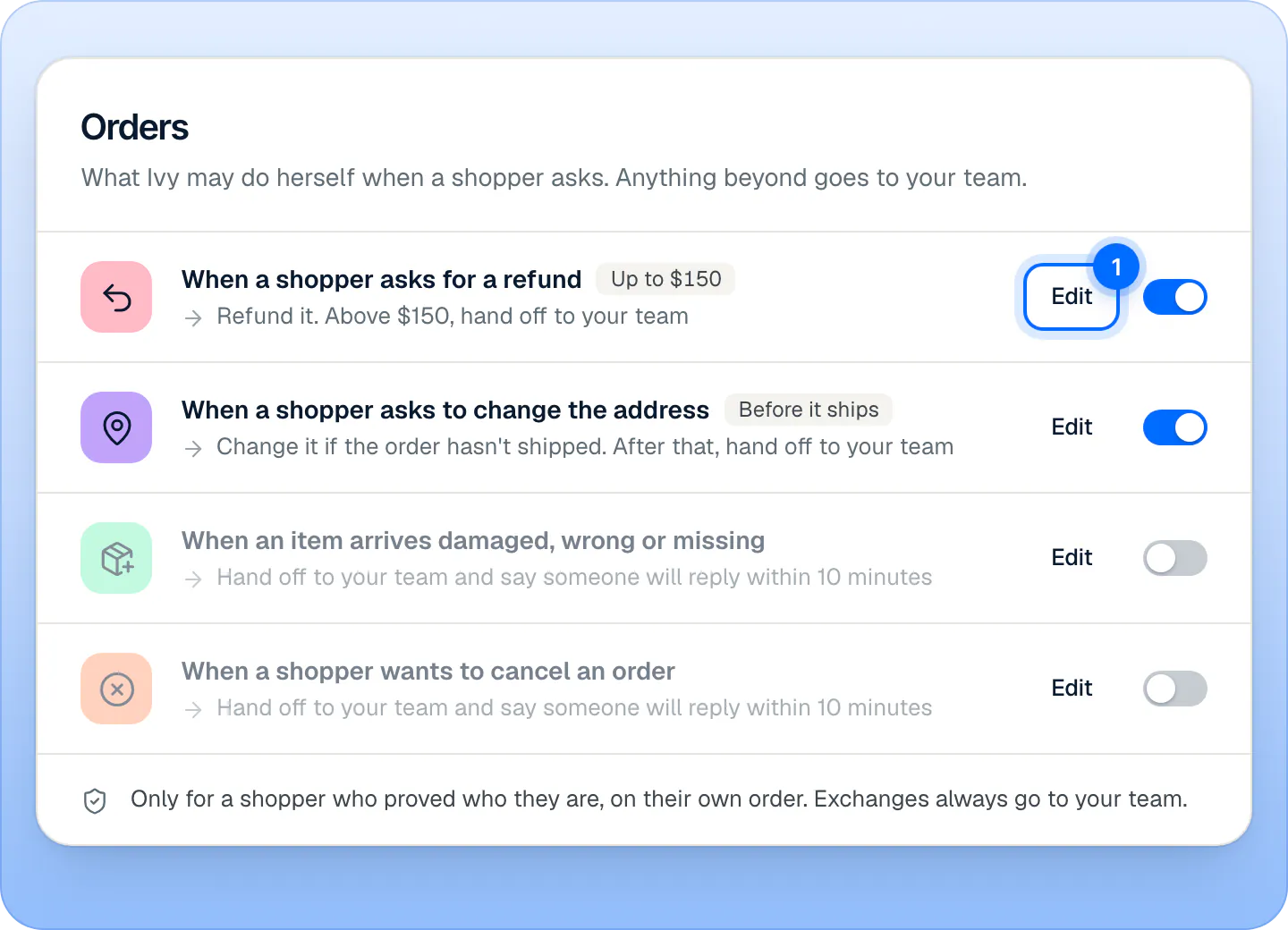
Each row is one thing Ivy may do herself. Open a row with Edit (1) to set its limit and what happens beyond it. Sample store. Turn on the switch at the top of the panel. It reads Ivy does this herself.
Set the limit: Refund limit per order for refunds, Order value limit for replacements and cancellations. Whole amounts in your store's currency, up to 99,999. Leave it empty for no limit. A limit of 0 isn't accepted: switch the row off instead. Address changes have no limit.
For refunds, choose what happens above your limit under Above $150, do this (the section's title follows your limit).
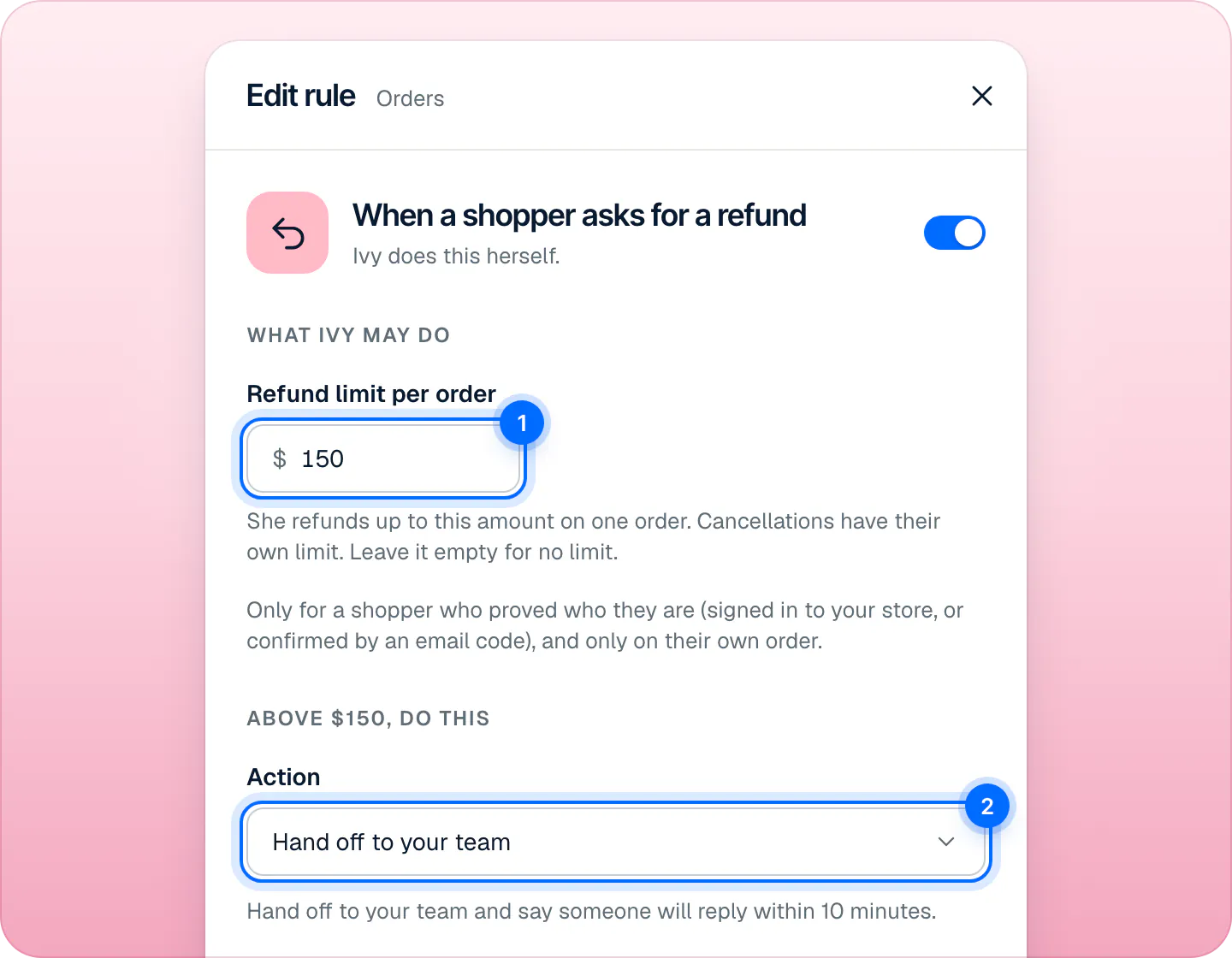
The refund limit (1) is per order. Above it, the Action (2) decides what happens: hand off, collect the shopper's email, or prepare the refund for a teammate. Press Done, then Save changes at the bottom of the page.
The card now shows what Ivy does, with a chip for the limit: Up to $150, Any amount, Before it ships, Orders up to $200 or Any order.
When can Ivy act?#
All of these must hold, every time. If one doesn't, she hands the request to your team as if the switch were off:
- The row's switch is on and saved.
- Your store has given Strathly the Shopify permission for it (see below).
- The shopper proved who they are, and Shopify confirms the order is theirs.
- The order is within your limit, and the action fits the order's state.
The server checks the order again before anything happens, whatever was said in the chat.
What each action does#
| Action | When Ivy may do it | What Shopify does |
|---|---|---|
| Refund | Up to your limit per order, counting what she already refunded or has waiting on that order, and never more than Shopify can still refund. | Refunds to the original payment method and emails the shopper the receipt. |
| Address change | Only while nothing on the order has shipped. No limit. | Updates the shipping address. Names and phone stay as on the order. |
| Replacement | For a delivered order worth up to your limit, with nothing refunded on it yet. | Creates a $0.00 order with the same items and free shipping, tagged "Strathly replacement". |
| Cancellation | Before the order ships, for an order worth up to your limit. | Cancels the whole order, refunds what the shopper paid, puts the items back in stock and emails the shopper. |
A few rules apply to all of them:
- One remedy per order. A refund, a replacement or a cancellation: once one of them is done, Ivy does none of the others on that order. An address change doesn't count as a remedy.
- Cancellations have their own limit. Cancelling refunds everything the shopper paid, separately from your refund limit, even with refunds switched off.
- Beyond what she may do, a refund follows the refund rule's Action; an address change, a replacement or a cancellation goes to your team.
- Always your team's job: exchanges, cancelling part of an order, cancelling an order that has shipped, lost packages and late returns.
What the shopper sees for an address change#
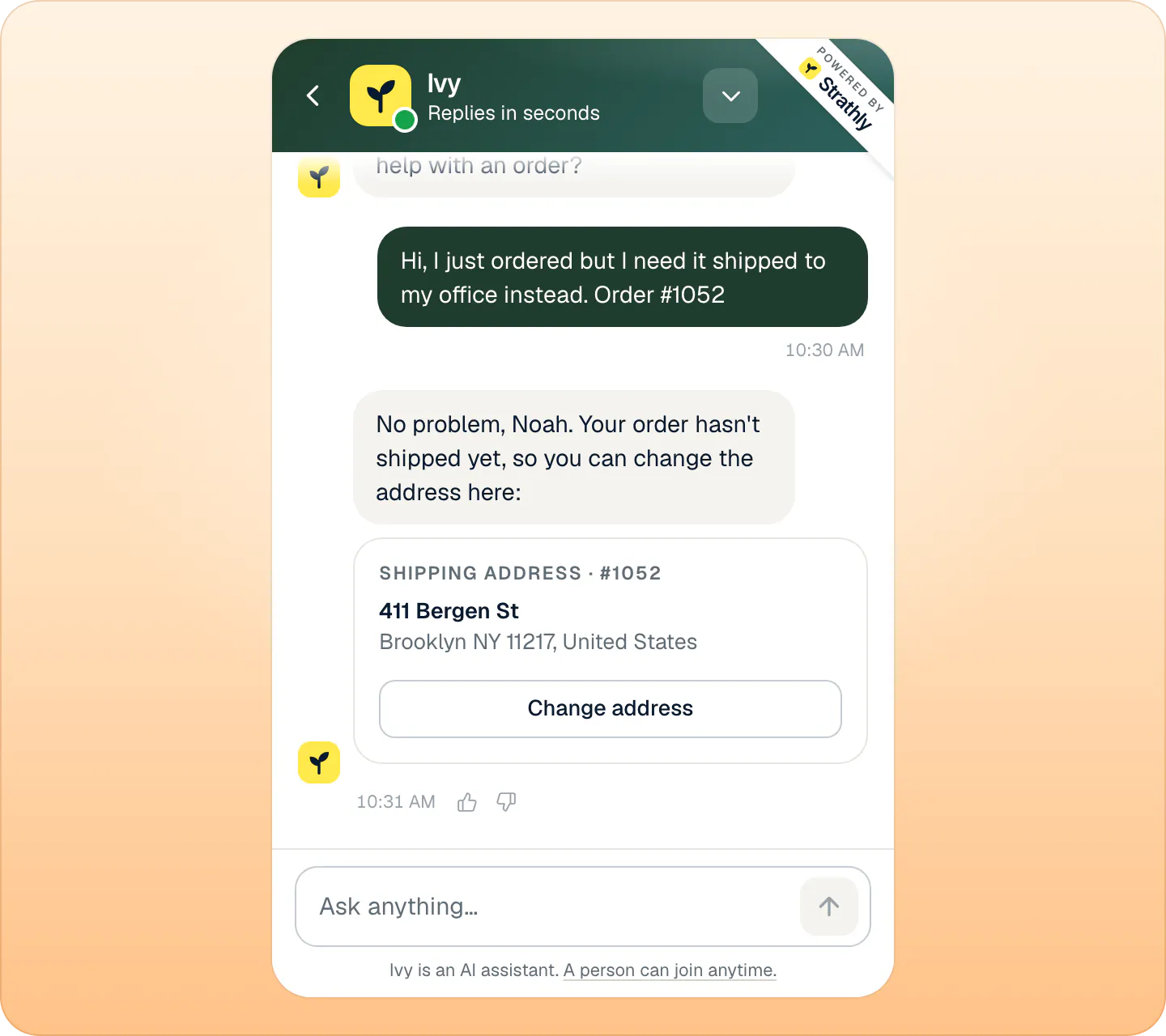
When Ivy may change addresses, a verified shopper gets a card in the chat: Shipping address with the order number, the current address and Change address. It opens a New address form with an address search and the address fields of the shopper's country, then Update address. Afterwards the card says Address change started. The form works for 60 minutes; after that Ivy offers a new one.
How is the shopper verified?#
Ivy acts only for a shopper who proved who they are, and only on their own order. There are two ways:
- Signed in to your Shopify store. A shopper logged in to their customer account is already verified. This check needs the chat installed with the theme app embed: see Put the chat on your store.
- A 6-digit code by email. Ivy sends a code to the email on the order (the order number and the email must match). The email's subject is "Your verification code for" your store's name, and the shopper types the code in the chat. In the chat Ivy shows the address masked.
Ivy asks for a code only when she could then act herself. With every switch off, nobody is ever asked for one, and order status never needs one. She never writes, repeats or guesses a code.
| Rule | Value |
|---|---|
| A code is valid for | 10 minutes |
| Wrong tries per code | 5 |
| Codes per email address | 3 an hour, then your team takes over |
| Proof lasts | 24 hours |
Can I undo an action? The 10-second hold#
Every order action, Ivy's or a teammate's, waits 10 seconds before it goes to Shopify. During those seconds:
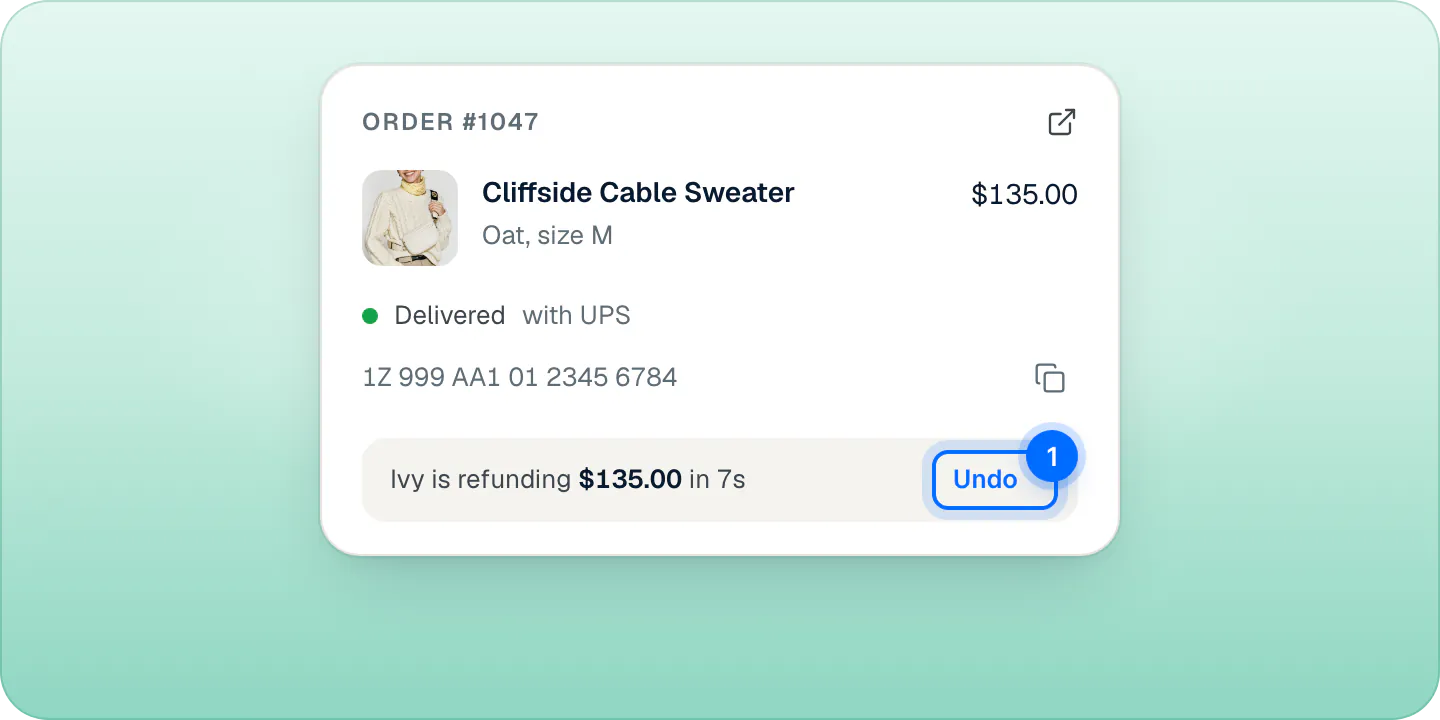
- The order block in the Inbox shows the countdown, for example Ivy is refunding $135.00 in 7s, with Undo.
- Anyone on the team can press Undo, and nothing reaches Shopify. When you undo one of Ivy's actions, the conversation is assigned to you, so you can tell the shopper.
- When a teammate starts the action, the message that confirms it also has Undo for as long as the hold lasts.
This hold is not the same as the Undo of other Inbox actions, like assigning or resolving a conversation: those are undone from a message that shows for a few seconds, and nothing goes to Shopify.
After the 10 seconds the action goes to Shopify once, and Shopify sends its usual emails to the shopper. A refund or a cancellation that went out can't be undone: Shopify doesn't reverse them.
When Ivy acts, you get a notification: "Ivy refunded $135.00 on #1047", "Ivy sent a replacement for #1050", "Ivy changed the shipping address on #1052" or "Ivy cancelled #1052". If Shopify refuses, the conversation comes to your team with the reason, for example "Ivy's refund on #1047 did not go through".
Who can do what#
| Task | Owner | Admin | Agent |
|---|---|---|---|
| Switch Ivy's order actions on or off, set limits | Yes | Yes | No |
| Replace or change an address from the Inbox | Yes | Yes | Yes |
| Refund or cancel from the Inbox | Yes | Yes | Only if Agents can refund and cancel orders is on in Settings,Team |
| Press Undo on a waiting action | Yes | Yes | Yes |
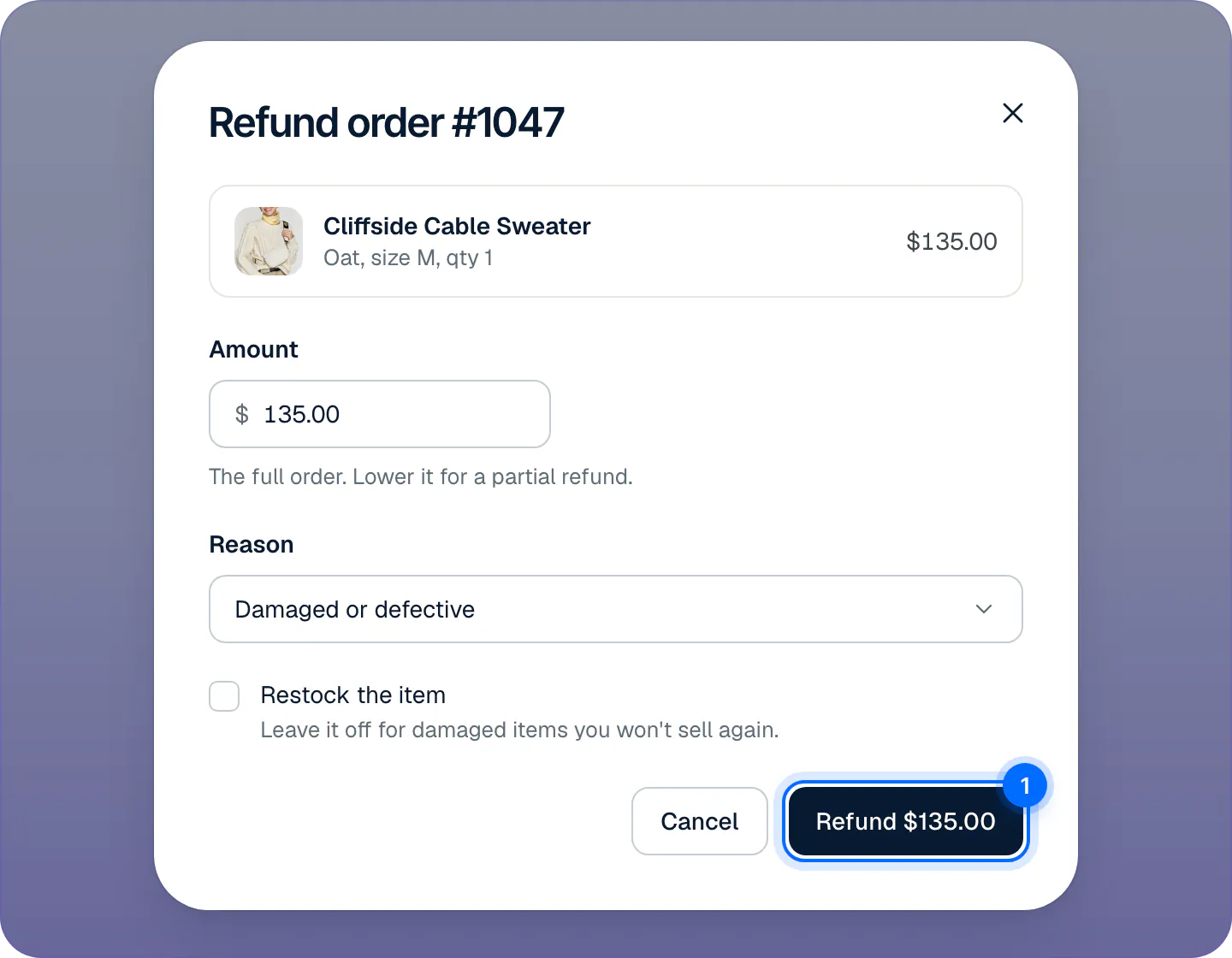
Teammates act from the order block in a conversation, on the web or in the iPhone app. Each action opens a dialog first: Refund order #1047 (amount, reason, Restock the item), Send a replacement for #1047?, Edit the address on #1052 (the new address field by field, in the shape of its country) or Cancel order #1052? (Keep order or Cancel order). If Ivy didn't verify the order in the chat, the dialog asks the teammate to tick I checked first. Then the same 10-second hold applies.
Shopify permissions#
| Action | Shopify permission |
|---|---|
| Refund, address change, cancellation | Edit orders (write_orders) |
| Replacement | Edit draft orders and read orders (write_draft_orders, read_orders) |
Without the permission, the row's switch is greyed out and the card's footer says Ivy needs new Shopify permissions to do it herself, with Reconnect Shopify. That link opens Shopify's approval screen for the permissions Strathly asks for today; once you approve, the switch can be turned on. Your store stays connected the whole time: there is no need to disconnect. In the Inbox, the order block shows Needs new Shopify permissions with a Reconnect button that does the same. The iPhone app has no such button: do it on the web. See Shopify permissions, one by one.
Limits#
| What | Value |
|---|---|
| Hold before an action reaches Shopify | 10 seconds |
| Limit per action | Whole amounts up to 99,999 in your store's currency; empty = no limit |
| Address form | Usable for 60 minutes |
| Verification code | 10 minutes, 5 tries, 3 codes an hour per address |
| Verified shopper | 24 hours |
| Actions on one order | One at a time, and one remedy (refund, replacement or cancellation) |
Frequently asked questions
Does Ivy refund on her own?
Only if you switch it on in Ivy,Behavior › Orders, Shopify allows refunds, and the shopper proved the order is theirs. Otherwise she follows the refund rule's Action, which hands off by default.
How is the shopper verified?
They're signed in to your store, or they type a 6-digit code Ivy emails to the address on the order.
Can I undo an action?
Yes, within 10 seconds, with Undo on the order block in the Inbox. After that Shopify can't reverse a refund or a cancellation.
Why is a switch greyed out?
Your store hasn't given Strathly the Shopify permission for that action. Press Reconnect Shopify in the footer of the Orders card in Ivy › Behavior and approve the permissions in Shopify. Your store stays connected while you do it.
Can agents refund?
Only if your store allows it. Refunds and cancellations from the Inbox are for the owner and admins until one of them switches on Agents can refund and cancel orders in Settings,Team. Any teammate can send a replacement or change an address. Only owners and admins change what Ivy may do herself.
Will Ivy ever cancel an order without my say-so?
Only if you switch on When a shopper wants to cancel an order. Even then, only before the order ships, within your limit, for a verified shopper, and with 10 seconds to undo.
Related pages
- InboxOrders next to the conversationSee the shopper's order and past orders next to the chat, then refund, replace, change the address or cancel from the Inbox, with 10 seconds to undo.
- IvyAnswer “Where is my order?”Ivy looks up an order from its number and checkout email and shows its status, items, carrier and tracking link. Nothing to set up, no login for shoppers.
- IvyChoose when Ivy hands offThe rules that bring in your team (a person, an upset shopper, wholesale, your own keywords) and what each does: hand off, ask for an email or notify you.