Add files and web pages
Shopify holds most of what Ivy needs. For the rest, like a size chart in a PDF or a care guide on another site, upload a file or add a web page in Knowledge. Ivy reads its text and uses it from her next answer.
Updated · 8 min read
Feature overview:AI chatbot knowledge base
On this page
Files and web pages join the pages and policies imported from Shopify on Knowledge,Sources, under the Files and Web filters. Ivy searches them the same way, and you can switch each one off, edit its text or remove it. Only admins and the owner can add them.
For a single fact, like whether you gift wrap, a file is more than you need: teach Ivy an answer instead. When an answer fits the question, it comes before your files and pages (how answers rank).
Upload a file#
- Open Knowledge and press New, then Upload a file. (On an empty Sources tab, Upload a file is also in the middle of the page.)
- Drop the file in the box, or press browse and pick it. One file at a time.
- Wait while it says Uploading with a percentage, then Reading the text.
- Check what was read: the dialog says Read 1,240 words from 3 pages (or how many words, for other formats) and shows the first lines. If it's the wrong file, press Choose another file.
- Press Add file.
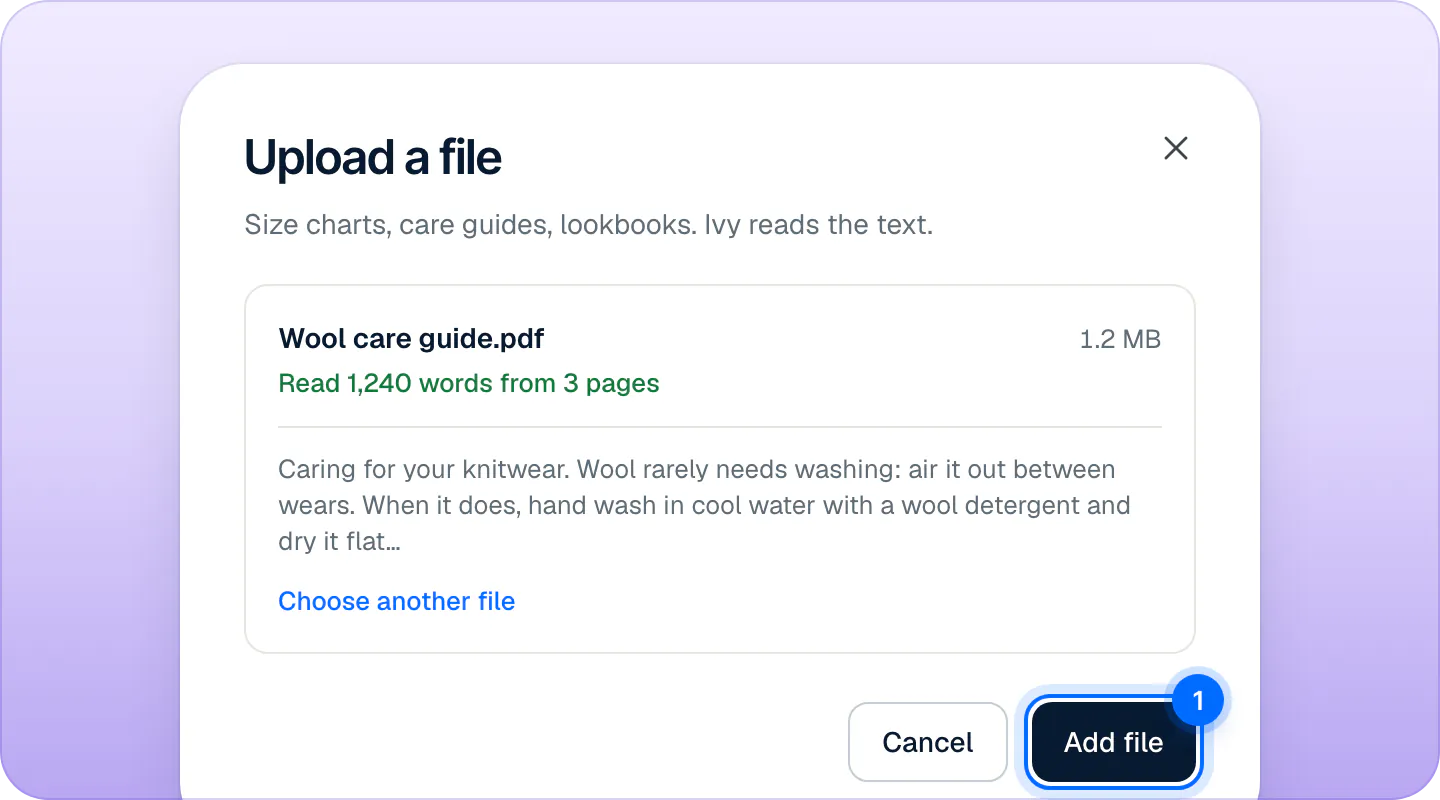
A toast says Ivy read the file, with how many words, and offers Undo. The file appears on the Sources tab with its file name as its title, and Ivy uses it within seconds, once it has been indexed.
Which files work#
| Format | Works? | Notes |
|---|---|---|
PDF (.pdf) | Yes | Only PDFs with selectable text. A scan is a picture of text: Ivy finds nothing in it. A PDF protected by a password is refused. |
Word (.docx) | Yes | Footnotes and endnotes are read too. |
Plain text (.txt) | Yes | |
Markdown (.md) | Yes | Headings help Ivy find the right section. |
CSV (.csv) | Yes | Read as text. Good for a size table. |
Older Word (.doc) | No | Save it as .docx and upload it again. |
Excel and other spreadsheets (.xlsx, .numbers) | No | Export the sheet as CSV first. |
Images (.jpg, .png) | No | Ivy reads text only. |
Limits:
- 20 MB per file.
- 200,000 characters of text per file. A longer file is cut at a paragraph break, and the dialog says "A long file: Ivy reads this much of it and leaves the rest out." Split a long catalog into several files.
- At least 3 words of text.
Only the text and a few facts (file name, size, page count) are kept. The file itself is not stored, so it can't be downloaded back from Strathly. Keep your original.
Add a web page#
- Open Knowledge and press New, then Add a web page.
- In Page address, type the page's address after
https://, likeaurorawool.co/pages/care-guide. - Press Read page. Strathly fetches the page and shows its title, how many words it read and its first lines.
- Leave Read it again every week on so Ivy picks up changes, or turn it off for a page that never changes.
- Press Add page.
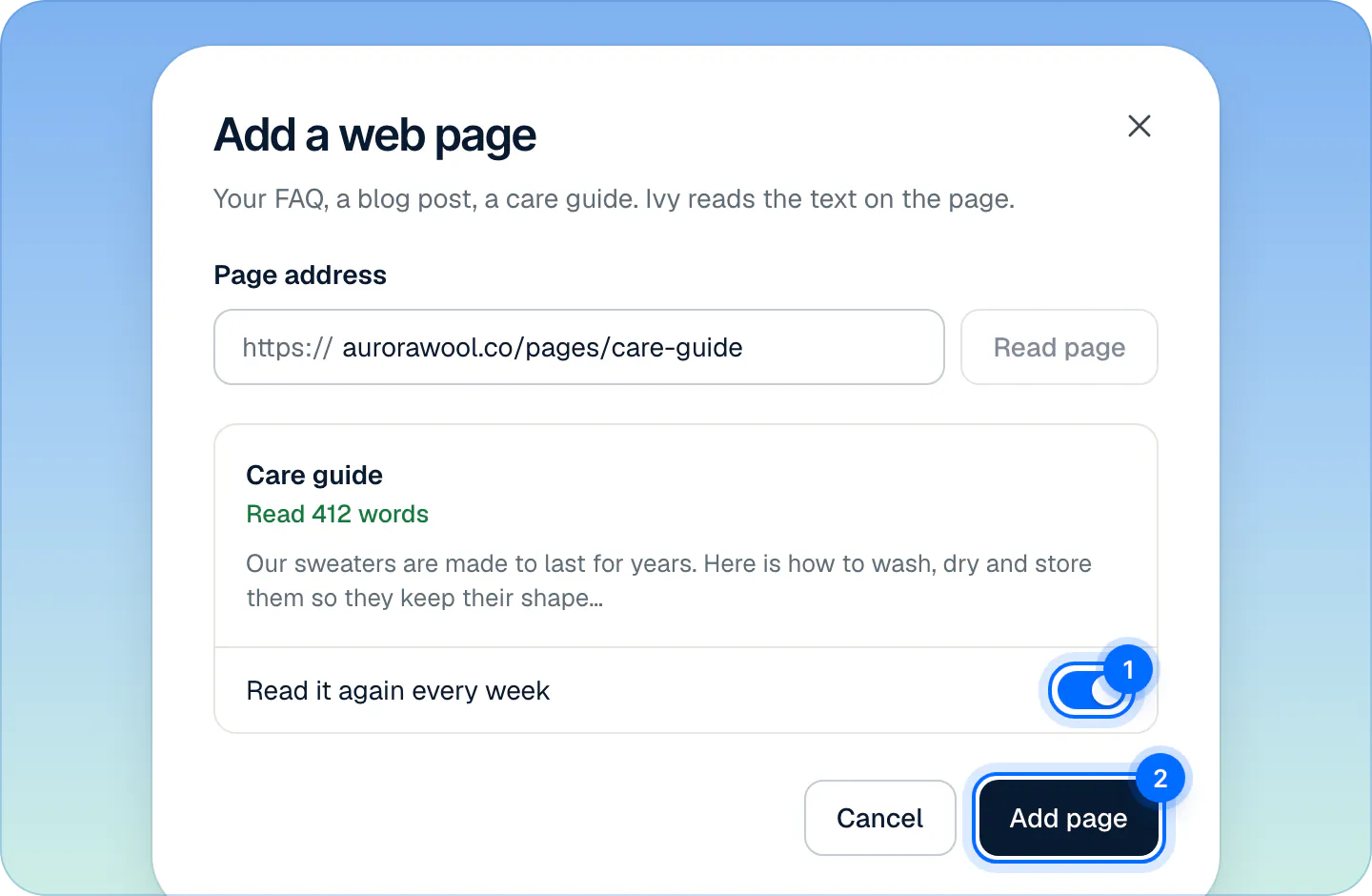
The toast says Ivy read the page, and that she reads it again every Monday when the weekly switch is on.
What Ivy reads on a page#
- Only that address. Strathly doesn't follow the page's links, crawl your site or read your sitemap. To add five pages, add them one by one. (Your published Shopify pages are already imported: you don't need to add them.)
- The main content. Menus, the footer, forms, buttons and pop-ups are left out.
- Text, not scripts. A page that builds its text with JavaScript after it loads has nothing to read, and is refused with "We couldn't find any text on that page."
- Public addresses only. An IP address, or an address on a private network, is refused. Strathly reads the page the way a visitor who isn't signed in sees it.
An address Ivy already reads, one you added or a Shopify page or policy at the same address, is refused with "Ivy already reads this page" and the source's name.
Keep a web page up to date#
With Read it again every week on, Strathly reads the page again every Monday from 06:00 in your store's time zone (when it was last read six or more days before). Ivy's text changes only if the page's text changed. If the page can't be read that day, Ivy keeps the old text, and the source's panel says what went wrong.
The weekly setting can only be chosen when you add the page. To change it later, remove the page and add it again.
To read a page now, open the card's … menu, or its panel, and press Read the page again. The toast says whether the text changed.
Fix the text Ivy read#
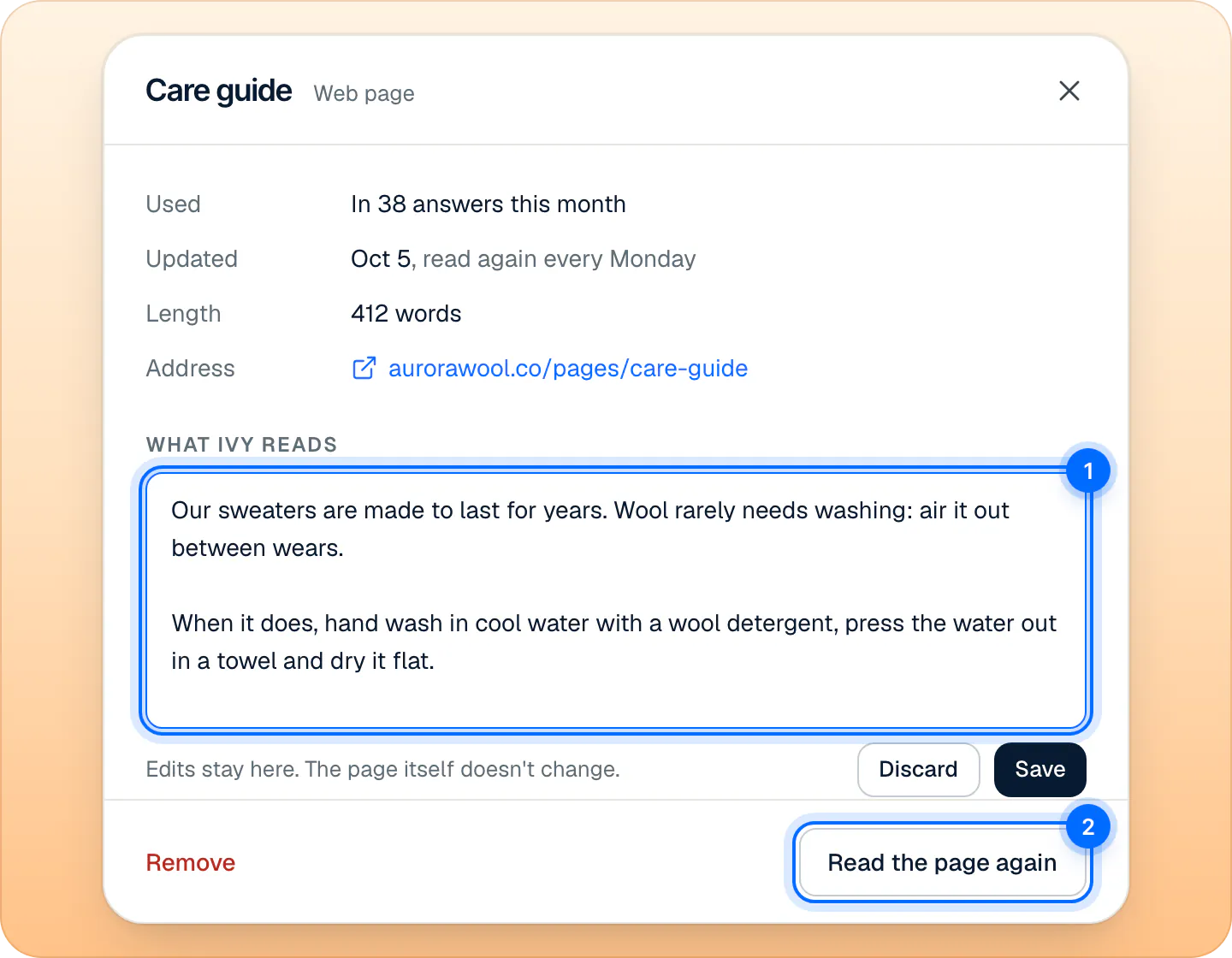
A file read with odd line breaks, a table that lost its columns, a sentence you'd rather Ivy didn't use: edit the text she reads.
- On the source's card, press View source, or open its … menu and press Edit.
- Change the text under What Ivy reads.
- Press Save, or ⌘Enter (CtrlEnter on Windows). The toast says Ivy reads the new text from now on.
Replace or remove a file or page#
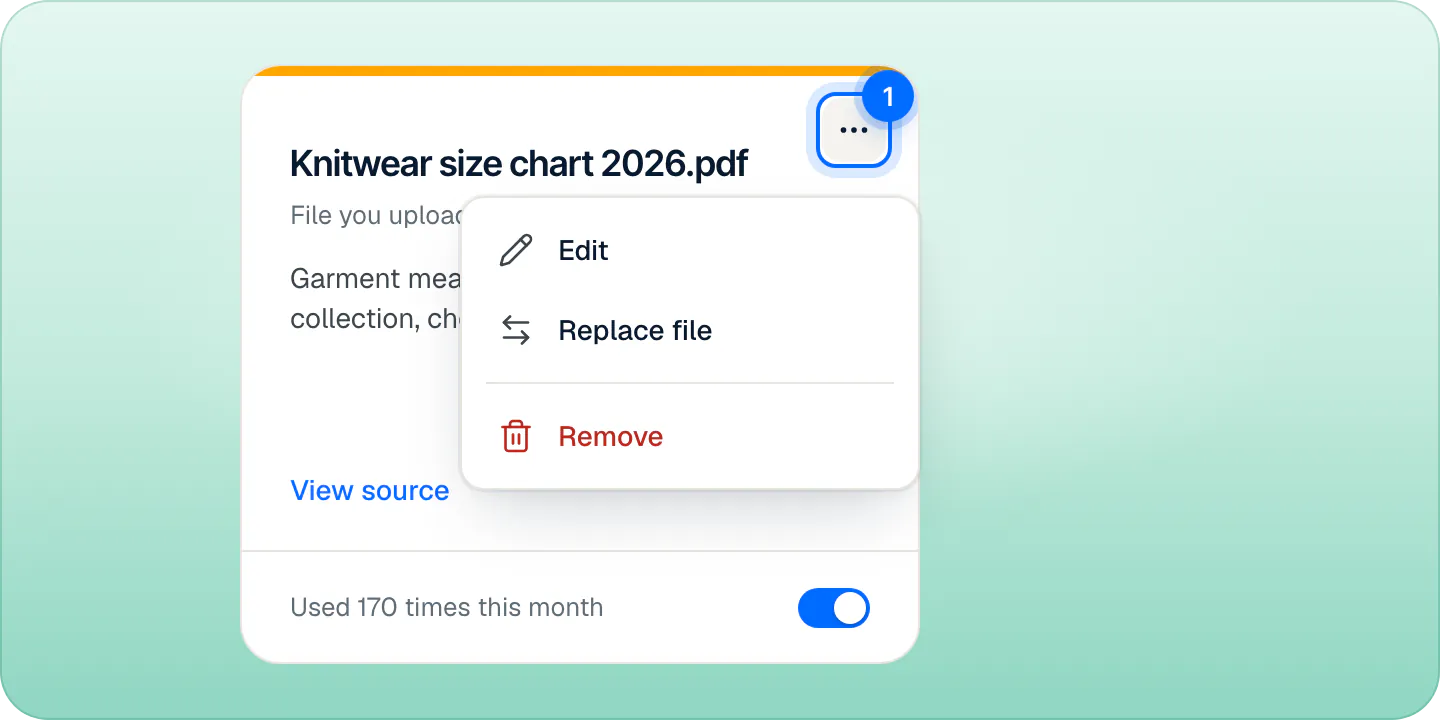
- Replace a file: open the card's … menu, press Replace file, and drop the new version. It keeps the source's switch and its usage history, and takes the new file's name as its title. There is no Undo for a replace.
- Remove a file or a web page: open the card's … menu, press Remove, then Remove again in the dialog. Ivy stops reading it right away; the toast offers Undo.
- Pause it instead: turn off its switch. Ivy ignores it, and nothing is lost.
Why a file or page was refused#
| Message | What to do |
|---|---|
| Upload a PDF, Word, text or CSV file. | The format isn't supported. Save it as one of the formats above. |
| … is an older Word file. Save it as .docx and upload it again. | Open it in Word or Google Docs and save as .docx. |
| … The limit is 20 MB. | Split the file, or remove its images (only the text counts). |
| … is protected by a password. Upload a copy without one. | Remove the password and upload again. |
| We couldn't find any text in … | It's probably a scan. Upload a version with selectable text. |
| We couldn't find any text on that page. It may be built with scripts we can't read. | Copy the page's text into a .txt or .docx file and upload that. |
| That address is a file, not a web page. Upload it as a file instead. | The address points to a PDF or a document: download it and use Upload a file. |
| … took too long to answer. Try again in a moment. | The site was slow (Strathly waits 12 seconds). Try again later. |
| That page returned a 404. Check the address and try again. | The address is wrong or the page is gone. |
Frequently asked questions
Can Ivy read a scanned PDF?
No. A scan is an image of text, and Ivy reads text only. Upload a PDF with selectable text, or a Word or text version.
Can I add my whole website?
Not in one go: each Add a web page reads one address. Your published Shopify pages and policies are already imported, so add only the pages Shopify doesn't hold, like blog posts or pages on another site.
Can I upload an Excel file?
No. Export the sheet as CSV and upload the CSV.
Is my file stored?
Only its text and a few facts about it (name, size, number of pages). The file itself isn't kept, so download links or images inside it don't reach Ivy.
How soon does Ivy use a new file or page?
Within seconds of adding it, once it's indexed in the background. Ask her about it in the Playground to check.
Related pages
- KnowledgeWhat Ivy knows and where it comes fromIvy reads your products, policies, pages and shipping rates from Shopify, plus files, web pages and answers you add. What she reads and when it updates.
- KnowledgeManage the answers you've taught IvyAnswers you teach Ivy win over your pages and policies. Find, edit, test or delete them in Knowledge › Answers and see how often each one is used.
- KnowledgeTeach Ivy and correct herUse Teach Ivy from the sidebar, a conversation, Unanswered or the Playground, and Correct this answer when she got it wrong. Live from her next reply.