What counts as an Ivy conversation
Your plan includes a number of Ivy conversations a month. This page explains exactly what one is: a shopper visit that Ivy took part in, however many chats and messages it has. Your team's conversations never count.
Updated · 6 min read
Prices:Plans and pricing
On this page
Strathly counts conversations to measure your plan's allowance and nothing else. You're never billed per message, per reply or per resolved chat.
The rule in one line#
One conversation = one shopper visit that Ivy took part in. Conversations only your team answers are unlimited on every plan.
What a visit is#
- A shopper is one browser on your store. The same person on a phone and on a laptop is two shoppers.
- A visit is a stretch of messages with no gap of 24 hours. It ends when nobody writes for 24 hours. The next message from the shopper after that starts a new visit.
- The gap is measured from the last message of anyone in any of that shopper's chats: the shopper's, Ivy's or a teammate's. A reply from your team keeps the visit open too.
- Several chats in one visit count once. A shopper who closes the chat and opens a new one an hour later is still in the same visit.
When a visit counts#
A visit counts only if Ivy really replied in it. Fixed lines in her voice, like her answer to Talk to the team, don't make a visit count. It counts on the day of its first counted message, in your store's time zone.
Long chats#
Every 30 replies from Ivy in one visit add one more conversation: her 31st reply adds one, her 61st another, and so on. The count starts again at each new visit. Most visits are far shorter.
A worked example#
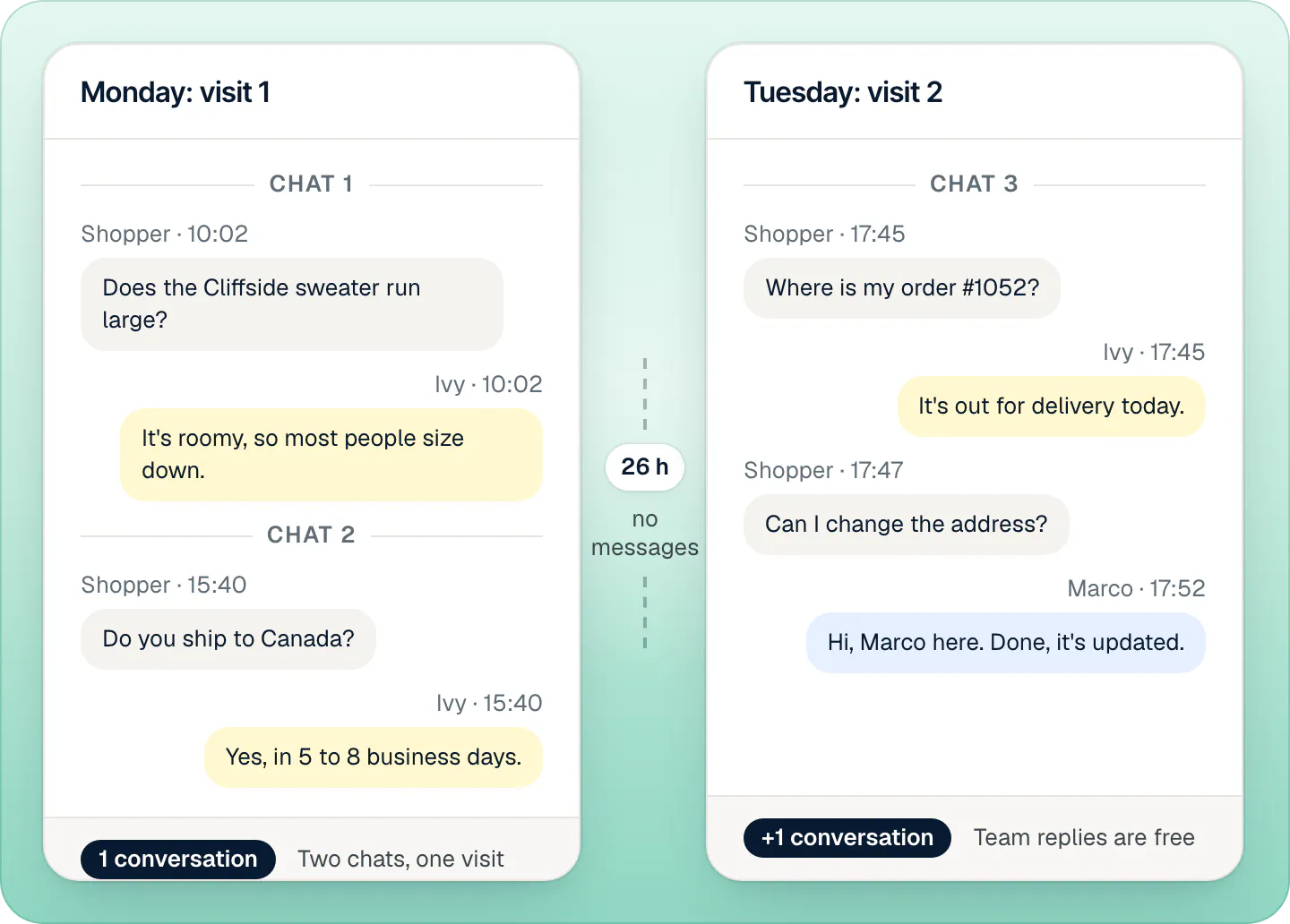
On Monday a shopper asks Ivy about sizing at 10:02, closes the chat, and opens a second one at 15:40 to ask about shipping. Both chats are in one visit: 1 conversation. On Tuesday at 17:45, 26 hours after the last message, she asks about her order. That starts a new visit: 1 more. Marco from your team answers her last question; his reply costs nothing.
More cases:
| What happens | Conversations |
|---|---|
| A shopper asks Ivy at 10:00 and comes back at 15:00 the same day | 1 |
| The same shopper comes back the next day, 26 hours after the last message | 2 |
| One visit where Ivy sends 45 replies | 2 |
| A shopper presses Talk to the team first and only your team answers | 0 |
| Ivy answers twice, then hands off, and your team finishes the chat | 1 |
| A shopper opens a second chat an hour after the first | still 1 |
| Your team replies the next morning, and the shopper answers within 24 hours of that reply | still 1 |
What never counts#
- Your team's replies, and visits only your team talked in (including a shopper who pressed Talk to the team before Ivy replied).
- Fixed lines in Ivy's voice: her Talk to the team answer and her fallback messages.
- The Playground and the test chat in setup.
- Chats in Spam, and chats Ivy flagged as likely spam.
- Chats the abuse protections sent to your team: more than 3 new chats from one visitor or 10 from one IP address in 24 hours, or a failed bot check. See spam and abuse protection.
- Chats that went to your team while Ivy was paused or out of conversations (if Ivy replies in one later, that visit counts).
- Messages sent with the contact form.
- A greeting nobody answered.
Where to see your count#
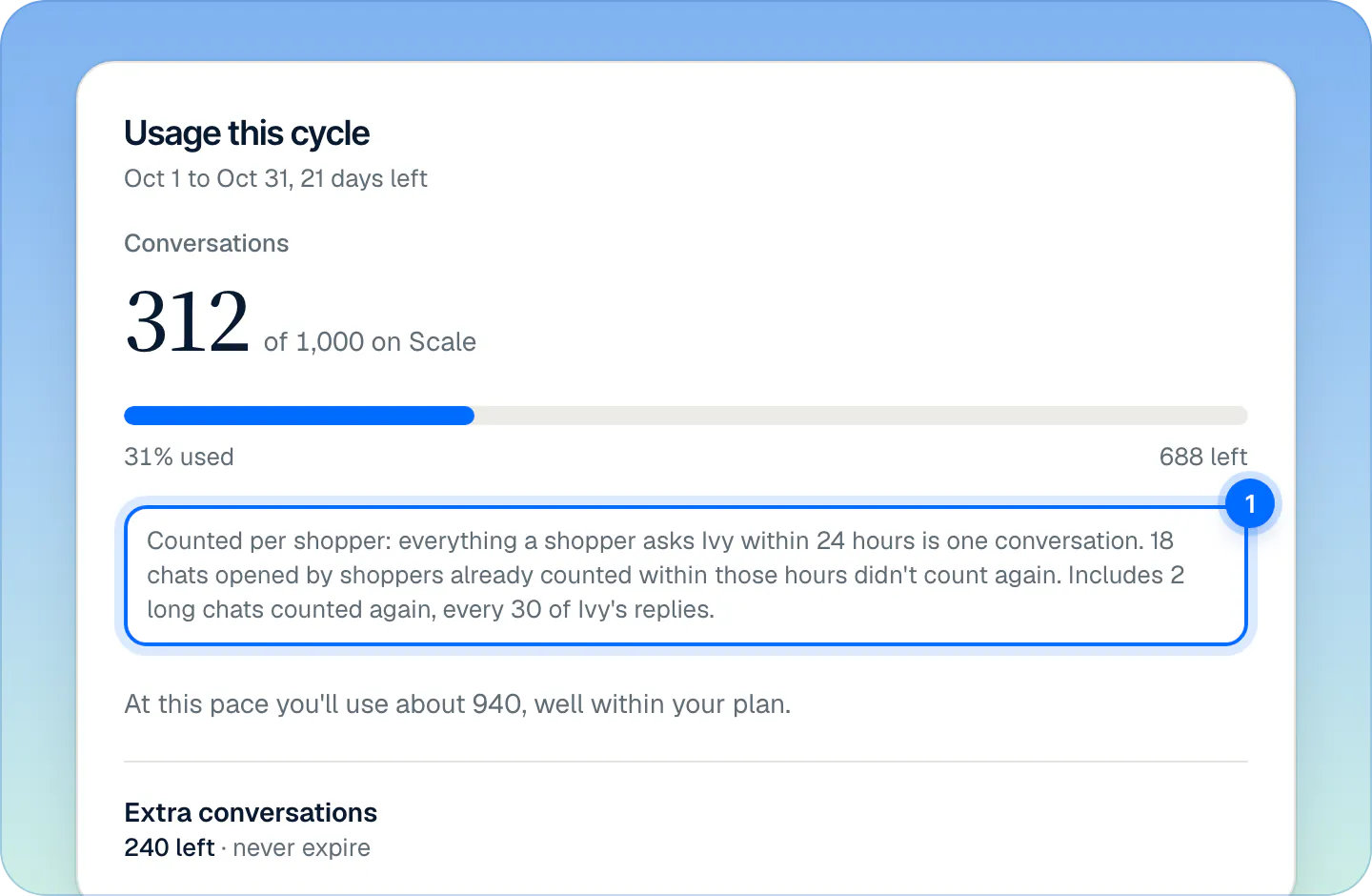
Open Settings,Billing (owner and admins). The first card, Usage this cycle, shows:
- Conversations, for example "312 of 1,000 on Scale", with a meter that turns amber from 80%.
- The share used and how many are left.
- A line that explains the count (1), when it applies: "Counted per shopper: everything a shopper asks Ivy within 24 hours is one conversation.", how many chats didn't count again because they were in a visit already counted, and how many long chats counted again.
- Where your pace leads, for example "At this pace you'll use about 940, well within your plan."
- Your Extra conversations balance.
Why Billing and Analytics show different numbers#
Billing counts visits. Analytics counts chats: every thread a shopper opens. Two chats in one visit are 1 in Billing and 2 in Analytics. Analytics also includes chats only your team answered. See Analytics.
Warnings and running out#
- At 80% of your allowance plus your extra conversations, the owner and every admin get a notification in the app and an email, "You've used 80% of your conversations", once per cycle. These alerts go out whatever each person's notification settings are.
- At 100% Ivy finishes the conversations she's in. New shoppers see a contact form and reach your team, and those messages don't count. The store's status turns Paused. Ivy takes new conversations again as soon as you add some or the cycle renews.
Extra conversations and auto top-up explains how to add more, by hand or automatically.
Frequently asked questions
Do my team's replies count?
No, never. Only visits Ivy replied in count. Your team can answer as many conversations as it likes on every plan.
Does a returning shopper count twice?
Only if they write 24 hours or more after the last message in their chats. Within that window, it's the same visit.
Does my reply keep the visit open?
Yes. The 24 hours run from the last message from anyone, so a reply from your team keeps the visit going.
Do spam chats count?
No. Neither chats you marked as spam, nor chats Ivy flagged as likely spam, nor chats the abuse protections stopped.
Do Playground tests count?
No. The Playground and the test chat in setup never count, and they work even when you're out of conversations.
Is a conversation the same as a resolution?
No. Strathly doesn't charge per resolved chat. A visit counts whether Ivy solved it, handed it off or the shopper left.
From the blog
Related pages
- Billing & accountPlans, prices and the 14-day free trialThree plans that differ only by Ivy conversations and seats, a 14-day free trial that starts when you go live, and billing through Shopify, on your Shopify bill.
- Billing & accountExtra conversations and auto top-upBuy extra conversations from 10 at your plan's rate. They never expire. Set auto top-up, and see what happens if you run out of conversations.
- Storefront widgetHow the chat is protected from abuseDaily caps per visitor and per IP, a bot check and Ivy's own spam flag protect the chat. It looks normal to shoppers, and protected chats never count.