Strathly FAQ
The questions merchants ask most, each answered in a few lines with a link to the page that explains it in full.
Updated · 6 min read
Setup
How do I put the chat on my store?
Open Ivy,Widget and, under Installation, press Open theme editor. Shopify's theme editor opens with Strathly AI chat already switched on: press Save. Shoppers see the chat once you've pressed Go live at the end of setup. See add the chat to your theme.
Do I need a developer?
No. The chat is a Shopify theme app embed: you switch it on in the theme editor and press Save, with no code to add to your theme. A chat link for emails and social bios is there too. See add the chat to your theme.
How long does setup take?
About two minutes: connect your store, let Ivy read it, make her yours, test her and go live. See the quickstart.
How does Ivy learn about my store?
She reads your products, variants, stock, shop policies, published pages, shipping rates and store information from Shopify. You can add files (PDF with selectable text, DOCX, TXT, Markdown or CSV, up to 20 MB), web pages one address at a time and your own answers in Knowledge. She doesn't read your blog posts or menus. See what Ivy knows.
Can I try Ivy before shoppers see her?
Yes. Test her in setup and any time in Ivy,Playground, where tests never reach shoppers and never count. The chat reaches your store only after Go live. See the Playground.
The chat doesn't show on my store. What do I check?
Check, in this order: that Shopify is connected, that you pressed Go live, that your trial or plan is active, and that the app embed Strathly AI chat is switched on and saved in your current theme. Home shows a notice when one of the first three is missing. See fix a chat that doesn't show.
Ivy
Will Ivy make things up?
She answers facts only from your catalog, your knowledge and your orders, and says she isn't sure when she has nothing to go on (how Strathly works explains where her answers come from). What Ivy used, on any of her messages in the Inbox, shows her sources, and Correct this answer fixes a wrong one for next time. See fix a wrong answer.
Which languages does she speak?
She replies in the shopper's language by default, or only in the languages you choose in Ivy,Behavior. The chat's own buttons and labels come in English, Italian, Spanish, French and German. See languages.
Can she tell shoppers where their order is?
Yes. With the order number and the email used at checkout, she shows the order's status and tracking in the chat, for orders from the last 60 days. See order status.
Can she refund or cancel orders?
Only if you allow it in Ivy,Behavior,Orders, where every switch is off by default, and only for a shopper who proved the order is theirs. Otherwise your team confirms each change in the Inbox. See order actions.
What happens when she can't help?
She hands the conversation to your team by your handoff rules, with a summary and a drafted reply. If nobody's around, she asks for the shopper's email so your team can reply later. See handoff rules.
Can I change her name, tone and look?
Yes. Her name, tone, reply length and languages are in Ivy,Behavior; the chat's colors, launcher and greeting in Ivy,Widget. See Ivy's behavior and customize the chat.
How do I pause Ivy?
Open the menu under your name and choose Pause Ivy (owner or admin). She finishes the conversations she's in, and new shoppers see a contact form that lands in your Inbox. See pause Ivy or hide the chat.
Team and apps
How do I add my team?
In Settings,Team, or Invite teammates in the menu under your name. Starter has 2 seats, Growth 5 and Scale no limit; the owner and pending invites count as seats. See invite your team.
Is there an iPhone or Android app?
An iPhone app for answering conversations is on the App Store, free for your team. There's no Android app; the dashboard works in any browser, on a phone too. See the iPhone app.
Why don't I get notifications?
Usually it's one of three things: the event is unticked for that channel in Settings,Notifications, you're Away (push and desktop alerts pause, email still arrives), or the browser or iPhone isn't allowed to show notifications. See fix missing notifications.
Plans and billing
What counts as a conversation?
One shopper visit that Ivy replied in. A visit lasts until nobody has written for 24 hours, so several chats in that time count once, and a very long one counts again every 30 Ivy replies. Your team's own conversations, spam, contact-form messages and Playground tests never count. See what counts as a conversation.
How does the free trial work?
It lasts 14 days and starts at Go live, when you approve a plan on Shopify's page. There's no free plan, and cancelling during the trial costs nothing. See plans and the free trial.
How do I pay?
Through Shopify, on your Shopify bill, also if you signed up on strathly.com. Your monthly plan and any extra conversations appear there, and Shopify charges the payment method of your Shopify account. See how you pay.
What happens if I run out of conversations?
Ivy finishes the chats she's in, and new shoppers reach your team through a contact form until you add extra conversations or your cycle renews. See extra conversations.
How do I change plan or cancel?
Both happen on Shopify's plan page: Upgrade or Downgrade in Settings,Billing opens it to change plan, and Manage in Shopify to cancel. See change your plan or cancel.
Does uninstalling cancel my plan?
Yes, at once: Shopify ends the subscription and Ivy goes off your store. See disconnect or uninstall.
Data
How long are conversations kept?
24 months after their last message, then they're deleted automatically. See privacy and shopper data.
Does uninstalling delete my data?
Not at once. Shopify asks apps to erase a store's data 48 hours after an uninstall, and the Strathly store is then deleted. Reinstall before then and nothing is lost. See disconnect or uninstall.
Which Shopify permissions does Strathly ask for?
Read access to your catalog, content, shipping, orders, customers and languages, and write access to orders for the refunds and changes your team confirms. It never edits products, prices or themes. See Shopify permissions.
Still stuck?#
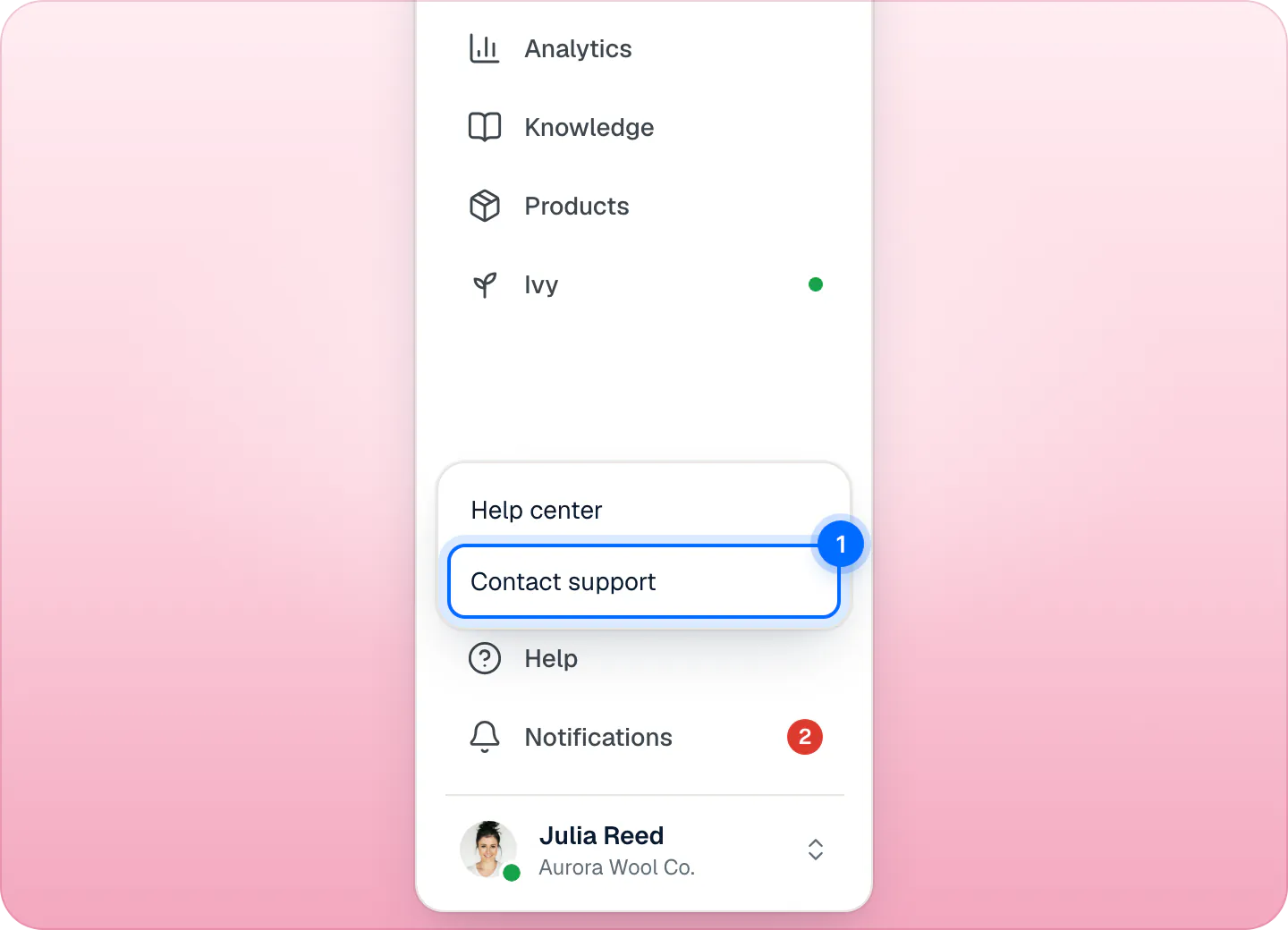
Email support@strathly.com, or from the dashboard open Help at the bottom of the sidebar and choose Contact support (1). A person replies. The same menu's Help center opens these docs in a new tab. The support page has the other ways to reach us.
Related pages
- Get startedSet up Strathly in five stepsSet up Strathly on Shopify in five steps: connect your store, let Ivy read your catalog and policies, make her yours, test her, then switch on the chat.
- TroubleshootingFix a chat that doesn't showThe chat shows once Shopify is connected, Ivy is live, your plan is active and the app embed is saved. Check each in order, then phones and the cart page.
- Billing & accountPlans, prices and the 14-day free trialThree plans that differ only by Ivy conversations and seats, a 14-day free trial that starts when you go live, and billing through Shopify, on your Shopify bill.