Disconnect or uninstall
Disconnecting Strathly or uninstalling it from Shopify takes Ivy off your store at once and ends your plan. 48 hours later your Strathly store is deleted. Reconnect within 48 hours and everything is as you left it.
Updated · 4 min read
Integration overview:Shopify integration
On this page
What happens to your plan#
Every store pays through Shopify (how you pay). When you disconnect or uninstall, Ivy goes off your store at once and Shopify ends the subscription: a paid plan doesn't run to the end of the period, and a free trial is never charged. If you reinstall before the trial's last day, the trial carries on where it was. Change your plan or cancel has the rest of the billing details.
Disconnect from Strathly#
Only the owner can disconnect: admins don't see the Disconnect Shopify card or the Disconnect button.
- Open Settings,General and, in the Disconnect Shopify card, press Disconnect. (Or Settings,Integrations, Manage on the Shopify card, then Disconnect.)
- In Disconnect Shopify?, read what will happen and type your store's name in the field under it.
- Press Disconnect (1). You'll see "Shopify disconnected".
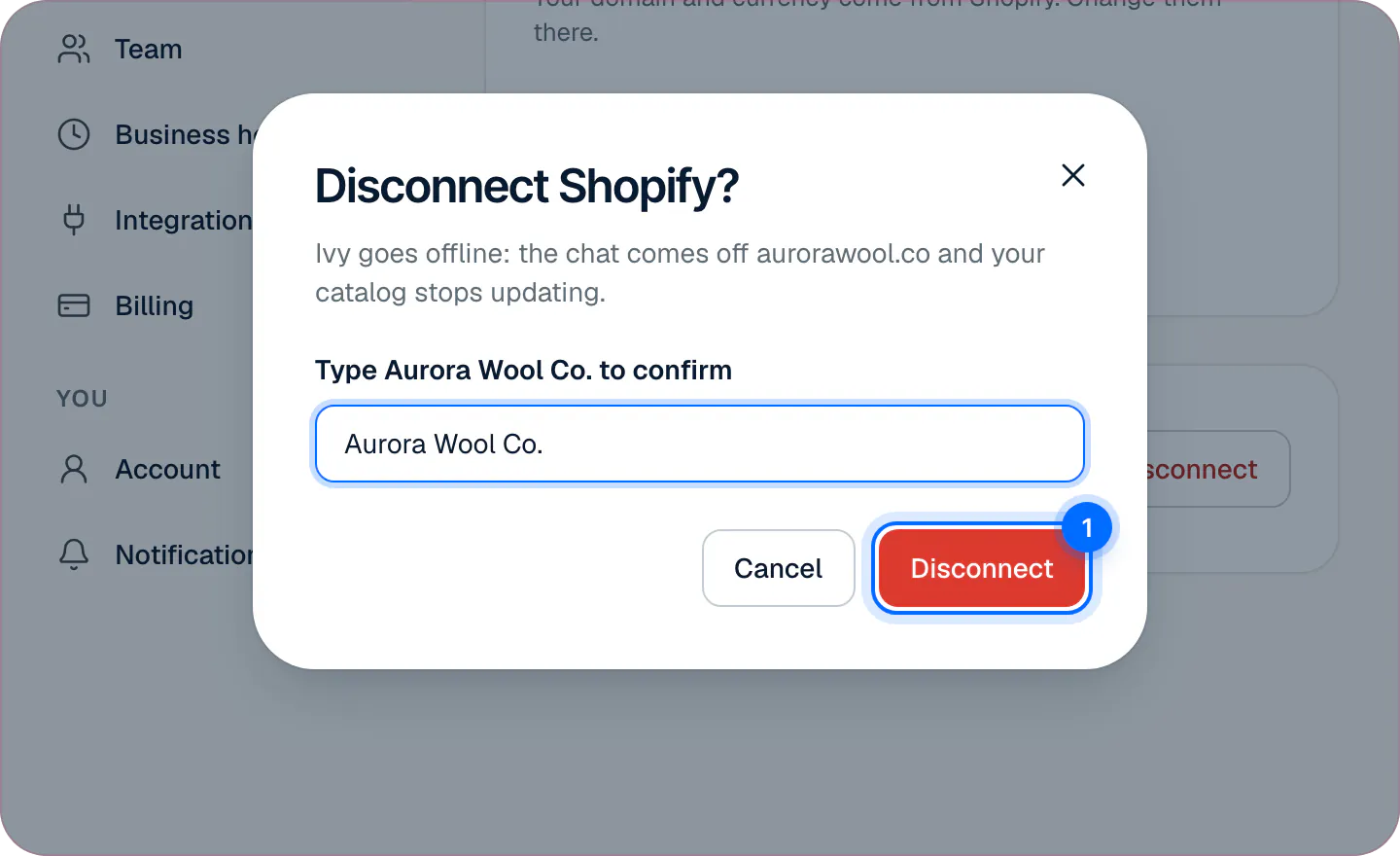
Disconnecting also uninstalls the Strathly app from your Shopify store.
Uninstall in Shopify#
In your Shopify admin, go to Settings,Apps and uninstall Strathly. Anyone allowed to manage apps in Shopify can do it. The result is the same as disconnecting from Strathly.
What stops right away#
- Ivy goes offline. The chat comes off your storefront and shoppers see nothing. Her status is Offline (red).
- Your catalog stops updating from Shopify.
- Order actions stop: "Shopify is disconnected. Reconnect it to refund, replace or change an order."
- The dashboard says so: Home, the Inbox and Ivy's pages show "Shopify is disconnected" with Reconnect Shopify.
- Your plan ends: Shopify ends the subscription at the uninstall.
Your products, orders and customers in Shopify don't change.
What happens to your data, 48 hours later#
Shopify asks every app to erase a store's data 48 hours after it's uninstalled. If you've reinstalled by then, nothing is erased.
After 48 hours the whole Strathly store is deleted: catalog, conversations, team, settings and what you taught Ivy. Logins stay, so your team can still sign in and start again. The record that the store used its free trial and its unused extra conversations are kept, tied to your .myshopify.com address.
The other way a store is deleted is with its owner's account, when the owner is alone on it: see delete your account.
Reconnect#
Press Reconnect Shopify: in the notice at the top of Home, in the menu under your name, or on the Shopify card of Settings,Integrations (1). Shopify shows its permission screen; approve it and you're back. The owner or an admin can reconnect.
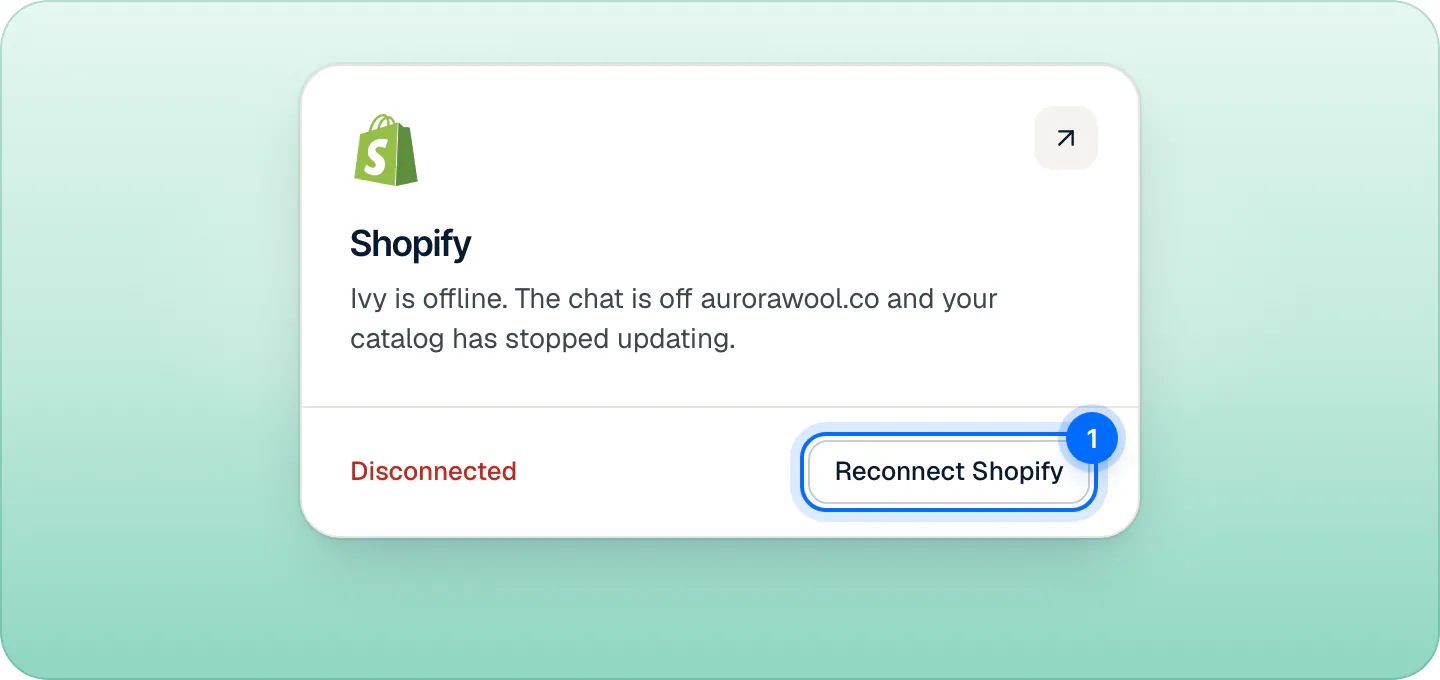
- Within 48 hours: the store comes back as it was, live or paused as you left it. No new setup and no new Go live. Shopify ended the plan at the uninstall, so choose a plan again in Settings,Billing (there's no second free trial).
- After 48 hours: you start setup again. There's no second free trial, and your unused extra conversations come back.
Moved to a new Shopify store?#
Your plan belongs to your Shopify store, so a Strathly store doesn't move between Shopify stores: install Strathly on the new store, which gets its own plan on its own Shopify bill.
Just want the chat off for a while?#
Disconnecting isn't a pause. To stop Ivy taking new chats, pause her; to hide the chat but keep everything running, untick Show chat widget in the app embed. See pause Ivy or hide the chat.
Frequently asked questions
Does uninstalling cancel billing?
Yes, at once. Shopify ends the subscription when the app is uninstalled.
Is my data deleted when I uninstall?
Not at once. 48 hours later, the Strathly store is deleted.
Can I reconnect later?
Yes. Within 48 hours everything is as you left it; choose a plan again in Settings,Billing. After that, you start setup again, with no second free trial.
Can an admin disconnect Shopify?
No, only the owner. Admins can reconnect.
Does disconnecting pause Ivy?
It takes her offline. A store that's reconnected comes back live, or paused if you had paused her.
Related pages
- Billing & accountChange your plan or cancelSwitch plans or cancel on Shopify's plan page, opened from Settings › Billing, and see what happens to Ivy, your extra conversations and your data.
- Shopify & dataPrivacy and shopper dataWhat the chat stores about shoppers, for how long (24 months), raw IPs cleared within hours, data requests through Shopify, the DPA and the AI provider.
- Shopify & dataShopify permissions, one by oneWhy Strathly needs each Shopify permission: products, pages, policies, shipping, markets, orders, customers, languages, themes. It never edits products, prices or themes.