Invite your team
Your team answers the shoppers Ivy hands over. This page shows how to invite teammates, what each role can do, how many seats your plan includes, and how to change a role, remove someone or hand the store to another owner.
Updated · 7 min read
On this page
- Invite teammates
- Do teammates need a Shopify staff account?
- When someone asks to join from Shopify
- What each role can do
- Let agents refund and cancel
- How many teammates does my plan include?
- Manage pending invites
- Change a role
- Remove a teammate
- Can I transfer ownership?
- Team activity
- Frequently asked questions
Inviting, changing roles and removing teammates is for admins and the owner. Everyone can see and change their own account, availability and notifications.
Invite teammates#
Open Settings,Team and press Invite teammates. (It is also in the account menu at the bottom of the sidebar.)
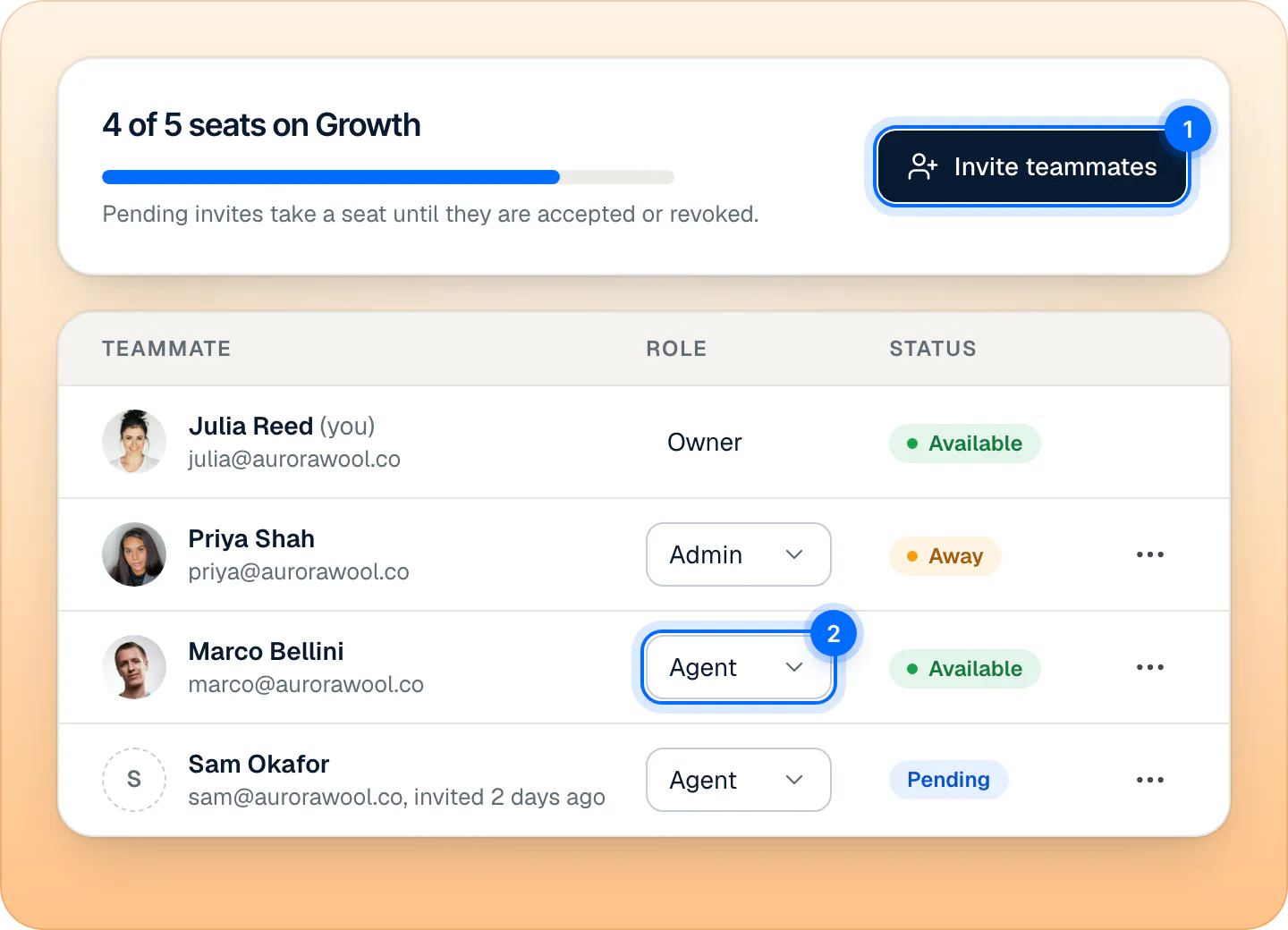
Sample store. Seats count you and pending invites; change a role from its menu. In Email addresses, type an address and press Enter or a comma. Add as many as you need, up to 50 at a time, or paste a list.
Under Role, pick Agent ("Answers handoffs and sees every conversation.") or Admin ("Also manages Ivy, knowledge, the team and billing."). Agent is preselected.
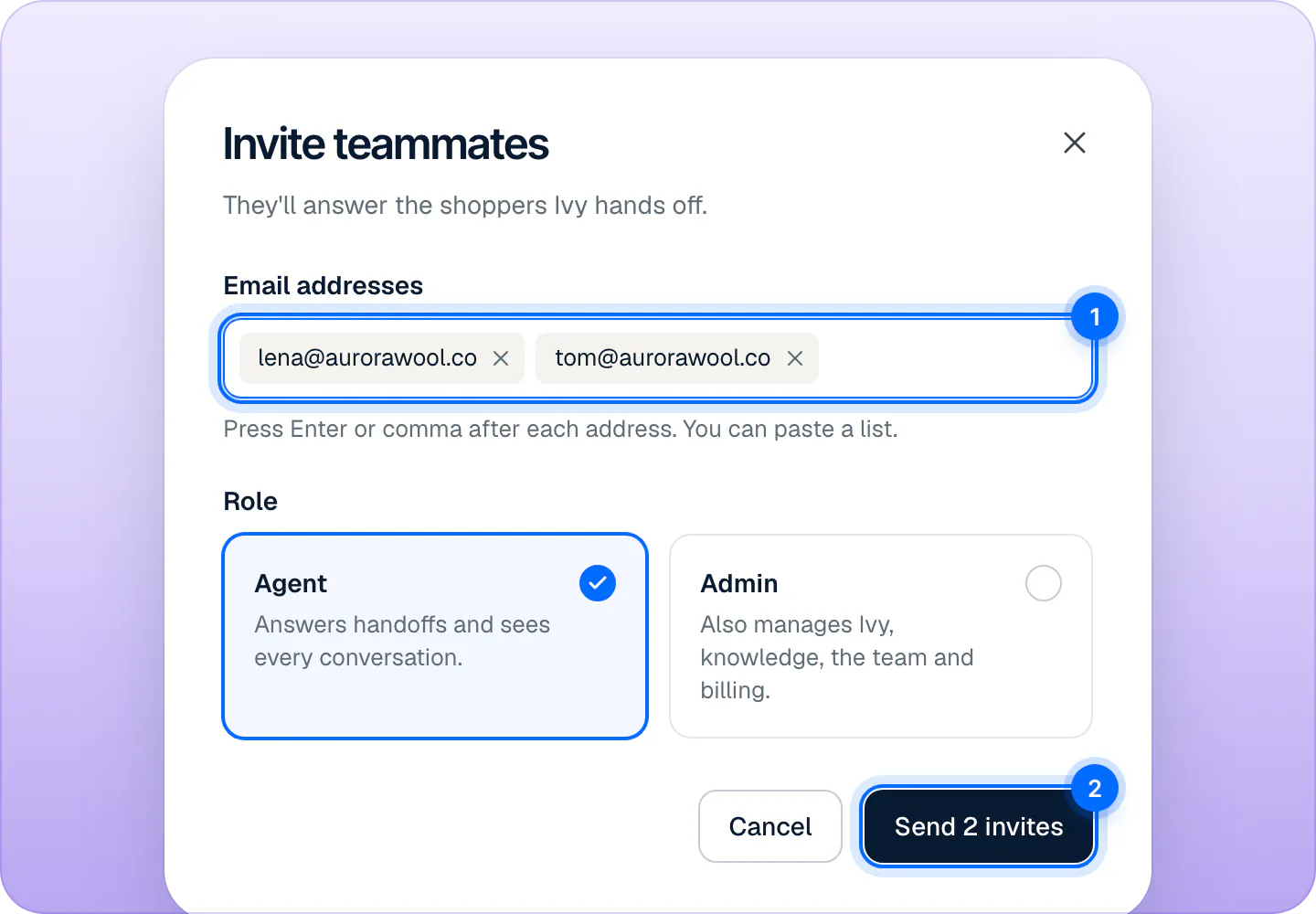
Type or paste several addresses, pick the role, and send. Press Send invite (or Send 2 invites).
Each person gets an email from Strathly, "Julia Reed invited you to join Aurora Wool Co. on Strathly", with an Accept the invite button. The link works for 7 days. They appear in the team table as Pending until they accept.
An address is skipped, with the reason, when the person is already on the team, already has an open invite, or already has a store of their own on Strathly. If you add more addresses than you have seats left, the dialog says so and links to the plans.
Do teammates need a Shopify staff account?#
No. A teammate opens the invite, types their name and a password, accepts the Terms and presses Accept invite. That creates their Strathly login with the address you invited, already confirmed, and they land in the dashboard. If they already have a Strathly login with that address, they log in and accept.
One login belongs to one store: someone who already has a store on Strathly can't join yours with the same email. They can join with another address.
When someone asks to join from Shopify#
Having access to your Shopify admin doesn't put anyone on your Strathly team. When a person who isn't on it opens Strathly from your Shopify admin (for example a member of your Shopify staff), they see that your store already uses Strathly and that they need an invite from you. Nothing in your store is shown to them.
You and your admins get an email, "Marco Bellini from your Shopify admin asked to join Aurora Wool Co.", with an Invite Marco button. It opens Settings,Team with the invite ready for their address: pick the role and press Send invite. If you don't know them, ignore the email: nothing changes until you send an invite. The same person asks at most once a day, and the request shows in the team's Activity.
Someone you already invited is told to open the invite in their email instead.
What each role can do#
| Agent | Admin | Owner | |
|---|---|---|---|
| Home, Analytics, their own account, availability and notifications | Yes | Yes | Yes |
| Inbox: see every conversation, reply, assign, resolve, return to Ivy, mark spam | Yes | Yes | Yes |
| Order actions in the Inbox: replace, change the address | Yes | Yes | Yes |
| Order actions in the Inbox: refund, cancel | Only if the store allows it | Yes | Yes |
| Teach Ivy, correct her answers, Knowledge, Products | No | Yes | Yes |
| Ivy › Behavior, Widget and Playground; pause or resume Ivy | No | Yes | Yes |
| Settings › General, Team, Business hours, Integrations, Billing | No | Yes | Yes |
| Invite, change roles, remove teammates | No | Yes | Yes |
| Disconnect Shopify, transfer ownership | No | No | Yes |
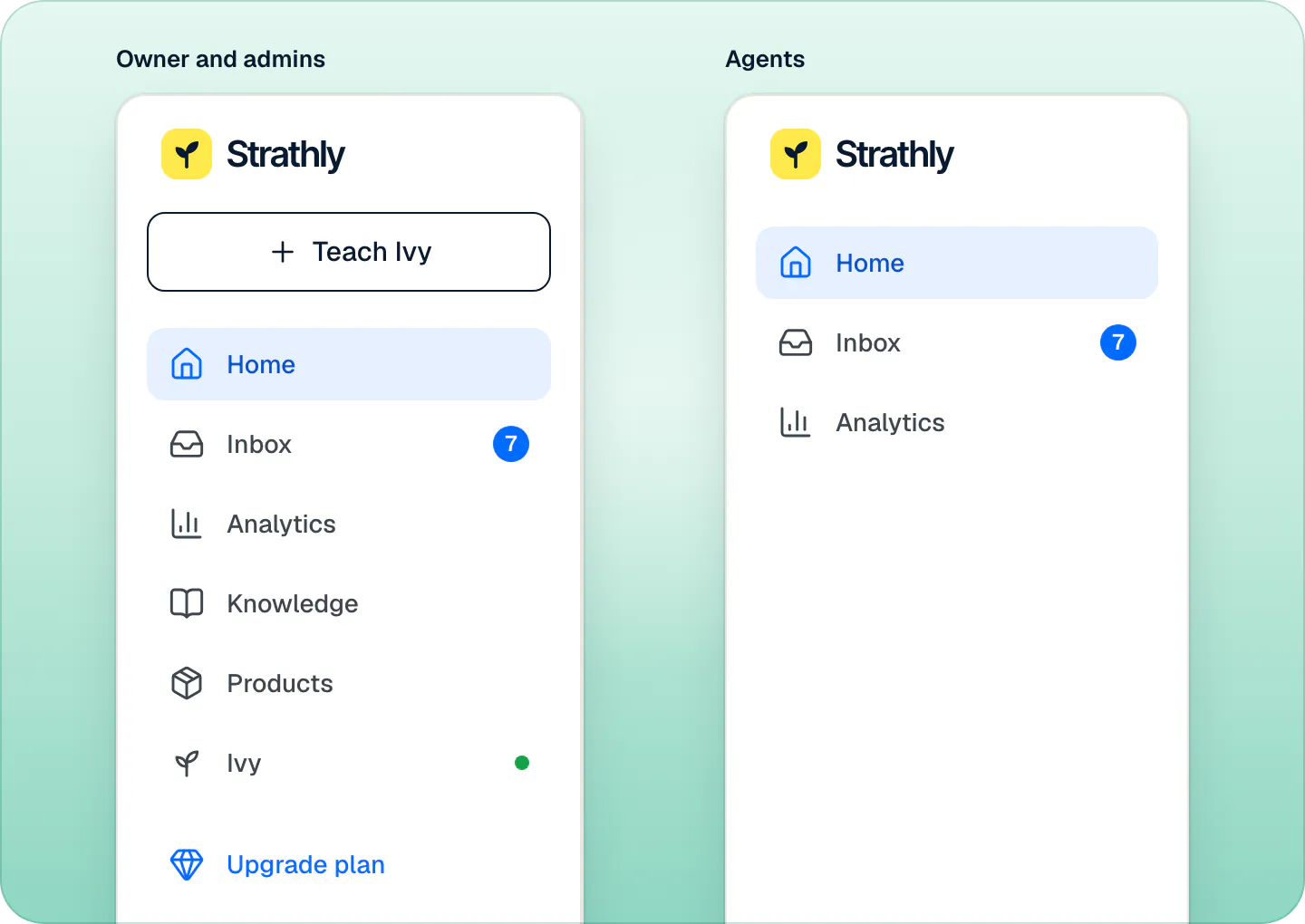
A store has exactly one owner: the person who created it, until they transfer it. An agent's sidebar shows Home, Inbox and Analytics; Knowledge, Products, Ivy and + Teach Ivy are not there, and their Settings hold only Account and Notifications.
Let agents refund and cancel#
Refunds and cancellations move money, so they are for the owner and admins. To let agents run them too, switch on Agents can refund and cancel orders in the Order actions card of Settings,Team. It applies at once, and it is off for a new store. Agents can always send a replacement or change an address.
With the switch off, an agent sees Refund and Cancel order grayed out in the order block, with "Ask an admin to refund this order", and Ivy's drafted refund can't go out with their reply. See orders next to the conversation.
How many teammates does my plan include?#
| Plan | Teammates |
|---|---|
| Starter | 2 |
| Growth | 5 |
| Scale | Unlimited |
The count includes you and every pending invite: on Starter, that is you and one teammate. During the free trial you have Growth's seats. An invite that has expired no longer takes a seat. The card at the top of Settings,Team shows how many are used, for example "4 of 5 seats on Growth". When every seat is taken, its button reads Get more seats and opens the plans. See plans and the free trial.
Manage pending invites#
A pending invite has its own row in the team table, with its role and Pending (or Expired after 7 days):
- Resend sends a new link, valid 7 more days. The old link stops working.
- Revoke withdraws it and frees the seat. The toast lets you undo it.
- The Role menu on its row changes the role the person will join with.
In a narrow window, Resend invite and Revoke invite are in the row's … menu.
Change a role#
Pick Agent or Admin in the Role menu of a teammate's row. It applies at once: the toast says "Marco is now an admin". Admins can change the role of any other teammate, other admins included. You can't change your own role, and nobody can change the owner's: the owner role moves only by transferring ownership.
Remove a teammate#
- In the team table, open the … menu of their row and choose Remove from team.
- Read what happens to their conversations, then press Remove with their name.
Admins can remove any teammate except the owner, other admins included; nobody can remove themselves. The person loses access to the store right away. Their open conversations go back to Needs you, unassigned, for anyone to take. Undo in the toast brings them back with the same role and settings, and gives back the conversations nobody took in the meantime.
Can I transfer ownership?#
Yes, to an admin. Make the person an admin first if they aren't one.
- The owner opens Settings,Account and, under Ownership, presses Transfer ownership.
- Pick the admin and press Transfer to their name. They get an email asking them to review it.
- They open Settings,Account and press Accept. You become an admin and they become the owner.
Until they accept, you stay the owner and can press Cancel transfer. Their Decline keeps everything as it was. More on your account in account settings.
Team activity#
The Activity card at the bottom of Settings,Team lists the latest changes to the team: invites sent, resent and revoked, who joined, who asked to join from your Shopify admin, role changes, removals, and changes to how handoffs are assigned and to the reply target.
Frequently asked questions
Can someone be on two stores?
No. One Strathly login belongs to one store. To help on a second store, a person joins it with another email address.
What should a new teammate set up first?
Their Name shoppers see in Settings,Account, their availability, and their notifications, so handoffs reach them by email, on the desktop or on the iPhone.
Can I delete the store?
There is no separate button for it. The store is deleted when its owner, alone on it, deletes their own account in Settings,Account. With teammates on the store, the owner transfers ownership first.
Related pages
- TeamHours, holidays and who's availableSet your weekly business hours and date-specific hours for holidays, choose what Ivy does when you're closed, and set each teammate to Available or Away.
- TeamChoose your notificationsChoose which handoffs reach you, every handoff or only yours and unassigned, and where they reach you: by email, desktop alert or iPhone app push.
- Billing & accountPlans, prices and the 14-day free trialThree plans that differ only by Ivy conversations and seats, a 14-day free trial that starts when you go live, and billing through Shopify, on your Shopify bill.