How Ivy chooses the shopper's language
Ivy answers each shopper in the language they write in, with nothing to set up. This page explains when she uses another language, how to limit her to the languages you choose, and which words of the chat follow your storefront's language instead.
Updated · 6 min read
On this page
Languages work on two levels: what Ivy writes (her replies, which follow the shopper) and what the chat itself shows (buttons, labels and forms, which follow your storefront). Both are covered below.
Which language does Ivy reply in?#
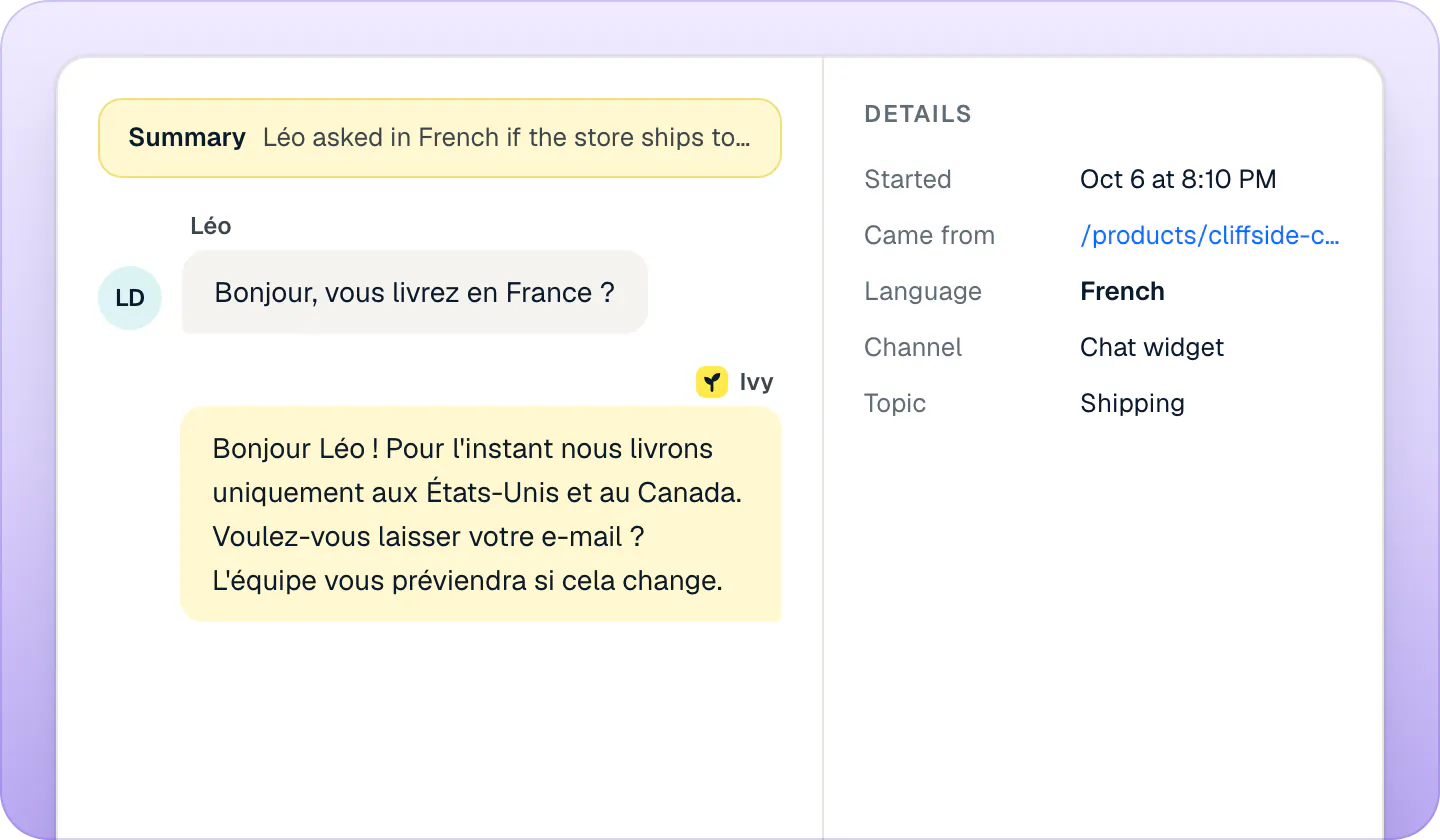
By default, Ivy replies in the language the shopper writes in, whatever it is. If the shopper switches language halfway, she switches too.
- When a message gives no clue (an order number, "ok", an emoji), she keeps the language of the conversation so far.
- At the very start, before the shopper has written anything she can read, she uses your Default language.
- The shopper's browser language is only a hint: what they write wins.
- Product titles stay exactly as they are in Shopify. Descriptions are translated naturally in her answer.
You don't need to translate your policies, pages or answers: Ivy reads them in the language you wrote them and answers in the shopper's. The clearer the source text, the better the translation.
Limit Ivy to some languages#
If your team can only follow up in some languages, or you sell only in some markets, you can limit Ivy to a list. Owners and admins can change this, in the same card as her name and tone (see Set Ivy's name, tone and rules).
Open Ivy,Behavior and find Languages in the Identity card.
Turn on Only reply in these languages. The list starts with your default language, tagged Default.
Press Add language and pick one from the menu. Repeat for each language. To take one out, press the × on its chip; the default one can't be removed.
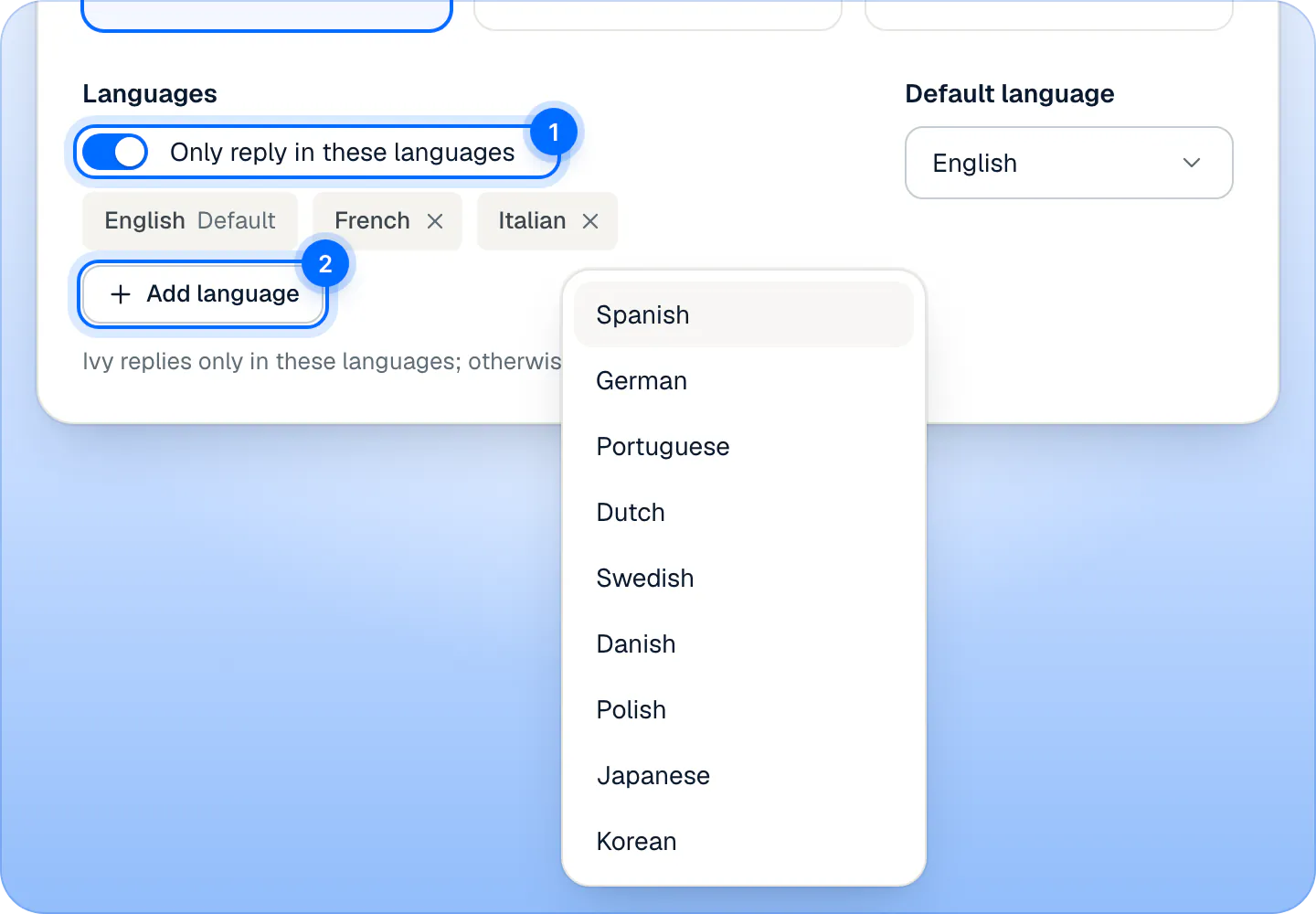
Switch on Only reply in these languages (1), then add languages from the menu (2). Your default language is always in the list. Press Save changes.
From then on, a shopper who writes in a language that isn't on your list gets answers in your default language, and Ivy may say once which languages she can help in. The line under the switch says the rule in words: "Ivy replies only in these languages; otherwise in English."
The menu offers 12 languages: English, French, Spanish, Italian, German, Portuguese, Dutch, Swedish, Danish, Polish, Japanese and Korean. With the switch off, none of this applies: Ivy replies in any language.
Change the default language#
Default language is next to the switch, in the same card. It starts as your Shopify store's primary language. Change it and press Save changes. It is the language Ivy starts in when she can't tell, the one she falls back to with Only reply in these languages, and the language Settings,General shows for your store (read-only there).
The chat's own words#
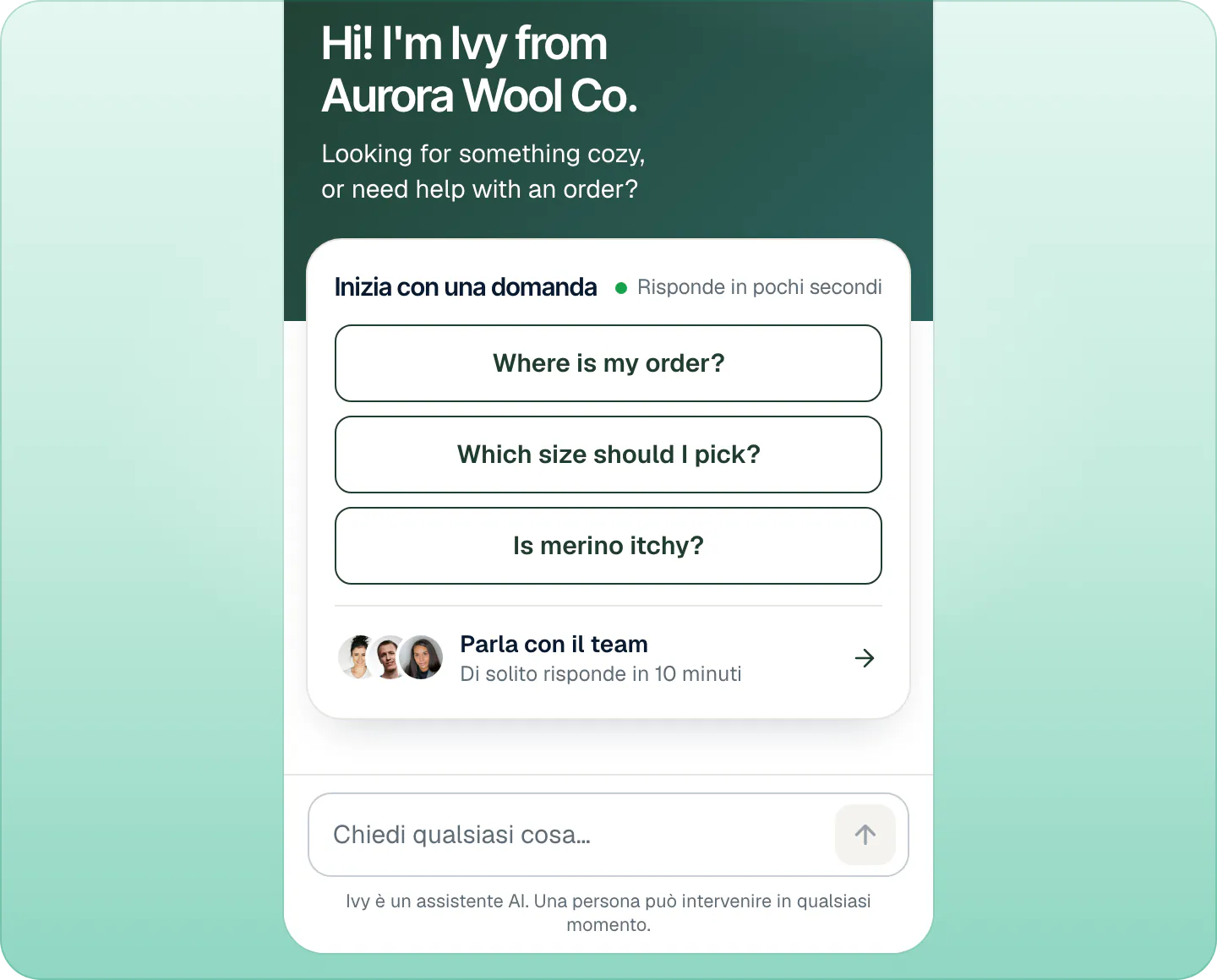
The buttons, labels and forms of the chat (Start with a question, Talk to the team, Add to cart, the contact form, the order card) are built in five languages: English, Italian, Spanish, French and German. For any other language they show in English.
To pick one of the five, the chat looks first at the language your storefront is showing (Shopify passes it to the chat through the theme app embed), then the shopper's browser languages. If your store is in English, an Italian shopper sees English buttons, even though Ivy answers them in Italian.
What the shopper sees in each part of the chat is on What shoppers see.
Text you typed is shown exactly as you wrote it, in every language: the greeting, the suggested questions, the launcher label and Ivy's name. Only the defaults you never changed are translated. Most stores keep "Ask Ivy" as the launcher label from setup, so it stays in English unless you change it in Ivy,Widget: see Make the chat look like your store.
Fixed lines#
A few lines in the chat are not written by Ivy but by Strathly: the handoff messages ("I've passed this to the team…"), the lines saying your team is away, the line a shopper gets while Ivy is paused, the refusal for a blocked topic and the line for suspected spam. The same goes for the address form and the email a shopper gets when a teammate replies.
These exist in English, Italian, Spanish, French and German, picked from the conversation's language. In any other language they appear in English, while Ivy's own replies stay in the shopper's language. Only reply in these languages decides Ivy's own replies; it doesn't change every one of these fixed lines.
What your team sees#
- Each conversation shows its Language in the Inbox details.
- Summaries, conversation subjects, handoff reasons and unanswered questions are always in English, so the whole team can read them.
- Ivy's drafted reply for your team is in the shopper's language, ready to send. See Reply to a shopper.
- Analytics,Conversations has a Languages chart: see Read your analytics.
Limits#
| What | Number |
|---|---|
| Languages Ivy replies in by default | Any language the shopper writes in |
| Languages in the Only reply in these languages menu | 12 |
| Languages of the chat's buttons, labels and fixed lines | 5 (English, Italian, Spanish, French, German); English otherwise |
Frequently asked questions
Do I need to translate my policies?
No. Ivy reads your knowledge in the language you wrote it and answers in the shopper's language.
Can I stop Ivy replying in some languages?
Yes. Turn on Only reply in these languages and list the ones you want. Shoppers who write in another language get your default language.
Why are the chat's buttons in English for an Italian shopper?
Because your storefront is in English. On Shopify the chat follows the language your storefront shows before the shopper's browser. Ivy's replies still follow what the shopper writes.
Which languages can the chat's buttons show?
English, Italian, Spanish, French and German. Any other language gets English buttons, and Ivy still replies in the shopper's language.
Related pages
- IvySet Ivy's name, tone and rulesRename Ivy, set her tone and reply length, choose her languages, decide what she does with discount codes and topics she won't discuss, then save.
- Storefront widgetWhat shoppers see in the chatThe chat from the shopper's side: languages, product cards and Add to cart, order status, the AI notice, and email replies after they leave.
- Storefront widgetMake the chat look like your storeSet the accent color, background, launcher, position, greeting and up to three suggested questions, with a live preview on desktop and phone.